143,993 - Pentesting IMAP
Internet Message Access Protocol
The Internet Message Access Protocol (IMAP) is designed for the purpose of enabling users to access their email messages from any location, primarily through an Internet connection. In essence, emails are retained on a server rather than being downloaded and stored on an individual’s personal device. This means that when an email is accessed or read, it is done directly from the server. This capability allows for the convenience of checking emails from multiple devices, ensuring that no messages are missed regardless of the device used.
IMAP commonly uses two ports:[3][4]
- Port 143 - cleartext IMAP initially, with an optional upgrade to TLS using
STARTTLS - Port 993 - IMAP over implicit TLS
PORT    STATE SERVICE REASON
143/tcp open  imap    syn-ack
Banner grabbing
nc -nv <IP> 143
openssl s_client -starttls imap -connect <IP>:143 -crlf -quiet
openssl s_client -connect <IP>:993 -quiet
NTLM Auth - Information disclosure
If the server supports NTLM auth (Windows) you can obtain sensitive info (versions):
root@kali: telnet example.com 143
* OK The Microsoft Exchange IMAP4 service is ready.
>> a1 AUTHENTICATE NTLM
+
>> TlRMTVNTUAABAAAAB4IIAAAAAAAAAAAAAAAAAAAAAAA=
+ TlRMTVNTUAACAAAACgAKADgAAAAFgooCBqqVKFrKPCMAAAAAAAAAAEgASABCAAAABgOAJQAAAA9JAEkAUwAwADEAAgAKAEkASQBTADAAMQABAAoASQBJAFMAMAAxAAQACgBJAEkAUwAwADEAAwAKAEkASQBTADAAMQAHAAgAHwMI0VPy1QEAAAAA
Or automate this with Nmap’s imap-ntlm-info script, which obtains the NTLM challenge and reports fields disclosed by the server.[5]
IMAP Bruteforce
Syntax
IMAP command examples from this crib sheet:[1]
Only send LOGIN credentials after establishing TLS; RFC 9051 requires implementations to protect cleartext passwords against disclosure.[3]
Login
    A1 LOGIN username password
Values can be quoted to enclose spaces and special characters. A " must then be escape with a \
    A1 LOGIN "username" "password"

List Folders/Mailboxes
    A1 LIST "" *
    A1 LIST INBOX *
    A1 LIST "Archive" *

Create new Folder/Mailbox
    A1 CREATE INBOX.Archive.2012
    A1 CREATE "To Read"

Delete Folder/Mailbox
    A1 DELETE INBOX.Archive.2012
    A1 DELETE "To Read"

Rename Folder/Mailbox
    A1 RENAME "INBOX.One" "INBOX.Two"

List Subscribed Mailboxes
    A1 LSUB "" *

Status of Mailbox (There are more flags than the ones listed)
    A1 STATUS INBOX (MESSAGES UNSEEN RECENT)

Select a mailbox
    A1 SELECT INBOX

List messages
    A1 FETCH 1:* (FLAGS)
    A1 UID FETCH 1:* (FLAGS)

Retrieve Message Content
    A1 FETCH 2 body[text]
    A1 FETCH 2 all
    A1 UID FETCH 102 (UID RFC822.SIZE BODY.PEEK[])

Close Mailbox
    A1 CLOSE

Logout
    A1 LOGOUT
Evolution
apt install evolution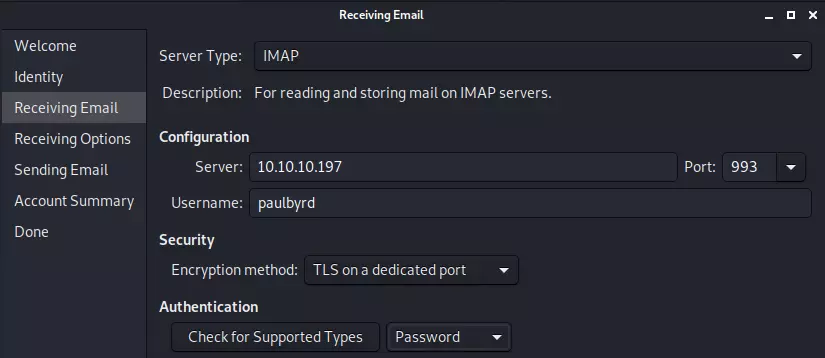
CURL
Basic navigation is possible with curl’s IMAP URL syntax.[6] The examples below retain -k for lab systems with self-signed certificates, but it disables certificate verification. Prefer a trusted CA and omit -k on real systems; for port 143, use --ssl-reqd to require a successful TLS upgrade.[6] When documented URL behavior differs from an unusual server, curl’s IMAP protocol implementation is also a useful source for confirming the exact command construction and response state machine.[7]
- Listing mailboxes (imap command
LIST "" "*")
curl -k 'imaps://1.2.3.4/' --user user:pass- Listing messages in a mailbox (imap command
SELECT INBOXand thenSEARCH ALL)
curl -k 'imaps://1.2.3.4/INBOX?ALL' --user user:passThe result of this search is a list of message indices.
It is also possible to provide more complex search terms, for example searching drafts for password in the message body:
curl -k 'imaps://1.2.3.4/Drafts?TEXT password' --user user:passA nice overview of the search terms possible is located here.[2]
- Downloading a message (imap command
SELECT Draftsand thenFETCH 1 BODY[])
curl -k 'imaps://1.2.3.4/Drafts;MAILINDEX=1' --user user:passThe mail index will be the same index returned from the search operation.
It is also possible to use a UID (unique identifier) to access messages. This is less convenient here because the search command must be formatted manually. For example:
curl -k 'imaps://1.2.3.4/INBOX' -X 'UID SEARCH ALL' --user user:pass
curl -k 'imaps://1.2.3.4/INBOX;UID=1' --user user:pass
Also, possible to download just parts of a message, e.g. subject and sender of first 5 messages (the -v is required to see the subject and sender):
$ curl -k 'imaps://1.2.3.4/INBOX' -X 'FETCH 1:5 BODY[HEADER.FIELDS (SUBJECT FROM)]' --user user:pass -v 2>&1 | grep '^<'Although, its probably cleaner to just write a little for loop:
for m in {1..5}; do
  echo $m
  curl "imap://1.2.3.4/INBOX;MAILINDEX=$m;SECTION=HEADER.FIELDS%20(SUBJECT%20FROM)" --user user:pass
done
Shodan
port:143 CAPABILITYport:993 CAPABILITY
HackTricks Automatic Commands
Protocol_Name: IMAP    #Protocol Abbreviation if there is one.
Port_Number:  143,993     #Comma separated if there is more than one.
Protocol_Description: Internet Message Access Protocol         #Protocol Abbreviation Spelled out

Entry_1:
  Name: Notes
  Description: Notes for IMAP
  Note: |
    The Internet Message Access Protocol (IMAP) is designed for the purpose of enabling users to access their email messages from any location, primarily through an Internet connection. In essence, emails are retained on a server rather than being downloaded and stored on an individual's personal device. This means that when an email is accessed or read, it is done directly from the server. This capability allows for the convenience of checking emails from multiple devices, ensuring that no messages are missed regardless of the device used.

    https://book.hacktricks.wiki/en/network-services-pentesting/pentesting-imap.html

Entry_2:
  Name: Banner Grab
  Description: Banner Grab 143
  Command: nc -nv {IP} 143

Entry_3:
  Name: Secure Banner Grab
  Description: Banner Grab 993
  Command: openssl s_client -connect {IP}:993 -quiet

Entry_4:
  Name: Console-less Metasploit enumeration
  Description: IMAP enumeration without the need to run msfconsole
  Note: sourced from https://github.com/carlospolop/legion
  Command: msfconsole -q -x 'use auxiliary/scanner/imap/imap_version; set RHOSTS {IP}; set RPORT 143; run; exit'
References
- [1] IMAP crib sheet - command examples
- [2] Atmail - IMAP Commands overview
- [3] RFC 9051 - Internet Message Access Protocol (IMAP) Version 4rev2
- [4] RFC 8314 - Cleartext Considered Obsolete: Use of TLS for Email Submission and Access
- [5] Nmap NSE documentation -
imap-ntlm-info - [6] curl documentation - IMAP URL syntax and TLS options
- [7] curl source - IMAP protocol implementation