Android Applications Pentesting
Android Applications Basics
It’s highly recommended to start reading this page to know about the most important parts related to Android security and the most dangerous components in an Android application:
For broader study, combine the OWASP Mobile Application Security project with Android reverse-engineering courses and practical security guides. The Android App Reverse Engineering 101 course, Manifest Security series, Android-Security-Teryaagh notes, Mobile Hacking Workshop, and Application Security Wiki provide complementary labs, methodology, and tool references.[2][3][4][5][6][17]
ADB (Android Debug Bridge)
This is the main tool you need to connect to an android device (emulated or physical).
ADB allows to control devices either over USB or Network from a computer. This utility enables the copying of files in both directions, installation and uninstallation of apps, execution of shell commands, backing up of data, reading of logs, among other functions.
See the ADB Commands page to learn how to use ADB.
Smali
Sometimes it is useful to modify application code to access hidden information, such as well-obfuscated passwords or flags. You can decompile the APK, modify its Smali code, and rebuild it.
This tutorial explains how to decompile an APK, modify Smali, and recompile it with new functionality. Keep this option in mind as an alternative when performing dynamic-analysis tests.
Other interesting tricks
- Spoofing your location in Play Store
- Play Integrity attestation spoofing (SafetyNet replacement)[1]
- Android app-level virtualization / app cloning abuse & detection
- Shizuku Privileged API (ADB-based non-root privileged access)
Futex Pi Uaf Pipe Buffer Workqueue Usermodehelper
- Exploiting Insecure In-App Update Mechanisms
- Abusing Accessibility Services (Android RAT)
- Android IME / InputMethodService Abuse (Malicious Keyboards)
- NFC/EMV Relay via HCE (Android Tap-to-Pay abuse)
- Android POS payment sockets / ISO 8583 backend abuse[15]
- Download APKs: https://apps.evozi.com/apk-downloader/, https://apkpure.com/es/, https://www.apkmirror.com/, https://apkcombo.com/es-es/apk-downloader/, https://github.com/kiber-io/apkd
Insecure proximity / file-transfer protocols
Some Android sharing apps stack BLE discovery/GATT, WiFi Direct, a control socket, and a pull-based HTTP download path. Audit them as a single trust boundary: if the receiver leaks connection material over BLE or trusts sender-supplied control fields, a normal “Receive” workflow can become a zero-click arbitrary file delivery primitive.[20][21]
What to test
- BLE/GATT secret disclosure: enumerate both custom services and standard characteristics such as Generic Access / Device Name (
0x2a00). Do not assume these only contain cosmetic names; check for leaked SSIDs, PSKs, IPs, ports, tokens, or QR-derived metadata. If the app moved to BLE extended advertising, desktop scanners may miss it while Android radios still recover the same bytes.[20][21] - Optional cryptography / fake key exchange: treat ECDH/RSA/DES/AES steps as untrusted until proven enforced. Send malformed or dummy key material, then continue with plaintext. If the receiver still returns an ack and accepts later commands, the real security boundary is only network access.[20][21]
- Remote consent-policy injection: grep protocol schemas and deserializers for sender-controlled flags such as
silence,silent,trusted,autoAccept,skipPrompt,hidden, orinstaller. Trace every branch that consumes them. If those fields suppress dialogs, UI counters, notifications, or transfer-list entries, the sender can convert a visible transfer into a silent receive path.[20] - Pull-based arbitrary file delivery: many proximity protocols do not push bytes over the control socket. Instead, the sender supplies name, size, checksum, and an HTTP URI, and the receiver connects back to fetch the payload. Exploitation becomes “control-message forgery + matching HTTP response,” so protocol responses like
Accept/DownloadFinishedare reliable success indicators even when the victim UI stays empty.[20][21] - Hidden staging-directory abuse: once you gain a file-drop primitive, identify where the app stores silent imports and which later workflows consume that directory. Hidden locations with
.nomediaare valuable staging points. In ShareMe/MiDrop, silent transfers landed in/sdcard/MIUI/ShareMe/.upgrade_package/, which is later reused by the app’s self-update logic.[20][21] - Weak APK verification in custom updates: if the same directory feeds an updater, check whether the app validates only
packageName/versionCodeor callsgetPackageArchiveInfo(path, 0)without requesting signing data. That enables official-looking update prompts, forced version changes, or downgrade-to-vulnerable-build attacks whenever platform signature checks are weak, bypassed, or satisfied by a correctly signed older build.[20] - WebView / FileProvider follow-on pivots: after file delivery, review
@JavascriptInterfacemethods that forward attacker-controlled URLs intoIntent.parseUri(...)orstartActivity(...), and inspectfile_paths.xmlfor broad mappings such as<root-path path="/data/">or/storage/. Those patterns extend a file-transfer bug into exported-intent abuse or provider-assisted file disclosure.[20] - Legacy fallback credentials: grep for hardcoded WiFi Direct / hotspot passwords in old compatibility paths. Modern Android may override them, while Android 9/10 or OEM fallback code can still use the embedded default verbatim.[20]
Fast triage
Use the decompiled tree and a test device to quickly validate this class of bug:[20][21]
rg -n 'send_pk|send_files|silence|silent|autoAccept|skipPrompt|trusted|installer|getPackageArchiveInfo|addJavascriptInterface|parseUri|root-path|/data/|/storage/' .
adb shell dumpsys bluetooth_manager | grep name:
Automated multi-source APK acquisition (justapk)
pip install justapk (Python 3.11+). CLI outputs JSON to stdout and progress to stderr (pipe-friendly). It tries a deterministic fallback chain across APK20 → F-Droid → APKPure (mobile API) → APKMirror (HTML scrape) → Uptodown (mobile API) → APKCombo (HTML scrape). Cloudflare-protected sources use curl_cffi with TLS fingerprint impersonation to mimic real clients and reduce bot-detection blocks.[13]
justapk download <package>              # auto fallback
justapk download <package> -s apkpure   # pin a source / version / output dir
justapk search telegram
justapk info org.telegram.messenger
justapk convert app.xapk -o output/      # merges splits, re-signs with debug key
convert merges XAPK/split APKs and signs them with a debug key, so the resulting APK signature/provenance differs from the original (use for testing/analysis, not production installs).[13]
- Extract APK from device:
adb shell pm list packages
com.android.insecurebankv2

adb shell pm path com.android.insecurebankv2
package:/data/app/com.android.insecurebankv2-Jnf8pNgwy3QA_U5f-n_4jQ==/base.apk

adb pull /data/app/com.android.insecurebankv2-Jnf8pNgwy3QA_U5f-n_4jQ==/base.apk- Merge all splits and base apks with APKEditor:
mkdir splits
adb shell pm path com.android.insecurebankv2 | cut -d ':' -f 2 | xargs -n1 -i adb pull {} splits
java -jar ../APKEditor.jar m -i splits/ -o merged.apk

# after merging, you will need to align and sign the apk, personally, I like to use the uberapksigner
java -jar uber-apk-signer.jar -a merged.apk --allowResign -o merged_signed
Jezail rooted Android pentesting toolkit (REST API + web UI)
- Runs on a rooted device (Magisk/rootAVD) and starts an HTTP server on tcp/8080 with a Flutter web UI and REST API.[14]
- Install the release APK with perms:
adb install -g -r jezail.apk, then launch the app (server auto-starts). - Endpoints:
http://<device-ip>:8080/(UI),http://<device-ip>:8080/api/json(API listing),http://<device-ip>:8080/api/swagger(Swagger). - Emulator port-forward to reach UI/API from the host:
adb forward tcp:8080 tcp:8080then browsehttp://localhost:8080.
Android Enterprise & Work Profile Attacks
Android Enterprise Work Profile Bypass
Case Studies & Vulnerabilities
Air Keyboard Remote Input Injection
Android Rooting Frameworks Manager Auth Bypass Syscall Hook
Abusing Android Media Pipelines Image Parsers
Baseband And Soc Isolation Exploitation
Firmware Level Zygote Backdoor Libandroid Runtime
Pre-installed privileged Android TV-box implants (OEM / reseller firmware abuse)
Some Android botnets are not sideloaded by the victim: they are baked into OEM/reseller firmware as privileged packages and later extend themselves with secondary APKs outside the normal user install flow. Treat these samples as a firmware/supply-chain foothold instead of as a normal malicious app: they can keep persistent C2 channels, install follow-on modules, stream the display, and repurpose the device for fraud or residential proxying.[16]
When reversing pre-installed Android implants, prioritize the following checks.[16]
- Package origin / privilege mismatch: compare
codePath, shared UID, requested permissions, and install paths against stock firmware. APKs that live outside/data/app, cannot be removed normally, or reappear across unrelated brands/models are strong supply-chain indicators. - Trusted follow-on install paths: inspect locations such as
/data/local/systemfor dynamically dropped APKs/JARs used as task modules or alternate execution modes. - Cross-layer identity spoofing: do not trust only
getpropor only browser fingerprints. Reconcile system properties, screen size, chipset remnants likerockchip,amlogic, orallwinner, launcher/settings packages, and browser-visible CPU/GPU data to catch TV-box-to-phone masquerading. - Selector-independent UI automation: if the sample combines
AccessibilityServiceabuse with OCR/object-detection assets, assume the operator can survive DOM/UI churn. Inspectassets/for ML models, OCR libraries, browser stealth scripts, and generated JavaScript task modules instead of focusing only on selectors. - Proxy-only monetization mode: hunt for bootstrap endpoints that fetch backconnect servers, then long-lived tunnels carrying multiplexed SOCKS5 sessions over a custom framing layer. This is closer to a residential proxy backhaul than a simple local SOCKS listener; see Tunneling and Port Forwarding.
- Expired management infrastructure: extract hardcoded domains/IPs from privileged apps and management agents, then verify whether DNS/TLS ownership still matches the vendor. If a root-capable management domain has expired, the finding becomes a mass-device takeover opportunity rather than a mere dangling record; see Domain/Subdomain takeover.
A quick rooted-device triage for this pattern is:[16]
adb shell pm list packages -f
adb shell dumpsys package <package>
adb shell find /data/local/system -maxdepth 2 -type f 2>/dev/null
adb shell getprop | grep -E 'ro.product|ro.board|ro.hardware|ro.build'
adb shell dumpsys accessibility
Static Analysis
First, inspect the APK’s Java code with a decompiler.
Please, read here to find information about different available decompilers.
APK anti-analysis via malformed containers, manifests, and asset names
Some malicious APKs are not merely obfuscated: they are deliberately malformed so common tooling (unzip, apktool, jadx, AV scanners, CI pipelines) cannot enumerate files reliably or aborts early. A useful mental model is parser differential anti-analysis: Android may still accept enough of the package to install or partially process it, while desktop ZIP/APK parsers disagree about what entries exist or where they start.
Common patterns:
- Malformed ZIP/APK metadata: inconsistent local file headers and central directory records can make tools resolve different offsets, sizes, or filenames for the same entry.
- Corrupted binary
AndroidManifest.xml: if the manifest cannot be decoded, many static-analysis pipelines stop before inspecting components, permissions, exported surfaces, or embedded resources. - Malformed asset filenames: suspicious names inside
assets/can break extraction, path handling, or downstream file processing and hide secondary payloads.
Practical workflow when a sample “looks empty” or decompilers crash:
- Compare how multiple parsers see the archive:
unzip -l app.apk zipinfo -v app.apk jadx app.apk -d out-jadx apktool d app.apk -o out-apktool - If the file list differs across tools, or
jadx/apktoolfails onAndroidManifest.xml, treat the APK as intentionally malformed instead of assuming corruption in transit. - Rebuild a normalized APK that rewrites ZIP metadata, repairs the manifest, and sanitises hostile asset names before deeper reversing.
One purpose-built tool for this is MalFixer:[11]
python malfixer.py /path/to/app.apk
python malfixer.py /path/to/app.apk --output-dir /path/to/output
python malfixer.py /path/to/app.apk -l DEBUG
The resulting *-fixed.apk is intended to be standard enough for static tooling, especially jadx. This is useful when triaging Android malware or packers that hide payloads behind malformed container metadata rather than only string/code obfuscation.
[!NOTE] The MalFixer README describes the ZIP repair module as
zipzixer.py, while the repository file listing currently exposeszipfixer.py. If you inspect or import the project manually, verify the actual filename in the checked-out tree.
Looking for interesting Info
Just taking a look to the strings of the APK you can search for passwords, URLs (https://github.com/ndelphit/apkurlgrep), api keys, encryption, bluetooth uuids, tokens and anything interesting… look even for code execution backdoors or authentication backdoors (hardcoded admin credentials to the app).
Firebase
Pay special attention to firebase URLs and check if it is bad configured. More information about whats is FIrebase and how to exploit it here.
Basic understanding of the application - Manifest.xml, strings.xml
The examination of an application’s Manifest.xml and strings.xml files can reveal potential security vulnerabilities. These files can be accessed using decompilers or by renaming the APK file extension to .zip and then unzipping it.
Vulnerabilities identified from the Manifest.xml include:
- Debuggable Applications: Applications set as debuggable (
debuggable="true") in the Manifest.xml file pose a risk as they allow connections that can lead to exploitation. For further understanding on how to exploit debuggable applications, refer to a tutorial on finding and exploiting debuggable applications on a device. - Backup Settings: The
android:allowBackup="false"attribute should be explicitly set for applications dealing with sensitive information to prevent unauthorized data backups via adb, especially when usb debugging is enabled. - Network Security: Custom network security configurations (
android:networkSecurityConfig="@xml/network_security_config") in res/xml/ can specify security details like certificate pins and HTTP traffic settings. An example is allowing HTTP traffic for specific domains. - Exported Activities and Services: Identifying exported activities and services in the manifest can highlight components that might be misused. Further analysis during dynamic testing can reveal how to exploit these components.
- Content Providers and FileProviders: Exposed content providers could allow unauthorized access or modification of data. The configuration of FileProviders should also be scrutinized.
- Broadcast Receivers and URL Schemes: These components could be leveraged for exploitation, with particular attention to how URL schemes are managed for input vulnerabilities.
- SDK Versions: The
minSdkVersion,targetSDKVersion, andmaxSdkVersionattributes indicate the supported Android versions, highlighting the importance of not supporting outdated, vulnerable Android versions for security reasons.
From the strings.xml file, sensitive information such as API keys, custom schemas, and other developer notes can be discovered, underscoring the need for careful review of these resources.
Tapjacking
Tapjacking places an attacker-controlled interface over another app and forwards the victim’s touches to obscured controls, tricking the user into triggering actions in the underlying application. Test transparent and partially occluding overlays, especially around exported activities and security-sensitive confirmation screens.
In effect, it is blinding the user from knowing they are actually performing actions on the victim app.
Find more information in:
Task Hijacking
An activity with the launchMode set to singleTask without any taskAffinity defined is vulnerable to task Hijacking. This means, that an application can be installed and if launched before the real application it could hijack the task of the real application (so the user will be interacting with the malicious application thinking he is using the real one).
More info in:
Insecure data storage
Internal Storage
In Android, files stored in internal storage are designed to be accessible exclusively by the app that created them. This security measure is enforced by the Android operating system and is generally adequate for the security needs of most applications. However, developers sometimes utilize modes such as MODE_WORLD_READABLE and MODE_WORLD_WRITABLE to allow files to be shared between different applications. Yet, these modes do not restrict access to these files by other applications, including potentially malicious ones.
- Static Analysis:
- Ensure that the use of
MODE_WORLD_READABLEandMODE_WORLD_WRITABLEis carefully scrutinized. These modes can potentially expose files to unintended or unauthorized access.
- Ensure that the use of
- Dynamic Analysis:
- Verify the permissions set on files created by the app. Specifically, check if any files are set to be readable or writable worldwide. This can pose a significant security risk, as it would allow any application installed on the device, regardless of its origin or intent, to read or modify these files.
External Storage
When dealing with files on external storage, such as SD Cards, certain precautions should be taken:
- Accessibility:
- Files on external storage are globally readable and writable. This means any application or user can access these files.
- Security Concerns:
- Given the ease of access, it’s advised not to store sensitive information on external storage.
- External storage can be removed or accessed by any application, making it less secure.
- Handling Data from External Storage:
- Always perform input validation on data retrieved from external storage. This is crucial because the data is from an untrusted source.
- Storing executables or class files on external storage for dynamic loading is strongly discouraged.
- If your application must retrieve executable files from external storage, ensure these files are signed and cryptographically verified before they are dynamically loaded. This step is vital for maintaining the security integrity of your application.
External storage can be accessed in /storage/emulated/0 , /sdcard , /mnt/sdcard
[!TIP] Starting with Android 4.4 (API 17), the SD card has a directory structure which limits access from an app to the directory which is specifically for that app. This prevents malicious application from gaining read or write access to another app’s files.
Sensitive data stored in clear-text
- Shared preferences: Android allow to each application to easily save xml files in the path
/data/data/<packagename>/shared_prefs/and sometimes it’s possible to find sensitive information in clear-text in that folder. - Databases: Android allow to each application to easily save sqlite databases in the path
/data/data/<packagename>/databases/and sometimes it’s possible to find sensitive information in clear-text in that folder.
Broken TLS
Accept All Certificates
For some reason sometimes developers accept all the certificates even if for example the hostname does not match with lines of code like the following one:
SSLSocketFactory sf = new cc(trustStore);
sf.setHostnameVerifier(SSLSocketFactory.ALLOW_ALL_HOSTNAME_VERIFIER);
A good way to test this is to try to capture the traffic using some proxy like Burp without authorising Burp CA inside the device. Also, you can generate with Burp a certificate for a different hostname and use it.
Broken Cryptography
Poor Key Management Processes
Encryption does not protect locally stored secrets when the key is hardcoded or predictably derived: reverse engineering can recover the key and expose the plaintext.
Use of Insecure and/or Deprecated Algorithms
Avoid deprecated algorithms such as RC4, MD4, MD5, and SHA-1 for authorization decisions or for protecting data at rest or in transit. Passwords require a salted, deliberately expensive password-hashing/KDF construction rather than a fast general-purpose hash.
Other checks
- It’s recommended to obfuscate the APK to difficult the reverse engineer labour to attackers.
- If the app is sensitive (like bank apps), it should perform it’s own checks to see if the mobile is rooted and act in consequence.
- If the app is sensitive (like bank apps), it should check if an emulator is being used.
- If the app is sensitive (like bank apps), it should check it’s own integrity before executing it to check if it was modified.
- Use APKiD to check which compiler/packer/obfuscator was used to build the APK
React Native Application
Read the following page to learn how to easily access javascript code of React applications:
Xamarin Applications
Read the following page to learn how to easily access C# code of a xamarin applications:
Superpacked Applications
According to this blog post superpacked is a Meta algorithm that compress the content of an application into a single file. The blog talks about the possibility of creating an app that decompress these kind of apps… and a faster way which involves to execute the application and gather the decompressed files from the filesystem.[18]
Automated Static Code Analysis
The tool mariana-trench is capable of finding vulnerabilities by scanning the code of the application. This tool contains a series of known sources (that indicates to the tool the places where the input is controlled by the user), sinks (which indicates to the tool dangerous places where malicious user input could cause damages) and rules. These rules indicates the combination of sources-sinks that indicates a vulnerability.
With this knowledge, mariana-trench will review the code and find possible vulnerabilities on it.
Secrets leaked
An application may contain discoverable secrets such as API keys, passwords, hidden URLs, and subdomains. You can search for them with a tool such as APKLeaks.
Bypass Biometric Authentication
Bypass Biometric Authentication Android
Other interesting functions
- Code execution:
Runtime.exec(), ProcessBuilder(), native code:system() - Send SMSs:
sendTextMessage, sendMultipartTestMessage - Native functions declared as
native:public native, System.loadLibrary, System.load - In-memory native code execution via JNI (downloaded shellcode → mmap/mprotect → call):[12]
In Memory Jni Shellcode Execution
Other tricks
Dynamic Analysis
First of all, you need an environment where you can install the application and all the environment (Burp CA cert, Drozer and Frida mainly). Therefore, a rooted device (emulated or not) is extremely recommended.
Online Dynamic analysis
You can create a free account in: https://appetize.io/. This platform allows you to upload and execute APKs, so it is useful to see how an apk is behaving.
You can even see the logs of your application in the web and connect through adb.
Thanks to the ADB connection you can use Drozer and Frida inside the emulators.
Local Dynamic Analysis
Using an emulator
- Android Studio (You can create x86 and ARM devices, and recent x86 system images can run ARM binaries without requiring a slow ARM-only emulator).[19]
- Learn to set it up in this page:
- Genymotion (Free version: Personal Edition, you need to create an account. It’s recommend to download the version WITH VirtualBox to avoid potential errors.)
- Nox (Free, but it doesn’t support Frida or Drozer).
[!TIP] When creating a new emulator on any platform remember that the bigger the screen is, the slower the emulator will run. So select small screens if possible.
To install google services (like AppStore) in Genymotion you need to click on the red marked button of the following image:
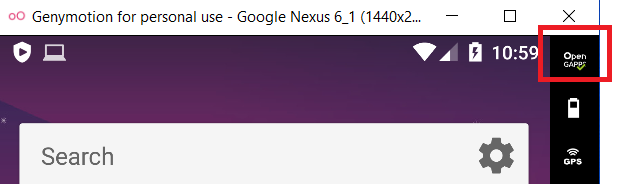
Also, notice that in the configuration of the Android VM in Genymotion you can select Bridge Network mode (this will be useful if you will be connecting to the Android VM from a different VM with the tools).
Use a physical device
You need to activate the debugging options and it will be cool if you can root it:
- Settings.
- (FromAndroid 8.0) Select System.
- Select About phone.
- Press Build number 7 times.
- Go back and you will find the Developer options.
Once you have installed the application, the first thing you should do is to try it and investigate what does it do, how does it work and get comfortable with it.
I will suggest to perform this initial dynamic analysis using MobSF dynamic analysis + pidcat, so we will be able to learn how the application works while MobSF captures a lot of interesting data you can review later on.
Magisk/Zygisk quick notes (recommended on Pixel devices)[10]
- Patch boot.img with the Magisk app and flash via fastboot to get systemless root
- Enable Zygisk + DenyList for root hiding; consider LSPosed/Shamiko when stronger hiding is required
- Keep original boot.img to recover from OTA updates; re-patch after each OTA
- For screen mirroring, use scrcpy on the host
Unintended Data Leakage
Logging
Developers should be cautious of exposing debugging information publicly, as it can lead to sensitive data leaks. The tools pidcat and adb logcat are recommended for monitoring application logs to identify and protect sensitive information. Pidcat is favored for its ease of use and readability.
[!WARNING] Note that from later newer than Android 4.0, applications are only able to access their own logs. So applications cannot access other apps logs.
Anyway, it’s still recommended to not log sensitive information.
Copy/Paste Buffer Caching
Android’s clipboard-based framework enables copy-paste functionality in apps, yet poses a risk as other applications can access the clipboard, potentially exposing sensitive data. It’s crucial to disable copy/paste functions for sensitive sections of an application, like credit card details, to prevent data leaks.
Crash Logs
If an application crashes and saves logs, these logs can assist attackers, particularly when the application cannot be reverse-engineered. To mitigate this risk, avoid logging on crashes, and if logs must be transmitted over the network, ensure they are sent via an SSL channel for security.
As pentester, try to take a look to these logs.
Analytics Data Sent To 3rd Parties
Applications often integrate services like Google Adsense, which can inadvertently leak sensitive data due to improper implementation by developers. To identify potential data leaks, it’s advisable to intercept the application’s traffic and check for any sensitive information being sent to third-party services.
SQLite DBs
Most of the applications will use internal SQLite databases to save information. During the pentest take a look to the databases created, the names of tables and columns and all the data saved because you could find sensitive information (which would be a vulnerability).
Databases should be located in /data/data/the.package.name/databases like /data/data/com.mwr.example.sieve/databases
If the database is saving confidential information and is encrypted but you can find the password inside the application it’s still a vulnerability.
Enumerate the tables using .tables and enumerate the columns of the tables doing .schema <table_name>
Drozer (Exploit Activities, Content Providers and Services)
From Drozer Docs: Drozer allows you to assume the role of an Android app and interact with other apps. It can do anything that an installed application can do, such as make use of Android’s Inter-Process Communication (IPC) mechanism and interact with the underlying operating system. .
Drozer is s useful tool to exploit exported activities, exported services and Content Providers as you will learn in the following sections.
Exploiting exported Activities
Read this if you want to refresh what is an Android Activity.
Also remember that the code of an activity starts in the onCreate method.
Authorisation bypass
When an Activity is exported you can invoke its screen from an external app. Therefore, if an activity with sensitive information is exported you could bypass the authentication mechanisms to access it.
Learn how to exploit exported activities with Drozer.
You can also start an exported activity from adb:
- PackageName is com.example.demo
- Exported ActivityName is com.example.test.MainActivity
adb shell am start -n com.example.demo/com.example.test.MainActivityNOTE: MobSF will detect as malicious the use of singleTask/singleInstance as android:launchMode in an activity, but due to this, apparently this is only dangerous on old versions (API versions < 21).
[!TIP] Note that an authorisation bypass is not always a vulnerability, it would depend on how the bypass works and which information is exposed.
Sensitive information leakage
Activities can also return results. If you manage to find an exported and unprotected activity calling the setResult method and returning sensitive information, there is a sensitive information leakage.
Tapjacking
If tapjacking isn’t prevented, you could abuse the exported activity to make the user perform unexpected actions. For more info about what is Tapjacking follow the link.
Exploiting Content Providers - Accessing and manipulating sensitive information
Read this if you want to refresh what is a Content Provider.
Content providers are basically used to share data. If an app has available content providers you may be able to extract sensitive data from them. It also interesting to test possible SQL injections and Path Traversals as they could be vulnerable.
Learn how to exploit Content Providers with Drozer.
Exploiting Services
Read this if you want to refresh what is a Service.
Remember that a the actions of a Service start in the method onStartCommand.
As service is basically something that can receive data, process it and returns (or not) a response. Then, if an application is exporting some services you should check the code to understand what is it doing and test it dynamically for extracting confidential info, bypassing authentication measures…
Learn how to exploit Services with Drozer.
Exploiting Broadcast Receivers
Read this if you want to refresh what is a Broadcast Receiver.
Remember that a the actions of a Broadcast Receiver start in the method onReceive.
A broadcast receiver will be waiting for a type of message. Depending on ho the receiver handles the message it could be vulnerable.
Learn how to exploit Broadcast Receivers with Drozer.
Exploiting Schemes / Deep links
You can look for deep links manually, using tools like MobSF or scripts like this one.
You can open a declared scheme using adb or a browser:
adb shell am start -a android.intent.action.VIEW -d "scheme://hostname/path?param=value" [your.package.name]Note that you can omit the package name and the mobile will automatically call the app that should open that link.
<!-- Browser regular link -->
<a href="scheme://hostname/path?param=value">Click me</a>
<!-- fallback in your url you could try the intent url -->
<a href="intent://hostname#Intent;scheme=scheme;package=your.package.name;S.browser_fallback_url=http%3A%2F%2Fwww.example.com;end">with alternative</a>
Code executed
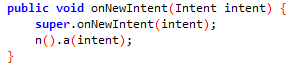
In order to find the code that will be executed in the App, go to the activity called by the deeplink and search the function onNewIntent.
Sensitive info
Every time you find a deep link check that it’s not receiving sensitive data (like passwords) via URL parameters, because any other application could impersonate the deep link and steal that data!
Parameters in path
You must check also if any deep link is using a parameter inside the path of the URL like: https://api.example.com/v1/users/{username} , in that case you can force a path traversal accessing something like: example://app/users?username=../../unwanted-endpoint%3fparam=value .
Note that if you find the correct endpoints inside the application you may be able to cause a Open Redirect (if part of the path is used as domain name), account takeover (if you can modify users details without CSRF token and the vuln endpoint used the correct method) and any other vuln. More info about this here.
More examples
An interesting bug bounty report about links (/.well-known/assetlinks.json).
Transport Layer Inspection and Verification Failures
- Certificates are not always inspected properly by Android applications. It’s common for these applications to overlook warnings and accept self-signed certificates or, in some instances, revert to using HTTP connections.
- Negotiations during the SSL/TLS handshake are sometimes weak, employing insecure cipher suites. This vulnerability makes the connection susceptible to man-in-the-middle (MITM) attacks, allowing attackers to decrypt the data.
- Leakage of private information is a risk when applications authenticate using secure channels but then communicate over non-secure channels for other transactions. This approach fails to protect sensitive data, such as session cookies or user details, from interception by malicious entities.
Certificate Verification
We will focus on certificate verification. The integrity of the server’s certificate must be verified to enhance security. This is crucial because insecure TLS configurations and the transmission of sensitive data over unencrypted channels can pose significant risks. For detailed steps on verifying server certificates and addressing vulnerabilities, this resource provides comprehensive guidance.
SSL Pinning
SSL Pinning is a security measure where the application verifies the server’s certificate against a known copy stored within the application itself. This method is essential for preventing MITM attacks. Implementing SSL Pinning is strongly recommended for applications handling sensitive information.
Traffic Inspection
To inspect HTTP traffic, it’s necessary to install the proxy tool’s certificate (e.g., Burp). Without installing this certificate, encrypted traffic might not be visible through the proxy. For a guide on installing a custom CA certificate, click here.
Applications targeting API Level 24 and above require modifications to the Network Security Config to accept the proxy’s CA certificate. This step is critical for inspecting encrypted traffic. For instructions on modifying the Network Security Config, refer to this tutorial.
If Flutter is used, follow the instructions on this page. Adding the certificate to the Android store alone may not work because Flutter/Dart applications can use an embedded BoringSSL-based networking stack and trust behavior that differs from the platform CA store.
Static detection of SSL/TLS pinning
Before attempting runtime bypasses, quickly map where pinning is enforced in the APK. Static discovery helps you plan hooks/patches and focus on the right code paths.
- Open-source static-analysis utility that decompiles the APK to Smali (via apktool) and scans for curated regex patterns of SSL/TLS pinning implementations.
- Reports exact file path, line number, and a code snippet for each match.
- Covers common frameworks and custom code paths: OkHttp CertificatePinner, custom javax.net.ssl.X509TrustManager.checkServerTrusted, SSLContext.init with custom TrustManagers/KeyManagers, and Network Security Config XML pins.
Install
- Prereqs: Python >= 3.8, Java on PATH, apktool
git clone https://github.com/aancw/SSLPinDetect
cd SSLPinDetect
pip install -r requirements.txt
Usage
# Basic
python sslpindetect.py -f app.apk -a apktool.jar

# Verbose (timings + per-match path:line + snippet)
python sslpindetect.py -a apktool_2.11.0.jar -f sample/app-release.apk -v
Example pattern rules (JSON) Use or extend signatures to detect proprietary/custom pinning styles. You can load your own JSON and scan at scale.
{
  "OkHttp Certificate Pinning": [
    "Lcom/squareup/okhttp/CertificatePinner;",
    "Lokhttp3/CertificatePinner;",
    "setCertificatePinner"
  ],
  "TrustManager Override": [
    "Ljavax/net/ssl/X509TrustManager;",
    "checkServerTrusted"
  ]
}
Notes and tips
- Fast scanning on large apps via multi-threading and memory-mapped I/O; pre-compiled regex reduces overhead/false positives.
- Pattern collection: https://github.com/aancw/smali-sslpin-patterns[9]
- Typical detection targets to triage next:
- OkHttp: CertificatePinner usage, setCertificatePinner, okhttp3/okhttp package references
- Custom TrustManagers: javax.net.ssl.X509TrustManager, checkServerTrusted overrides
- Custom SSL contexts: SSLContext.getInstance + SSLContext.init with custom managers
- Declarative pins in res/xml network security config and manifest references
- Use the matched locations to plan Frida hooks, static patches, or config reviews before dynamic testing.
Bypassing SSL Pinning
When SSL Pinning is implemented, bypassing it becomes necessary to inspect HTTPS traffic. Various methods are available for this purpose:
- Automatically modify the apk to bypass SSLPinning with apk-mitm. The best pro of this option, is that you won’t need root to bypass the SSL Pinning, but you will need to delete the application and reinstall the new one, and this won’t always work.
- You could use Frida (discussed below) to bypass this protection. Here you have a guide to use Burp+Frida+Genymotion: https://spenkk.github.io/bugbounty/Configuring-Frida-with-Burp-and-GenyMotion-to-bypass-SSL-Pinning/
- You can also try to automatically bypass SSL Pinning using objection:
objection --gadget com.package.app explore --startup-command "android sslpinning disable" - You can also try to automatically bypass SSL Pinning using MobSF dynamic analysis (explained below)
- If you still think that there is some traffic that you aren’t capturing you can try to forward the traffic to burp using iptables. Read this blog: https://infosecwriteups.com/bypass-ssl-pinning-with-ip-forwarding-iptables-568171b52b62
Looking for Common Web Vulnerabilities
It’s important to also search for common web vulnerabilities within the application. Detailed information on identifying and mitigating these vulnerabilities is beyond the scope of this summary but is extensively covered elsewhere.
Frida
Frida is a dynamic instrumentation toolkit for developers, reverse-engineers, and security researchers.
You can access running application and hook methods on run time to change the behaviour, change values, extract values, run different code…
If you want to pentest Android applications you need to know how to use Frida.
- Learn how to use Frida: Frida tutorial
- Some “GUI” for actions with Frida: https://github.com/m0bilesecurity/RMS-Runtime-Mobile-Security
- Ojection is great to automate the use of Frida: https://github.com/sensepost/objection , https://github.com/dpnishant/appmon
- You can find some Awesome Frida scripts here: https://codeshare.frida.re/
- Try to bypass anti-debugging / anti-frida mechanisms loading Frida as in indicated in https://erfur.github.io/blog/dev/code-injection-without-ptrace (tool linjector)
Anti-instrumentation & SSL pinning bypass workflow
Android Anti Instrumentation And Ssl Pinning Bypass
Dump Memory - Fridump
Check if the application is storing sensitive information inside the memory that it shouldn’t be storing like passwords or mnemonics.
Using Fridump3 you can dump the memory of the app with:
# With PID
python3 fridump3.py -u <PID>

# With name
frida-ps -Uai
python3 fridump3.py -u "<Name>"
This will dump the memory in ./dump folder, and in there you could grep with something like:
strings * | grep -E "^[a-z]+ [a-z]+ [a-z]+ [a-z]+ [a-z]+ [a-z]+ [a-z]+ [a-z]+ [a-z]+ [a-z]+ [a-z]+ [a-z]+$"Sensitive data in Keystore
In Android the Keystore is the best place to store sensitive data, however, with enough privileges it’s still possible to access it. As applications tends to store here sensitive data in clear text the pentests should check for it as root user or someones with physical access to the device could be able to steal this data.
Even if an app stored date in the keystore, the data should be encrypted.
To access the data inside the keystore you could use this Frida script: https://github.com/WithSecureLabs/android-keystore-audit/blob/master/frida-scripts/tracer-cipher.js
frida -U -f com.example.app -l frida-scripts/tracer-cipher.jsAndroid Physical Attacks
Fingerprint/Biometrics Bypass
Using the following Frida script it could be possible to bypass fingerprint authentication Android applications might be performing in order to protect certain sensitive areas:
frida --codeshare krapgras/android-biometric-bypass-update-android-11 -U -f <app.package>Background Images
When you put an application in background, Android stores a snapshot of the application so when it’s recovered to foreground it starts loading the image before the app so ot looks like the app was loaded faster.
However, if this snapshot contains sensitive information, someone with access to the snapshot might steal that info (note that you need root to access it).
The snapshots are usually stored around: /data/system_ce/0/snapshots
Android provides a way to prevent the screenshot capture by setting the FLAG_SECURE layout parameter. By using this flag, the window contents are treated as secure, preventing it from appearing in screenshots or from being viewed on non-secure displays.
getWindow().setFlags(LayoutParams.FLAG_SECURE, LayoutParams.FLAG_SECURE);Android Application Analyzer
This tool can help manage multiple utilities during dynamic analysis: Android Application Analyzer.
Intent Injection
Developers often create proxy components like activities, services, and broadcast receivers that handle these Intents and pass them to methods such as startActivity(...) or sendBroadcast(...), which can be risky.
The danger lies in allowing attackers to trigger non-exported app components or access sensitive content providers by misdirecting these Intents. A notable example is the WebView component converting URLs to Intent objects via Intent.parseUri(...) and then executing them, potentially leading to malicious Intent injections.
Essential Takeaways
- Intent Injection is similar to web’s Open Redirect issue.
- Exploits involve passing
Intentobjects as extras, which can be redirected to execute unsafe operations. - It can expose non-exported components and content providers to attackers.
WebView’s URL toIntentconversion can facilitate unintended actions.
Android Client Side Injections and others
Probably you know about this kind of vulnerabilities from the Web. You have to be specially careful with this vulnerabilities in an Android application:
- SQL Injection: When dealing with dynamic queries or Content-Providers ensure you are using parameterized queries.
- JavaScript Injection (XSS): Verify that JavaScript and Plugin support is disabled for any WebViews (disabled by default). More info here.
- Local File Inclusion: WebViews should have access to the file system disabled (enabled by default) -
(webview.getSettings().setAllowFileAccess(false);). More info here. - Eternal cookies: In several cases when the android application finish the session the cookie isn’t revoked or it could be even saved to disk
- Secure Flag in cookies
Automatic Analysis
MobSF
Static analysis
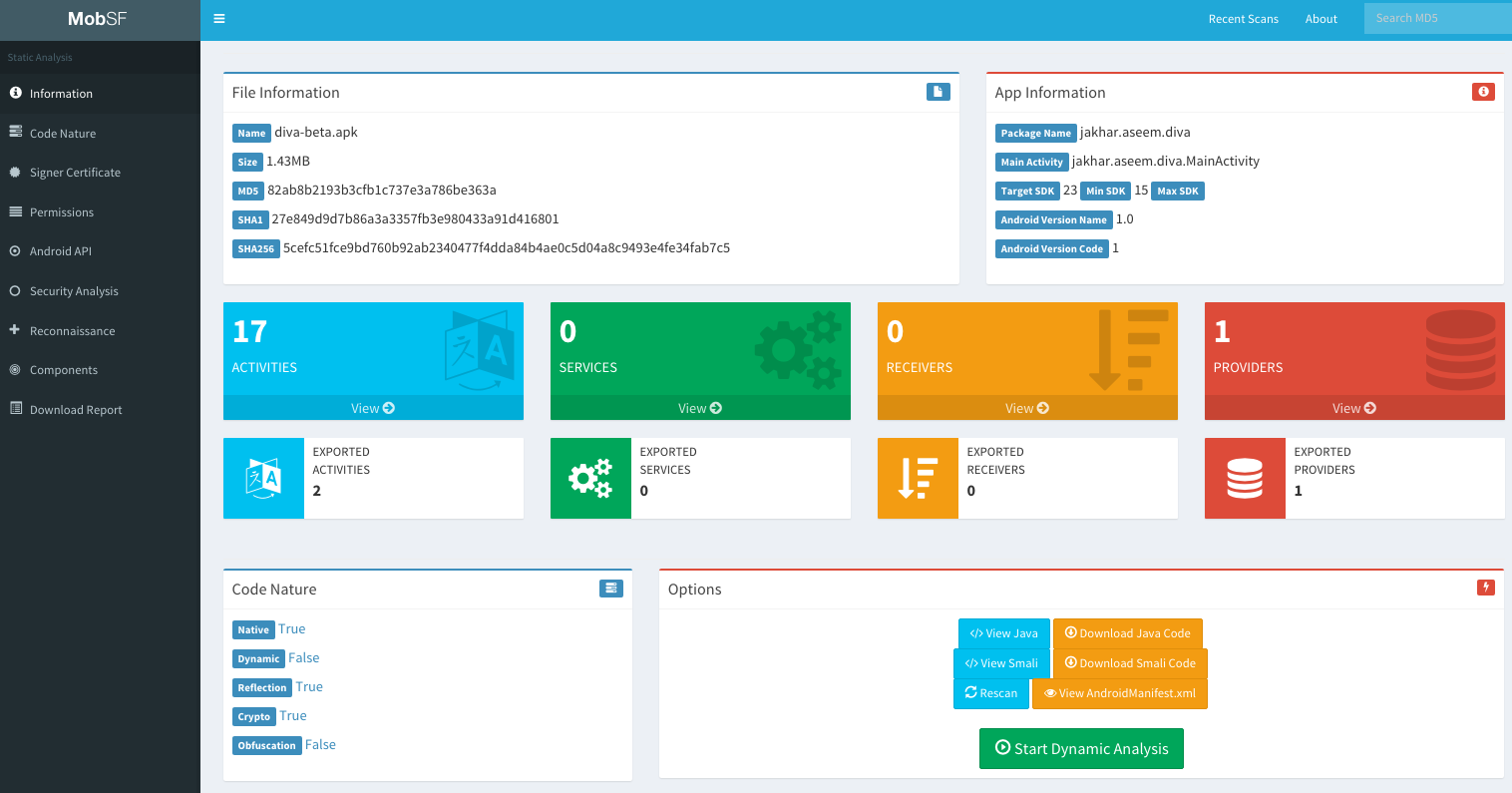
Vulnerability assessment of the application using a nice web-based frontend. You can also perform dynamic analysis (but you need to prepare the environment).
docker pull opensecurity/mobile-security-framework-mobsf
docker run -it -p 8000:8000 opensecurity/mobile-security-framework-mobsf:latest
Notice that MobSF can analyse Android(apk), IOS(ipa) and Windows(apx) applications (Windows applications must be analyzed from a MobSF installed in a Windows host).
Also, if you create a ZIP file with the source code if an Android or an IOS app (go to the root folder of the application, select everything and create a ZIPfile), it will be able to analyse it also.
MobSF also allows you to diff/Compare analysis and to integrate VirusTotal (you will need to set your API key in MobSF/settings.py and enable it: VT_ENABLED = TRUE VT_API_KEY = <Your API key> VT_UPLOAD = TRUE). You can also set VT_UPLOAD to False, then the hash will be upload instead of the file.
Assisted Dynamic analysis with MobSF
MobSF can also be very helpful for dynamic analysis in Android, but in that case you will need to install MobSF and genymotion in your host (a VM or Docker won’t work). Note: You need to start first a VM in genymotion and then MobSF.
The MobSF dynamic analyser can:
- Dump application data (URLs, logs, clipboard, screenshots made by you, screenshots made by “Exported Activity Tester”, emails, SQLite databases, XML files, and other created files). All of this is done automatically except for the screenshots, you need to press when you want a screenshot or you need to press “Exported Activity Tester” to obtain screenshots of all the exported activities.
- Capture HTTPS traffic
- Use Frida to obtain runtime information
From android versions > 5, it will automatically start Frida and will set global proxy settings to capture traffic. It will only capture traffic from the tested application.
Frida
By default, it will also use some Frida Scripts to bypass SSL pinning, root detection and debugger detection and to monitor interesting APIs.
MobSF can also invoke exported activities, grab screenshots of them and save them for the report.
To start the dynamic testing press the green bottom: “Start Instrumentation”. Press the “Frida Live Logs” to see the logs generated by the Frida scripts and “Live API Monitor” to see all the invocation to hooked methods, arguments passed and returned values (this will appear after pressing “Start Instrumentation”).
MobSF also allows you to load your own Frida scripts (to send the results of your Friday scripts to MobSF use the function send()). It also has several pre-written scripts you can load (you can add more in MobSF/DynamicAnalyzer/tools/frida_scripts/others/), just select them, press “Load” and press “Start Instrumentation” (you will be able to see the logs of that scripts inside “Frida Live Logs”).
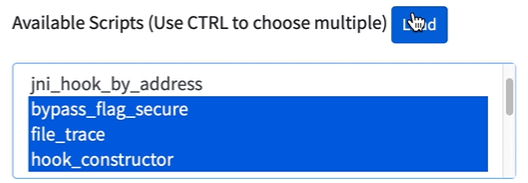
Moreover, you have some Auxiliary Frida functionalities:
- Enumerate Loaded Classes: It will print all the loaded classes
- Capture Strings: It will print all the capture strings while using the application (super noisy)
- Capture String Comparisons: Could be very useful. It will show the 2 strings being compared and if the result was True or False.
- Enumerate Class Methods: Put the class name (like “java.io.File”) and it will print all the methods of the class.
- Search Class Pattern: Search classes by pattern
- Trace Class Methods: Trace a whole class (see inputs and outputs of all methods of th class). Remember that by default MobSF traces several interesting Android Api methods.
Once you have selected the auxiliary module you want to use you need to press “Start Intrumentation” and you will see all the outputs in “Frida Live Logs”.
Shell
Mobsf also brings you a shell with some adb commands, MobSF commands, and common shell commands at the bottom of the dynamic analysis page. Some interesting commands:
help
shell ls
activities
exported_activities
services
receivers
HTTP tools
When http traffic is capture you can see an ugly view of the captured traffic on “HTTP(S) Traffic” bottom or a nicer view in “Start HTTPTools” green bottom. From the second option, you can send the captured requests to proxies like Burp or Owasp ZAP.
To do so, power on Burp —> turn off Intercept —> in MobSB HTTPTools select the request —> press “Send to Fuzzer” —> select the proxy address (http://127.0.0.1:8080\).
Once you finish the dynamic analysis with MobSF you can press on “Start Web API Fuzzer” to fuzz http requests an look for vulnerabilities.
[!TIP] After dynamic analysis with MobSF, the proxy settings may be left misconfigured and may not be repairable from the GUI. Reset them with:
adb shell settings put global http_proxy :0
Assisted Dynamic Analysis with Inspeckage
You can get the tool from Inspeckage.
This tool with use some Hooks to let you know what is happening in the application while you perform a dynamic analysis.
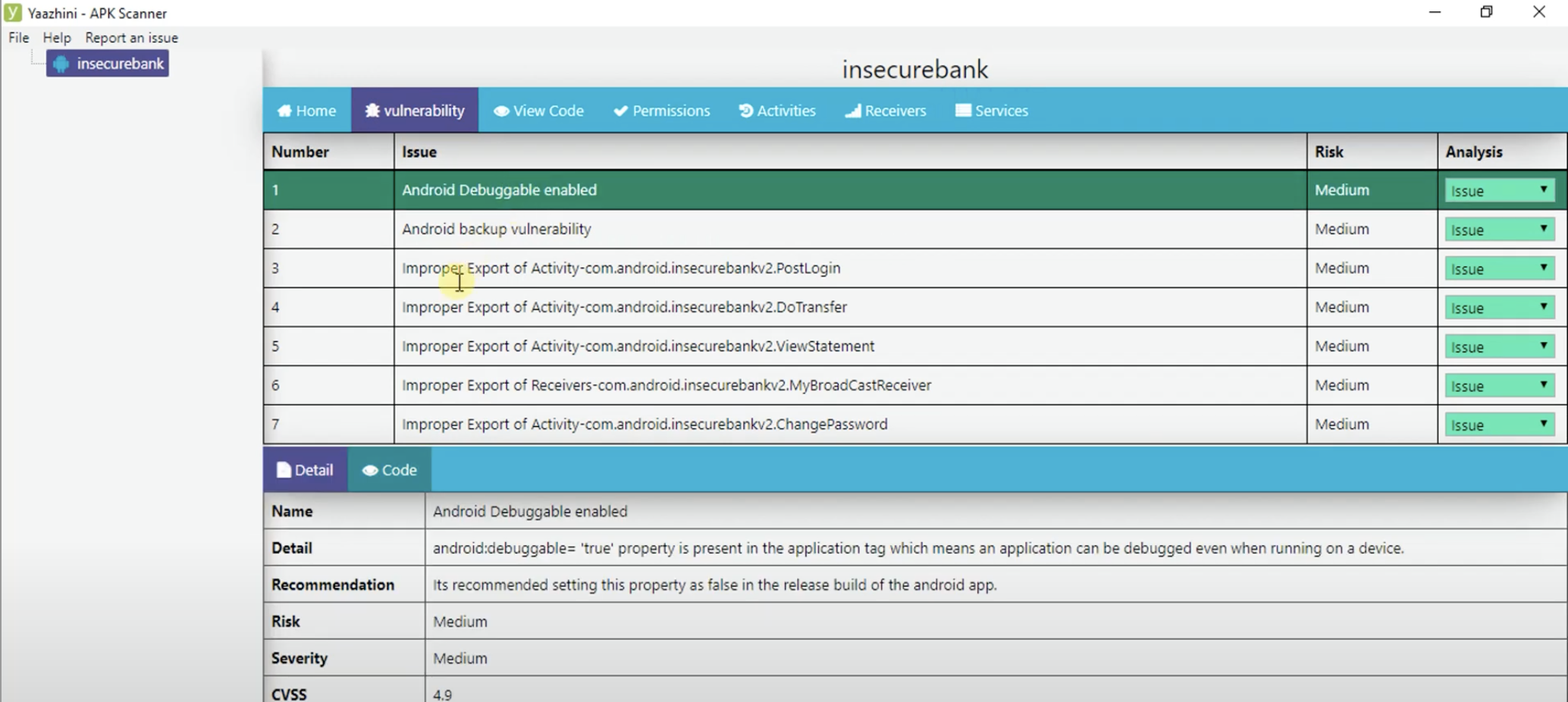
Yaazhini
This is a great tool to perform static analysis with a GUI
Qark
This tool is designed to look for several security related Android application vulnerabilities, either in source code or packaged APKs. The tool is also capable of creating a “Proof-of-Concept” deployable APK and ADB commands, to exploit some of the found vulnerabilities (Exposed activities, intents, tapjacking…). As with Drozer, there is no need to root the test device.
pip3 install --user qark  # --user is only needed if not using a virtualenv
qark --apk path/to/my.apk
qark --java path/to/parent/java/folder
qark --java path/to/specific/java/file.java
ReverseAPK
- Displays all extracted files for easy reference
- Automatically decompile APK files to Java and Smali format
- Analyze AndroidManifest.xml for common vulnerabilities and behavior
- Static source code analysis for common vulnerabilities and behavior
- Device info
- and more
reverse-apk relative/path/to/APP.apkSUPER Android Analyzer
SUPER is a command-line application that can be used in Windows, MacOS X and Linux, that analyzes .apk files in search for vulnerabilities. It does this by decompressing APKs and applying a series of rules to detect those vulnerabilities.
All rules are centered in a rules.json file, and each company or tester could create its own rules to analyze what they need.
Download the latest binaries from in the download page
super-analyzer {apk_file}StaCoAn
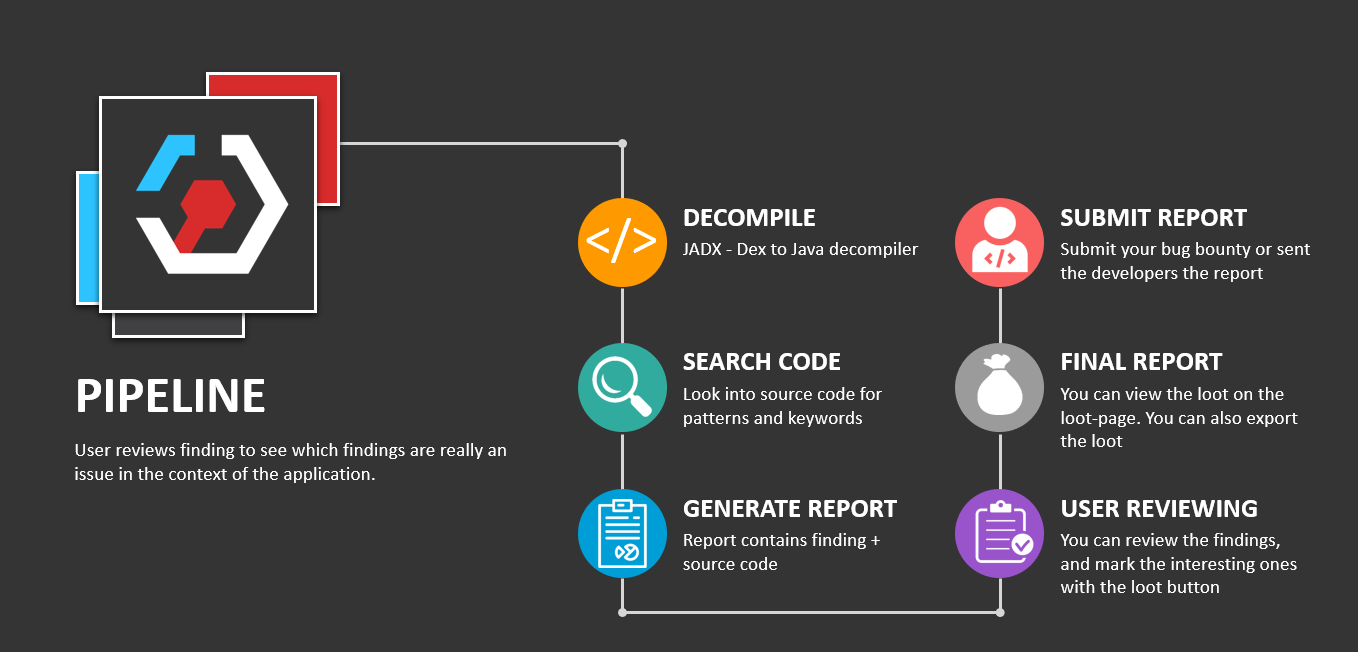
StaCoAn is a cross-platform tool that helps developers, bug-bounty hunters, and ethical hackers perform static code analysis on mobile applications.
The concept is that you drag and drop your mobile application file (an .apk or .ipa file) on the StaCoAn application and it will generate a visual and portable report for you. You can tweak the settings and wordlists to get a customized experience.
Download latest release:
./stacoanAndroBugs
AndroBugs Framework is an Android vulnerability analysis system that helps developers or hackers find potential security vulnerabilities in Android applications.
Windows releases
python androbugs.py -f [APK file]
androbugs.exe -f [APK file]
Androwarn
Androwarn is a tool whose main aim is to detect and warn the user about potential malicious behaviours developped by an Android application.
The detection is performed with the static analysis of the application’s Dalvik bytecode, represented as Smali, with the androguard library.
This tool looks for common behavior of “bad” applications like: Telephony identifiers exfiltration, Audio/video flow interception, PIM data modification, Arbitrary code execution…
python androwarn.py -i my_application_to_be_analyzed.apk -r html -v 3MARA Framework
MARA is a Mobile Application Reverse engineering and Analysis Framework. It is a tool that puts together commonly used mobile application reverse engineering and analysis tools, to assist in testing mobile applications against the OWASP mobile security threats. Its objective is to make this task easier and friendlier to mobile application developers and security professionals.
It is able to:
- Extract Java and Smali code using different tools
- Analyze APKs using: smalisca, ClassyShark, androbugs, androwarn, APKiD
- Extract private information from the APK using regexps.
- Analyze the Manifest.
- Analyze found domains using: pyssltest, testssl and whatweb
- Deobfuscate APK via apk-deguard.com
Koodous
Useful to detect malware: https://koodous.com/
Obfuscating/Deobfuscating code
Note that depending the service and configuration you use to obfuscate the code. Secrets may or may not ended obfuscated.
ProGuard
From Wikipedia: ProGuard is an open source command-line tool that shrinks, optimizes and obfuscates Java code. It is able to optimize bytecode as well as detect and remove unused instructions. ProGuard is free software and is distributed under the GNU General Public License, version 2.
ProGuard is distributed as part of the Android SDK and runs when building the application in release mode.
DexGuard
Find a step-by-step guide to deobfuscate the apk in https://blog.lexfo.fr/dexguard.html
(From that guide) Last time we checked, the Dexguard mode of operation was:
- load a resource as an InputStream;
- feed the result to a class inheriting from FilterInputStream to decrypt it;
- do some useless obfuscation to waste a few minutes of time from a reverser;
- feed the decrypted result to a ZipInputStream to get a DEX file;
- finally load the resulting DEX as a Resource using the
loadDexmethod.
DeGuard
DeGuard reverses the process of obfuscation performed by Android obfuscation tools. This enables numerous security analyses, including code inspection and predicting libraries.
You can upload an obfuscated APK to their platform.
Deobfuscate Android App
This is a LLM tool to find any potential security vulnerabilities in android apps and deobfuscate android app code. Uses Google’s Gemini public API.
Simplify
It is a generic Android deobfuscator. Simplify virtually executes an app to understand its behavior and then tries to optimize the code so it behaves identically but is easier for a human to understand. Each optimization is generic, so it does not depend on a specific obfuscation technique.
APKiD
APKiD gives you information about how an APK was made. It identifies many compilers, packers, obfuscators, and other weird stuff. It’s PEiD for Android.
Manual
Read this tutorial to learn some tricks on how to reverse custom obfuscation
Labs
Androl4b
AndroL4b is an Android security virtual machine based on ubuntu-mate includes the collection of latest framework, tutorials and labs from different security geeks and researchers for reverse engineering and malware analysis.
References
- [1] Play Integrity API: How It Works & How to Bypass It
- [2] OWASP Mobile Application Security
- [3] Android App Reverse Engineering 101 - Android quick course
- [4] Android Application Security Series
- [5] Android-Security-Teryaagh
- [6] Mobile Hacking Workshop - Community Day
- [7] SSLPinDetect: Advanced SSL Pinning Detection for Android Security Analysis
- [8] SSLPinDetect GitHub
- [9] smali-sslpin-patterns
- [10] Build a Repeatable Android Bug Bounty Lab: Emulator vs Magisk, Burp, Frida, and Medusa
- [11] MalFixer
- [12] CoRPhone — Android in-memory JNI execution and packaging pipeline
- [13] justapk — multi-source APK downloader with Cloudflare bypass
- [14] Jezail rooted Android pentesting toolkit (REST API + Flutter UI)
- [15] ISO 8583 Under Fire: Finding Vulnerabilities in a Payment Socket
- [16] Fuyao Enterprise: Building an Ad-Fraud Empire with AI and Kids’ Coding Blocks
- [17] Application Security Wiki - It is a great list of resources
- [18] clearbluejar.github.io - Desuperpacking Meta Superpacked Apks With Github Actions
- [19] android-developers.googleblog.com - Run Arm Apps On Android Emulator
- [20] Zero-Click File Drop on Xiaomi ShareMe (MiDrop)
- [21] Byterialab mishare-zero-click-file-drop PoC repository