Objection Tutorial
Introduction
objection - Runtime Mobile Exploration
Objection is a runtime mobile exploration toolkit, powered by Frida. It was built with the aim of helping assess mobile applications and their security posture without the need for a jailbroken or rooted mobile device.[1]
Note: This is not some form of jailbreak / root bypass. By using objection, you are still limited by all of the restrictions imposed by the applicable sandbox you are facing.
Summary
The goal of objection is to expose common Frida-powered mobile-testing actions through a reusable command-line interface, reducing the need to write a separate script for every application.
Tutorial
For this tutorial I am going to use the APK that you can download here:
Or from its original repository (download app-release.apk)
Installation
pip3 install objectionConnection
Establish a regular ADB connection, start Frida Server on the device, and verify that the client and server can communicate.
If you are using a rooted device and frida-server, enumerate packages and then start the current objection REPL (start is the modern syntax; older writeups may still show explore or --gadget):
frida-ps -Uai
objection -n asvid.github.io.fridaapp start
If you are using a non-rooted device, a common workflow is to patch the APK to embed Frida Gadget, reinstall it, and then connect to Gadget:[3]
objection patchapk -s app-release.apk --network-security-config --enable-debug --use-aapt2
adb install -r app-release.objection.apk
objection -n Gadget start
For a complete Gadget embedding workflow (including --gadget-config and -l/script-mode patching), check:
If the application still crashes or exits as soon as Objection/Frida attaches, continue with this anti-instrumentation workflow.
Basic Actions
This tutorial lists a practical subset of Objection commands.
Environment
The environment may reveal interesting information such as paths or accidentally exposed secrets.
env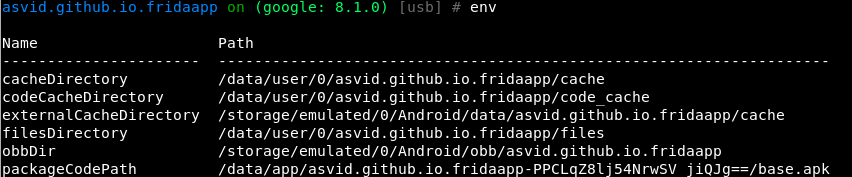
Frida Information
frida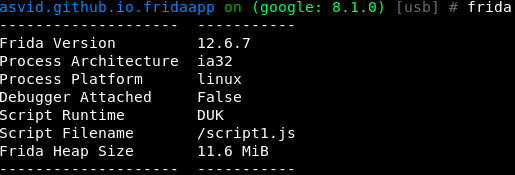
Upload/Download
file download <remote path> [<local path>]
file upload <local path> [<remote path>]
Import frida script
import <local path frida-script>Jobs
Imported scripts and many hooks run as jobs in the background, so you can keep using the REPL while the hook stays loaded:
import ssl-bypass.js "ssl-bypass"
jobs list
jobs kill <job_id>
This is especially useful after android hooking watch ... or when importing a long-running Frida helper.
Early instrumentation
If the app runs root checks, SSL pinning or anti-tampering during startup, run the hook before the REPL finishes collecting environment data:[2]
objection -n asvid.github.io.fridaapp start --startup-command "android sslpinning disable"
objection -n asvid.github.io.fridaapp start --startup-script ssl-bypass.js
This is much more reliable when the interesting code runs inside Application.onCreate() or in the first launched Activity.
SSLPinning
android sslpinning disable #Attempts to disable SSL Pinning on Android devices.Root detection
android root disable  #Attempts to disable root detection on Android devices.
android root simulate #Attempts to simulate a rooted Android environment.
Exec Command
android shell_exec whoamiScreenshots
android ui screenshot /tmp/screenshot
android ui FLAG_SECURE false  #This may enable you to take screenshots using the hardware keys
Useful Android helpers
android deoptimize                         # Force ART to go through the interpreter and make hooks more reliable
android proxy set 192.168.1.10 8080       # Set a proxy only for the hooked app
android intent implicit_intents --dump-backtrace
android deoptimize is especially useful when ART optimization makes a hook appear correct but the implementation is never reached.
Static analysis made Dynamic
In a real application we should know all of the information discovered in this part before using objection thanks to static analysis. Anyway, this way maybe you can see something new as here you will only have a complete list of classes, methods and exported objects.
This is also useful when you cannot obtain readable source code for the app.
List activities, receivers and services
android hooking list activities
android hooking list services
android hooking list receivers
Frida will report an error if none is found.
Getting current activity
android hooking get current_activity
Search Classes
Start by looking for classes inside the application:
android hooking search classes asvid.github.io.fridaapp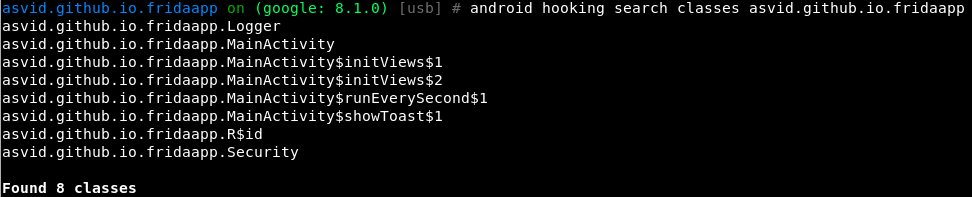
Search Methods of a class
Now extract the methods inside the MainActivity class:
android hooking search methods asvid.github.io.fridaapp MainActivity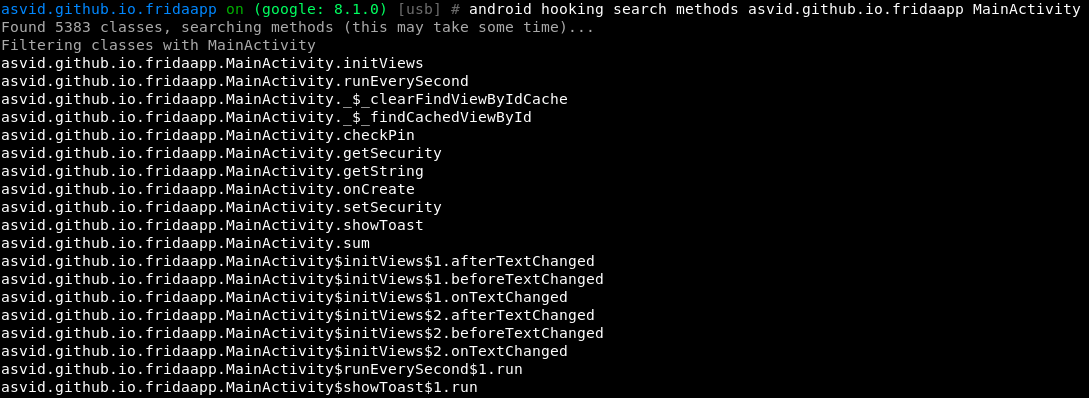
List declared Methods of a class with their parameters
List the declared methods and their parameter types:
android hooking list class_methods asvid.github.io.fridaapp.MainActivity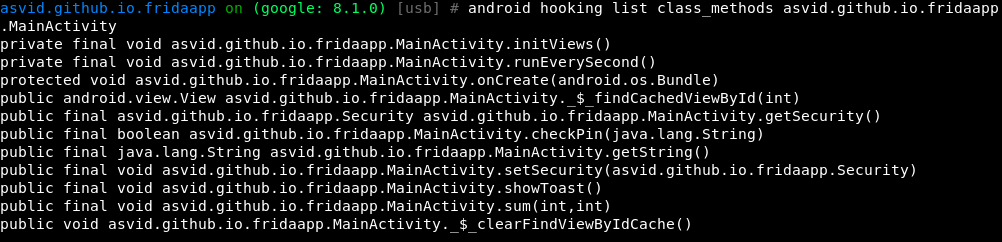
List classes
You can also list every class loaded in the current application:
android hooking list classes # More classes appear as the application loads additional code.
android hooking list class_loaders
This is useful when you know a class name but not its owning module; locate the class first, then hook its method.
android hooking list class_loaders is especially useful in packed apps, plugins, and apps that decrypt or load additional DEX files at runtime, because interesting classes may appear only in a secondary class loader.
Hooking being easy
Hooking (watching) a method
The application’s source code shows that MainActivity.sum() runs every second. Dump its arguments, return value, and backtrace each time it is called:
android hooking watch class_method asvid.github.io.fridaapp.MainActivity.sum --dump-args --dump-backtrace --dump-return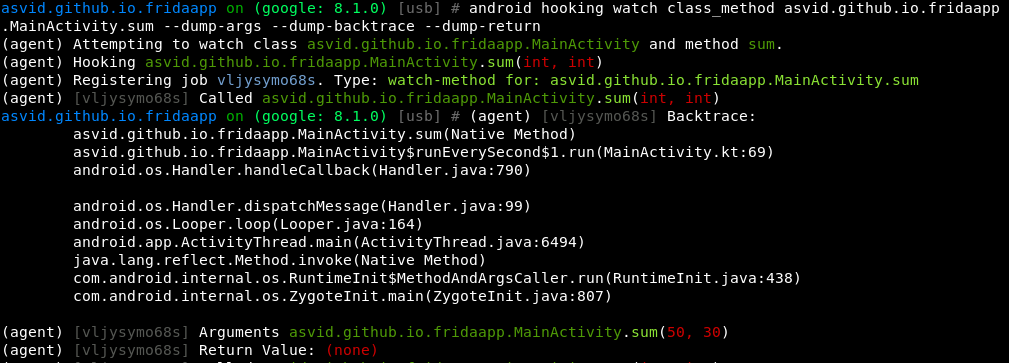
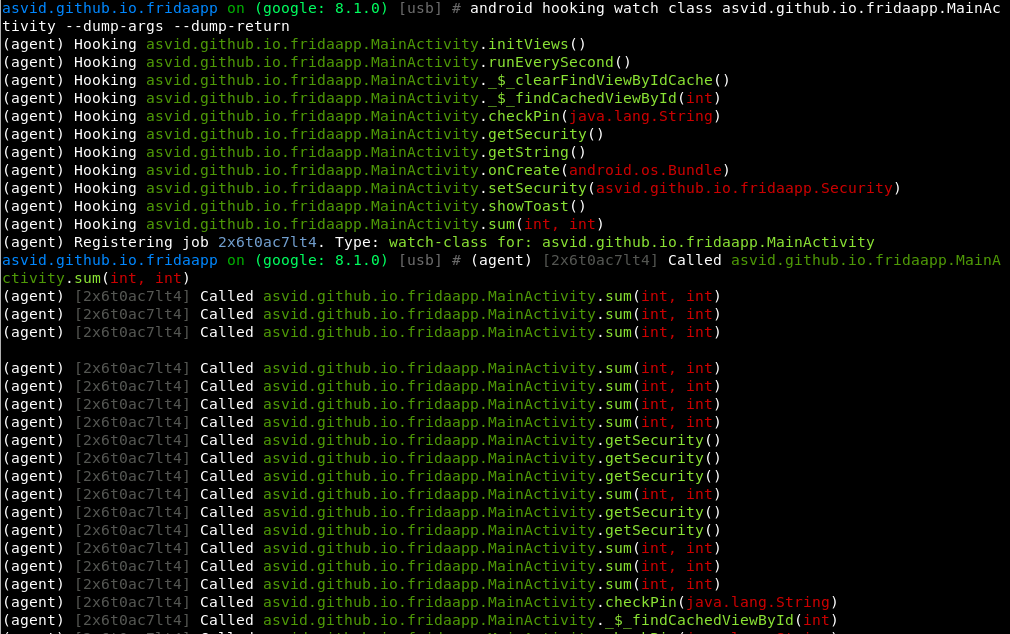
Hooking (watching) an entire class
To observe the whole MainActivity class, hook every method. This can crash the application.
android hooking watch class asvid.github.io.fridaapp.MainActivity --dump-args --dump-returnIf you play with the application while the class is hooked you will see when each function is being called, its arguments and the return value.
Changing boolean return value of a function
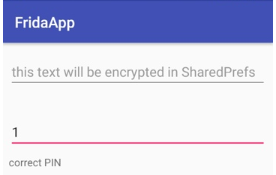
The source shows that checkPin accepts a String and returns a Boolean. Make the function always return true:

After the hook is active, any value entered in the PIN field is accepted:
Class instances
Search for and print live instances of a specific Java class, specified by a fully qualified class name. The returned hashcode can then be reused to inspect the object and even execute instance methods on it.
android heap search instances <class>
android heap print fields <hashcode>
android heap print methods <hashcode> --without-arguments
android heap execute <hashcode> <method> --return-string
android heap evaluate <hashcode>
This is very useful when static analysis shows an interesting singleton or manager object already in memory and you want to inspect its state or call a helper method without writing a custom Frida script.

Keystore/Intents
You can play with the keystore and intents using:
android keystore list
android intent launch_activity
android intent launch_service
Memory
Dump
memory dump all <local destination> #Dump all memory
memory dump from_base <base_address> <size_to_dump> <local_destination> #Dump a part
List
memory list modules
At the bottom of the list, you can see Frida:

List the exports from a selected module:
memory list exports libfoo.so
memory list exports libfoo.so --json exports.json
Search/Write
You can also search and write process memory with Objection:
memory search "<pattern eg: 41 41 41 ?? 41>" (--string) (--offsets-only)
memory write "<address>" "<pattern eg: 41 41 41 41>" (--string)
SQLite
Use the sqlite command to interact with SQLite databases.
sqlite connect /data/data/<package>/databases/app.db
sqlite connect /data/data/<package>/databases/app.db --sync
Using --sync will upload the modified temporary copy back to the application path when you exit the SQLite prompt.
Exit
exitWhat I miss in Objection
- The hooking methods sometimes crashes the application (this is also because of Frida or anti-instrumentation checks in the target app).
- Modern versions can inspect heap instances and execute methods on existing handles, but creating fresh Java objects or orchestrating complex overloaded method calls is usually still easier with a custom Frida script.
- There is no shortcut comparable to
sslpinningfor hooking every common cryptographic API and displaying ciphertext, plaintext, keys, IVs, and algorithms.