Integrity Levels
Integrity Levels
In Windows Vista and later versions, securable objects can carry an integrity level label. Most objects are treated as medium integrity, while specific locations intended for low-integrity applications can be labelled low. Processes started by standard users normally run at medium integrity, elevated applications run at high integrity, and many services run at system integrity.[1]
A key rule is that objects cannot be modified by processes with a lower integrity level than the object’s level. Windows applies this Mandatory Integrity Control (MIC) check before evaluating the object’s discretionary access control list (DACL). The commonly encountered levels are:[1][2]
- Untrusted: The lowest level, represented by
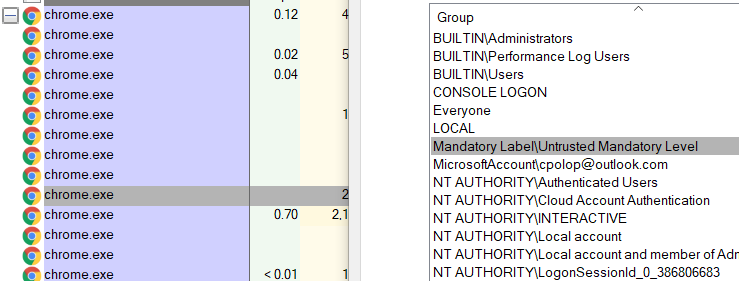
SECURITY_MANDATORY_UNTRUSTED_RID(S-1-16-0). Do not confuse this integrity label with the Anonymous Logon identity (S-1-5-7); authentication identities and MIC labels are separate SID namespaces. As a real-world example, Chromium’s Windows sandbox initially assigns sandboxed targets Low integrity and then lowers renderer targets to Untrusted integrity after startup.[5][6] - Low: Mainly for internet interactions, especially in Internet Explorer’s Protected Mode, affecting associated files and processes, and certain folders like the Temporary Internet Folder. Low integrity processes face significant restrictions, including no registry write access and limited user profile write access.
- Medium: The default level for most activities, assigned to standard users and objects without specific integrity levels. Even members of the Administrators group operate at this level by default.
- High: Reserved for administrators, allowing them to modify objects at lower integrity levels, including those at the high level itself.
- System: The highest operational level for the Windows kernel and core services, out of reach even for administrators, ensuring protection of vital system functions.
Windows also defines a protected-process integrity value above System. TrustedInstaller, however, is a Windows service identity rather than a separate MIC level; its ability to modify protected operating-system resources comes from the permissions granted to that identity.
Do not assume that a location such as the root of a system drive always has a fixed High integrity label. Inspect the effective DACL and any explicit mandatory label with icacls; an unlabeled object is treated as Medium for MIC, while its DACL and ownership can still independently restrict access.[1][4]
You can obtain the integrity level of a process using Process Explorer from Sysinternals by opening the process properties and viewing the Security tab:[3]
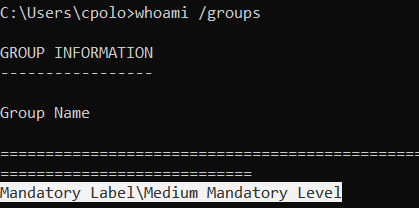
You can also obtain your current integrity level using whoami /groups:
Integrity Levels in the File System
An object in the file system may have a minimum integrity-level requirement. A process below that level is subject to the object’s mandatory policy even when its DACL would otherwise grant access. For example, create a regular file from a standard-user console and inspect its permissions:[1][4]
echo asd >asd.txt
icacls asd.txt
asd.txt BUILTIN\Administrators:(I)(F)
        DESKTOP-IDJHTKP\user:(I)(F)
        NT AUTHORITY\SYSTEM:(I)(F)
        NT AUTHORITY\INTERACTIVE:(I)(M,DC)
        NT AUTHORITY\SERVICE:(I)(M,DC)
        NT AUTHORITY\BATCH:(I)(M,DC)
Now, assign a minimum integrity level of High to the file. This must be done from a console running as administrator, because a regular console runs at Medium integrity and will not be allowed to assign High integrity to an object:
icacls asd.txt /setintegritylevel(oi)(ci) High
processed file: asd.txt
Successfully processed 1 files; Failed processing 0 files

C:\Users\Public>icacls asd.txt
asd.txt BUILTIN\Administrators:(I)(F)
        DESKTOP-IDJHTKP\user:(I)(F)
        NT AUTHORITY\SYSTEM:(I)(F)
        NT AUTHORITY\INTERACTIVE:(I)(M,DC)
        NT AUTHORITY\SERVICE:(I)(M,DC)
        NT AUTHORITY\BATCH:(I)(M,DC)
        Mandatory Label\High Mandatory Level:(NW)
The user DESKTOP-IDJHTKP\user has FULL privileges over the file because that user created it. However, the mandatory label prevents the user from modifying the file unless the process is running at High integrity. The user can still read it because the displayed mandatory policy is (NW), or no-write-up:
echo 1234 > asd.txt
Access is denied.

del asd.txt
C:\Users\Public\asd.txt
Access is denied.
[!TIP] Therefore, when a file has a minimum integrity level, in order to modify it you need to be running at least in that integrity level.
Integrity Levels in Binaries
The following example uses a copy of cmd.exe at C:\Windows\System32\cmd-low.exe and assigns it a Low integrity level from an administrator console:
icacls C:\Windows\System32\cmd-low.exe
C:\Windows\System32\cmd-low.exe NT AUTHORITY\SYSTEM:(I)(F)
                                BUILTIN\Administrators:(I)(F)
                                BUILTIN\Users:(I)(RX)
                                APPLICATION PACKAGE AUTHORITY\ALL APPLICATION PACKAGES:(I)(RX)
                                APPLICATION PACKAGE AUTHORITY\ALL RESTRICTED APP PACKAGES:(I)(RX)
                                Mandatory Label\Low Mandatory Level:(NW)
Now, when I run cmd-low.exe it will run under a low-integrity level instead of a medium one:
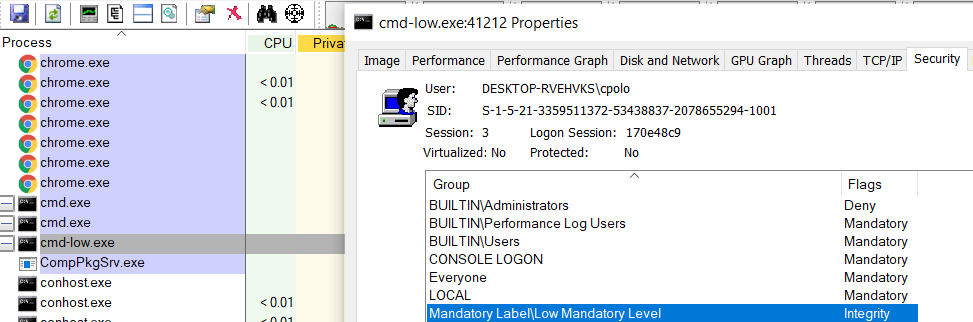
Assigning a High integrity label to a binary (icacls C:\Windows\System32\cmd-high.exe /setintegritylevel high) does not make it run at High integrity automatically. If invoked from a Medium-integrity process, it runs at Medium integrity because a new process receives the lower of the executable file’s and the caller’s integrity levels.[1]
Integrity Levels in Processes
Not all files and folders have an explicit minimum integrity label, but every process runs at an integrity level. As with file-system objects, a process that wants write access to another process must have at least the same integrity level. Therefore, a Low-integrity process cannot open a Medium-integrity process with full access.[1]
Because of these restrictions, the safest approach is to run each process at the lowest integrity level that still lets it perform its intended work.