Reverse Tab Nabbing
Description
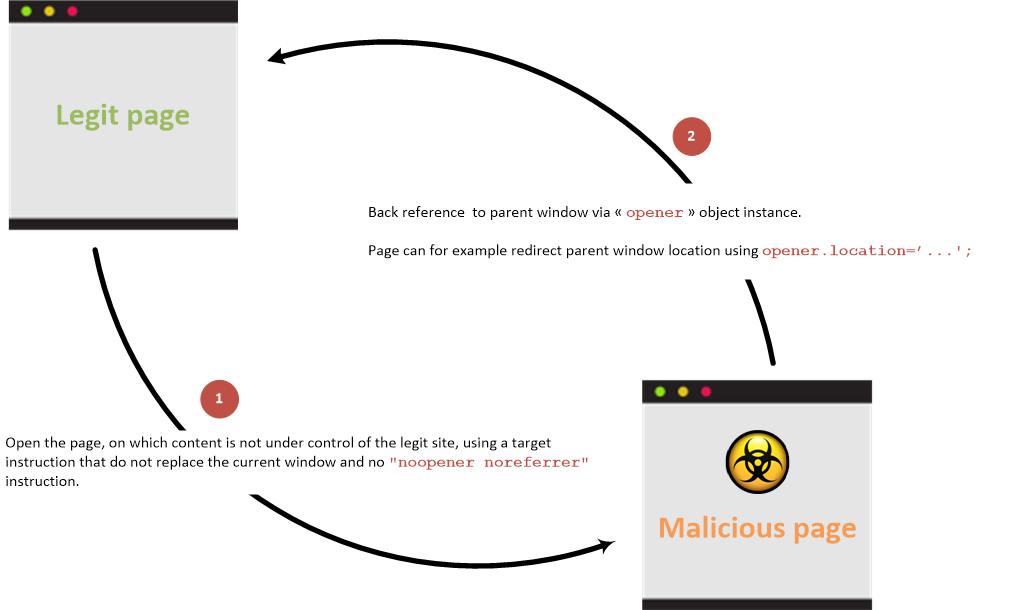
If an attacker controls the href of a link opened with target="_blank" and the new page receives an opener reference, the attacker-controlled page can navigate the original tab through window.opener. Explicit rel="opener" requests that relationship. Current HTML behavior gives _blank links implicit noopener in modern browsers, but older browsers, embedded webviews, window.open() calls, or explicit opener can still expose it.[1][3]
A regular way to abuse this behaviour would be to change the location of the original web via window.opener.location = https://attacker.com/victim.html to a web controlled by the attacker that looks like the original one, so it can imitate the login form of the original website and ask for credentials to the user.
Cross-origin policy does not give the malicious page arbitrary DOM or JavaScript access to the opener. It exposes only the limited cross-origin WindowProxy surface, whose most important tabnabbing capability is navigation of the opener.[3]
Overview
With back link
Link between parent and child pages when prevention attribute is not used:
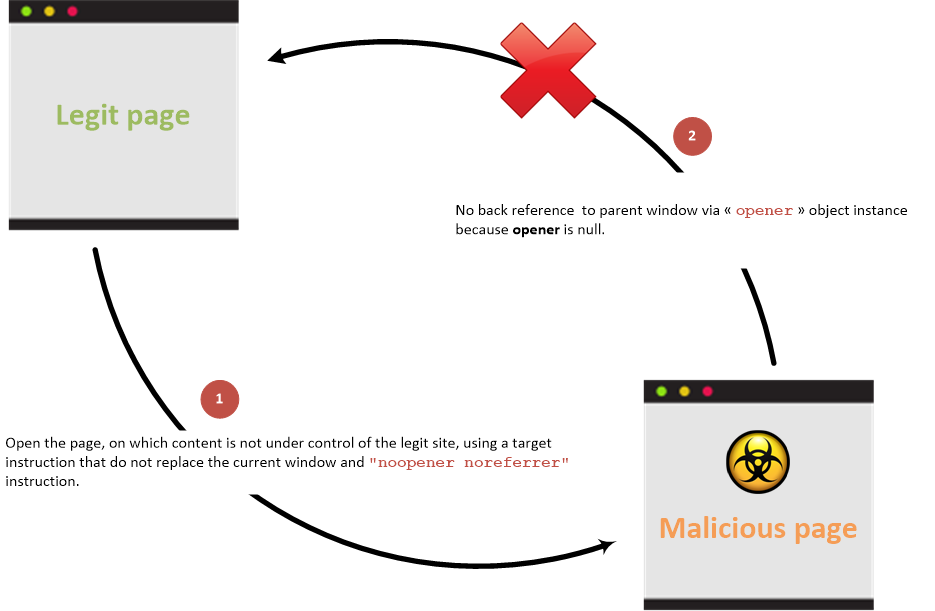
Without back link
Link between parent and child pages when prevention attribute is used:
Examples
Create the following pages in a folder and run a web server with python3 -m http.server
Then access http://127.0.0.1:8000/vulnerable.html, click the link, and observe that the original tab’s URL changes.
<!DOCTYPE html>
<html>
<body>
<h1>Victim Site</h1>
<a href="http://127.0.0.1:8000/malicious.html" target="_blank" rel="opener">Controlled by the attacker</a>
</body>
</html><!DOCTYPE html>
<html>
<body>
<script>
window.opener.location = "http://127.0.0.1:8000/malicious_redir.html";
</script>
</body>
</html><!DOCTYPE html>
<html>
<body>
<h1>New Malicious Site</h1>
</body>
</html>Accessible properties
In the scenario where a cross-origin access occurs (access across different domains), the properties of the window JavaScript class instance, referred to by the opener JavaScript object reference, that can be accessed by a malicious site are limited to the following:
opener.closed: This property is accessed to determine if a window has been closed, returning a boolean value.opener.frames: Returns a window proxy for the opener’s frame hierarchy; it does not expose cross-origin iframe DOM elements.opener.length: Returns the number of child browsing contexts (frames).opener.opener: A reference to the window that opened the current window can be obtained through this property.opener.parent: This property returns the parent window of the current window.opener.self: Access to the current window itself is provided by this property.opener.top: This property returns the topmost browser window.
When the documents are same-origin, normal same-origin Window access applies.[3]
Prevention
Use rel="noopener" (and noreferrer when referrer suppression is also desired), avoid explicit opener, and null the opener for script-created windows where appropriate. OWASP’s HTML5 cheat sheet documents these defenses.[2]