161/udp, 162/udp, 10161-10162/tcp/udp - Pentesting SNMP
Basic Information
SNMP (Simple Network Management Protocol) is used to monitor and, when write access is authorized, configure networked devices such as routers, switches, printers, servers, and IoT systems.[4]
PORT    STATE SERVICE REASON                 VERSION
161/udp open  snmp    udp-response ttl 244   ciscoSystems SNMPv3 server (public)
[!TIP] SNMP managers commonly listen on 162/UDP for asynchronous notifications from agents. A Trap is unacknowledged, while an InformRequest expects a response.[4]
MIB
A Management Information Base (MIB) is the conceptual collection of managed objects available through SNMP. MIB modules define those objects in a standardized hierarchy using the Structure of Management Information (SMI), an adapted subset of ASN.1. The module definitions describe each object’s OID, syntax, access, and semantics; the live values reside in the agent rather than in the definition file.[5]
OIDs
Object Identifiers (OIDs) play a crucial role. These unique identifiers are designed to manage objects within a Management Information Base (MIB).
The upper arcs of the OID tree are delegated to standards bodies and other registration authorities.
Furthermore, vendors are granted the liberty to establish private branches. Within these branches, they have the autonomy to include managed objects pertinent to their own product lines. This system ensures that there is a structured and organized method for identifying and managing a wide array of objects across different vendors and standards.
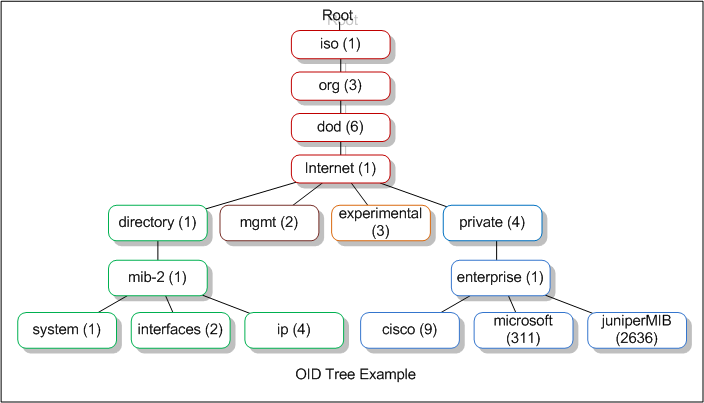
You can navigate through an OID tree from the web here: http://www.oid-info.com/cgi-bin/display?tree=#focus or see what a OID means (like 1.3.6.1.2.1.1) accessing http://oid-info.com/get/1.3.6.1.2.1.1.
There are some well-known OIDs like the ones inside 1.3.6.1.2.1 that references MIB-2 defined Simple Network Management Protocol (SNMP) variables. And from the OIDs pending from this one you can obtain some interesting host data (system data, network data, processes data…)
OID Example
1 . 3 . 6 . 1 . 4 . 1 . 1452 . 1 . 2 . 5 . 1 . 3. 21 . 1 . 4 . 7
Here is a breakdown of this address.[1]
- 1 – the
isoroot arc. Not every possible ASN.1 OID starts with 1; the root also defines arcs 0 and 2. - 3 – this is called ORG and it is used to specify the organization that built the device.
- 6 – this is the dod or the Department of Defense which is the organization that established the Internet first.
- 1 – this is the value of the internet to denote that all communications will happen through the Internet.
- 4 – this value determines that this device is made by a private organization and not a government one.
- 1 – this value denotes that the device is made by an enterprise or a business entity.
The prefix 1.3.6.1.4.1 is the widely used internet.private.enterprises branch. It is common for vendor-specific objects, but standards-defined objects and other registered branches use different prefixes; the distinction is not simply government versus private devices.
Moving on to the next set of numbers.
- 1452 – gives the name of the organization that manufactured this device.
- 1 – explains the type of device. In this case, it is an alarm clock.
- 2 – determines that this device is a remote terminal unit.
The rest of the values give specific information about the device.
- 5 – denotes a discrete alarm point.
- 1 – specific point in the device
- 3 – port
- 21 – address of the port
- 1 – display for the port
- 4 – point number
- 7 – state of the point
SNMP Versions
The versions most likely to be encountered are:
- SNMPv1 and SNMPv2c: Common community-based models. The community string and management data are not cryptographically protected, so anyone able to observe the traffic can read them.
- SNMPv3: Separates message processing, security, and access control. Its standard security levels are
noAuthNoPriv,authNoPriv, andauthPriv; onlyauthPrivprovides both message authentication and encryption/privacy. Weak authentication secrets may still be susceptible to offline guessing after capturing the required exchange.[6]
Community Strings
For community-based SNMPv1/v2c, the requester normally needs an accepted community string; SNMPv3 uses a security name and the credentials required by the configured security level. public and private are common defaults, not protocol-defined types:
publicis conventionally configured read-only.privateis conventionally configured read-write.
Note that the writability of an OID depends on the community string used, so even if you find that “public” is being used, you could be able to write some values. Also, there may exist objects which are always “Read Only”.
An unauthorized or invalid SET can return version- and condition-specific errors such as noAccess, notWritable, wrongType, or legacy noSuchName/readOnly compatibility values.[7]
Agents commonly drop SNMPv1/v2c requests with an invalid community string, so a syntactically valid SNMP response is strong evidence that the community was accepted. A timeout alone is inconclusive because filtering, packet loss, rate limiting, and unsupported versions produce the same symptom.
Ports
[The standard port mappings are]:[2][8]
- The SNMP agent receives requests on UDP port 161.
- The manager receives notifications (Traps and InformRequests) on port 162.
- SNMP over TLS uses TCP 10161/10162, while SNMP over DTLS uses UDP 10161/10162; the lower port is for command traffic and the higher port for notifications.
Brute-Force Community String (v1 and v2c)
To guess the community string you could perform a dictionary attack. Check here different ways to perform a brute-force attack against SNMP. A frequently used community string is public.
Enumerating SNMP
Install the relevant MIB definitions to resolve numeric OIDs into names and descriptions:
apt-get install snmp-mibs-downloader
download-mibs
# Finally comment the line saying "mibs :" in /etc/snmp/snmp.conf
sudo vi /etc/snmp/snmp.conf
If you know a valid community string, you can access the data using SNMPWalk or SNMP-Check:
snmpbulkwalk -c [COMM_STRING] -v [VERSION] [IP] . #Don't forget the final dot
snmpbulkwalk -c public -v2c 10.10.11.136 .

snmpwalk -v [VERSION_SNMP] -c [COMM_STRING] [DIR_IP]
snmpwalk -v [VERSION_SNMP] -c [COMM_STRING] [DIR_IP] 1.3.6.1.2.1.4.34.1.3 #Get IPv6, needed dec2hex
snmpwalk -v [VERSION_SNMP] -c [COMM_STRING] [DIR_IP] NET-SNMP-EXTEND-MIB::nsExtendObjects #get extended
snmpwalk -v [VERSION_SNMP] -c [COMM_STRING] [DIR_IP] .1 #Enum all

snmp-check [DIR_IP] -p [PORT] -c [COMM_STRING]

nmap --script "snmp* and not snmp-brute" <target>

braa <community string>@<IP>:.1.3.6.* #Bruteforce specific OID
If the Net-SNMP extend feature is configured and exposed to the tested principal, query its output with:
snmpwalk -v X -c public <IP> NET-SNMP-EXTEND-MIB::nsExtendOutputFullDepending on the enabled MIB modules and access-control view, SNMP may reveal network interfaces and addresses, usernames, uptime, OS/version information, storage, and running processes. Process command lines or extension output can occasionally expose secrets.
Dangerous Settings
In the realm of network management, certain configurations and parameters are key to ensuring comprehensive monitoring and control.
Access Settings
Two main settings enable access to the full OID tree, which is a crucial component in network management:
rwuser USER noauthgrants the named SNMPv3 security user read-write access at thenoAuthNoPrivsecurity level.noauthmeans messages need neither authentication nor privacy; it does not remove the required user/security-name mapping. An optional OID or view can restrict the accessible subtree.[9]- For more specific control, access can be granted using:
rwcommunityfor IPv4 addresses, andrwcommunity6for IPv6 addresses.
These directives require a community string and can optionally restrict the source and accessible OID/view. Without those restrictions, a read-write community can expose every writable object supported by the agent.[9]
SNMP Parameters for Microsoft Windows
A series of Management Information Base (MIB) values are utilized to monitor various aspects of a Windows system through SNMP:
- System Processes: Accessed via
1.3.6.1.2.1.25.1.6.0, this parameter allows for the monitoring of active processes within the system. - Running Programs: The
1.3.6.1.2.1.25.4.2.1.2value is designated for tracking currently running programs. - Processes Path: To determine where a process is running from, the
1.3.6.1.2.1.25.4.2.1.4MIB value is used. - Storage Units: The monitoring of storage units is facilitated by
1.3.6.1.2.1.25.2.3.1.4. - Software Name: To identify the software installed on a system,
1.3.6.1.2.1.25.6.3.1.2is employed. - User Accounts: The
1.3.6.1.4.1.77.1.2.25value allows for the tracking of user accounts. - TCP Local Ports: Finally,
1.3.6.1.2.1.6.13.1.3is designated for monitoring TCP local ports, providing insight into active network connections.
Cisco
For Cisco-specific enumeration, see Cisco SNMP.
From SNMP to RCE
If you have a community or SNMPv3 principal that can write sensitive objects, command execution may be possible on agents exposing executable extension MIBs. See SNMP to RCE.
Massive SNMP
Braa is a mass SNMP scanner. Unlike snmpwalk from Net-SNMP, it can query many hosts concurrently in one process, which makes it efficient but also easy to run at a disruptive rate.
Braa implements its own SNMP stack, so it does not require a library such as Net-SNMP.
Syntax: braa [Community-string]@[IP of SNMP server]:[iso id]
braa ignite123@192.168.1.125:.1.3.6.*This can extract many megabytes of information, so save and filter the output systematically.
So, lets look for the most interesting information (from https://blog.rapid7.com/2016/05/05/snmp-data-harvesting-during-penetration-testing/):[3]
Devices
The process begins with the extraction of sysDesc MIB data (1.3.6.1.2.1.1.1.0) from each file to identify the devices. This is accomplished through the use of a grep command:
grep ".1.3.6.1.2.1.1.1.0" *.snmpIdentify Private String
A crucial step involves identifying the private community string used by organizations, particularly on Cisco IOS routers. This string enables the extraction of running configurations from routers. The identification often relies on analyzing SNMP Trap data for the word “trap” with a grep command:
grep -i "trap" *.snmpUsernames/Passwords
Logs stored within MIB tables are examined for failed logon attempts, which might accidentally include passwords entered as usernames. Keywords such as fail, failed, or login are searched to find valuable data:
grep -i "login\|fail" *.snmpEmails
Finally, to extract email addresses from the data, a grep command with a regular expression is used, focusing on patterns that match email formats:
grep -E -o "\b[A-Za-z0-9._%+-]+@[A-Za-z0-9.-]+\.[A-Za-z]{2,6}\b" *.snmpModifying SNMP values
You can use NetScanTools to modify values. You will need to know the private string in order to do so.
Spoofing
If an ACL authorizes SNMP solely by source IP, a forged UDP source may cause the agent to send a response to that authorized address. The attacker will not receive the response unless they are on-path, control that address, or can otherwise observe/reroute the reply. Stateful filtering and SNMPv3 authentication prevent this from becoming a general read primitive.
Examine SNMP Configuration files
- snmp.conf
- snmpd.conf
- snmp-config.xml
HackTricks Automatic Commands
Protocol_Name: SNMP    #Protocol Abbreviation if there is one.
Port_Number:  161     #Comma separated if there is more than one.
Protocol_Description: Simple Network Management Protocol         #Protocol Abbreviation Spelled out

Entry_1:
  Name: Notes
  Description: Notes for SNMP
  Note: |
    SNMP - Simple Network Management Protocol is a protocol used to monitor different devices in the network (like routers, switches, printers, IoTs...).

    https://book.hacktricks.wiki/en/network-services-pentesting/pentesting-snmp/index.html

Entry_2:
  Name: SNMP Check
  Description: Enumerate SNMP
  Command: snmp-check {IP}

Entry_3:
  Name: OneSixtyOne
  Description: Crack SNMP passwords
  Command: onesixtyone -c /usr/share/seclists/Discovery/SNMP/common-snmp-community-strings-onesixtyone.txt {IP} -w 100

Entry_4:
  Name: Nmap
  Description: Nmap snmp (no brute)
  Command: nmap --script "snmp* and not snmp-brute" {IP}

Entry_5:
  Name: Hydra Brute Force
  Description: Need Nothing
  Command: hydra -P {Big_Passwordlist} -v {IP} snmp
References
- [1] SNMP MIB and OIDs explained
- [2] Simple Network Management Protocol (Wikipedia)
- [3] SNMP Data Harvesting During Penetration Testing (Rapid7)
- [4] RFC 3413 – SNMP Applications
- [5] RFC 2578 – Structure of Management Information Version 2
- [6] RFC 3411 – Architecture and SNMP security levels
- [7] RFC 3416 – SNMPv2 protocol operations and error statuses
- [8] RFC 6353 – SNMP over TLS and DTLS
- [9] Net-SNMP
snmpd.confaccess-control directives