111/TCP/UDP - Pentesting Portmapper
Basic Information
rpcbind (historically portmapper) maps ONC RPC program/version numbers to the transport addresses on which their services listen. Enumerating it can reveal NFS, NIS/YP, mountd, rusersd, and vendor-specific RPC programs, although the program list alone does not reliably identify the operating-system version.[4]
Default port: 111/TCP and 111/UDP. Individual RPC programs may use fixed or dynamically assigned high ports; do not treat a historical Solaris high port such as 32771 as a universal rpcbind default.[4]
PORT    STATE SERVICE
111/tcp open  rpcbind
Enumeration
rpcinfo -p irked.htb
nmap -sSUC -p111 192.168.10.1
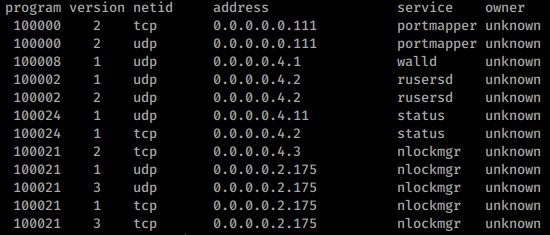
Sometimes it doesn’t give you any information, in other occasions you will get something like this:
Advanced rpcinfo usage
Leverage rpcinfo -T udp -p <target> to pull the UDP program list even when TCP/111 is filtered, then immediately run showmount -e <target> to spot world-readable NFS exports registered through rpcbind.
rpcinfo -T udp -p 10.10.10.10
showmount -e 10.10.10.10
Exhaustive mapping with Nmap NSE
Pair the classic scan with nmap --script=rpcinfo,rpc-grind -p111 <target> to brute-force RPC program numbers. rpc-grind hammers the portmapper with null calls that walk the nmap-rpc database, extracting supported versions whenever the remote daemon replies with “can’t support version,” which often reveals quietly registered services such as rusersd, rquotad or custom daemons. Multi-threading via --script-args 'rpc-grind.threads=8' speeds up large targets while the companion rpcinfo script prints human-readable tables you can diff against host baselines.[1]
Shodan
port:111 portmap
RPCBind + NFS
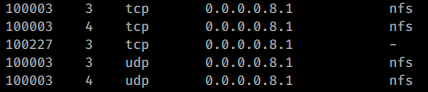
If you find the service NFS then probably you will be able to list and download(and maybe upload) files:
Read 2049 - Pentesting NFS service to learn more about how to test this protocol.
NIS / YP
NIS (also called YP / Yellow Pages) frequently appears behind rpcbind as ypbind, ypserv, or yppasswdd. On a compromised Unix/Linux host, first verify whether identities are being resolved from NIS before talking directly to the server.[2]

Detect NIS-backed accounts from a client
grep -nE '^\+' /etc/passwd /etc/group 2>/dev/null
grep -E '^(passwd|group|shadow|hosts|services|netgroup|rpc):' /etc/nsswitch.conf
domainname
ypwhich
rpcinfo -p <target> | egrep 'ypbind|ypserv|yppasswdd'+user/+@netgroupentries inside/etc/passwdor/etc/groupusually mean users or netgroups are being imported from NIS.passwd: files nisorshadow: files nisin/etc/nsswitch.confconfirms that NSS lookups fall back to NIS.- From a host already enrolled in the NIS domain,
getent passwd/getent groupwill usually return the merged local + NIS view.
Query maps without authentication
Many legacy NIS deployments still allow unauthenticated map queries from any reachable client. Try both direct YP queries and NSS lookups from an enrolled machine:
# Directly query a specific NIS domain/server
ypcat -d <nis-domain> -h <nis-server> passwd
ypcat -d <nis-domain> -h <nis-server> passwd.byname
ypcat -d <nis-domain> -h <nis-server> passwd.byuid
ypcat -d <nis-domain> -h <nis-server> group.byname
ypcat -d <nis-domain> -h <nis-server> hosts.byname
ypcat -d <nis-domain> -h <nis-server> netgroup

# Query through NSS from a joined client
getent passwd
getent group
The returned records can expose usernames, UIDs, GIDs, comments/GECOS fields, home directories, login shells, hosts, and netgroup memberships.
Password-hash extraction and cracking workflow
In insecure environments the passwd maps can expose password hashes directly:
ypcat -d <nis-domain> -h <nis-server> passwd.byname | tee nis-passwd.txt
cut -d: -f1,2 nis-passwd.txt | grep -vE '^[^:]+:[x*!]*$' > nis-hashes.txt

# Quick format triage
grep ':\$1\$' nis-hashes.txt   # MD5Crypt
grep ':\$5\$' nis-hashes.txt   # SHA256Crypt
grep ':\$6\$' nis-hashes.txt   # SHA512Crypt

john --format=md5crypt nis-hashes.txt
hashcat --username -m 500 nis-hashes.txt <wordlist>
hashcat --username -m 7400 nis-hashes.txt <wordlist>  # $5$ SHA256Crypt
hashcat --username -m 1800 nis-hashes.txt <wordlist> # $6$ SHA512Crypt- Hashes beginning with
$1$are MD5Crypt (Hashcat-m 500). - If the map only returns
x/*placeholders, try other maps or query from an actual NIS client withgetent passwd. - After recovering a reused Unix password, spray the same username/password pair against other authorized SSH targets before assuming it matches Active Directory credentials.
netexec ssh hosts.txt -u <user> -p '<password>'Useful NIS master files / maps
| Master file | Map(s) | Notes |
|---|---|---|
| /etc/passwd | passwd.byname, passwd.byuid | Usernames, shells, home dirs, maybe hash |
| /etc/group | group.byname, group.bygid | Group memberships |
| /etc/hosts | hosts.byname, hosts.byaddr | Hostnames and IPs |
| /etc/netgroup | netgroup | Netgroup-based trust / access rules |
| /etc/services | services.byname | Service name mappings |
| /etc/rpc | rpc.bynumber | RPC service mappings |
| /usr/lib/aliases | mail.aliases | Mail aliases |
RPC Users
If you find the rusersd service listed like this:

You could enumerate users of the box. To learn how read 1026 - Pentesting Rsusersd.
Bypass Filtered Portmapper port
For NFSv2/v3, client tools often need rpcbind plus auxiliary services such as mountd; if port 111 is filtered but those discovered service ports are reachable through a pivot, a local rpcbind shim and port forwards can make standard clients usable.[3] NFSv4 normally uses TCP/2049 directly, so first determine the negotiated NFS version before building this workaround.
Labs to practice
- Practice these techniques in the Irked HTB machine.
HackTricks Automatic Commands
Protocol_Name: Portmapper    #Protocol Abbreviation if there is one.
Port_Number:  111
Protocol_Description: PM or RPCBind        #Protocol Abbreviation Spelled out

Entry_1:
  Name: Notes
  Description: Notes for PortMapper
  Note: |
    Portmapper is a service that is utilized for mapping network service ports to RPC (Remote Procedure Call) program numbers. It acts as a critical component in Unix-based systems, facilitating the exchange of information between these systems. The port associated with Portmapper is frequently scanned by attackers as it can reveal valuable information. This information includes the type of Unix Operating System (OS) running and details about the services that are available on the system. Additionally, Portmapper is commonly used in conjunction with NFS (Network File System), NIS (Network Information Service), and other RPC-based services to manage network services effectively.

    https://book.hacktricks.wiki/en/network-services-pentesting/pentesting-rpcbind.html

Entry_2:
  Name: rpc info
  Description: May give netstat-type info
  Command: rpcinfo -p {IP}

Entry_3:
  Name: nmap
  Description: May give netstat-type info
  Command: nmap -sSUC -p 111 {IP}